A SCORM-ready template: Part 1G . Branching behaviors
Branching behaviors
Several branching functions are included in js/branchingToolkit.js and are available to be used in your modules. Note: These haven’t been thoroughly tested!
Continue reading
Solving technology problems, one at a time
Several branching functions are included in js/branchingToolkit.js and are available to be used in your modules. Note: These haven’t been thoroughly tested!
The css styles are defined in several sheets. Any of the styles can be overridden by adding a new definition for the selector to /css-local/userStyles.js or to individual pages or even individual elements on a page. YOU WILL NOT BE ABLE TO change any of the files inside the css/ folder but you can add your own overrides to userStyles.css.
Continue reading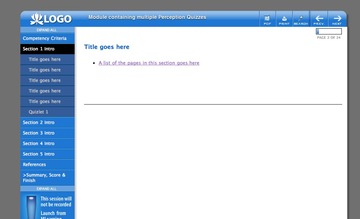 Here’s a screenshot of the template, showing part of the left-hand navigation expanded. Note the previous/next navigation buttons at upper right, which are automatically created based on your list of pages, as is the progress bar and page numbering at upper right. |
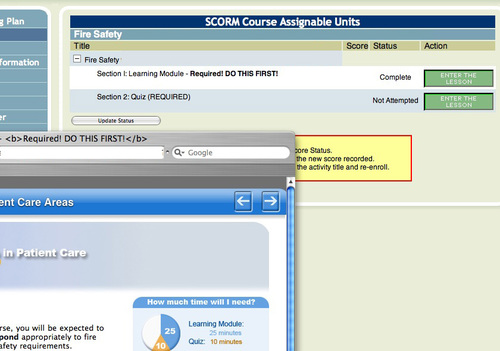
SCORM courses in the SumTotal 6.5 Learning Management System are launched from a page that lists each SCO (lesson) in a list of links representing the course structure.
On clicking the “Enter the Lesson” button next to any SCO, a new frameset window opens. The screenshot below shows the “Enter the Lesson” page, with the course window open in front of it.
(Click to enlarge)
On the main Project page, we changed the meaning of the background color of each project row to reflect the project status.

To make this change, in System Admin: System Lookup Values: ProjectStatusColor add the correct hex color values for each status

Click to enlarge

The Projects page comes with a set of tabs, based on a combination of the project status fields and whether or not a project is active or archived, and includes a Gannt chart tab.
We changed the values used for Project Status to
0|Not Defined 2|Pending Content 3|In Progress 4|In Review 5|Complete
(to do this use: System Admin: System Lookup Values:click edit icon next to ProjectStatus)
Continue readingBecause I am constantly forgetting this Finder shortcut, here it is: To open a folder in a new window, use “Command – double click” on the folder.
Continue reading