October 31, 2008
Error #1056: Cannot create property x on loaded clip in AS3
I had a particularly sticky flash problem where a MovieClip worked perfectly when run on its own, but when loaded into a container clip using a loader, would give:
Error #1056: Cannot create property someProperty on loaded clip myLoadedClip
At first I thought it was some kind of timing problem or failure to declare the items in the clip, but it turned out, simply adding the word dynamic to the class definition fixed the problem. Dynamic classes can have properties added at runtime. The MovieClip class is already dynamic, but apparently, the dynamic property is removed in some other part of my code.
So in the example below showing the opening lines of a class declaration, I've highlighted the added "dynamic" in red.
package {


	  import flash.display.*;

	  import flash.events.*;

	  import flash.utils.*; //for timer

	  import flash.text.*;

	  import flash.net.*

          import flash.xml.*

	  import ToolTip;

	  import cart;

	  import drawerHandle;

	  import stopDragEvent;


	  public dynamic class drawer extends MovieClip

	{

          etc. . . .
Many thanks to Flep of flepstudio for this article which helped solve the problem.
useButtonMode = true not working in AS3
In Actionscript 3, you may find yourself wondering why when you use "useHandCursor" on a MovieClip, the cursor remains an arrow on mouse_down.
In AS3, useHandCursor is a property of the SimpleButton class. if an object has "buttonMode" set to true, by default "useHandCursor" will also be true. If is is not set to buttonMode, setting "useHandCursor" to true will do nothing.
On objects that are set to buttonMode, setting "useHandCursor to false will prevent the cursor from changing to a hand on MOUSE_DOWN.
Example:
The blue square on the right has buttonMode = true applied to it, and when dragged, the cursor will change to a hand.
Actionscript for this example:
function mouseDownHandler(event:MouseEvent):void
{
MovieClip(event.target).startDrag();
var draggedObject = DisplayObject(event.target);
stage.addChild(draggedObject);
}
function mouseUpHandler(event:MouseEvent):void
{
event.target.stopDrag();
}
square1.addEventListener(MouseEvent.MOUSE_DOWN, mouseDownHandler);
square1.addEventListener(MouseEvent.MOUSE_UP, mouseUpHandler);
square2.addEventListener(MouseEvent.MOUSE_DOWN, mouseDownHandler);
square2.addEventListener(MouseEvent.MOUSE_UP, mouseUpHandler);square1.useHandCursor=true;
square2.buttonMode=true;
//square1.useHandCursor=false; //use to turn OFF hand cursor on a button
1119: Access of possibly undefined property error in ActionScript 3
I am working on a Flash project where a MovieClip that is contained within another clip needs to get a property from the main timeline of the container clip.
trace(this.parent.someProperty)
But this generated an error:
1119: Access of possibly undefined property someProperty through a reference with static type flash.display:DisplayObjectContainer.
I finally found the reason for this in this excellent article by Josh Tynjala.
The problem is with "casting". The parent clip must be cast as type "MovieClip" or the compiler will throw that error in strict mode.
Either of the following two methods will work:
MovieClip(this.parent.someProperty);
or
(this.parent as MovieClip).someProperty;
For the complete explanation of why this is so, see:
WHY DOESN'T THE "PARENT" PROPERTY WORK THE SAME IN ACTIONSCRIPT 3?
October 29, 2008
No audio in Flash 9 in Windows XP
I've come across several PC's that will play Flash videos, but with no audio. There appear to be a couple of possible fixes to try, thanks to Selder and others in the Weyland.be blog.
- Go to Control Panel > Administrative Tools > Services > Windows Audio and make sure the Status is "Started". You will no doubt need administrative access to do this.
-
- Go to Start > Run
- Type "regedit"
- The registry will open.
- Go to: HKEY_LOCAL_MACHINE > SOFTWARE > Microsoft > Windows NT > CurrentVersion > Drivers32
- Create a new String value named "wavemapper". As value give it "msacm32.drv". (Right click the right window, then select New >String Value from the menu that pops up.
- Enter "wavemapper" and it will add that to the list.
Double-click wavemapper in the list and enter msacam32.drv in the Value Data box.
- Close the registry window.
For a much longer discussion of this issue see:
October 25, 2008
Display invisible files in the finder - Leopard
If you are trying to edit .htaccess files or other invisible files through the GUI, or using Fetch's automatic linkage with BBedit, you will need to show hidden files.
Open the terminal and type:
defaults write com.apple.finder AppleShowAllFiles TRUE
you can restart the Finder through the terminal by typing:
killall Finder
or
- select "Force Quit Applications" in the Apple menu,
- select "Finder from the list and
- click the "Relaunch" button.
Many thanks to "Matthew" for this one!
October 24, 2008
Stem cell tourism
While stem cell research funding remains bogged down and encumbered in the United States, other countries, most notably China, have forged ahead. Patients are travelling to foreign stem cell clinics, to try treatments not available in this country, whether they follow standard testing and clinical protocols or not.
Lab research with stem cells has been extremely exciting and suggestive of great potential, but the current artificially embargoed situation in the US and several other countries provides ground for less than scrupulous treatment centers.
Beike Biotech, in Shenzen and other cities in China, is one bio-technology company which offers stem cell treatments for diseases that are usually considered untreatable. Their site offers many testimonials from people who have been treated for conditions like Spinal Cord Injury, Autism, ALS, and brain injury, but little in the way of systematic followups. Reading their patient blogs, although very interesting, it is difficult to tell for any given patient exactly what was done beyond "injections of stem cells" and exactly what their outcome was after they left the clinic. Most of the blogs end one or two entries after leaving. Beike's treatment philosophy is summed up in this paragraph from their website:
"Beike's greatest strength and what differentiates it from other research initiatives is that Beike specializes in clinical applications. There are a lot of patients in countries around the world who could have a better quality of life and even extend their lives with the technology available but don't have the chance because of politics, religion and bureaucracy. Beike's goal is to help those people. Beike takes the most advanced biotechnological research in the world, specifically stem cell therapy, and applies it clinically at a rapid pace."
A note on the CareCure forums by Jon Hakim who runs the stemcellchina.com website (devoted mainly to Beike, but also other researchers and clinics in China) attempts to address the lack of information:
"The goal for the web site and my work (which is starting out as a hobby to this point but I am hoping will lead to something more - maybe some years later, setting up a hospital?) is to make the information that the Chinese doctors and researchers involved have palatable for foreign consumption. It is not an easy task and I am just starting. I hope to give the industry in Chinese some legitimacy - over time - in the eyes of the foreign community. If I do my best to get as much information and documentation out there with detailed patient cases, interviews, etc. and to help the hospitals, researchers etc. to get the information that the west needs, that should lend some credibility to what's going on over here and should help to speed up the delivery of more effective treatments.For example, Dr. Yang out of Shengyang hospital has done a clinical trial on 56 patients and has treatment more patients than anyone in the world for diabetic foot using adult stem cells (180+). However, Dr. Yang does not speak English and she has given me her paper that she would like to get published in foreign journals. It is not anywhere close to what is necessary to get published in a foreign journal, so I have put her in touch with diabetes professionals in Ireland who are helping the with the paper. " Full text here...
Another doctor who gained some notoriety is Huang Hongyun, a Chinese neurologist working at Chaoyang Hospital, who does not use stemcells but embryonic olfactory ensheathing cells (additional articles here and here)to treat Spinal Cord Injury and ALS (Lou Gherig's Disease). Although the jury is still out on the efficacy and safety of his OEC transplants, it may be impossible to make a determination for for quite a while since accurate data are nearly impossible to come by, according to this very detailed 2005 article in Technology Review.
Although Huang was somewhat favorably mentioned in a 2003 article in the New Yorker detailing Christopher Reeve's advocacy of cutting-edge research into treatments for spinal chord injury, an April 2006 (fee required) article in Nature, describes how three spinal-cord experts have published a critique (B. H. Dobkin, A. Curt and J. Guest Neurorehabil. Neural Repair 20, 5-13; 2006) of his methods after examining seven of Huang's patients before and after treatment, reviewing his publications and visiting his lab. They say that although his surgical technique is good, five of the seven patients experienced side effects including meningitis, and none of the patients showed any improvement after treatment. The journal Nature contacted several of the patients, and they claim to have experienced benefits, such as reduced sweating, muscle spasm and pain, and better sense of balance. However with no blind assessment or long-term observation, it is impossible to sort out cause and effect and wishful thinking.
In general it seems that although there is much good research being done in China and other "stem-cell tourism" countries, the imbalance in availability of clinical trials in the developed world and the not-terribly-legitimate clinical trials in these countries creates an irresistible draw for desperate patients with no options in their country of origin.
Hopefully this will change over time, and as policies change and research cultures change. The Shanghai International Symposium on Stem Cell Research in 2007 drew researchers from all over the world, and besides papers on potential avenues for treating retinal disease, diabetes, nerve disorders and more, featured sessions on "Publishing in high-profile journals", "Ethical issues in stem cell research and treatment", and "Cultivating a global outlook and interactions in stem cell research."
Related articles:
October 20, 2008
Clarke's law # 3 in action - Shazam, an amazing iPhone app!

I just got my mind blown by "Shazam", a new FREE application for the iPhone. Shazam uses the iPhones microphone to listen to songs or music happening anywhere in earshot. It will then tell you what song you are listening to.
Just click "Tag it" and point the mic end of the phone in the general direction of the sound. It twirls for a while, then reports back, usually extremely accurately what song you were listening to.

Shazam sending song info to the web for processing.
It even works when you put your phone up against your headphones
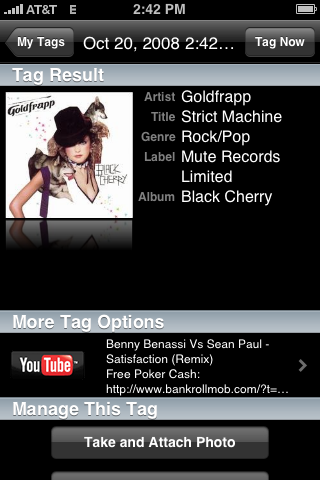
Got it right ... again!
What's next - phones that can understand what we are saying? Phones that get bored and chime in on the conversation?
Shoot screenshots on the iPhone
You can find this anywhere, but I am putting this entry up for my own reference:
To shoot a screenshot of any screen on the iPhone, hold down the Home and Sleep buttons simultaneously until the screen flashes. If you hold them down TOO long the phone will try to shut itself off.
It will create a PNG image of the screen and save it to the camera roll. I've found it works best if you hit the Home button slightly before the Sleep button. The PNG may take a minute or so to show up.
October 19, 2008
SCORM 2.0 workshop
The SCORM Workshop held by LETSI (Learning Education Training Systems Interoperability) is over, and some clear direction emerged from the blizzard of whitepapers, informal submissions and comments over the last few months. I was very impressed by how fast they moved things forward in a few days.
The design process will be driven by use cases generated by the people who actually use SCORM applications in their work: Instructional designers, administrators, teachers, and other strategic adopters all over the world. This is significantly different from the way SCORM was originally designed, by a small community of LMS vendors and the U.S. Department of Defense, one of the BIG USERS of training and tracking.
There was a lot of acknowledgement of the fact that we don't just want to track or "interoperate" web-based interactions, but transactions that could occur just about anywhere, including simulations, instructor-led, or instructor-guided, mobile, disconnected, etc. Fuzzy human-requiring (or at least AI-requiring) interactions should not be excluded. A key take-away is that we can't limit functions to what currently exists - learners will be learning in ways we can't even imagine.
Of course backward compatibility is crucial - many of us who want more, more more also have thousands of old-school SCORM courses in our libraries that we do not want to have to revamp to a new standard.
The use of Web Services and a Service Oriented Architecture is likely in the new standard. This will (hopefully) facilitate interoperability, and the ability to modularize applications. There was some question about whether this architectural approach has been a success in other areas, and a lot of discussion about what the business case for this might be, but those questions are in the process of being answered
Also discussed was the fact that people are out there choosing to learn from many sources, social, non-authoritative, non-standard, web-based, informal, random, and there is currently no way to track or analyze data about what they are doing or how they are doing that.
Every aspect of the current SCORM standard was examined closely and will continue to be. A useful refresher on the current basic assumptions of SCORM and a suggestion for a new conceptualization of what SCORM is and should be were given in a whitepaper by Allyn Radford
Regarding SCORM 2.0, Radford suggested an approach where SCORM would support three separate domains which would remain agnostic to each other: Content, Communications, and Learning, Education and Training (LET) Support.
From his white paper:
"SCORM can be conceptualized and described in many ways. After the last few weeks of papers and interaction and seemingly conflicting requirements in some areas I now find it useful to think of SCORM as having the potential to serve diverse community needs through a focus in three separate 'domains' under which most other requirements can be categorized."
"..the design of the infrastructure and applications within it are declared out of scope where SCORM is concerned but the communications between applications/systems for the purposes of meeting LET requirements are in scope. By way of example, SCORM should not be dictating how a repository should store and manage content but it should provide for interaction between a repository and a front-end application. It could be said that cross domain scripting became a problem because content got mixed up with communications..."
During the workshop, the "ility" Reusability was reexamined. What exactly do people mean by it? Do we still want it? At what level should content be resusable? The individual asset? The whole SCO? What constitutes a SCO anyway?
The working group on Sequencing organized the submissions they had received into 3 general conceptual groups:
- Sequencing functions should be moved to the content developer's domain, within the SCO or within the manifest.
- There is still value to be had with sequencing being handled by the LMS, but the current spec is bad and should be replaced. The goal would be a rules-based sequencing engine controlled by the LMS, which would allow content developers to author sequencing rules using a finite defined set o primitives.
- A big change in architecture needs to be made to make sequencing workable. Papers suggested a new, layered approach where the higher levels allow instructional designers to work directly with sequencing, and a set of reusable object oriented components to handle higher order sequencing functions.
The group considered a possible dual solution which extends the current data model to fully accomodate giving control over to the content devloper, but also creating a simple rules-based engine to be used by the LMS for those that prefer that type of workflow. I could see very different types of tools being developed to take advantage of these options.
Moving onward!
How can you take part in shaping the new SCORM?
Look for LETSI at:
DECOM Conference, Sestri Levante, Italy, October 23, 2008
Learning 2008 in Orlando, October 26-29
eLearning Guild's DevLearn, San Jose, California, November 11-14
Your input is being requested on use cases, functionality, prioritization, etc.
So, if you use SCORM, or think your organization may use SCORM in the future, stand up and be counted!
October 14, 2008
Update on Autism research
Although repeated studies show little or no correlation between vaccination with the MMR vaccine and the onset of autism, there is a lot of popular support for the idea that there is some causal link. Originally the use of mercury in the form of thiomersal in vaccines was suggested as the culprit, but this seems less likely since mercury was removed from vaccines in North America and Europe by 2001 and the incidence of Autism continued to rise
Still many people remain unconvinced there is NO link between vaccination and autism, despite all the negative results, so other ideas have been floated. These include:
"...Williams syndrome has enormous heuristic value because its pathological feature of heightened "sociability" can be a "deficit" symptom of major complex neuropsychiatric disorders, such as schizophrenia and autism. Data consistent with a core inability of patients with Williams syndrome to inhibit social approach suggest that this disorder may afford an opportunity to study the biological basis of the "drive" toward socialization. From a research perspective, the syndrome lends itself to neurobiological studies of sociability as a dimension that varies independently of cognition (or at least many separable cognitive processes)...."
autism spectrum disorders (ASD) tend to improve, sometimes rather
dramatically, during a fever. This would suggest that the pathways necessary for normal function exist, but are not being used, until the fever changes brain function in some way.
Related resources:
October 13, 2008
A SCORM-ready template: Part 8E - Add the video player to your learning module
If you are in a hurry, here are two ready-to-use pieces of player code to choose from. All you need to do is choose one, edit a few lines and drop the code into your page. You will need a playlist for both of them, although it can be very simple for the single file player. Save the playlist to the media folder (there is probably a sample one there already in newer modules).
- Single file player
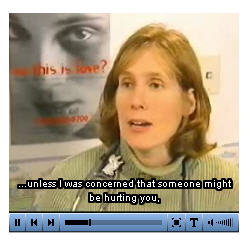
Just add this code to the body of your document. The player will show up wherever you put the div with the id="player". If you want more than one player on a page, give them each different id's and change the ID in the "so.write" statement at the end of the list of parameters. Everything else has been included for you in the common files. If the player is not showing up, copy the latest common folders to your module that is under development.
<div id="player"></div>

<a href="http://www.macromedia.com/go/getflashplayer">Get the Flash Player</a> to see this player.</p>

<script type="text/javascript">

var so = new SWFObject('includes/jw_media_player/mediaplayer.swf','playlist','320','260','7'); //modify the width and height settings here - this is the dimensions of the player, not the video. Add 20 to show controls below video instead of superimposed.

so.addParam('allowfullscreen','true');

so.addParam('allowscriptaccess','always');

so.addVariable('displayheight','240');

so.addVariable('displaywidth','320'); //this is the height of the video itself.

so.addVariable('file','media/playlist.xml'); //edit this line if you have changed the name of your playlist or have more than one.

so.addVariable('backcolor','0x6CA6E3');

so.addVariable('lightcolor','0x155393');

so.addVariable('showstop','true');

so.addVariable('overstretch','true');

so.write('player');//this is the id of the element (div or p) the player will appear in.

</script>
- Multiple files or multiple chapters player:
If you have a single long video that you want to break into chapters or sections, OR if you have several separate files, including audio, video, or images, you can use this version of the player. You will need to create a playlist, and if you want preview images and/or thumbnails, you'll need to create those as well, save them to the "media" folder, then add them to the playlist, one for each item. If you leave out the "Image" tag in the playlist, the player will simply close up that space in the menu and not show any images. The images do not need to be sized exactly: the player resizes them to fit.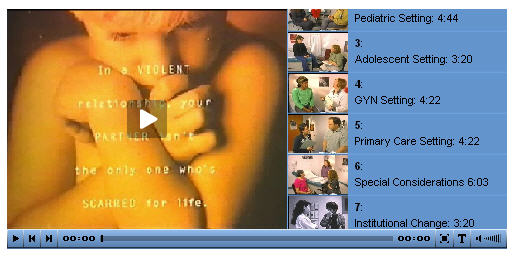 multiChapterPlayer
<div id="player"></div>
<script type="text/javascript"> var so = new SWFObject('includes/jw_media_player/mediaplayer.swf','media/playlist.xml','500','240','7'); so.addParam('allowfullscreen','true'); so.addParam('bufferlength','1'); so.addVariable('displayheight','220'); so.addVariable('displaywidth','280'); so.addVariable('file','media/playlist.xml'); so.addVariable('image','media/intro2.jpg'); so.addVariable('height','240'); so.addVariable('width','500'); so.addVariable('backcolor','0x6CA6E3'); so.addVariable('lightcolor','0x155393'); so.addVariable('autoscroll','true'); so.addVariable('thumbsinplaylist','true'); so.addVariable('rotatetime','100'); so.addVariable('shuffle','false'); so.addVariable('overstretch','true'); so.write('player'); </script>
Posted by ellen at 8:54 PM

A SCORM-ready template: Part 8D - Create a Captions file for the Jeroen Media Player
Creating a captions file
Creating synced captions using Subtitle Workshop
In my opinion, Subtitle Workshop has the best interface for creating and editing captions quickly and accurately. Its key-commands make the whole process go very fast. However to use it, you will have to export a copy of your video to one of the formats that it can read. Fortunately this includes a lot of formats: avi, wmv, quicktime, mpg, mpeg, mp4 - and chances are you have one of them laying around as an intermediate step in creating your video. The one format it does NOT read at this time is FLV. The captioning clip must use the same framerate as your intended final version.Note: Captionate will read FLV, but even Captionate plays MPEG more smoothly, and will offer to convert your file before use.
- Install Subtitle Workshop (it is available on the shared drive in "Ellen Software")
- Download THIS FILE and unzip it.
- Put the file "JW_FLV_player_asp.cfp" in
C:\Program Files\URUSoft\Subtitle Workshop\CustomFormats - Open Subtitle Workshop
- Begin by creating a new subtitle file. Selecting File>New Subtitle. This will add your first caption row.
- Set Input Frames per Second and Frames per Second to equal the frame rate of your video.
- Select File>Save. Since this is your first save, Subtitle Workshop will ask you what format you want to use. Temporarily, choose SAMI captioning. We will change this at the end, using a custom format, but choosing SAMI will enable you to save without some additional steps.
Next you will be asked for a location and filename. I usually choose a filename similar to the video filename, so I can keep track of what captions go with what video.
- Select Movie>Open, and find the video file you want to caption. The video will start playing, so if you aren't ready to start captioning yet, type control-spacebar to pause the video. Control-spacebar toggles between play/pause.
- Select the first caption row (it may already be selected). Hit control-spacebar to start the video. Listen to a single phrase, then pause the video by hitting control-spacebar again. Immediately type Alt-V to set the duration of the first caption.
- Click in the large text field under the caption row. This is where you will type what you hear. As you type, the caption will appear in the "Text" column in the selected caption row.
- When you have finished the first line, hit the Insert key to create a new caption row.
- Type control-spacebar to start the video again. Try to memorize the key sequence: control-space to play, control-space to pause , Alt-V to set the duration. It will make the captioning process go much more smoothly.
- When you reach the end of the video, you will need to save the file to a custom format to create the correct playlist structure. Follow the directions carefully to navigate this somewhat confusing aspect of Subtitle Workshop.
- Select File>Save As from the File menu.
In the Save As dialog, click the Custom Format button.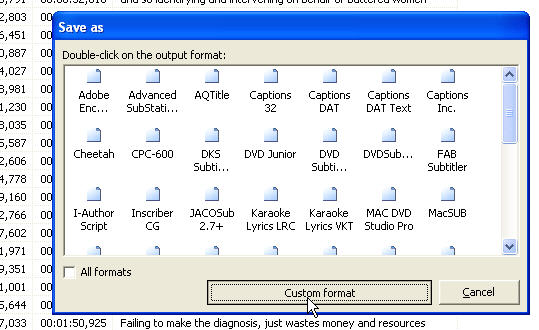
- The Custom formats window will open. Click the Load project button.
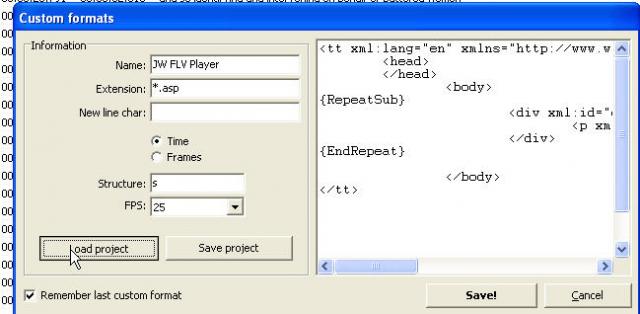
- The Open dialog appears. If you aren't there already, navigate to the Custom Formats folder where you dropped the JW_FLV_player_asp.cfp file in Step 3. Select that file and click Open.

- The Open window will disappear and you will be back on the Custom Formats window. The settings for the JW FLV Player format will be showing. Click the Save button.

- The Save dialog will appear. Navigate to the "media" folder of your learning module, type a filename in the File name area, and click the Save button.
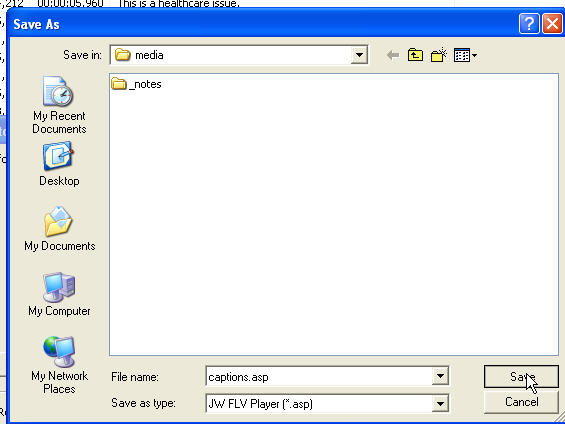
The Save window will close and you will be dropped back into the Custom formats window again, which can be very confusing. Simply click the Cancel button.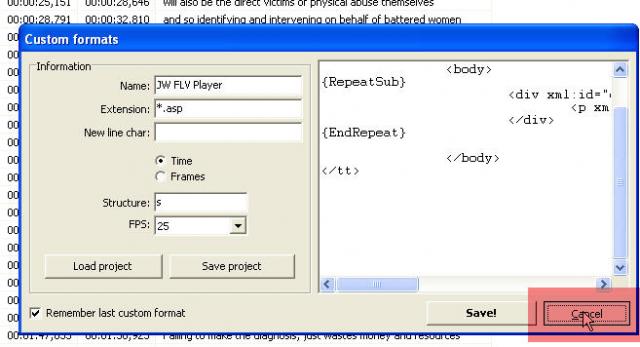
-
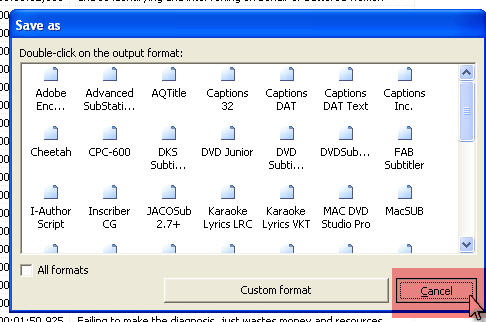
The Custom formats window will close, and you will be back on the Save as window. Simply click the Cancel button AGAIN! This will return you to the captioning screen. Your file is now saved as an ASP file.
- There is one more important step. Browse to the asp file you just created in a web browser.
- Once you see the page, select "View Source" in your browser. Select the source and copy it.
- Open Notepad, and paste the text into it. Save as "yourcaptionsfile.xml" in the media folder.
The reason for this is that most caption formats do not require a calculated duration, so Subtitle workshop does not provlde a way to generate one. It generates start and stop points for each caption line. So, the custom format file you created outputs instructions in visual basic to calculate those durations. When you browsed the .asp file you creaed with Subtitle workshop, the server executed those visual basic commands, and output the durations in the source. Your XML file is now complete.
A SCORM-ready template: Part 8C - Create a Playlist file
The Playlist
A playlist is an XML file that tells the player the order of files or chapters to play, and contains metadata for each item, such as title, author, duration, file format, location, etc.
The media player understands the following XSPF tags:
| MEANING | TAG |
| streaming folder or actual file if streaming is not being used | <location> |
| Title that will be displayed in the chapter menu | <title> |
| link to more information | <info> |
| filename of video file, including extension | <identifier> |
| full or relative path to thumbnail image | <image> |
| author (displayed in chapter menu) | |
| duration in hours:min:sec | <meta rel="duration">00:03:30</meta> |
| format: RTMP or FLV (streaming or non-streaming) | <type> |
| start time (in seconds) | <meta rel="start">0</meta> |
| full or relative path to captions file | <link rel="captions">media/abuse.xml</link> |
A sample XSPF playlist for a single video with no chapters is shown below.
<?xml version="1.0" encoding="utf-8"?>

  <playlist version="1" xmlns="http://xspf.org/ns/0/">

  <trackList>

  <!--red5.mcit.med.umich.edu = 141.214.83.38-->

  <!--red502.mcit.med.umich.edu = 141.214.83.48-->

  <track>

  <title>Introduction: 3:31</title>

  <location>rtmpt://red502.mcit.med.umich.edu:80/oflaDemo/criticalincident</location>

  <identifier>ManagingViolence.flv</identifier>

  <type>rtmpt</type>

  <!--<link rel="captions">media/abuse.xml</link>-->

  <!--<meta rel="start">0</meta>

  <meta rel="duration">00:03:30</meta>-->

</track>

</trackList>

  </playlist>
Sample xpsf playlist for a video with multiple chapters:
<?xml version="1.0" encoding="utf-8"?>
<playlist version="1" xmlns="http://xspf.org/ns/0/">
<trackList><track>
<title>Introduction: 3:31</title>
<location>rtmpt://red502.mcit.med.umich.edu:80/oflaDemo/abusePhys</location>
<identifier>243.abuse.flv</identifier>
<type>rtmpt</type>
<image>media/introChild.jpg</image>
<link rel="captions">media/abuse.xml</link>
<meta rel="start">0</meta>
<meta rel="duration">00:03:30</meta>
</track>
<track>
<title>Pediatric Setting: 4:44</title>
<location>rtmpt://red502.mcit.med.umich.edu:80/oflaDemo/abusePhys</location>
<identifier>243.abuse.flv</identifier>
<image>media/pediatricSetting.jpg</image>
<type>rtmpt</type>
<link rel="captions">media/abuse.xml</link>
<meta rel="start">212</meta>
<meta rel="duration">00:04:44</meta>
</track>
<track>
<title>Adolescent Setting: 3:20</title>
<location>rtmpt://red502.mcit.med.umich.edu:80/oflaDemo/abusePhys</location>
<identifier>243.abuse.flv</identifier>
<image>media/adolescentSetting.jpg</image>
<type>rtmpt</type>
<link rel="captions">media/abuse.xml</link>
<meta rel="start">506</meta>
<meta rel="duration">00:03:20</meta>
</track>
<track>
<title>GYN Setting: 4:22 </title>
<location>rtmpt://red502.mcit.med.umich.edu:80/oflaDemo/abusePhys</location>
<identifier>243.abuse.flv</identifier>
<image>media/gynSetting.jpg</image>
<type>rtmpt</type>
<link rel="captions">media/abuse.xml</link>
<meta rel="start">787</meta>
<meta rel="duration">00:04:39</meta>
</track>
<track>
<title>Primary Care Setting: 4:22</title>
<location>rtmpt://red502.mcit.med.umich.edu:80/oflaDemo/abusePhys</location>
<identifier>243.abuse.flv</identifier>
<image>media/primaryCare.jpg</image>
<type>rtmpt</type>
<link rel="captions">media/abuse.xml</link>
<meta rel="start">947</meta>
<meta rel="duration">00:04:22</meta>
</track>
<track>
<title>Special Considerations 6:03</title>
<location>rtmpt://red502.mcit.med.umich.edu:80/oflaDemo/abusePhys</location>
<identifier>243.abuse.flv</identifier>
<image>media/specialCons.jpg</image>
<type>rtmpt</type>
<link rel="captions">media/abuse.xml</link>
<meta rel="start">1213</meta>
<meta rel="duration">00:06:03</meta>
</track>
<track>
<title>Institutional Change: 3:20</title>
<location>rtmpt://red502.mcit.med.umich.edu:80/oflaDemo/abusePhys</location>
<identifier>243.abuse.flv</identifier>
<image>media/institutionalChange.jpg</image>
<type>rtmpt</type>
<link rel="captions">media/abuse.xml</link>
<meta rel="start">1578</meta>
<meta rel="duration">00:03:20</meta>
</track>
</trackList>
</playlist>
A SCORM-ready template: Part 8B - Create an FLV clip and a wmv clip for captioning.
Select the destination folder


- To add Flash Video to your learning module, start by creating your FLV file. You can use any encoder that will output an FLV - probably the easiest to start with is Adobe's Flash CS3 Video Encoder.
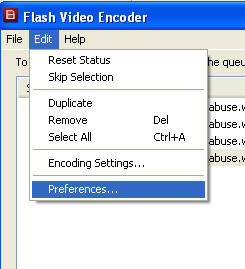
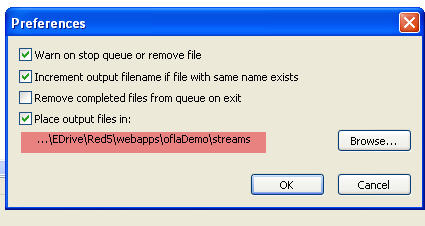
- Open the Encoder Application and select Preferences from the Help menu (if on windows). Set "Place Output files in:" to
\\red5server.com\Red5\webapps\oflaDemo\streams\yourmodule
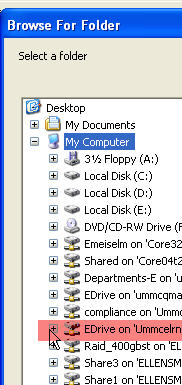
Navigate to EDrive
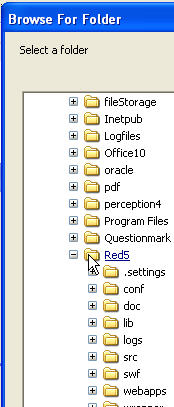
then to "Red5"
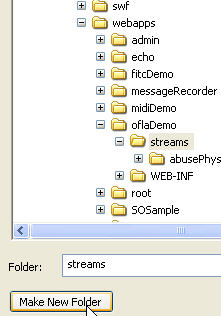
...then to "oflaDemo/streams". Click Make New Folder.
Name your folder with the learning module topic.
Click OK.
Encode Video files
 Drag your video file in to the encoder window.
- Drag your video clip into the Flash Video Encoder. Set the output settings at Flash 8 Medium Quality. To ensure it plays well on weaker computers, type "250" in the Max data rate box. To view quality comparisons between various settings on the same video clip, see this test page
Set the in and out points if you need to crop off opening or closing footage. You can also do this in the playlist by setting a start point and a duration, without altering the video file.
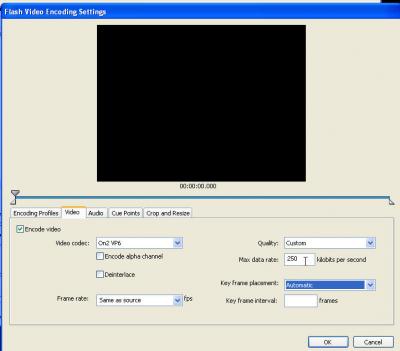 Settings
- Click "Start Queue" to begin the conversion process. This will encode the file and save it directly to the streaming server.
Click "Start Queue"Posted by ellen at 8:43 PMA SCORM-ready template: Part 8A - Adding Flash Video to your learning module
What files are required to add video to your learning module?
The player we are using for embedding streaming media into the SCORM template. is the Jeroen Wigering media player. Some of the necessary files are already included in the template and do not need to be touched:
- includes/mediaPlayer.swf (already included in template)
this file generates the player according to the settings you include in the content page.
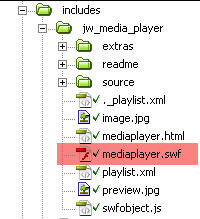
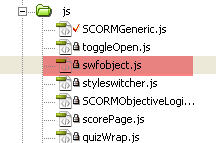
- js/swfObject.js (see for more info on swfObject
this file contains the code necessary to avoid the ActiveX problem with embedded SWFs in Internet Explorer, and generates embed code used by other browsers. A reference to this file already exists in the head of each module page, so you do not need to include it again.
The rest of the necessary files must be created or edited:
- A video clip, encoded to FLV format.
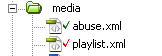
- media/playlist.xml (a sample is included: you will need to edit this one or generate a new one)
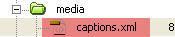
- media/captions.xml (a sample is included: you will need to create your own.)
- pageXX.htm (your content page)
some code must be added to your content page to position and configure the player.
Click chapter links below to learn how to create the necessary files.
Posted by ellen at 8:41 PMNo sound on Flash player 9 on some PC's
We had a problem with some people not being able to hear the sound on Flash videos, even after adjusting all their volume controls carefully. It turns out that sometimes the correct settings don't get written to the registry when the flash player is installed.
Thanks to "512jones" in the Adobe forums, we have the following fix:
"I just reinstalled my system with XP SP2 and found that sound in Macromedia Flash player (version 9) wasn't working. I compared it to another machine and found out that - for some obscure reason - the wavemapper mapping was missing.I tried reinstalling other versions of the Flash player, but to no success ... So I added the mapping myself via the registry.
Go to the following sweetspot in your registry:
My Computer\HKEY_LOCAL_MACHINE\SOFTWARE\ Microsoft\ Windows NT\CurrentVersion\Drivers32
Create a new String value named "wavemapper". As value give it "msacm32.drv".
And that's it, no restart necessary, all your Flash embedded videos will have sound again :)"
Posted by ellen at 11:21 AMOctober 12, 2008
No bootable device --insert boot disk and press any key error on Intel iMac
I came back from a trip, turned on my iMac, only to see a black screen with a DOS-like prompt: "No bootable device -- insert boot disk and press any key."
It did not seem likely that the hard drive had already died, but I thought perhaps it was getting confused because I had a lot of USB and firewire devices plugged in. I pulled all the plugs and cables and restarted. Same error! I then tried restarting with the Leopard install CD in the slot, but got the same message.
It turned out that when I had re-imaged my Acer computer last week, using the restore DVD, I had changed the "Startup Disk" settings to the DVD drive. Seems like it USED to be the case that if you switched the startup disk to the CD/DVD drive, then started up again with no disk in the drive, it would revert to the main hard drive, but apparently this is no longer the case. Instead you get the ugly error message. Not even a sad mac face or an empty folder icon.
I further complicated the issue by having pulled the USB cable for the keyboard when I pulled all the others, and could not figure out why holding down the Option key did nothing! However this was soon sorted out, and holding down the Option key did allow selection of the main system drive. As soon as the computer rebooted, it was possible to select System Preferences: Startup Disk: Mac HD, and all was well again.
Posted by ellen at 10:34 AMOctober 8, 2008
Synch video with slides in Adobe Presenter
In my search for the best way to synch video with slides, I've tried a number of different software packages. At this time, I've settled on the Rich Media Project's flash extensions as the most reliable way to create synched presentations, but I'm always looking for a better way.
When I came across Adobe Presenter, it seemed like another promising tool for this purpose, and possibly easier for clients to use than anything else so far.
Unfortunately it does not yet seem to be the case, at least not yet. When I tried to sync a video of a lecture with a powerpoint using Presenter, it proved to be a hopelessly frustrating and tedious task.
I want the video to appear in the sidebar, not just on a single slide, and it should continue throughout the presentation, across all the slides. There is no instruction for this type of video use in the various help files, but as far as I could tell, the "official" way to do this was to import the video on every single slide, then use the in/out points in the video preview to trim the duration of the video on each slide. A very tedious process and one that would probably magnify the size of the finished file by about 3000% because of the repeated imports. The death-blow to this approach is that the trim preview works quite poorly at this time, jumping back to the starting point whenever the current time pointer is moved. It is too buggy to be of much use.Thanks to leo_leoon the Adobe Connect forum there may be a better way, although it still requires finding the time points manually for each slide.
-
"There is an indirect way to do this :
1. Import the video you want to import on slide from where you want video to start playing and publish the presentation
See
/data / viewer.xml . Copy the video tag within slide tag and paste it to slides where you want the video and modify start and stop time accordingly This way you will be using single video and there you can modify time when to play and on which slide ."
Posted by ellen at 9:31 AMOctober 3, 2008
The milk contamination scandal in China
In thinking about the current Chinese milk scandle, the reference that comes to mind is Edward G. Robinson's movie, "Brother Orchid," about a gangster who hides out in a monastery, and while there, improves their dairy's milk production by adding buckets of water to the milk.
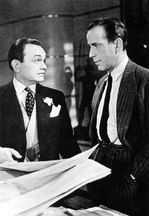
The difference is that Little Johnny Sarto never added anything poisonous to the milk to hide what he had done. Unfortunately, in the modern-day version of this story, that's exactly what was done. Perhaps they got the idea from the melamine-laced gluten scandal that killed a lot of pets. It's hard to believe they didn't think it would ever come out.So why add melamine to watered-down milk? According to ScienceBase, Melamine is an organic compound, with a high nitrogen content, used in fire retardants because its nitrogen is released as nitrogen gas when it is burned.
Acute exposure to melamine can cause cancer or reproductive damage. But even low-dose but chronic exposure to melamine can lead to bladder or kidney stones, bladder cancer and kidney failure.
According to this article in the Christian Science Monitor, the scandal points out a problem in Chinese business ethics or the business culture, probably akin to things that used to go on in the U.S., and one could say, probably still are (the reluctance of the government to ensure that the beef industry has instituted safe practices against Mad Cow disease for example).Posted by ellen at 12:06 AM - Open the Encoder Application and select Preferences from the Help menu (if on windows). Set "Place Output files in:" to