November 26, 2008
What would a truly Senior-friendly Operating System look like?
From many sessions helping seniors with their computer problems, I've gleaned some idea of how they think a computer should behave.
Note that the ideas listed here only apply to the current generation of seniors. It is doubtful that when the current generation of children grow old, they will have the same requirements.
My usability wish list:
- Most important is that the interface be DOCUMENT-based, not application-based. There should be no distinction between the operating system or shell (Finder, Desktop, whatever) and the applications. In other words, there should be only one big application that does everything.
- For example, the idea that there is a separate application to manage and edit photos and one to edit text is a needless complexity.
- Tree-based file systems are completely lost on them - there has to be a simpler way to find documents.
- Documents should end up in only one place, with no alternatives. They should not be asked to add meaningful metadata to anything. The computer must figure it out somehow. Perhaps they could be asked once to find a picture of each family member, and from then on, the computer could recognize that person and tag them for searches.
- Note, however, the fact that they want a simple operating system should not be construed to mean that they want to do simple tasks. They want to be able to run complete businesses or non-profits from their homes, communicate with a wide range of people using email, forums, chat, etc. They want to create forms that can be filled out online, and send complex documents with many graphics and photos.
- Backup should be universal and automatic.
- Documents that are being edited should save themselves every minute, and all versions of the document should be accessible through some easy roll-back interface, perhaps like in a wiki. Except much less confusing than a wiki!
- Attachments in email should automatically download and be easy to find and use. There should be no distinction or loss of functionality between opening things in email and opening them in the 'real' editing application.
- Security worries should vanish, because they are hopeless. The computer must be smart enough to repel all attacks.
- All text should be larger, screens should be larger, and mouse targets (scrollbars, resizing corners, little "x's") should be larger.
November 25, 2008
Topic not found error on Perception quiz created using QML
I've been working on several custom Questionmark Perception quizzes lately. As sometimes happens, it is not possible to use the Authoring Manager's Question Editor to create the questions, so I created an example question in the Editor that was as close as possible to the one I wanted, then exported it to QML and modified it to get the custom structure that I wanted. Then I duplicated it and wrote the entire quiz in QML.
When I tried out the quiz created by importing these questions, the quiz came up with no problems, but on trying to submit the answers, it gave a "Topic not found" error.
It turns out that you must have a TOPIC attribute stated in the QML or it will error out. I don't recall this being the case before, but it definitely is the case now.
RIGHT:
<QUESTION ID="3084430213002589" DESCRIPTION="01. Question title goes here" TOPIC=topic title\subtopic title" STATUS="Normal">

<ANSWER QTYPE="FIB">
WRONG:
<QUESTION ID="3084430213002589" DESCRIPTION="01. Question title goes here" STATUS="Normal">

<ANSWER QTYPE="FIB">
November 24, 2008
Mixing Question Types Within a Question in Perception Quizzes
We had a request to mix fill-in-the-blank type choices with select-a-blank choices within a single question. Questionmark Perception really isn't set up to do this, so of course I had to see if I could get around it's limitations. You can add HTML and javascript to a question though, so I thought of this nefarious back-door trick to fool Perception into taking both answers. Unfortunately it still requires accuracy on the part of the user, so perhaps it is not very useful. They must not type spaces, and must type the answer first, then select the units - in order. That's a lot to ask.
On the other hand, this particular quiz was set up primarily because the users are required to demonstrate absolutely perfect accuracy in this topic, so perhaps it is acceptable in this type of situation. I'll probably add a javascript that strips spaces, too.
An example question is shown below. The user is instructed to type the calculated answer first, then select the units. The pulldown simply adds the units or whatever you want to the end of the typed answer. The entire thing is judged as a fill-in-the-blank question.
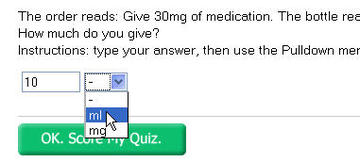
The QML for the question shown is given below. All it is doing is appending the units to the user's answer, in the correct format.
<?xml version="1.0" standalone="no"?>

  <!DOCTYPE QML SYSTEM "QML_V3.dtd">

<QML>


<QUESTION   DESCRIPTION="12. 30mg "   STATUS="Normal">

  <ANSWER QTYPE="FIB" SUBTYPE="VERT">

  <CONTENT TYPE="text/html" STYLE="blue"><![CDATA[<P>The order reads: Give 30mg of medication. The bottle reads 15mg/5ml. <BR>How much do you give?<BR>Instructions: type your answer, then use the Pulldown menu for the units. DO NOT TYPE ANY SPACES!</P>]]></CONTENT>

  <CHOICE ID="1">

  <CONTENT TYPE="text/html" WIDTH="6"><![CDATA[

  <SELECT id=unitSelector_%CHOICE.ID% onChange="(document.forms[0]['%CHOICE.ID%'].value)+=(document.forms[0]['unitSelect_%CHOICE.ID%'].value);alert('changing');" name=unitSelect_%CHOICE.ID%>

  <OPTION value=- selected>-</OPTION>

  <OPTION value=ml>ml</OPTION>

  <OPTION value=mg>mg</OPTION>

  </SELECT>]]>

  </CONTENT>

  </CHOICE>

  </ANSWER>

  <OUTCOME ID="right" SCORE="1">

  <CONDITION>"1" MATCHES NOCASE "10ml"</CONDITION>

  <CONTENT TYPE="text/html"><![CDATA[You are correct.]]></CONTENT>

  </OUTCOME>

  <OUTCOME ID="wrong" SCORE="0">

  <CONDITION>OTHER</CONDITION>

  <CONTENT TYPE="text/html"><![CDATA[Sorry, that is not correct.]]></CONTENT>

  </OUTCOME>

  </QUESTION>

</QML>
November 22, 2008
Caching in Google Gadgets
When creating a Google gadget that pulls data from an XML file, you will probably notice that the data doesn't update right away in the gadget even after you have changed the file. This caching behavior can make it very difficult to troubleshoot, and you'll probably want to shut it off while developing.
It took me a while to find this so I'm posting it here:
From Google's "Refreshing the Cache" instructions:
To make sure your gadget fetches fresh new content at least once per interval, simply specify a value (measured in seconds) for the refreshInterval parameter. For example:
// Fetch fresh content every half hour
_IG_FetchContent("http://news.google.com/?output=rss", callback, { refreshInterval: (60 * 30) });// Fetch fresh content every 10 minutes
_IG_FetchContent("http://news.google.com/?output=rss", callback, { refreshInterval: (60 * 10) });// Fetch fresh content every 30 seconds
_IG_FetchContent("http://news.google.com/?output=rss", callback, { refreshInterval: 30 });// Disable caching completely and fetch fresh content every time -- !! Try to avoid using this !!
_IG_FetchContent("http://news.google.com/?output=rss", callback, { refreshInterval: 0 });function callback(response) { ... }
If you notice that your Gadget's code is also being cached, check in your sandbox that the gadget in question does not have the "Cached" checkbox checked.

So for example, since I am constantly tinkering with my Daily Bailout widget, I use the following code for fetching the XML data:
function displayBailouts(val)
			{
			  var url = "http://thedesignspace.net/widgets/bailout-data4.xml";

			  _IG_FetchXmlContent(url, function (response) {
					   refreshInterval: (0);
					    if (response == null || typeof(response) != "object" || response.firstChild == null) {
					      _gel("content_div").innerHTML = "invalid response "+typeof(response);
							    return;
							}//end if
November 21, 2008
Dialogs too big in Vista to fit on small laptop screen
My first attempts to work with Vista have definitely been an "experience". I'm trying to get a Lenovo ThinkPad set up for use primarily for Qwizdom and Powerpoint, which would seem to be well within the limits of what Microsoft intended, but you almost have to wonder if they ever tried Vista on a laptop before releasing it! What a mess!
The default size of windows is often just a little too big for the screen. I've double and triple checked the screen resolution - it is set to maximum. We did set the default font size larger than the minimum because it is too hard to see otherwise.
Yet the windows are all over the place in sizing - sometimes they are correct, sometimes obviously wrong, with title bars above the top of the screen or dialogs with Accept/Cancel buttons below the bottom of the screen.
With normal windows that isn't a big issue but with dialogs, when the Accept and Cancel buttons are below the bottom of the screen, you are very stuck. Sure,you can kill the process in the task manager or hit escape or enter to cancel, but that means you don't get any farther in what you are trying to do.
The window cannot be resized or moved up to where you can see the hidden buttons. The key command "Alt-Spacebar" does not work on dialogs, apparently.
I did finally find a way to get through these mega-dialog-odons, though. If you hit the Tab key a couple of times, then hit the Enter key, that should submit the window.
Hopefully someone will buy Steve Ballmer a ThinkPad before he releases Windows 7.
Installing Adobe Reader on Vista
The case of the missing confirmation dialog
A problem I've encountered several times on Vista: dialogs will open, then refuse to disappear, and the Windows Task Manager simply tells you they are "expecting a response". They are "expecting a response" from a confirmation dialog that has completely disappeared.
This seems to happen when another window pops up and steals focus unexpectedly. The confirmation dialog is not hidden behind any other windows, nor minimized, but simply vanished. This can be very confusing even when you know what you are looking for. This happened while I was installing Adobe Reader. Here's what it looked like when it got stuck:
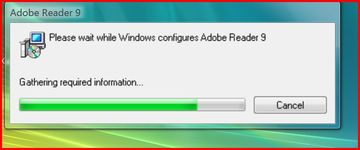
Task Manager reported that Adobe Installer was "expecting a response" but there was no corresponding process in Task Manager for that response dialog, nor was it hiding out in the Task Bar, nor anywhere. Believe me, I looked.
I ended up killing the Installer, and starting over. But really, if a dialog is absolutely necessary to proceed, then perhaps it should not be allowed to lose focus? Otherwise, let it disappear after 60 seconds or something.
Unwanted Toolbars
Just a note on another topic: there are way too many Windows applications that attempt to get you to install some unwanted toolbar along with the application that you do want, usually by making it look like you have no choice. I was surprised to see that Adobe does that with its Adobe Reader installer. By default, you will end up downloading the version that installs the Google Toolbar. They do provide a "NO" option for the toolbar installer but it is not easy to find on the downloads page. I'm surprised Adobe has chosen to do this.
November 19, 2008
Care Managers: help for your aging parents
If you have every tried to help out with finding care for someone who is just returning home from a hospital stay, or for someone who has need of long term care within their home, you know how difficult it can be.
Since patients are frequently discharged from the hospital before being fully recovered, it's often necessary to rapidly put together a patchwork of home-care and health services to allow them to survive in their own home while recovering. Although the hospital will usually provide a visiting nurse and maybe a social worker, it is rarely enough for elderly patients who may have more than one illness or disability and need extra assistance.
It can be very difficult to put together the right mix of helpers for this type of situation. It took me years to find out that there were people who specialize in finding services to help keep people independent in their homes. Care Managers or "Geriatric Care Managers" are usually nurses or social workers with training in geriatric assessment, who will look at the person and their situation and recommend services to fill the gaps. They can be extremely helpful in an emergency, and also for the longer term.
Just something to file away in case you ever need it!
More information:
November 17, 2008
Connecting to wireless networks on Vista
We were having trouble connecting a ThinkPad to a local wireless network. It would first say there were no networks available, then when I would locate one, it kept requesting Username, Password and Domain, as if there were an authentication server involved. The wireless network is simply set up with a WEP key, so there are no individual users associated with it - anyone with the WEP key can log on.
It turned out that previous efforts to connect had set up a "wireless network" entry in a list somewhere which needed to be deleted and set up again correctly.
- IMPORTANT: be sure to check that the wireless switch on the front of the laptop is turned on. It is difficult to see and it must be turned on or all your other efforts to connect will be unsuccessful.
- First, select Start Menu > Control Panel > Network and Internet > Network and Sharing Center. Under "Tasks", click Manage wireless networks.
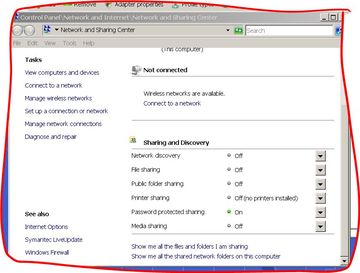
- The Manage Wireless Networks window will appear.
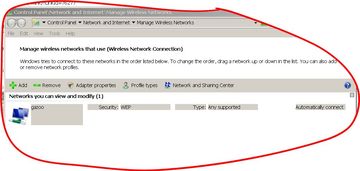
- The network that needs to be replaced is probably listed in this window. Select it, and click "Remove".
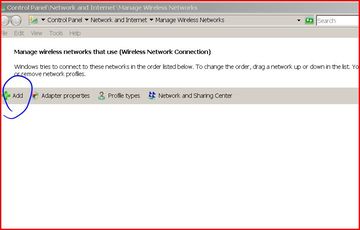
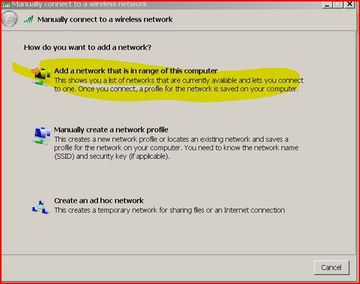
- Click "Add" and the Manually connect to a wireless network window appears. Select the first item: Add a network that is in range of this computer.
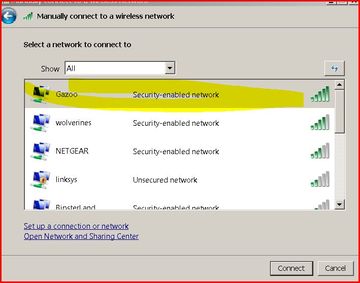
- A list of networks will be displayed. Select the network you want to connect to.
- A dialog should appear requesting the WEP key for the network. This should be all it needs to connect and stay connected - and to connect forevermore when the laptop is brought within range of this network.
November 15, 2008
Changing the window scope in Firebug
If I had to choose one piece of advice for new web developers, I'd tell them to learn to use Firebug. Firebug is probably the most valuable debugging tool available, but if you are just getting started, it may seem pretty opaque at first.
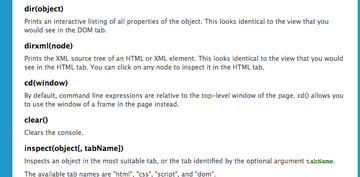
In addition, some things do not appear to work as advertised. In particular, the "cd" function does nothing as far as I can tell.
The page that documents the commands you can use within Firebug lists the cd command as a way of changing the window scope:
Let's say you want to test for the existence of something (a function, property, etc.) within a page. If you are working with a single window, you would simply type the name of the property into the command line and firebug returns the current value of that property, or "null" or "undefined".
But what if the property you want to examine resides within a window that is inside a frame? You need to change the scope that is being addressed so that your expression is evaluated within the correct frame.
You are supposed to be able to type "cd(frameName)" or "cd(top)" to change the window scope of the succeeding commands. Yet, I've tried just about every possible way of addressing windows and frames with it, and it never seems to work. It always returns "null".
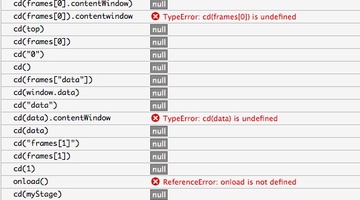
However there are other ways to get almost the same results.
If you are not certain exactly what you are looking for, you can just type:
values(frameName); into the command line box
and you will get a listing of every value of ALL properties of the object.
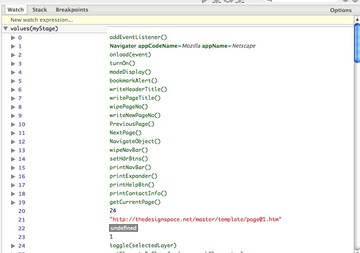
And if you simply enter "frames[0]" you will get a navigable DOM listing of everything within that frame similar to the listing in the DOM tab.
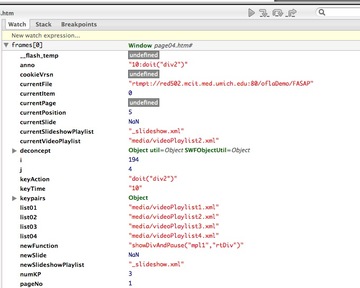
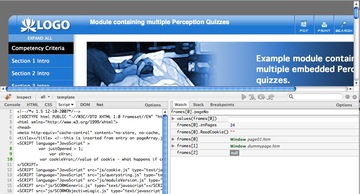
To inspect a specific property of frames[0], type
frames[0].property

![Reblog this post [with Zemanta]](http://img.zemanta.com/reblog_a.png?x-id=311df0ec-d275-4c39-826e-2be232feb751)
November 12, 2008
Meet Monifa, the Pygmy Hippo!

A rare pygmy hippo has reached the ripe old age of three weeks and is thriving at the Taronga zoo in Sydney, Australia. Monifa, (which means "I am lucky") was very weak when she was born, and could not stand or walk immediately, so she could not be fed by her mother. She has been painstakingly hand-raised by the keepers.
You will definitely want to see the videos and the rest of the pictures of this little creature!
Monifa Pictures on Flickr

November 8, 2008
Growth Factor I, insulin sensitivity, life extension
Andrzej Bartke, a researcher in geriatrics, and his colleagues at Southern Illinois University in Springfield, are closing in on the genetic basis for and biochemical/endocrine prevention of aging in mammals .
For years it has been observed that calorie restriction could enhance longevity in rats and other animals (research history) but the mechanisms behind this effect were unknown.
In a 2006 article in the Proceedings of the National Acadamy of Sciences , they write
"there is considerable evidence that reduced secretion of insulin-like growth factor I and insulin are among the mechanisms that mediate the effects of Calorie Restriction (CR) on aging and longevity in mammals."
Insulin-like Growth Factor I (IGF-1) is a hormone secreted by the liver as a result of the stimulation of Growth Hormone (GH). If Growth Hormone receptors are blocked, less IGF is produced. It is possible that this lower production of IGF-1 helps minimize the development of insulin resistance, as would a calorie reduced diet.
Mice with the GH receptor gene knocked out are called GHRKO mice. They tend to be longer lived than normal mice. In the study described in the article, a group of GHRKO mice were compared with normal mice. They were either fed normally or on a 30% Calorie Restriction diet starting from 2 months of age.
"In the normal, non-GHRKO mice, Calorie Restriction produced the expected increases in overall, average, median, and maximal life span.In the mice with no GH receptors (GHRKO), Calorie Restriction failed to increase overall, median, or average life span in GHRKO mice and increased maximal life span only in females"
Calorie restriction also increases insulin sensitivity in the normal mice, but does not do so in the GHRKO mice who already have a high degree of insulin sensitivity.
The authors conclude that this tends to support the idea that enhanced sensitivity to insulin plays a prominent role in the actions of Calorie Restriction and Growth Hormone resistance on longevity.
Experimental Gerontology
Volume 43, Issue 1, January 2008, Pages 11-14
Annual Reviews in Biogerontology
doi:10.1016/j.exger.2007.10.009
November 5, 2008
iTunes garbles playback on all songs
I've been having a lot of authorization issues with iTunes since a recent upgrade, so when this morning, iTunes started garbling playback on ALL my music, I panicked thinking it was another bug. It sounded like the speakers were underwater.
Fortunately it turned out to be a USB issue. I use USB headphones by Plantronics, and they seemed to have lost proper connection somehow.
If you have the same problem on a Mac, and are using a USB headset or speakers, try opening the Sound control panel and switching Output away from whatever USB output device is currently selected, to Internal speakers and back again to the USB device. This fixed the problem for me.
November 1, 2008
Movable Type comment error: invalid Request: Corrupt Character Data For Character Set
After a recent upgrade to Movable Type, I found that attempting to comment using the comment forms on each entry page generated the error:
invalid Request: Corrupt Character Data For Character Set
The fix is simply to change the meta tag "content-type" on the Individual Entry template:
<meta http-equiv="Content-Type" content="text/html; charset=ISO-8859-1" />
should become
<meta http-equiv="Content-Type" content="text/html;charset=utf-8" >
Then re-publish the individual entry archives.