December 30, 2008
Troubleshooting Jeroen Wijering's FLV player in your HTML
There are some errors that come up time and time again when working with Jeroen Wijering's Flash Video Player. Here's how to troubleshoot them. I'll keep adding to the list as time permits. Click the images to see a larger view.
Problem 1: Player does not appear at all. In the example below, the only thing showing up is the link that is supposed to be filled with the player at runtime.


then it is probably because the code for the swfobject functions cannot be found. This is most likely caused by not including a link to the swfobject script in the head of the HTML page.
<script type="text/javascript" src="js/swfobject.js"></script>
Not including the code means that the object and embed tags for the player cannot be written into the HTML document at runtime.
Another possible cause is that there is an error in the path to the player SWF file, usually named "player.swf".
In this case the object embed code will be written into the HTML, but the player file is not where the code expects it to be, so it doesn't display.
In the example shown below, two players should be showing up in the second row of the table. Firebug is open to show the generated source. ( in other words all the HTML that was written to the page by javascript at runtime. It appears that the code for the player was indeed written to the page, yet still the player does not show up. So this means that swfobject did perform its function, but something went wrong after the code was written to the page.

Problem 2: Player appears but nothing happens when Play button is clicked. Player stays black and progress bar does not advance.

Jeroen Wijering explains this issue quite well on his site:
- Note that the Flash plugin checks for image and MP3 files relative from the HTML page and for FLV files relative from the SWF file!
Second, a playlist should always reside on the same server as the SWF file, due to security restrictions of the Flash Player. This can be solved if you own the domain on which the mediafiles reside. You then have to put a crossdomain.xml file in the root webfolder of that server. In this file, you can specifically allow sites to load data. An example is the crossdomain file from Youtube.
"/media/playlist3.xml" instead of "media/playlist3.xml"
The player appears but is black - there is no posterframe, since posterframes are specified in the playlist. Nothing happens when the PLAY button is clicked.
Checking the code in Firebug will reveal that the object code is indeed there on the page. No javascript errors will occur.

Player on left has:
"/media/playlist3.xml"
Player on right has:
"media/playlist3.xml"
Sometimes the last few tags in the playlist file may get overwritten. Try validating your XML in Dreamweaver or whatever you prefer to use.
In the example below there are several missing closing tags at the bottom:
<?xml version="1.0" encoding="utf-8"?>


<playlist version="1" xmlns="http://xspf.org/ns/0/">


<trackList>


<track>


<title>Magnetic Resonance Safety</title>


<location>02_Presentation</location>


<type>rtmpt</type>


<image>media/posterframevid20.jpg</image>
Problem 3: Player appears and starts playing but stops after a second. Video is being streamed from Red5 server.
Norovirus vaccine near - good news for cruise ship passengers and students
Norovirus is a highly infectious stomach virus that thrives in closed communities like dormitories and cruise ships. It only takes a few virus particles to cause illness, and is relatively hard to kill. Like the flu virus, it rapidly undergoes genetic modification, and thus defeats any immunity that may have developed in the population.
Every year the news is full of stories about outbreaks, along with the usual cautions about washing hands carefully. This is always a good idea, but may not be entirely preventive because the virus is resistant to some detergents and alcohol rubs.
Diagnostic tests for norvirus only recently became accurate enough to understand the epidemiology of this type of infection, and it is clear that it is pervasive enough to merit the development of vaccines.
At least one company, Ligocyte, has a candidate vaccine in clinical trials. The vaccine is a "Virus Like Particle" vaccine, shaped to elicit an immune response without using actual viral RNA, so the vaccine cannot cause norovirus. Their vaccine candidate would be a nasally administered powder.
This may not be the deadliest disease but a vaccine for this would surely improve the quality of life for a lot of people, particularly during the winter months when norovirus infections are rampant.
LigoCyte Pharmaceuticals Initiates U.S. Clinical Trial Of Norovirus Vaccine
December 29, 2008
The Chernobyl Experiment

After a couple of months of watching Microsoft's teaser "Mojave Experiment" commercials on TV, I finally got around to looking at the Mojave Experiment site.
The TV commercials (unlike the web commercials) give the impression that some new top-secret version of Windows is in the works that will usher in an amazing new era in usability and coolness. Since I have just finished configuring a Vista laptop for classroom use, I am definitely in the market for a new era in usability, so was very much looking forward to seeing this marvel.
It turns out that the true marvel is that Microsoft has somehow convinced itself there is no problem, other than a perception problem. The Mojave experiment involved showing ordinary people some of the slick features in Vista without telling them it was Vista. Of course, they got a much higher approval rating than before the blind demonstration.
In response, I respectfully propose ANOTHER experiment: The Chernobyl Experiment:
Give those same ordinary people a simple task to accomplish, a time limit, and a computer running Vista.
Let me know the results.
December 28, 2008
F8 key doesn't bring up Spaces on Leopard
Ever since I got the new iMac, the FKeys never seemed to work as expected. The special functions on each, like brightness, volume, dashboard, etc. would take precedence over whatever function my applications had assigned to F5, F12, etc. This wasn't a problem for a while: Dreamweaver's F8 function did not bring up the Files menu, so I simply selected "Files" from the Window menu. F12 did not bring up Dashboard anymore, but the F4 key has a Dashboard symbol on it, so I used that key instead.
But when I started using Spaces, I really needed that F8 Key to work to bring up the Spaces display. I finally found the answer: you must go to:
System Preferences > Keyboard and Mouse > Keyboard
Then check "Use all F1, F2, etc. keys as standard function keys"

Note that when this option is selected, you must press the Fn key to use the special features printed on each key, like volume, brightness, dashboard, etc..
Thanks to "eluk" from Macrumors forums for this tip.
December 27, 2008
Microsoft's Silverlight
After years of institutionalized incompatibility in their browser software, office software, and video software, Microsoft has come out with with Silverlight, their Rich Internet application platform and supposed Flash Killer.
Flash is universally accepted because it is universally compatible. The same cannot be said of Silverlight at this time. It has only been out for a year or so, and has already left some computers behind. Version 2 is not available for legacy Mac computers - only for Intel-based Macs. It is a new platform, however, and to give Microsoft some badly needed credit, they have opensourced parts of the Silverlight and .Net specifications. Mono, an opensource .NET develpment framework, and Mono's version of Silverlight "Moonlight" are being actively developed, and although not entirely compatible yet, it will be interesting to see how far they differ from the official version in a few years. Moonlight is currently only compatible with Silverlight 1.0 applications, but there is a new version in the works that should work with Silverlight 2.0.
In the learning modules I develop, I switched from a WMV standard to FLV forat for embedded videos because Windows Media is not well supported on Safari or Firefox on Macs nor on Firefox on Windows. The scripting commands necessary for captioning and detailed control of the video rely on the ability to "see" properties inside the player object, which Safari and Firefox (even on PC) cannot do. The flip4mac player which replaced the Windows Media Player on the mac is inconsistent in behavior, depending on how people set up their plugins and browsers. I have even had issues with Windows Media on Windows XP, including the fact that in IE6 with the Google Toolbar, embedded Windows Media will sometimes crash the browser.
If Silverlight fixes the scripting issues on the Mac and in Firefox, it will be worth testing for that reason alone. I've seen articles which see Silverlight as a very positive development, in that Silverlight has "brought Windows Media support back to the Mac" but I'm not sure that it is not already too late: Windows Media may be irrelevant on the Mac at this point Adobe has so thoroughly open sourced Flash and Flash Video that it would take some convincing to want to switch entirely, though for specific applications, Silverlight may be just right. One such application would be Deep Zoom which looks like it would be perfect for some elearning scenarios, as long as you don't mind developing entirely on Windows.
A real world example of the gaps that still exist I am testing a new video mashup product: Ultralearn. It is based on Silverlight 2.0, and allows combinations of video, documents, images, and tracking for elearning or marketing. I installed Silverlight on my Mac at work, only to find out that without realizing it, I had installed an old version, since the latest version of Silverlight, 2.2, does not exist for G5 macs.
I next tried Ultralearn on another computer, only to find out that it ONLY imports Windows Media format video, not AVI, or MPEG, just WMV. Nearly all I have on hand are AVI's or FLV's, so that was a bit of a setback. I suspect that is a Silverlight requirement, not the vendor's decision, since anyone doing video mashups would surely want to enable any type of file including YouTube or video straight from the camera. It complicates the workflow in a non-Web 2.0 manner. When I attempted to upload a WMV file on the Mac, it resulted in "cannot display this video" errors, which I'll have to take up with the vendor at some point. It's not clear if that is a Silverlight issue with Macs, or an UltraLearn issue.
I think that Silverlight will be a long time in catching up to Flash, but it is well worth learning to develop in for the right use.
December 25, 2008
Flash movie works under "Test Movie" but not when published.

If your flash file works correctly when you test the movie in Flash, but not once it is published, check your Publish Settings.
While modifying a flashcard example application I downloaded from Flashkit.com, I noticed that in development, using "Test Movie", it worked perfectly, but once published, it had odd bugs.
On checking the publishing settings, I realized it had defaulted to Flash Player 7. Once changed to Flash Player 9, it worked fine. Apparently, some of my modifications relied on features that Flash Player 7 does not support.
December 24, 2008
Batch resizing in Photoshop, step by step
One important element that is often left out of beginner Dreamweaver courses is how to make your photos web-ready. Today's cameras turn out multi-megapixel images that are several feet wide when dropped into a web page at web resolution. Here's how to take a folder of high-resolution images and turn them into smaller files that will display at about 5-6" wide at 72dpi using Photoshop.
- Select Scripts > Image Processor from the File menu

- Click Select Folder in the Image Processor window.
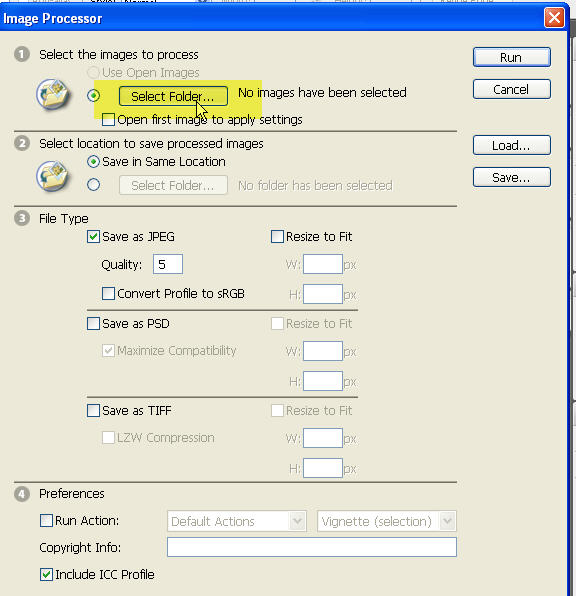
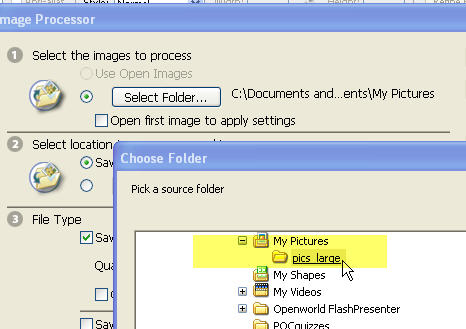
- Choose the folder that contains the pictures you want to resize.
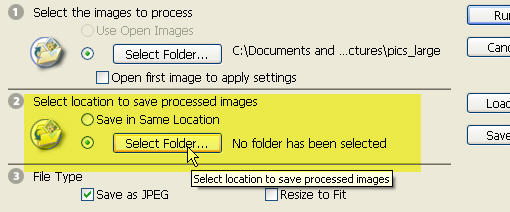
- Choose a location for the resized photos.
- You may want to make a folder for the newly resized images to keep them separate from your other images.
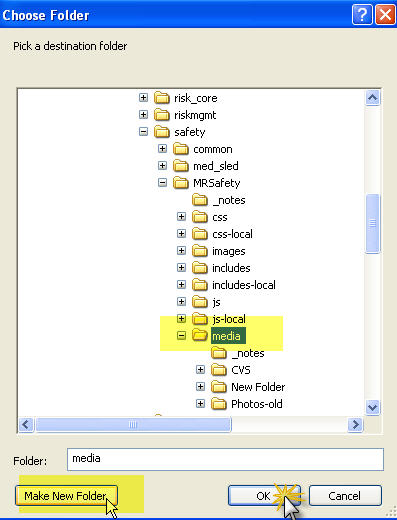
- Select the new folder.


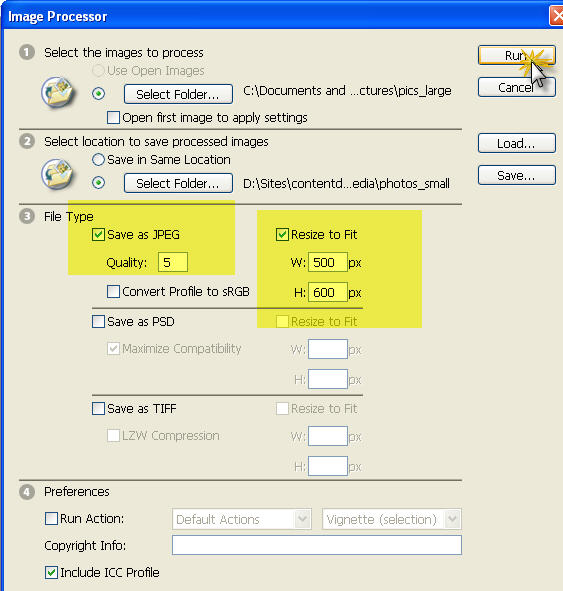
- In the main Image Processor window, choose "Save as JPEG", and "Resize to Fit." Enter maximum width and height in the boxes as shown. Click "Run". After a minute or so, the images will start being resized.
- Check the new folder to see that your resized images have appeared.

![Reblog this post [with Zemanta]](http://img.zemanta.com/reblog_a.png?x-id=2e49bc0c-e060-4603-8772-10e7a700f9a2)
December 23, 2008
How to turn on captions in Windows Media Player 11
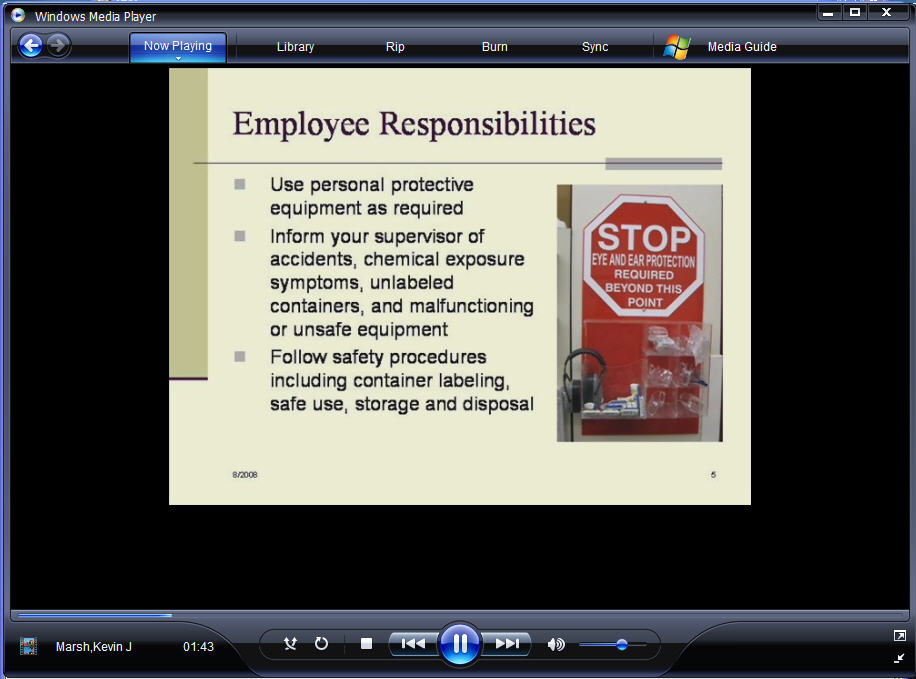
- When you open Windows Media 11, chances are, it will look like this:
- To view captions or subtitles when they are available, you must turn on the "Subtitles" setting.
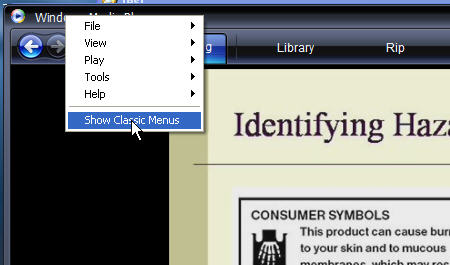
Right click the title bar and select "Show Classic Menus."
- Then, select Lyrics, Captions and Subtitles > Subtitles from the Play menu. If there are subtitles that go with your video, they will show up below the video in the player.

A brief complaint about Microsoft Windows Media Player!
A colleague at work needed to know how to turn on captions in Windows Media Player. I started to write her a note explaining it, but needed to check exactly how to get to the setting since I knew how to do it in older versions but not 11.
This turned out to be just another opportunity to experience Microsoft's creative approach to usability.
Here's a snapshot of the the player. Note, there is no "File" menu, no Open command, nothing that appears useful unless you are purchasing music from their store or ripping from an old CD. And really, aren't "Rip" and "Burn" SO 2006? Who even cares about ripping CD's anymore?
But I digress. The file I wanted to play is an ASX file on the web which contains a reference to her video and her SAMI caption file. As I said, there is no "Open" command visible in the interface, so I gave up on opening the file from within the player and right-clicked the ASX file on my desktop, then selected "Open with..." > "Windows Media Player."
I knew from experience I needed to find a setting "Show Captions." That setting used to be pretty easy to locate, but not anymore. After some fruitless attempts to find any menu option that looked like it might be related to captions, including a brief trip to one dialog with 10 inscrutable tabs in it, I opened the Help file, and searched for "Captions". This brought up many choices, including "Showing or Hiding". Wonderful!
But Not So Fast! The help file says that Step 1. is "Click the PLAY menu...etc." But, there IS NO PLAY menu, as I think I mentioned!

I started right clicking everything visible, and accidentally happened on the correct spot - it is a tiny target, indeed: the title bar of the window. This brought up a drop-down menu listing File, View, Play, and other crucial items including "Show Classic Menus." I guess they are called "Classic" because you are no longer supposed to need them. I mean, who would want to Open a file? Or perhaps you are supposed to get used to using right-click for everything?
This setup reminds me of what they used to call "mystery-meat" navigation, where a site's navigation buttons were so cryptic that you couldn't tell what their destinations were without mousing over each one. Microsoft, HELLO! Do not assume we don't need the File menu!!! Replace those out of date Rip and Burn buttons on your slick interface with menus showing File, View, Play, etc.

Of course, once I selected Show "Classic" Menus, all was well again.
December 19, 2008
Associative Arrays
If you've used javascript much, you are probably familiar with arrays. Typically arrays are used to manage lists of items. I frequently use arrays for maintaining information about the state of pages and quiz questions in learning modules, storing a series of properties for each item.
But, there is a problem. To find the particular item you want to use, you must loop through the whole array. Sometimes you can get yourself into a situation requiring multiple loops to get one item of information and performance will suffer.
I recently got to wondering if there weren't a way to jump straight to the desired item, if the ID of the item were known. Yes there is!
Enter "associative arrays". Associative arrays allow you to index items by any string key, not just the usual arbitrary index numbers. So you can go straight to the exact item by name without testing for property matches while looping through the array.
In other words, instead of
 for (var i=0; i < itemList.length; i++)  {
           if (itemList[i].id == myItemID) {
              itemList[i].property = newValue;
            }
     }
You can use
itemList['myItemID'].property = newValue;
One thing to keep in mind, however is that Javascript doesn't actually have associative arrays. The "associative arrays" I described above are really Objects which act as hash tables, or tables of values that are associated with keys. In the case shown above, I am using 'myItemID' as the key to find the correct item.
The problem with their not being a real Array() object is that you can't loop through the array in the normal way, because an Object() does not have a Length property. Thus you can't test for
i < itemList.length
You can, however, use
for var in
for those times when you MUST loop through this type of array.
In my learning module example, I store the interactions in an array like this:
 var IntArray = new Object(); //interactions object


      IntArray['p03_000'] = {tries:1, ascore:1, req:1, msg:'Completed', quiz:100100000003},

      IntArray['p03_001'] = {tries:1, ascore:0, req:1, msg:'Try again?', quiz:100100000003},

      IntArray['p03_002'] = {tries:0, ascore:0, req:1, msg:'Not attempted', quiz:100100000003},

      IntArray['p03_003'] = {tries:1, ascore:1, req:1, msg:'Completed', quiz:100100000003},
When someone completes a question or interaction, I update just that specific item with:
itemList['specificItemID'].ascore = 1;
But at the end of the quiz, I want it to print out ALL interactions with their scores and other information. At that point, I use
 outputBlock.innerHTML=('<br/>');

  for (var i in itemList)  {

	  var itm = itemList[i];

	 outputBlock.innerHTML+=('Question '+i+ ' Score: ',+ascore'+itm.ascore+', Tries: '+itm.tries+', '+msg+'<br\/>');
and a clear description of how to get started using them, by Trevor on thingoid.com
December 16, 2008
Video Recording on the iPhone
There are many iPhone applications available, but so far, no one has come out with an official application that does video recording. To get that functionality, you must jailbreak the iPhone and install one of the unofficial video recorder apps, and some type of networking so you can transfer the video files back to your computer.
The main problem with jailbreaking the iphone is that it is no longer in a standard, supportable condition afterward, and so things may not work as expected. I found that my syncing setup was all messed up, and I was basically starting from square one in terms of settings. There are some things it still does not do well, like syncing to iPhoto. However, there are enough benefits to a jailbroken phone to try it out, and hopefully (haven't tried it yet!) it can be restored if it no longer seems worth all the effort.
Jailbreak the iPhone
- Download the latest PwnageTool from this page. Direct download links are shown about midway down the page. Or you can get it from iPhone Hacks.com
Check all the versions and what they support carefully. This is not one of those times when you should wing it. Read the instructions.
- Download and unrar the appropriate iPhone Bootloader file from this page. You'll probably want the latest one (The current one is 4.6 at this time), but Pwnage Tool will let you know which.
- Run Pwnage Tool. Follow the instructions in the guide PwnageTool 2.0.1 Guide For Jailbreaking and Unlocking EDGE iPhones With v2.0 Firmware using Mac OSX
- Download the latest PwnageTool from this page. Direct download links are shown about midway down the page. Or you can get it from iPhone Hacks.com
Install Cydia and Netatalk
- Once the phone is back up and running, you will see an icon for Cydia on the bottom of your home screen. Run Cydia and install Cycorder and Netatalk. A good walkthrough on how to use Cydia is here, but you probably won't need it. Although Cycorder and iPhone Video Recorder seem to be the frontrunners in the video recording category, after reading several reviews, I decided to try Cycorder first.
- After installing netatalk, you will need to restart. You won't see netattalk on your Home screen, but when you restart, the iPhone will show up in the shared area in the Finder on the Mac.

- Sign in to your iPhone per the instructions in the netatatalk Connection Guide. More information on netatalk is here. It is a good idea to change the password as shown here. You will have to install Mobile Terminal (using Cydia) to do this.
- Look for the Cycorder icon in your Home screen. Once you shoot some videos, they will be located at "home/Media/Videos/" as shown in the image above.
December 7, 2008
iPhoto stops syncing photos from iPhone

I just noticed that iPhoto was no longer syncing new photos off the iPhone. As you can see in the image above, when the iPhone was plugged in, nothing shows in the import window, although there really are photos there!
From the number of pictures left on the phone this has probably been going on for about a week or so. I tried downloading them using Image Capture and it appeared to see them and looked like it was downloading them, but ever nothing arrived in the download folder.
After searching the Apple discussion lists fruitlessly, I gave up and simply rebooted both the computer and iPhone, and everything magically started working again. This hasn't been the first time I've rebooted in a week, so it must require rebooting the iPhone as well.
Alzheimer's research update - big news! HSV1 infection in elderly can cause Alzheimer's
An enormous breakthrough. Research by Professor Ruth Itzhaki and her team at the University of Manchester confirms earlier suspicions about the role of the HSV1 virus as a cause of Alzheimer's disease.
As reported in Science Daily and Slashdot, researchers in the University of Manchester have published research that suggests:
"...that HSV1 (the Herpes cold sore virus) enters the brain in the elderly as their immune systems decline and then establishes a dormant infection from which it is repeatedly activated by events such as stress, immunosuppression, and various infections.
"The ensuing active HSV1 infection causes severe damage in brain cells, most of which die and then disintegrate, thereby releasing amyloid aggregates which develop into amyloid plaques after other components of dying cells are deposited on them."
Possible treatments include antiviral drugs and vaccination.
Journal reference: MA Wozniak, AP Mee and RF Itzhaki. Herpes simplex virus type I DNA is located within Alzheimer's disease amyloid plaques. The Journal of Pathology, Volume 217, Issue 1 , Pages131 - 138 DOI: 10.1002/path.2449
December 6, 2008
New Google Gadget: The Daily Bailout
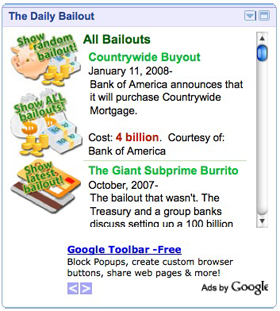
My first attempt at a Google Gadget is now available, ready to contribute to your information overload and general level of anxiety. When loaded, "The Daily Bailout" widget shows you a random bailout from a list starting with the buyout of Countrywide Mortgages.
Researching this little gadget has been an eye opener because of the sheer size of the numbers involved. For example, did you know that the bailouts so far this year exceed all US bailouts in history combined? Did you know that some of the banks that appeared to be bailing other banks and companies out are actually themselves in serious trouble? This list could become very long before this is over.
In any case, you can add the gadget to your webpage by clicking this link:
If you can take it, click the "Show All" button to see all the bad news at once, or click "Show Latest to show the most recent one.
Good reading on the Economic Meltdown:
How Big Will the Bank Bailout Get?
The Secret Bailout of J. P. Morgan: How Insider Trading Looted Bear Stearns and the American Taxpayer
The Bank Implode-O-Meter: JP Morgan Bailout or Wachovia Buyout?
Show Me the TARP Money
CNN Money: Where the Bailouts Stand
December 1, 2008
Borders digital store

Borders has two big bookstores in Ann Arbor, both of which are always crowded with shoppers. So when the new Borders concept store opened several months ago, I was curious to see what it had to offer. Touted as a "breakthrough retail concept incorporating digital and internet features ", the new stores have quietly been opening around the country.
The obvious focal point of the store was the Digital Center, a circle of PC's surrounded by an array of tempting gadgets. It so happened when I first walked in, that I was in the market for an ebook reader, but it had to be capable of reading PDF's. Borders heavily promotes their Sony ebook reader, and it was about the right size, so I grabbed for my iphone to look up this information. Big surprise - the only wifi in the Borders store of the future is T-mobile, which is notoriously un-free. [Update 1 year later: they recently started offering free wifi.] You can't even get online for a few minutes without paying 6 or 7 bucks. Call me a digital snob, but even Starbucks finally got the message and dumped the pay-for-every-second T-mobile service. It definitely struck a jarring note. I looked it up using regular Edge service and found that the Sony does not do PDFs. It also doesn't have a huge selection of ebooks - nothing like the Kindle. That ended my interest in the Sony. (I eventually got an Acer Aspire One which cost only a little more than the Sony, reads PDF's without reformatting, has wifi, does email, runs Open Office, etc.)
The Digital Center offers Digital Services like Shutterfly photo books, Lulu self-publishing, music downloads, etc. I just can't understand what they are thinking. If I'm looking for music online, I really don't see a need to go to a store to do it. If I am too poor to have internet service at home, I probably can't afford an mp3 player or to pay for my music downloads, either. If I want to use Shutterfly or something similar to create a photo book, it's probably going to take at least an hour, often more, and I'll want to do that from home as well. If I am one of the few remaining people on the planet that can't figure Shutterfly out for myself, I might go down to Borders to get some help the first time, but not the second. And it's hardly a business model to build with.
The whole affair is a sad testimony to what can go wrong when corporate marketing people who understand neither how people use computer services nor how they use bookstores try to hop on the "digital" bandwagon. It's actually embarrassing and not very successful. The last time I went down there, last Sunday, just after Thanksgiving, there was hardly anyone in the store. There were loads of eager staff, though, ready to help out if we needed any. Actually I DID need help. I was looking for a book - on a digital subject, too! Erica Sadun's iPhone Developer's Cookbook. Borders did not have that book, nor any book on iPhone development. I assumed this was because the topic is too obscure or unpopular to be at a big bookstore and was all set to get it from Amazon, but then the very next week I found it and several other books on the subject at the local Barnes and Noble. Barnes and Noble got that sale. The Borders employees kindly offered to order the book, but if I need to order a book, I'll order through Amazon, since you get a choice of sellers and prices on most books, as well as indepth reviews, previews of the inside, etc.
Which brings me back to the books at Borders new store. There really aren't very many of them. There's loads of space for them, though, because the thing about digital services is, they don't take up much room! Even with all the signage and fanfare, the whole digital thing takes up a tiny fraction of the space available. But their book selection is shallow at best. They do have a lot of nice seating, though.
Borders really needs to think hard about why people choose to go to a physical bookstore in this day and age. I think it's got more to do with having a destination OTHER than your computer chair at home. We all spend plenty of quality time with our computers. We don't need someone to give us a worse computer to work on, with less features and no internet. Give us a nice place to browse the books that Amazon only gives us a glimpse of, and give us a superb selection. Spend some serious money on your book buyers who will figure out which books we actually want. Get creative! Enlarge the coffee shop, add some better food, make it fun!
I heard that Borders was trying to find a buyer a little while back, but were unsuccessful. That's really too bad, since it would be a shame to lose the other Borders stores, so I hope they reshape these concept stores into something attractive, soon.