January 30, 2009
CVS error: server reported an error while performing the "cvs add" command. common: cvs server: [filename] added independently by second party.
When trying to replace some old files in my local workspace, then commit the new ones to CVS, I got this error:
- The server reported an error while performing the "cvs commit" command. myproject: cvs server: failed to create lock directory for `/cvsrepositories/path_to/myproject' (/cvsrepositories/path_to/myproject/subfolder/#cvs.lock): No such file or directory common: cvs server: lock failed - giving up myproject: cvs [server aborted]: lock failed - giving up - did not match any documents.
It turned out that the files had been previously stored in another CVS repository, with a different directory structure. Some of the directories still had CVS folders with pointers to the old repository directories and hostname.
I went through all the CVS folders in each directory and changed the paths and hosts to make sure there were no incorrect pointers, but I still got this error when trying to commit the changed files.
Finally I found a way to get it to accept the new versions of the files:
An Actionscript 3 Drag and Drop Medical Treasure Hunt Game
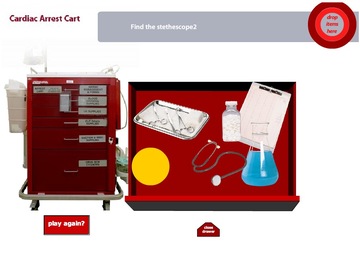
This game is a framework to create a simulation of a crash cart in a hospital. A crash cart is a red metal tool cart with 6 drawers, filled with the items used by the Cardiac Arrest team to save people's lives when they have a cardiac arrest. Speed is of the essence in an arrest, so the people on the team need to know exactly where each item is in the drawers. The goal of this game is to help train team members to find the items they need.
An item to be found is randomly chosen, and the player clicks on a drawer and looks through the items to find the one they are looking for. When it is found, they drag the item to the target (which will probably be animated and a whole lot cooler looking in the final game. If they get it right, they get positive feedback of some sort and another item is chosen. If not, the item pops back to its last position before the drag and they get another chance to find the correct item.
Still to be added, a lot of graphics, additional animations around clicking the drawers, additional feedback, target animations, a preloader, etc., etc. The game is in a very rough graphical state at the moment with the graphics mostly represented by placeholders. However, all the functions are in place and the code can be used to build your own custom treasure-hunt style game. To customize the look of the game to meet your own requirements, follow the instructions below.
When the game opens, it will ask for an item (use the XML file listed below as a cheat sheet). Click a drawer, it will open, and drag an item to the target. If it is correct, you'll get a "You Got it" message.
Instructions for customizing the game
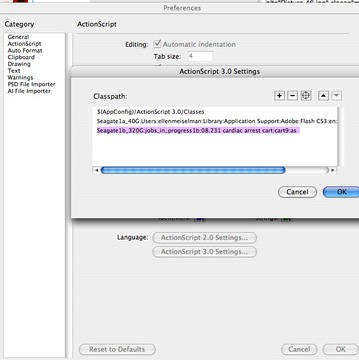
- Add the as files in the as folder to your classpath settings:
To finish each drawer, create Photoshop files with one item on each transparent layer. You can have more than one item per layer, but each needs to be outlined, on a transparent background.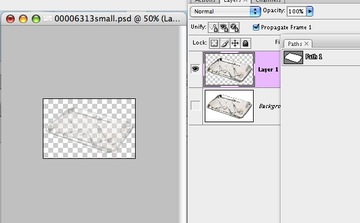
- Open one of the FLA files inside the "drawers" folder.
- Import the items
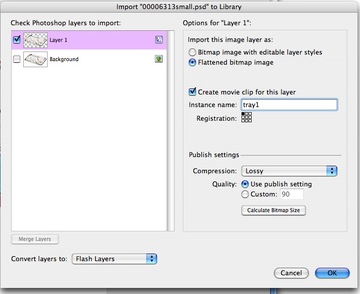
Double click the drawer symbol so that you are editing inside the symbol.Import the psd file to the stage with as a Flattened bitmap image. Select "Convert layers to Flash Layers." For each layer, create a movie clip instance, and name it. This name is what you will enter into the drawers.xml file.
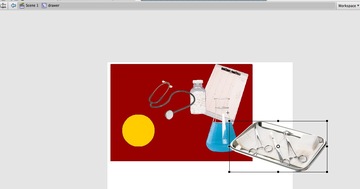
- Arrange the items
Position the items in the drawer. You can put items on different layers in the timeline so they overlap each other correctly. When they are picked up by the user, they will jump up to the top layer, so items will not be dragged behind each other.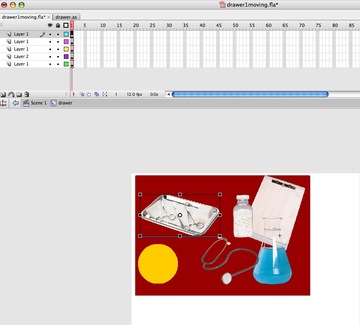
- Once you have put all the items into place in the drawer, select "Test Movie" from the Control menu. (Command-enter, on a Mac). This will create a newly compile swf in the drawers folder. You may get a permissions error in the output window as this movie plays, but just ignore it. It has to do with the fact that the movie is loading an xml file from the desktop.
- List all the items
Now you will need to list all the items in all the drawers in the "xml/drawers.xml" file. The display name that shows up in the tooltips goes in the "name" area, and the movieclip instance name goes in between the item tags.<?xml version="1.0" encoding="UTF-8"?>
<drawers>
<drawer title="drawer1" name="Drawer 1">
<items>
<item name="Triangle 1">myTriangle1</item>
<item name="Circle 1">myCircle1</item>
<item name="Square 1">mySquare1</item>
<item name="Stethescope">stethescope2</item>
<item name="Flask">flask1</item>
<item name="Tray">tray1</item>
</items>
</drawer>
<drawer title="drawer2" name="Drawer 2">
<items>
<item name="Triangle 2">myTriangle2</item>
<item name="Circle 2">myCircle2</item>
<item name="Square 2">mySquare2</item>
</items>
</drawer>
<drawer title="drawer3" name="Drawer 3">
<items>
<item name="Triangle 3">myTriangle3</item>
<item name="Circle 3">myCircle3</item>
<item name="Square 3">mySquare3</item>
</items>
</drawer>
<drawer title="drawer4" name="Drawer 4">
<items>
<item name="Triangle 4">myTriangle4</item>
<item name="Circle 4">myCircle4</item>
<item name="Square 4">mySquare4</item>
</items>
</drawer>
<drawer title="drawer5" name="Drawer 5">
<items>
<item name="Triangle 5">myTriangle5</item>
<item name="Circle 5">myCircle5</item>
<item name="Square 5">mySquare5</item>
</items>
</drawer>
<drawer title="drawer6" name="Drawer 6">
<items>
<item name="Triangle 6">myTriangle6</item>
<item name="Circle 6">myCircle6</item>
<item name="Square 6">mySquare6</item>
</items>
</drawer>
</drawers>
- Tooltips: I've included a script by Duncan Reid that generates tooltip hints. If you don't want to use them, open "drawer.as" and comment out line 154 as shown:
// tt.show( currentItem.parent, currentItemName+" ");
- Note on paths
The main cart swf loads the drawer swfs at runtime, as well as the associated actionscript classes. It looks for those files in specific places, so do not change the arrangement of the files in the cart folder.
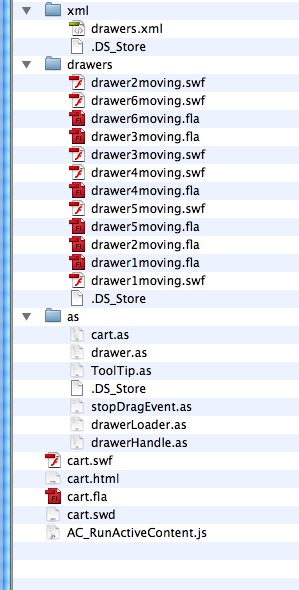
- Playing the game:
When the game is loaded, a message will appear in the gray area asking you to find one of the items. The item is chosen randomly from the drawers.xml file. Click on a drawer to open it, select an item and drag it to the target to see if it is correct. Once you find the correct item, it will immediately ask for another one. If you want it to pick another item, click "Play again".
January 23, 2009
Photoshop taking forever to open images on Windows XP
I have a very fast multi-core system, so I was puzzled because Photoshop always opened even tiny images slowly, sometimes taking 5 or 10 seconds, and freezing everything in the process.
Thanks to a post on Cha2e.com, I found the cause: printer drivers I don't even use!
Chase suggests checking your printers to find any offline or unconnected ones. I did not have any offline printers, but I have a lot of virtual printers, including one called "PurePage," which was installed by Thesis courseware software. That was the only one I don't use regularly, so I deleted it. Photoshop sped up immediately - small images open instantaneously now.
Other possible causes of photoshop slowdowns that I've found include:
January 18, 2009
Drupal module Feed Aggregator escapes HTML tags in feeds
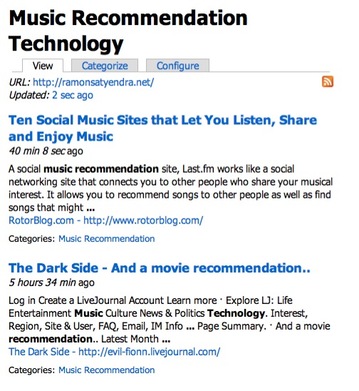
Drupal's Feed aggregator has a problem displaying some of the escaped tags in Google Alerts Feeds. For example, see the screenshot below:
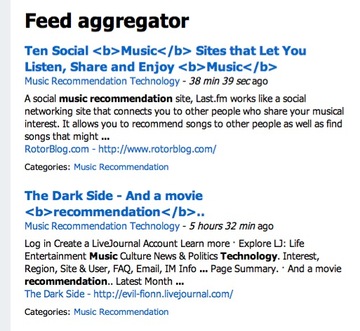
The fix is to alter the code in
modules/aggregator/aggregator.module
Search for
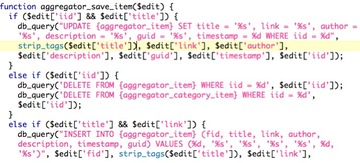
function aggregator_save_item($edit)
In both the UPDATE statement and the INSERT statement:
replace $edit['title']with
strip_tags($edit['title'])
The words "strip_tags" are colored green in the image below, to make it easier to see the exact spots that need editing:
After the fix, the feed looks like this:
Note: You may want to put the edited copy of this module into the sites/modules folder so it will not be overwritten by the next update of Drupal.
Many thanks to Manjeet in the Drupal forums for this tip.
The role of search in corporate learning programs
Enterprise Search as Learning Technology
With the current training industry interest in elearning trends like informal learning, social and collaborative Web 2.0 learning technologies, it's easy to overlook the importance of the humble search box as a learning tool.
More important now than ever
As companies seek to increase productivity with fewer people and resources, one way to improve efficiency is to create better connections between people and the information they need to do their jobs. It's not hard to make big improvements in the search situation companies' internal networks: the barriers that exist between knowledge workers and and information resources within company intranets are profound and economically significant. They fall into several categories:- Information is hidden away in personal folders in documents that cannot be accessed through the web, and are not searched by a search engine.
- Web-based information that could have wider access is locked down to a small group of people.
- Information is available, but not located where people think to look for it.
- Information is available and can be searched but there are problems with the search engine's judgement or display which prevent the user from finding it.
When searching does not yield results, employees have few options to find the information they need: they can try to click through hundreds of irrelevant and outdated results, they can do multiple searches, attempting to find a search term that yields better results, they can ask a more experienced coworker for a pointer to the information, or they may try to consult a confusing and outdated list of links or bookmarks. They often end up going to outside sources to find information that is relevant, if not entirely in accord with company policy.
Walls around information
Corporations spend millions to create online training. Typically, much of that training is locked away in content packages sequestered in Learning Management Systems. How much of it can be directly searched? How much can be accessed "just-in-time"? Learning Management Systems usually only allow searches based on metadata, not content. Metadata is a notoriously poor way to know what is inside. Does this mean there are adequate reference guides or tutorials available available on-demand outside the formal context of the course? Sometimes, but not always. And even if they are there, they need to be discoverable! If the information in these courses is actually worth something, it should be as accessible as possible to employees that have the right to see it. Within a company there is always a tension between protecting confidential information and the need for efficient access to that information - the lines drawn may need to be evaluated and re-evaluated as times change.Just-in-time and on-demand training
Employees may be trained weeks or months before putting their new skills into practice. At the point of use, they will likely need a refresher on detail or on the entire topic, but faster than reviewing an entire course. Ideally this information should be available just-in-time, accurately and rapidly. People will search for it based on the task they want to accomplish, not on the solution. If they have taken a course on it, they may search for it by the title of the course, but may not necessarily go to the LMS for that search. Adult learners are very goal-oriented. Wherever the information is, no matter what system it is buried in, it should be discoverable, if not actually visible to users with no permission to see it.
According to Jay Cross in a recent interview on Informal Learning:
- When learners need to figure out how to apply classroom concepts on the job, in their lives and in the world at large, they need a completely different kind of learning intervention.
... informal learning refers to the wide variety of spontaneous, unofficial, impromptu ways people learn to actually do their jobs. It offers a path to improved organizational capability, agility, and profits. It also respects and challenges them to be all they can be. The self-evident benefit of linking informal learning with the anytime, anywhere sensibilities of next-generation eLearning is that organizations combine informal alternatives such as social media, serious games, connections, and collaboration with online courses and on-demand tutorials.
Searching for information hidden in people
One of the benefits of social networks is the ability to discover people with ideas and skills. As a friend of mine once said about the business case for using Twitter: "...because the smartest people don't work at your company!" I would offer a corollary: "Because the smartest people don't work in your department!" would be my case for using Intranet social networking. People are fuzzy objects, constantly changing and difficult to define by skills. Putting their names in a talent management system, with a list of skills or courses they have taken or "goals" they have accomplished may not be the best way to find the skills you need within the organization. Things change too fast to be boxed in by job description or learning plan. Ideally some of this social networking data could be included in a corporate search portal, in some useful way.
Discovery of related topics
Ideally, a good search engine will be semantically sophisticated, can guess what searcher really means, and may suggest alternate searches or related topics. This is where informal learning is at its best. Looking for information on one topic could lead the searcher to a more helpful category.
Efficient access to information requires more than one technological solution, but since people tend to try the path of least resistance first - the main intranet search - using that search box should get them at least part of the way there.
Search is a two way street
When a user searches for information or help on a topic, they use what they know at the time, which is not necessarily the same as the keywords used in the solution. Modern search engines learn based on a variety of inputs, including result links that get clicked in each query, related queries, bounce rate, etc. So while the search engine is providing information to the users, they are providing information back to the search engine.
Enterprise Search: making the business case for improvement
Companies spend millions on training but not much on that last mile: fast, accurate access to the policies and up-to-date information that are needed in the unpredictable and changing workplace. For example, in healthcare, if a nurse spends 10 minutes extra searching for information needed right now, that has a real cost. If she comes up with an out-of-date policy or instructions, that can have an even greater cost. The same is true in other industries: access to the right information and the right just-in-time training is crucial.Further, (anonymized) search trends can be used to help determine what training resources need to be added, or what topics need to be modified to reflect the way people contextualize their information: does what is out there really answer the questions people are asking? I frequently use search results from a department wiki in deciding what articles and tutorials to work on. I may think I've filled a need by creating a tutorial on a specific task, only to discover through watching searches that what is really needed is a set of tutorials or checklists on one or more end-to-end processes that incorporate that task.
According to a recent study of Global Intranet Practices & Trends, over half the organizations surveyed responded that their employees were not satisfied with their intranet search. The reasons why enterprise search is in such a poor state include the cost of upgrading it, as well as the perception that the intranet is neither a priority nor essential for daily work. This is a perception that needs to change to help align learning and learners with strategic goals.
More information:
Drupal module ImagePicker does not show up in Page edit screen
After installing ImagePicker 6.x-1.2 in a new Drupal site, I opened a book page to try to add images to it. There was no ImagePicker Fieldset below the text entry area. It did show up in "My Account," though. The Configuration options all seemed correct so I had not changed them. The access permissions were all set correctly - I should have had access.
(Site configuration>ImagePicker)
The solution was to simply open the Configuration Options and save them without any changes.
The direct path to that page is:
http://yoursite.com/admin/settings/imagepicker
Many thanks to maikeru on the Drupal forums for this answer.
January 14, 2009
Embed YouTube video in PPT for lecture - no internet
The fastest way to grab a YouTube video for Powerpoint? If you can't count on internet access at the lecture hall, you will need to download the video in a format compatible with Powerpoint. YouTube videos are Flash Video format (FLV) which Powerpoint isn't really very good at handling yet.
- It's easiest to download and convert in one step: go to one of the free online media conversion services and paste in the YouTube video URL.
Some free video conversion services:
MediaConverter.org
Zamzar.com
Mux
Vixy
Videocodezone
online.movavi.com
flvix.com
All2convert.com
ConvertTube.com
ConvertDirect.com(Thanks to CultCase for the list)
- Convert to Windows Media format
- Put the your Powerpoint file into its own folder and add the video file you just created to the same folder. If you transfer the Powerpoint file to another computer or to a thumbdrive, move the entire folder, because Powerpoint does not keep track of the path to the video.
- Open the Powerpoint file, select "Insert Movies and Sounds > Movie from File" and select your movie file. This will embed the file into the Powerpoint. Powerpoint will probably ask you to choose whether to play the movie automatically when the slide loads or on click.
January 10, 2009
Virtual Cardiac Arrest Cart Treasure Hunt game: Adapting the game to your needs
A while back I wrote [LINK] about a treasure-hunt-style game we developed in-house for training purposes. The purpose of the game is to help healthcare professionals memorize the location of items stored within a cardiac arrest cart, to make things go smoothly when every second counts.
A cardiac arrest cart (or "crash cart") is a red metal tool cabinet, filled with items like airway tubes, IV needles, masks and other supplies used in advanced cardiac life support. The goal of this game is to learn where all the items are by retrieving the requested item from the cart by opening drawers, then dragging the item to a target for checking.
VIEW DEMO of the Virtual Cardiac Arrest Cart
DOWNLOAD SOURCE files for the cart game.
Game play
- When the game loads, a cardiac arrest cart stands off to the left. A specific item is chosen at random and requested in a message toward the bottom of the screen.
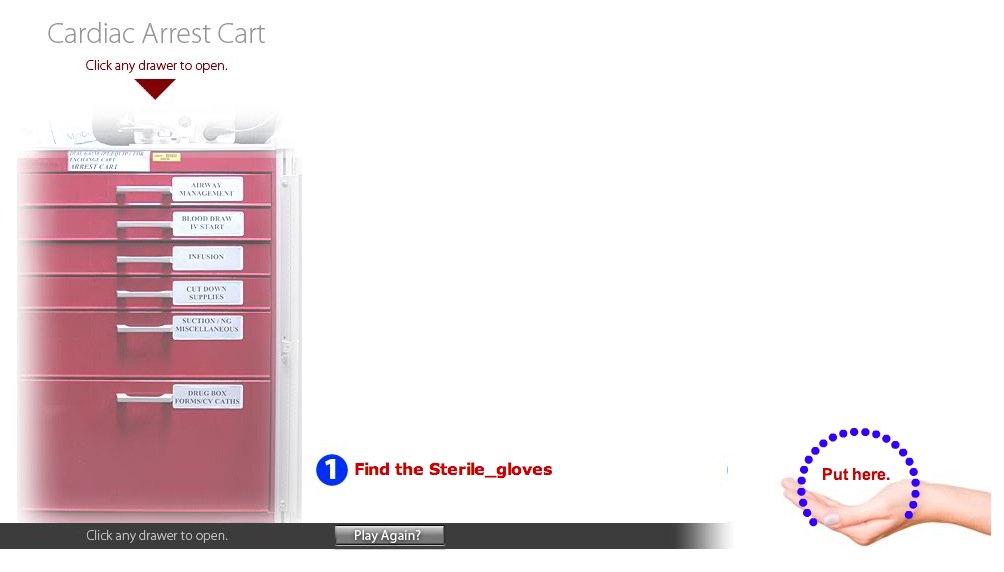
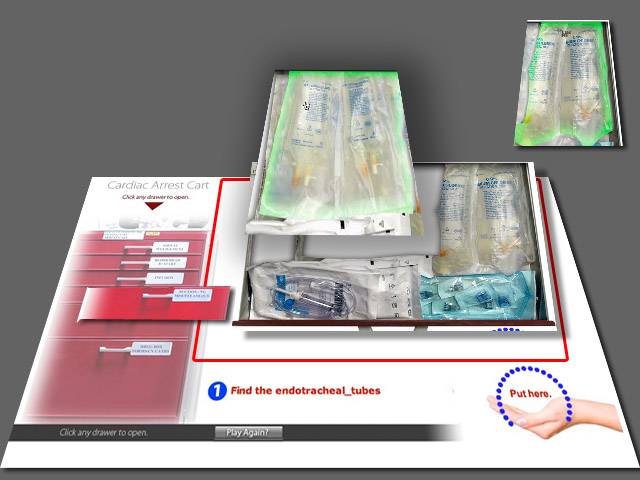
- To search the drawers, the player clicks on a drawer handle. The corresponding drawer slides down from the top until its contents are entirely visible.
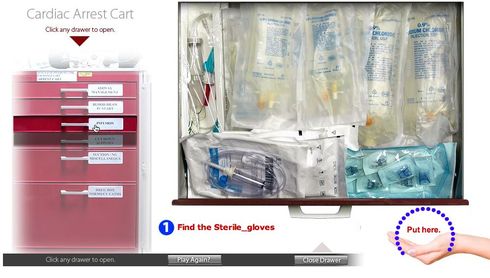
- Items can be dragged out of the way to reveal other items if necessary.
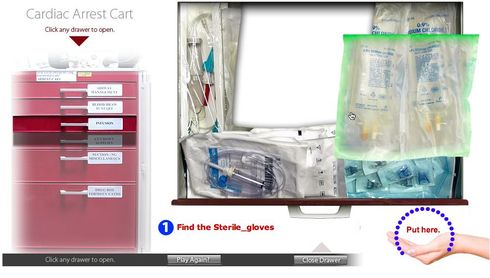
- If the item is not in the drawer, clicking another handle will closed the current drawer and open the new drawer.
Once the correct item is visible, the player drags it to the target area at bottom right.
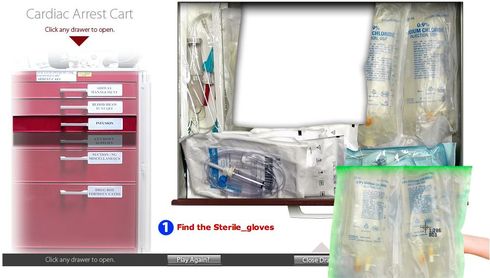
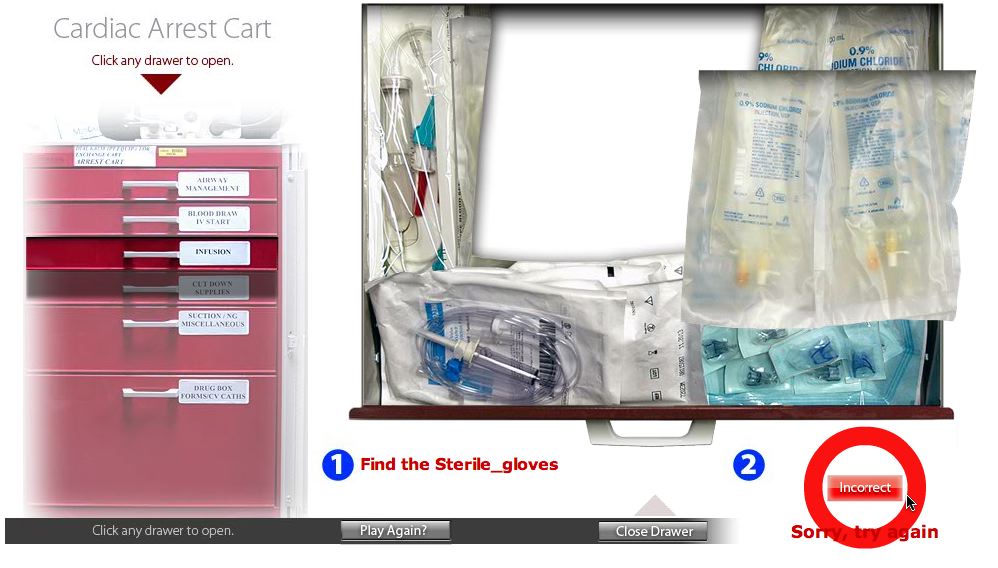
- If the wrong item is dragged to the target it turns red, sends the item back to its last position and allows another try. Once the right object is chosen, the target turns green and another object is requested.
Customizing the game
- The files that make up the game are shown below.
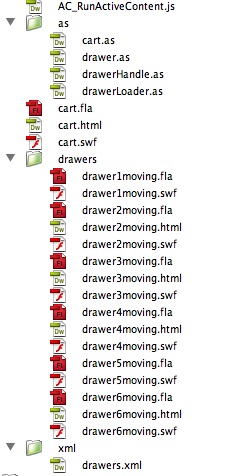
- The main movie, cart.swf is the stage and contains the cart image. Each moving drawer is a separate movie (drawer1moving.swf, drawer2moving.swf, etc.). When a drawer handle on the cardiac cart is clicked, the corresponding drawer movie is loaded on to the stage at runtime. Probably the simplest type of customization would be to replace the cart image and the drawer contents images with new items.
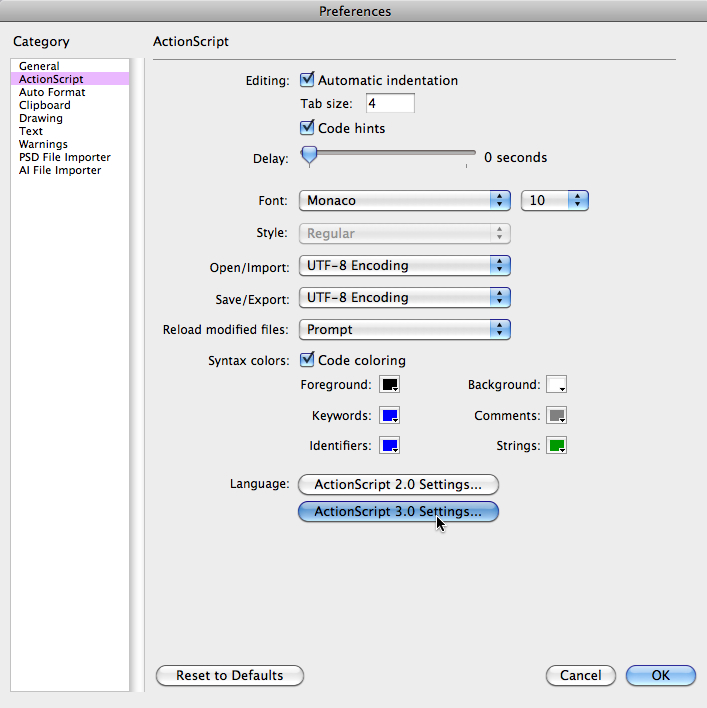
- First be sure to set the Actionscript 3 classpaths so that Flash will be able to use the actionscript files in the /as folder. Open Flash's Preferences and click ActionScript 3.0 Settings.
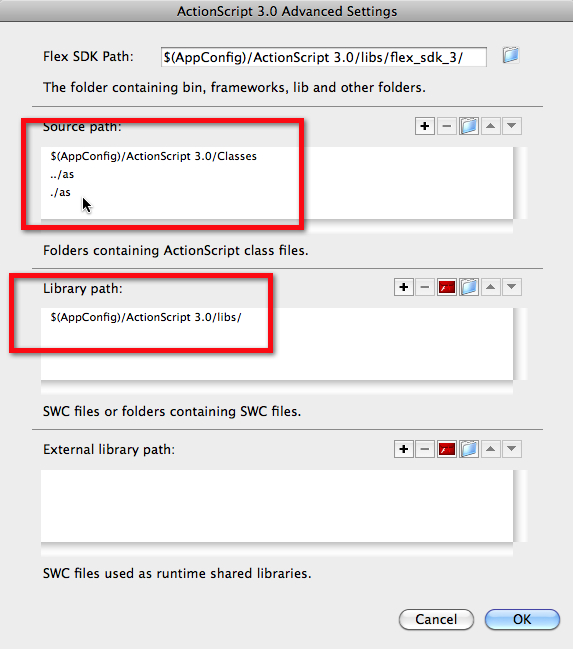
Set the Source paths and Library paths as shown.
The reason there are two paths listed which point to the /as folder is because the drawer movies are located one level down from the cart movie, so they must use a different path to see the /as folder than the main cart movie.
- Open cart.fla. To change the cart background, find and replace the bitmap image on the Background layer.
The "Play again" button and the "Close drawer" button are both MovieClips sitting on the stage,which contain bitmap graphics. Currently there is no hover state to these button but you could add one. They are both controlled via event listeners in cart.as.
The hand target is a Movie Clip on the stage which contains 4 frames, each with a different bitmap graphic. The frames are for "up" state, "over" state, "incorrect" state and "correct" state. It is controlled by cart.as
There are also 6 drawer face clips which are normally hidden but become opaque when a drawer is opened. Each one contains a bitmap image of a drawer face. Simply replace the bitmaps with your own.The instructions and feedback areas are dynamic text boxes which are controlled by functions on cart.as. and drawer.as. The feedback text is hardcoded into cart.as, but a possible customization might be to use drawers.xml to specify custom feedback for each item if desired.
- Open drawer1moving.fla. The only item on the Stage is an instance of the "drawer" Movie Clip. "drawer" is controlled by "drawer.as".
- A tween animation from frames 2-5 creates the downward motion of the drawer. Double-click the drawer1 Movie Clip to edit it.
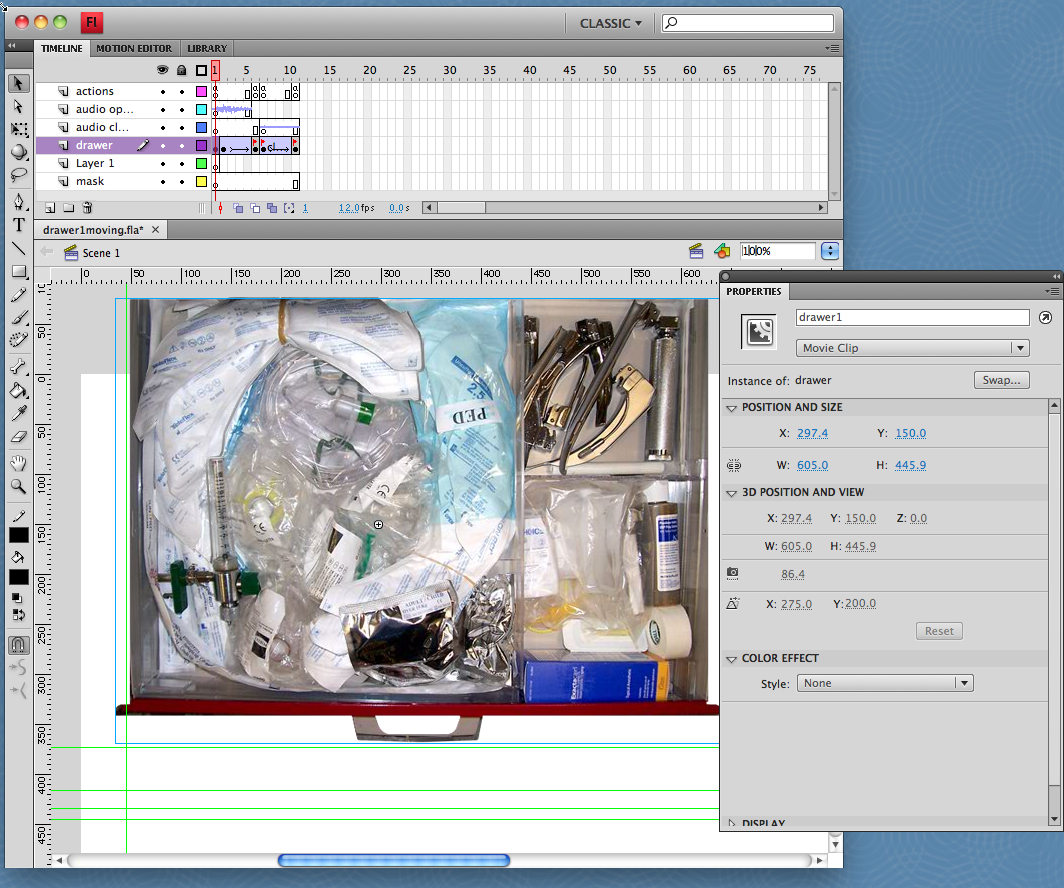
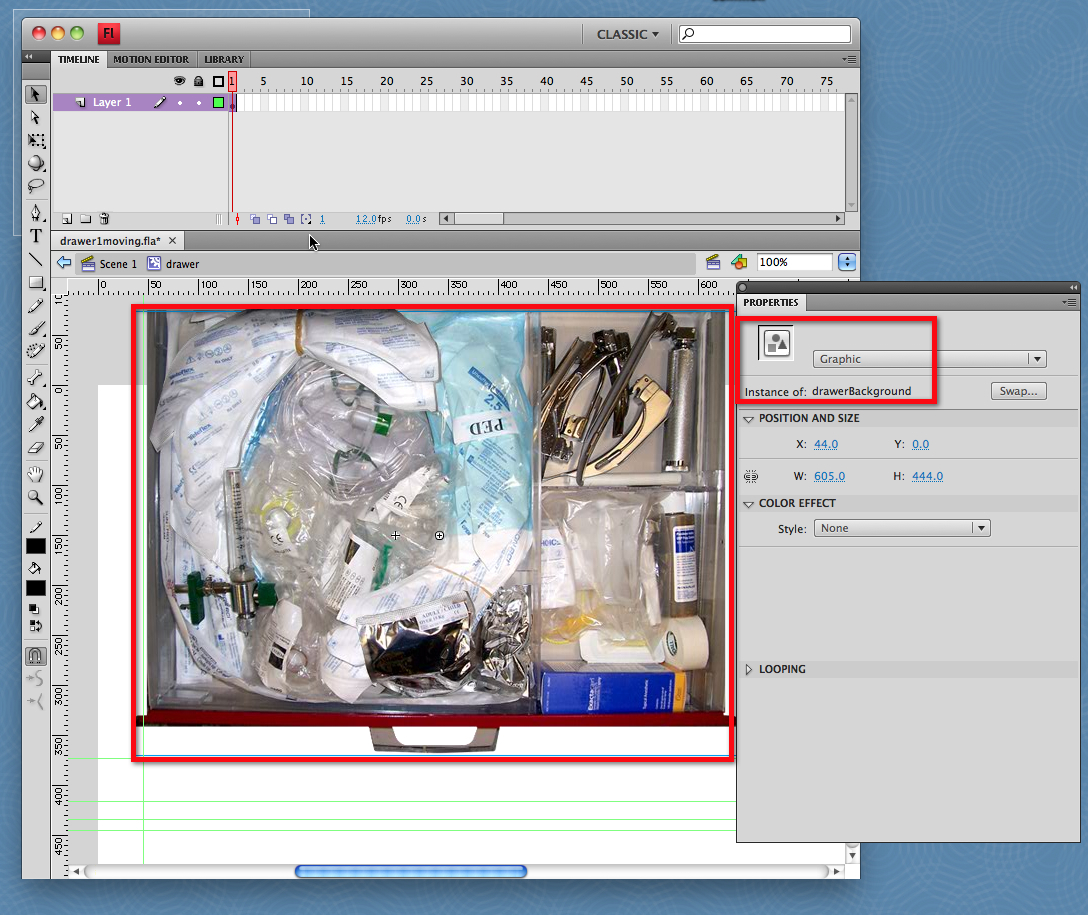
- The drawer Movie Clip is where all the items are positioned on top of the drawer background image. The properties of the drawerBackground image are shown below: it can be either a Graphic or a Movie Clip but all the items in the drawer must be Movie Clips and each must have an instance name. I'll be referring to these item Movie Clips as "item clips" below.
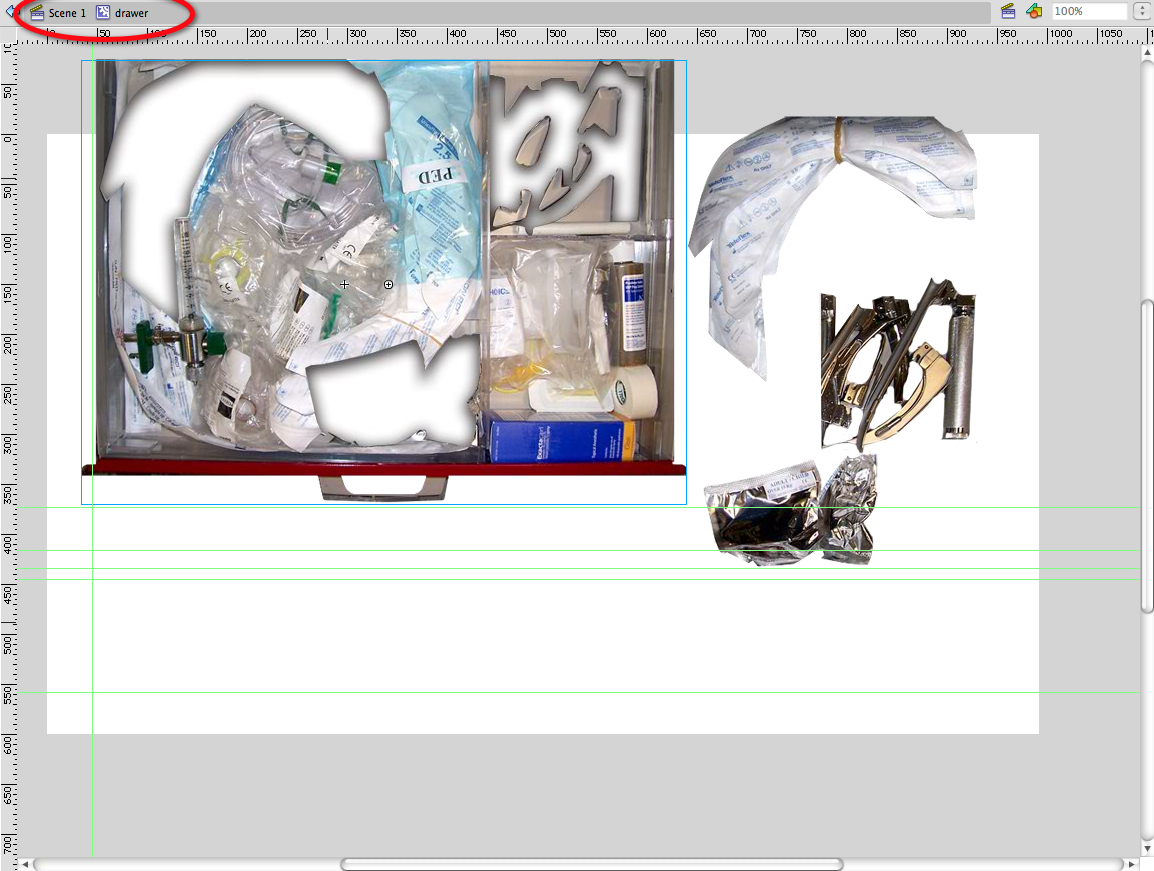
- Here, the items have been moved off the background so you can see how they fit together.
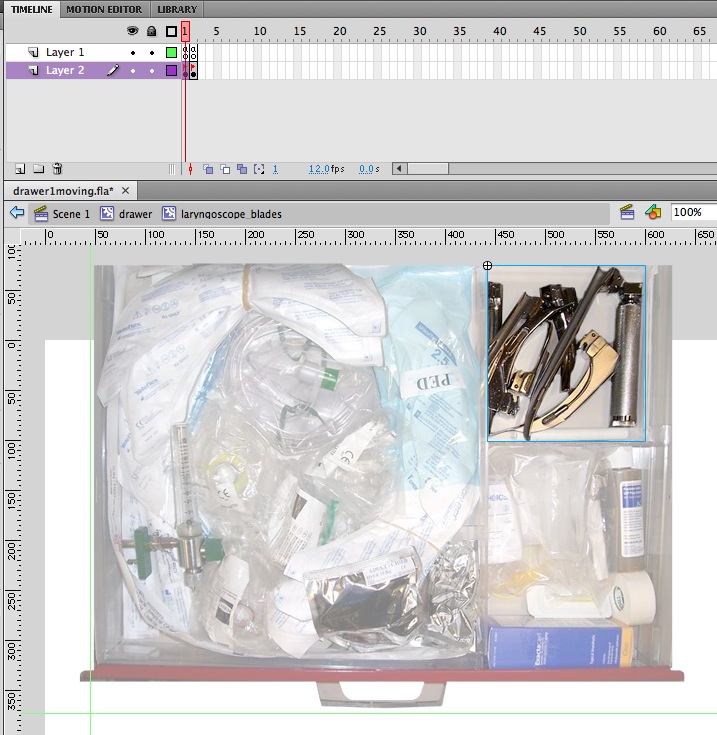
- Every item clip contains an up state ...
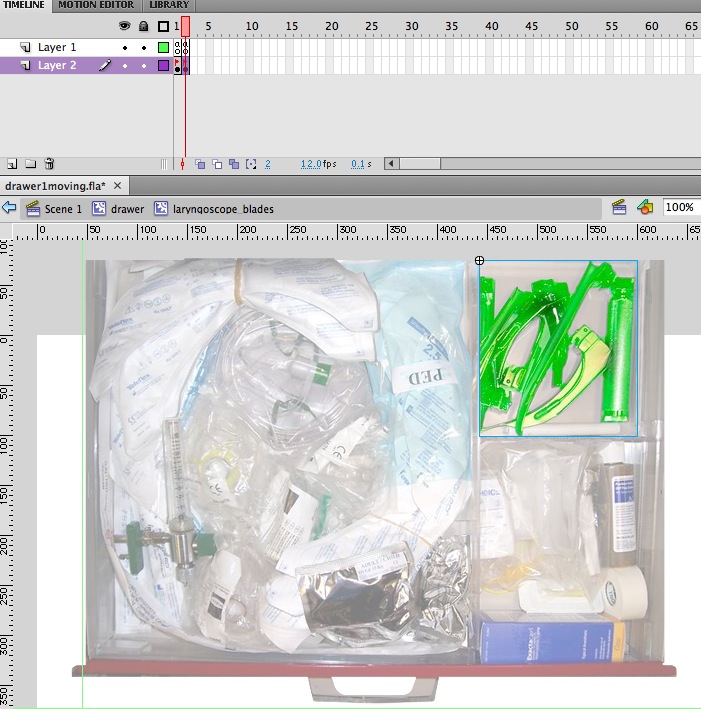
...and an over state (see below), You can use bitmaps or movie clip animations inside the item clip. You may want to add an animation to the item so it wiggles when picked up, or performs its its function.
- Every draggable item must have an "item" entry in drawers.xml. The name listed here should exactly match the name of the item clip.
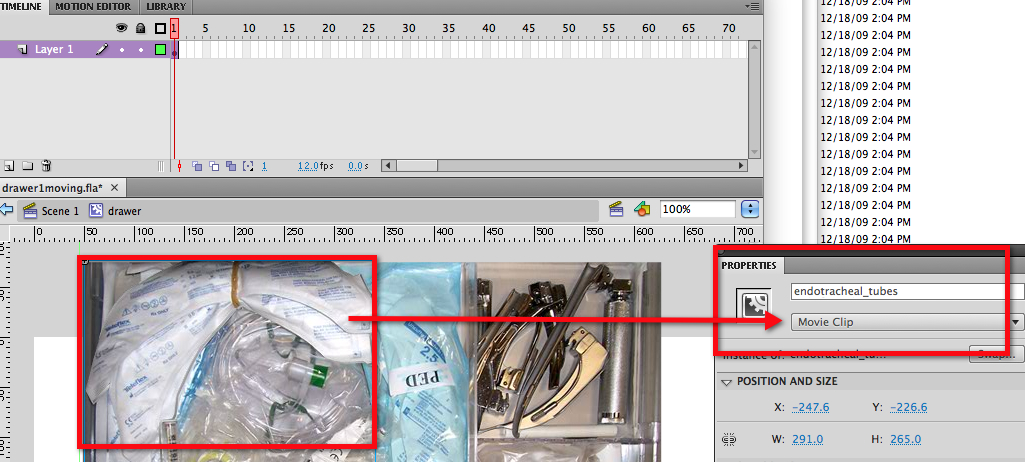
- Note: do not add items to the drawer files positioned outside the boundaries of the drawer. This will cause the drawers to shift around unpredictably as they are opened. If you need a graphic to appear on the main stage when a drawer is opened or closed, it should be done by adding an event handler to the cart actionscript that controls its transparency or by loading it in dynamically, not by putting a graphic directly into the relevant frame in the drawer movie.
- Once the drawer movies are built, the drawers must all be compiled or "published" as swf files, in the /drawers folder.
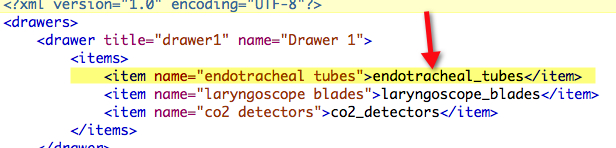
- List drawers and items in the xml file. The "name" attribute (in green) is what will be displayed in the instructions messages onscreen. The text in yellow must match the instance name of the item exactly.
<?xml version="1.0" encoding="UTF-8"?>
<drawers>
	<drawer title="drawer1" name="Drawer 1">
		<items>
			<item name="endotracheal tubes">endotracheal_tubes</item>
			<item name="laryngoscope blades">laryngoscope_blades</item>
			<item name="co2 detectors">co2_detectors</item>
		</items>
	</drawer>
	<drawer title="drawer2" name="Drawer 2">
		<items>
			<item name="IVs">IVs</item>
			<item name="ABG syringes">ABG_syringes</item>
			<item name="Intraosseous Needles">intraosseousNeedles</item>
			<item name="Blunt Needles">blunt_needles</item>
			<item name="Butterfly Needles">butterfly_needles</item>
			<item name="Saline Flushes">saline_flushes</item>
		</items>
	</drawer>
	<drawer title="drawer3" name="Drawer 3">
		<items>
			<item name="Blood tubing">Blood_tubing</item>
			<item name="blunt cannulas">blunt_cannulas</item>
			<item name="Normal saline 1000cc">Normal_saline_1000cc</item>
			<item name="Normal saline 250cc">Normal_saline_250cc</item>
		</items>
	</drawer>
	<drawer title="drawer4" name="Drawer 4">
		<items>
			<item name="Sterile gloves">Sterile_gloves</item>
			<item name="Faceshield masks">Faceshield_masks</item>
		</items>
	</drawer>
	<drawer title="drawer5" name="Drawer 5">
		<items>
			<item name="pressure bags">pressure_bags</item>
			<item name="suction tubing">suction_tubing</item>
			<item name="cuff with stethoscope">cuff_with_stethoscope</item>
		</items>
	</drawer>
	<drawer title="drawer6" name="Drawer 6">
		<items>
			<item name="drug box">drug_box</item>
			<item name="folder">folder</item>
			<item name="N95 masks">N95_masks</item>
		</items>
	</drawer>
</drawers>
- Now publish the cart movie and test the game!
The drawers and items
January 9, 2009
Drupal: Take back control of a folder from Drupal and password protecting it
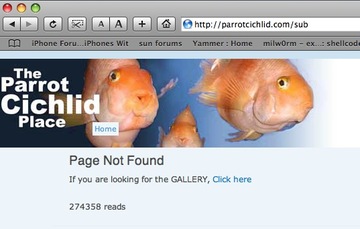
By default, Drupal takes control of all subdirectories within its root folder. If Drupal resides within the web root of your site, you will not be able to get to any subdirectories that are non-Drupal related. Drupal will give a "Page Not Found" error on any page that doesn't have Drupal content associated with it.
To prevent this, add these lines to the .htaccess file, right after the "RewriteEngine on" directive, one line for each directory you want to hold out of Drupal's control:
<IfModule mod_rewrite.c>
RewriteEngine on
# =========[ start of .htaccess snippet]==========

#
# stuff to let through (ignore)
RewriteCond %{REQUEST_URI} "/subdirectory1/" [OR]
RewriteCond %{REQUEST_URI} "/subdirectory2/" [OR]
RewriteCond %{REQUEST_URI} "/subdirectory3/"
RewriteRule (.*) $1 [L]
#
# ====================[ end ]=====================
Note that the last subdirectory in the list does not get an "[OR]"
Then, add the following to the .htaccess in the password protected directory:
#the following allows users in to this directory without drupal interfering

ErrorDocument 401 "Unauthorized"
For more information:
January 6, 2009
Enable commenting in Adobe Reader, then use a PDF as a whiteboard
Writing notes and sketching on PDF's using a Tablet PC can be an excellent replacement for a blackboard or whiteboard in the classroom, meetings or lectures. Easier than using Powerpoint, especially when you want to improvise, it is particularly useful for annotating complex diagrams, music, mathematical problems, or anything requiring gridlines or graph paper.
On a Lenovo Tablet PC, you can use the clipping function to drop PDF's into the Journal application and type or write on them with the pen. The pen has good enough resolution to write legibly, and draw lines and curves.
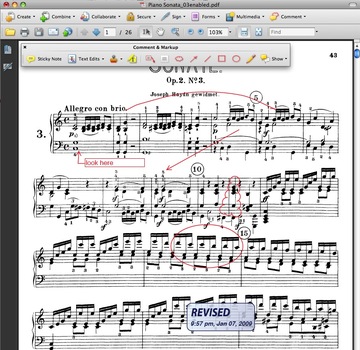
Marked up PDF's make good digital handouts, because the entire multi-page file can be saved complete with your comments, arrows and sketch-lines intact on all pages. After the lecture just save the file, and put it online for download by your class or audience. The main drawback with using the Pencil tool rather than the pen in Journal is that the Pencil tool isn't as smooth and responsive.
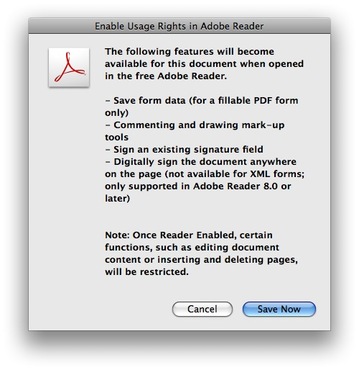
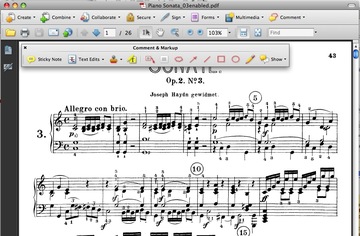
However, on some PDF's you'll find that even when the Comment & Markup toolbar is enabled, it does not show up. This is because the commenting rights are not enabled, which can be fixed in Acrobat Pro. (see image below)

No comment bar
Open the PDF in Acrobat, select Extend Features in Adobe Reader from the Advanced menu. The message shown below will pop up, and once you click "Save Now" it will be Comment-enabled.
January 3, 2009
Can't import movies shot on Canon PowerShot into Adobe Media Encoder
After installing Adobe Web Premium CS4, I tried to import a video clip that was shot on a little Canon PowerShot camera into Adobe Media Encoder.
It immediately responded with the error:
The file "CIMG1324.AVI" could not be imported."
There were no entries in the log or error log to clarify this this, so I started searching Adobe.com. It turns out that AVI is not a supported file format in Adobe Media Encoder, at least not on the Mac. You must convert them to DV AVI first.
Opening the movie in Quicktime, select File>Export>Movie to DV Stream did the trick, and my files converted beautifully after that.
January 2, 2009
JW Player example: two streaming flash players that clip to hard stop in a single page
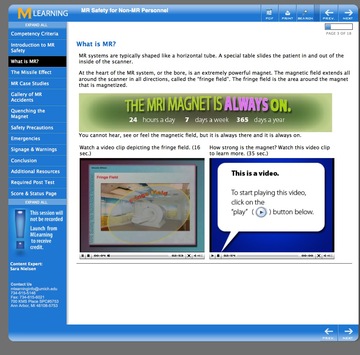
The authors of our learning modules often want to embed one one or more videos embedded in a page. A typical request is to be able to "edit" the video using a duration set in the playist, so that the player shows only a few seconds of the video, focusing on only the relevant material for the current page.
The flash video player that we use (JW Player) does not have a built-in time-limiting function, so you need to create it using the player's Javascript API. There IS a duration attribute, but it simply specifies the length of time the associated chapter button will be highlighted if the chapter navigation is being displayed. In other words, you can break a long video into clickable chapters, but it will still play the entire video, not just one clip.
"KLink" provided some code that is the basis of this solution, but it needed to be adapted for the multiple player configuration shown below.
The two-player version can be downloaded here:
kLink's idea involved using meta tags "start" and "dur" to indicate the start point and duration for each clip, as described in this post:
Stop Points: Defining playback duration. The modifications mostly involved adding separate functions for the two players so that they do not get confused with each other's settings. I ended up hard coding the individual functions "timeMonitor1", timeMonitor2", and variables "currentStart1", currentStart2, etc., instead of using dynamically generated variable names, because it was not working and I began to suspect some sort of timing issue. If I can get that to work, I'll replace this code with the more generally useful version.
Other piecs of this solution were drawn from Jeroen Wigering's example: Simultaneous players.
It requires the JW 4.2.9 FLV player and SWFObject 2.1. Both are included in the zip file since both items undergo substantial updates from time to time, and I can't guarantee that this will not break when used with newer versions.
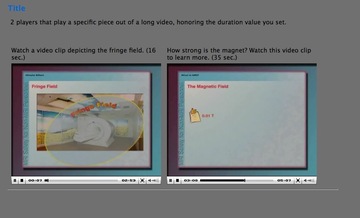
Unfortunately, I don't have an externally facing streaming server to demonstrate this in a working example, but it will look like the image below once you edit the playlists and streamer variables to point to your own streaming video files. The two places you absolutely must edit to get this working are:
- in page03minimalexample.htm, lines 47 and 48, you must replace my streamer address with the path to the folder on the streaming server containing your FLV files, and the FLV name must go into the "Location" tag in the playlist.
 function init() {

              createPlayer("placeholder1", "player1", "rtmpt://red502.mcit.med.umich.edu:80/oflaDemo/safety/MRI_SafetyNonPro", "media/playlist3.xml", false );

              createPlayer("placeholder2", "player2", "rtmpt://red502.mcit.med.umich.edu:80/oflaDemo/safety/MRI_SafetyNonPro", "media/playlist3b.xml", false);


} - in the playlists, you must replace my "location" "01_Presentation" and "02_Presentation"
with your FLV's filename.
<?xml version="1.0" encoding="utf-8"?>

<playlist version="1" xmlns="http://xspf.org/ns/0/">

<trackList>

<track>

<title>Magnetic Resonance Safety</title>

<location>02_Presentation.flv</location>
You will probably need to adjust the clip durations also.
Folder structure contained in the zip file:
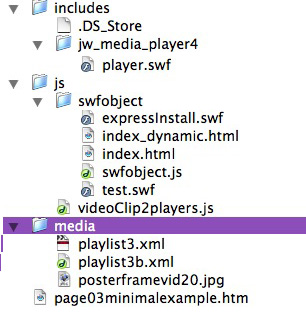
<!DOCTYPE html PUBLIC "-//W3C//DTD XHTML 1.0 Transitional//EN"
"http://www.w3.org/TR/xhtml1/DTD/xhtml1-transitional.dtd">
<html xmlns="http://www.w3.org/1999/xhtml">
<head>
<TITLE>2 clip players </TITLE>
<link href="css/allBrowsers.css" rel="stylesheet" type="text/css" />
<link href="css/header.css" rel="stylesheet" type="text/css" />
<script type="text/javascript" src="js/swfobject/swfobject.js"></script>
<script type="text/javascript">
//http://www.jeroenwijering.com/?thread=11566#msg73578
//icons: false gets rid of buffering "clock"
/*mutually exclusive players - another option for setting up 2 players
http://home5.inet.tele.dk/nyboe/flash/mediaplayer4/JW_API_xmpl_1-1-3-0.html
*/
</script>
<script type="text/javascript">
function createPlayer(thePlaceholder, thePlayerId, theStreamer, theFile, theAutostart) {
var flashvars = {
streamer:theStreamer,
file:theFile,
autostart:theAutostart,
repeat:'none',
shuffle:'false',
volume:'50',
icons:'false'
}
var params = {
allowfullscreen:"true",
allowscriptaccess:"always"
}
var attributes = {
id:thePlayerId,
name:thePlayerId
}
swfobject.embedSWF("includes/jw_media_player4/player.swf", thePlaceholder, "320", "260", "9.0.115", false, flashvars, params, attributes);
//alert('thePlaceholder'+thePlaceholder+'\n thePlayerId= '+thePlayerId+'\n theStreamer= '+theStreamer+ '\ntheFile= '+ theFile + '\ntheAutostart= '+theAutostart);
}//end function createPlayer
function init() {
createPlayer("placeholder1", "player1", "rtmpt://red502.mcit.med.umich.edu:80/oflaDemo/safety/MRI_SafetyNonPro", "media/playlist3.xml", false );
createPlayer("placeholder2", "player2", "rtmpt://red502.mcit.med.umich.edu:80/oflaDemo/safety/MRI_SafetyNonPro", "media/playlist3b.xml", false);
}
</script>
<script type="text/javascript" src="js/videoClip2players.js"></script>
</head>
<body onload="init();">
<div id="rightColumn">
<div id="content">
<!--*********************put content below this line!!!!************-->
<table width="100%" border="0" id="contenTable">
<tr>
<td valign="top"><h1>Title </h1>
<p>2 players that play a specific piece out of a long video, honoring the duration value you set. </p>
<p><br />
</p>
<p>
<table width="670" border="0">
<tr>
<td width="328" valign="top"> Watch a video clip depicting the fringe field. (16 sec.)</td>
<td width="332" valign="top">How strong is the magnet? Watch this video clip to learn more. (35 sec.)</td>
</tr>
<tr>
<td>
<div id="wrapper1">
<div id="placeholder1"></div>
</div>
</td>
<td>
<div id="wrapper2">
<div id="placeholder2"></div>
</div>
</td>
</tr>
</table>
<div id="generalMsg" style="float:left;"></div>
<div id="timeMonitor" style="float:left;padding-left:6px;"></div>
<div id="itemMonitor" style="float:left;padding-left:6px;"></div>
<hr style="clear:both;" />
<div id="currentDur1"></div>
<div id="currentDur2"></div>
<div id="currentStart1"></div>
<div id="currentStart2"></div>
<div id="currentItem1"></div>
<div id="currentItem2"></div>
<div id="currentPosition1"></div>
<div id="currentPosition2 "></div>
<div id="stopPosition1"></div>
<div id="stopPosition2"></div>
<div id="dump0"></div>
<div id="dump1">
</div>
<div id="dump2">
</div>
<div id="dump3">
</div>
<div id="dump4">
</div>
<div id="dump5">
</div>
</td>
</tr>
<tr>
<td valign="top"> </td>
</tr>
</table>
<!--*********put content above this line!!!!!*****-->
</div><!--end content-->
</div><!--end rightColumn-->
</body>
</html>
"videoClip2Players.js" (goes in "js" folder)
// JavaScript Document

  //this is a workaround for the fact that there is no "stop" flashvar in the JW Player. This script uses the Javascript API to force the player to play ONLY a specified clip out of the video, and do a hard stop.


 var player1         =  null;

  var player2         =  null;

  var playlist1       =  null;

  var playlist2       =  null;

  var currentItem1     =   0;

  var currentItem2     =   0;

  var previousItem1    =  -1;

  var previousItem2   =   -1;

  var currentFile1     =  null;

  var currentFile2     =  null;

  var previousFile1    =  null;

  var previousFile2    =  null;

  var currentPosition1 =     0;

  var currentPosition2 =     0;

  var currentStart1    =  null;

  var currentStart2    =  null;

  var currentEnd1      =  null;

  var currentEnd2      =  null;

  var currentDur1      =  null;

  var currentDur2      =  null;

  var stopPos1        =     0;

  var stopPos2         =    0;

  var advance1         = 'dur';

  var advance2         = 'dur';

  var testing         =  false;

  var thegetPlayers    = false; //used to prevent calling the getPlayers function twice


 /* function playerReady(obj)

  {

  player = document.getElementsByName(obj.id)[0];

  alert(player.id);

  player.addModelListener('TIME', 'timeMonitor');

  player.addControllerListener('ITEM', 'itemMonitor');

 setTimeout("playlist = player.getPlaylist()", 100);

  player.addControllerListener("PLAYLIST", "playlistHandler");

  //setTimeout("dumpPlaylist()", 200);

  };*/


  function playerReady(obj)

  {

  getPlayers();

  if (testing){ gid('generalMsg').innerHTML += "<br/>playerReady being called now";}

  // getPlayers();

  };

//http://www.longtailvideo.com/support/forum/Setup-Problems/13910/Two-Players-in-parallel-

  function  getPlayers()

  {

  // if(thegetPlayers ==false){

  //alert("getPlayers being called now");

  player1 = gid('player1');

  player2 = gid('player2');

  if (testing){gid('generalMsg').innerHTML += '<br/><b>Im in getPlayers</b><br/> player1='+player1.id+'<br>player2='+player2.id;}


  player1.addModelListener("TIME",  "timeMonitor1");

  player2.addModelListener("TIME",  "timeMonitor2");

  player1.addViewListener("ITEM",   "itemMonitor1");

  player2.addViewListener("ITEM",   "itemMonitor2");

  player1.addControllerListener("PLAYLIST", "playlistHandler1");

  player2.addControllerListener("PLAYLIST", "playlistHandler2");

  if (testing){gid('generalMsg').innerHTML += "<br/>Player1 Ready(): " + player1.id+"<br/>Player2 Ready(): " + player2.id;}

  thegetPlayers=true;

  // }//end if the getplayers == false

  };


 function playlistHandler1(){

  playlist1 = player1.getPlaylist();

  if (testing){  gid('generalMsg').innerHTML += "<br/>inPlaylistHandler1:";

  gid('generalMsg').innerHTML += "<br/>playlist1[currentItem1].file= "+playlist1[currentItem1]['file'];

  gid('generalMsg').innerHTML += "<br>playlist1[currentItem1].start= "+playlist1[currentItem1]['dur'];

  dumpPlaylist1();}

  currentStart1 = 1 * playlist1[currentItem1]['start'];

  if (testing){  gid('currentStart1').innerHTML += "<br/>" +currentStart1;}

  currentEnd1   = 1 * playlist1[currentItem1]['end'];

  currentDur1   = 1 * playlist1[currentItem1]['dur'];

  if (testing){  gid('currentDur1').innerHTML += "<br/>" +currentDur2;}

  playlist1[currentItem1].duration      = currentDur1;

  stopPos1      = currentStart1 + currentDur1;

  if (testing){  gid("stopPosition1").innerHTML += "<br/>" +stopPos1;}

  currentFile1  = playlist1[currentItem1]['file'];

  }


  function playlistHandler2(){

  playlist2 = player2.getPlaylist();

  if (testing){  gid('generalMsg').innerHTML += "<br/><b>inPlaylistHandler2:</b> playlist[currentItem2].start= "+playlist2[currentItem2].start;

  dumpPlaylist2();}

  currentStart2 = 1 * playlist2[currentItem2]['start'];

  if (testing){     gid('currentStart2').innerHTML += "<br/>currentStart2= " +currentStart2;}

  currentEnd2   = 1 * playlist2[currentItem2]['end'];

  currentDur2   = 1 * playlist2[currentItem2]['dur'];

  if (testing){   gid('currentDur2').innerHTML += "currentDur2=" +currentDur2;}

  duration      = currentDur2;

  stopPos2      = currentStart2 + currentDur2;

  if (testing){   gid('stopPosition2').innerHTML += "stopPos2 =" +stopPos2 ; }

  currentFile2  = playlist2[currentItem2]['file'];

  }


  function timeMonitor1(obj) {

  currentPosition1 = obj.position;

  if (testing){   gid('timeMonitor').innerHTML += "<br>obj.id="+obj.id+" currentPosition1: " + currentPosition1 + "<br/>currentDur1: '" + currentDur1 + "<br/>currentStart: " + currentStart1 + "<br/>Stop Position1: " + stopPos1;}

  if(currentPosition1 >= stopPos1){

  if(playlist1[currentItem1+1]) {

  player1.sendEvent('NEXT');

  if (testing){   gid('timeMonitor').innerHTML += '<br>AAA sendEvent NEXT';}

  }

  else {   player1.sendEvent('STOP');

  if (testing){     gid('timeMonitor').innerHTML += '<br>AAA sendEvent STOP';}

  }

  }

  };


  function timeMonitor2(obj)

  {

  currentPosition2 = obj.position;

  if (testing){   gid('timeMonitor').innerHTML += "<br>obj.id="+obj.id+" currentPosition2: " + currentPosition2 + "<br/>currentDur2: '" + currentDur2 + "<br/>currentStart: " + currentStart2 + "<br/>Stop Position2: " + stopPos2;}

  if(currentPosition2 >= stopPos2)

  {

  if (testing){  gid('timeMonitor').innerHTML += '<br>YES!';

  gid('timeMonitor').innerHTML += '<br>currentPosition2: ' + currentPosition2 + '<br/>currentDur2: ' + currentDur2 + '<br/>currentStart: ' + currentStart2 + '<br/>Stop Position2: ' + stopPos2; }

  if(playlist2[currentItem2+1])

  {

  player2.sendEvent('NEXT');

  if (testing){    gid('timeMonitor').innerHTML += '<br>sendEvent NEXT';}

  } //end if(playlist2[currentItem2+1])

  else  {

  player2.sendEvent('STOP');

  if (testing){     gid('timeMonitor').innerHTML += '<br>sendEvent STOP';}

  } //end else

  }//end  if(currentPosition2 >= stopPos2)

  else if(currentPosition2 <=currentStart2){

  player2.sendEvent('PLAY');

  if (testing){   gid('timeMonitor').innerHTML += '<br>BBBBsendEvent PLAY';}


  }

  };


 function itemMonitor1(obj)

  {

  alert(obj.index);

  currentItem1 = obj.index;

  if (testing){   gid('itemMonitor').innerHTML += '<br/>currentItem1.title='+currentItem1.title;

  gid('itemMonitor').innerHTML += '<br/>ItemMonitor1 says:<br/>currentItem1: ' + currentItem1 + '<br>previousItem1: ' + previousItem1 + '<br>currentItem Start1: ' + playlist1[currentItem1]['start'];}


  if(currentItem1==previousItem1){

  setTimeout("player1.sendEvent('SEEK', currentStart1); gid('itemMonitor').innerHTML += '<br>sendEvent SEEK1';", 500);

  setTimeout("player1.sendEvent('NEXT'); gid('itemMonitor').innerHTML += '<br>sendEvent NEXT1';",200);

  }


  currentStart1 = 1 * playlist1[currentItem1]['start'];

  if (testing){    gid('currentStart1').innerHTML += "<br/>b" +currentStart1;}

  currentEnd1   = 1 * playlist1[currentItem1]['end'];

  currentDur1   = 1 * playlist1[currentItem1]['dur'];

  if (testing){       gid('currentDur1').innerHTML += "<br/>b" +currentDur2;}

  playlist1[currentItem1].duration      = currentDur1;

  stopPos1      = currentStart1 + currentDur1;

  if (testing){gid('stopPosition1').innerHTML += "<br/>b" +stopPos1;}

  currentFile1  = playlist1[currentItem1]['file'];

  };


 function itemMonitor2(obj)

  {

  alert(obj.index);

  currentItem2 = obj.index;

  if (testing){gid('itemMonitor').innerHTML +=  '<br>currentStart2=' + currentStart2 +'<br>currentItem2= ' + currentItem2 + '<br>previousItem2: ' + previousItem2 + '<br>CurrentItemStart2: ' + playlist2[currentItem2]['start']; }


  if(currentItem2==previousItem2){

  setTimeout("player2.sendEvent('SEEK', currentStart2); gid('itemMonitor').innerHTML += '<br>sendEvent SEEK2';", 500);

  setTimeout("player2.sendEvent('NEXT'); gid('itemMonitor').innerHTML += '<br>sendEvent NEXT2';",200);

  }

  if(currentItem2 != previousItem2)

  {

  previousItem2 = currentItem2;

  currentStart2 = 1 * playlist2[currentItem2]['start'];

  if (testing){ gid('currentDur2').innerHTML +=  "playlist2[currentItem2]['start']; " + playlist2[currentItem2]['start']+ " currentDur2="+currentDur2;

  gid('currentStart2').innerHTML += "currentStart2" +currentStart2; }

  currentEnd2   = 1 * playlist2[currentItem2]['end'];

  currentDur2   = 1 * playlist2[currentItem2]['dur'];

  if (testing){gid('currentDur2').innerHTML +=  " currentDur2" + currentDur2;}


  stopPos2      = currentStart2 + currentDur2;

  //upDate2 = true;

  //  alert('currentItem='+currentItem);

  // extra seek if the file has changed

  currentFile2  = playlist2[currentItem2]['file'];

  /*  if(currentFile2 != previousFile2)

  {

  // alert('currentFile != previousFile');

  previousFile2 = currentFile2;

  setTimeout("player2.sendEvent('SEEK', currentStart2)", 500);

  setTimeout("player2.sendEvent('PLAY')",200);

  alert('currentStart2 after Seek='+currentStart2);


  } */


  }

  };

 function dumpPlaylist1()

  {

  //alert('attempting to dumpPlaylist1');

  for(var j in playlist1)

  {

  var nodes = '<br />';

  for(var k in playlist1[j])

  { nodes += '<li>' + k + ': ' + playlist1[j][k] + '</li>'; }

  gid('dump1').innerHTML = '<br><b>playlist1</b>'+nodes;

  }

  };


  function dumpPlaylist2() {

  //	alert('attempting to dumpPlaylist2');

  for(var a in playlist2)

  {

  var nodes = '<br />';

  for(var b in playlist2[a])

  { nodes += '<li>' + b + ': ' + playlist2[a][b] + '</li>'; }

  gid('dump2').innerHTML = '<br><b>playlist2</b>'+nodes;

  }

  };

 function gid(name)

  {

  return document.getElementById(name);

  };
The playlists (go in "media" folder)
Playlist 1
<?xml version="1.0" encoding="utf-8"?>

<playlist version="1" xmlns="http://xspf.org/ns/0/">

<trackList>

<track>

<title>Magnetic Resonance Safety</title>

<location>02_Presentation.flv</location>

<type>rtmpt</type>

<image>media/posterframevid20.jpg</image>

<meta rel="type">video</meta>

<meta rel="start">0</meta>

<meta rel="end">16</meta>

<meta rel="dur">16</meta>

</track>

</trackList>

</playlist>
Playlist 2
<?xml version="1.0" encoding="utf-8"?>

<playlist version="1" xmlns="http://xspf.org/ns/0/">

<trackList>

<track>

<title>Magnetic Resonance Safety</title>

<location>01_Presentation</location>

<type>rtmpt</type>

<image>media/posterframevid20.jpg</image>

<meta rel="type">video</meta>

<meta rel="start">174</meta>

<meta rel="end">215</meta>

<meta rel="dur">41</meta>

</track>

</trackList>

</playlist>
More information: