June 30, 2009
Managing your privacy on Facebook
Facebook's privacy settings can be managed in a very detailed manner, but setting them up correctly can be confusing to new members. It is not at all obvious that you have any control over what people see of your personal information.
Put your friends into lists
To get started with taking back control over your personal life, take a moment to consider what privacy levels you might need. There may be items you may be comfortable with your family seeing but not friends, and vice-versa, such as photos of yourself uploaded by your friends. You'll be grouping people into lists that will allow or prevent them to see specific items. Typical lists you might consider making would be "family", "friends", "acquaintances", "coworkers", "party animals", etc.
Click "All Friends" under the Friends menu in the blue stripe up top.

A list of all your friends will appear. You can create a new list right by clicking the Create New List button above the list of all your friends, or select one that is already created from the menu to the right of each friend's name. Don't worry about creating all your lists right away - it's easy to go back and add more from this view as needed.
Go through your friends and assign them all to one or more lists.

Batten down the hatches
Once you have finished assigning friends to lists, you can start managing your privacy settings in a meaningful way.Click Settings: Privacy Settings.

Check your current Profile appearance
You can see precisely what your friends and acquaintances can currently see of your personal information by viewing your own Profile as if you were one of your friends. Under the Basic tab, just under the introductory material, type a name of one of your Facebook friends in the "see how a friend sees your profile" box.
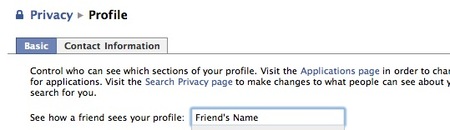
Your profile will appear, underneath a "Viewing your profile as:" header.
You will probably be horrified at just how much they can see. To return to editing the settings, click "Edit Profile Privacy" in the bottom right corner of the "Viewing your profile as:" header.

The detailed settings for your Profile can be modified on this page. Use the drop down menus to control what can be seen by different groups. For example, to have photos that others upload and tag with your name visible only to your family list, select "Customize" from the menu, and click "Some friends". Type the first few letters of the list name you want to allow, and the entire name should appear. Select it, and click OK. You may exclude a specific list of people from seeing the photos by typing the name of the list into the "Except These People" box.

Work your way all the way down the Profile Privacy settings page and be sure to click the "Save Changes" button when you are done. You will return to the Privacy Page.

Let people find you but maintain some control
Click the Search next. Depending on what you use Facebook for, you may want to keep Search Visibility as loose as possible so people can find you, but you do not have to show them your friend list, profile picture, etc. on the Search Result page that they see.

Click Save Changes to return to the main Privacy page.
News Feed and Wall
This area is one size fits all: you can't use lists to manage each feature. However you still have a great deal of control over exactly what everyone that can see your wall will see. Be sure to look at the list of applications (in the right column) that you have allowed to make posts to your wall, and also at the Social Ads tab. Make your selections, then click "Save Changes".

Applications
This is where you can make changes to what personal data ALL Facebook and Facebook Connect applications have access to. Read it all carefully to make sure that your settings reflect your comfort levels. For example, Beacon websites can post the fact that you purchased or reviewed items on other sites.
I would suggest checking back on this page every few months, since Facebook frequently adds connections to other types of applications and websites.
Facebook is a great place to hang out, but its default settings tend toward less privacy for its users. This makes the typical user's wall more fun, but may not be very good for them in the long run.
June 24, 2009
Slow scrolling with IE8 and old PC
At work, I installed Internet Explorer 8 on an old computer running XP to see how well it would work with our Learning Management System. It was immediately apparent that the scrolling and rendering performance of IE 8 was very poor. Each click on the scroll bar resulted in a jerky redraw of the page in 1" rows. IE 8 uses new rendering techniques that cause scrolling to be painfully slow on the old Dell.
The group policy on all the machines prevents alteration of any Internet Explorer settings not on the temporary items tab, so I could not tinker with those. But display settings are accessible. Shutting off hardware acceleration did fix the problem, and now IE 8 is just as fast as earlier versions.
To turn off hardware acceleration:
- Select Start > Control Panel > Display
- Select the General tab
- Click the Advanced button.
- Select the Troubleshoot tab
- Drag the Hardware Acceleration slider to the left.
- Click OK
June 22, 2009
iPhone thinks headphones are still attached
A friend's iPhone stopped functioning correctly when making or receiving calls. When he would call, people on both ends could not hear each other, unless he hit the "Speaker" icon.
I tried resetting all settings and rebooting the phone to no avail. Then during a test call, I hit the volume switch to try to increase the volume. The volume icon that normally appears when you do that had the word Headphones on it, meaning the phone thought it had the headphones attached.

A few minutes of searching brought up the answer: there was lint inside the jack. The fix was to connect and remove a pair of headphones several times to try to clear the debris.
If that doesn't work, read the Apple technote for several other possible solutions.
June 17, 2009
Playing futurologist: small consequences of technological changes
Although some great books [1 and 2] have been written about the huge changes being wrought on society and culture by the digital revolution, it's just as interesting to speculate about the smaller consequences of the adoption of new technology. Here are some of the ones I've noticed, but perhaps you will have your own to add. Please jump in and comment!Item: Records have given way to CD's which have given way to digital music streaming and downloads
- The 70 minute CD-length album format has no real reason to exist anymore. There is no longer a reason to group unrelated tracks together in any particular way. We could even go back to the lengthy psychedelic and progressive rock tracks, if anyone wanted to hear them. Tracks can be sold grouped with hundreds of others or individually.
- You can't really give CD's as wrapped gifts anymore, at least not to people under 60. Who wants that junk cluttering up their house?
- it is harder for artists to brand themselves with images, since there is no wrapper or record album to put a cool image on. On the other hand, they have MORE room now, since they can create entire sites, and Facebook pages, IF they can get people to go there. Guess there is still room for advertising? [update: apparently Apple is coming up with a new electronic "album" format ]
- No more need for coffee table books like "The Secret Life of Flowers" devoted to macrophotography or similar specialty trade books.
- People can shoot many many photos for almost no cost, so pretty much everything is being photographed, in every light, and from every angle.
- People are also becoming better photographers, partly because of the instant feedback and additional practice, and partly because of the social aspects of the sharing services.
- Stock photography easier to find, and a lot cheaper
- Encyclopedias are a thing of the past. The debate about editorial authority rages on, but no one is really listening. Brittanica lingers on, but I'd love to know the real financial story there.
- Anything is now likely to being recorded, either by a cellphone or security camera. You can no longer assume you are not being recorded.
- So far, there is no rock-solid way to back up permanently, so people will start losing entire decades worth of memories
- Item: more dependence on the web for day to day tasks
- Perhaps it will be easier to disrupt services we depend on because there are more electronic choke points on communication, business, etc.
- Newspapers
- Yellow Pages and White Pages
- Day planners
- Calculators
- Micro-cassette recorders
- Encyclopedias
- Books? When you think of it - there is no particular reason why the long book format needs to stay the same as it is. Some of what currently are published as books could be serialized or continually published and revised. Magazines? (except on airplanes)
- Fax machines
- Maps
- Cable TV
OK, I know I've left out some great ones - it's your turn!
June 16, 2009
IE8: Navigation to the webpage was cancelled
With the advent of IE 8, I started getting calls about a new error when accessing our learning management system.
"Navigation to the webpage was cancelled."
This error can be caused by many things, but in this case, I believe it has to do with the fact that the LMS has both secure and insecure assets in the frameset. Unfortunately, many times messages will come up asking people whether they want to view both types, and they will click "no" without knowing that the page requires them to function.
Since I can't ever really know what is going on with a user's home computer's security setup, I simply tell them to reset their Internet Explorer to its default settings.
- Exit all programs, including Internet Explorer (if it is running).
- For Windows XP, click Start, and then click Run. Type the following command in the Open box, and then press ENTER:
inetcpl.cpl
If you use Windows Vista, click Start. Type the following command in the Start Search box, and then press ENTER:
inetcpl.cpl
- Click the Advanced tab in the Internet Options window that comes up.
- Under Reset Internet Explorer settings, click Reset. Then click Reset again to close the dialog.
- When Internet Explorer finishes resetting the settings, click Close in the Reset Internet Explorer Settings dialog box.
- Start Internet Explorer again.
This will not delete your bookmarks.
UPDATE: If this did not work, you may want to try adding the site to your trusted sites and relaxing the settings. See this post for more details [LINK]
Resources:
How to reset Internet Explorer's Settings
June 10, 2009
How to use the HTML SCORM template with Moodle - unscored example
The HTML SCORM template works with Moodle, but it needs a few modifications to work perfectly.- Server side include statements in the content pages must be replaced with the real code
- The closing javascript on buttons in the navbar needs to be modified from "top.window.close()" to "window.close" because of the Moodle uses a different learning activity window structure than our own in-house LMS.
I've made these changes and created a "Moodleized" version of the template for you to download:
DOWNLOAD MOODLE VERSION OF TEMPLATE
This template is an unscored activity and should just mark itself complete. I will soon be posting one that will allow scored interactions on each page as well.
Moodle uses slash arguments so the server cannot see the extension (.htm) that tells it a file may have Server-Side includes in it. For example, a typical module path would be:
http://yourserver.com/moodle/file.php/4/unit1/index.htm
There is an ".htm" extension on the end of the path, but "file.php" is the only file that is executed by the server.
Once you've downloaded the Moodleized template, follow these steps to create a test course:
- Go into the category you want to put the course in, and click Add a new course.
- Enter a name and code
- Set format to SCORM format
- Set number weeks/topics to 1
- Set course start date to today's date
- Set news items to 0
- Set show gradebook to yes
- Set activity reports to yes
- Set max upload size to 64 mb
- Set is meta course to no

- Set course enrollable to yes
- Disable the start and end dates
- Set this course is available to students


- Click Save Changes. In the Assign roles to Courses window
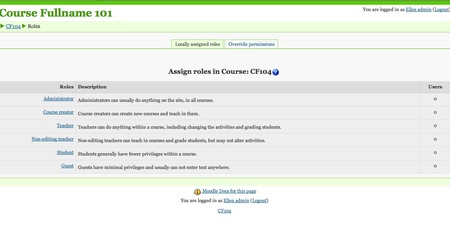
- Add the desired user(s) to that role.
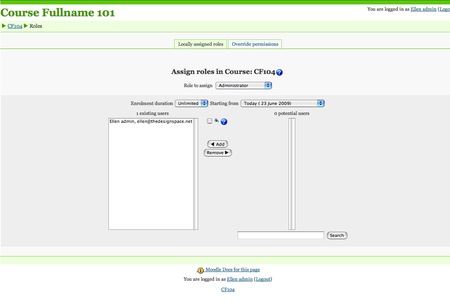
- Click the Course Code (CF104 in the example below) at the bottom or top left of the page to continue.
- Since you have not yet associated any SCORM packages with this SCORM course, it will next display the Adding a new SCORM/AICC page.
- Fill in a Name and Summary for the SCORM package. Then click Choose or upload a file...

- The Upload a file window will open

- Choose a SCORM package (a zip archive containing files plus manifest) and click Upload this file
- There will be no progress bar. Just wait until the screen changes to a list of available files.

- You'll see a list of the available files to choose from. Unzip the package by selecting it and clicking Unzip.

- A list of all the contained files will now appear. Select imsmanifest.xml and click Choose.

- The window will close, leaving the Adding a new SCORM/AICC window visible. "imsmanifest.xml" will now appear in the Package file box.
- Choose a Scoring method, Maximum grade, Number of attempts, and Attempts grading. You may need to consult Moodle documentation to decide which is appropriate.
- For stage size, make height at least 500. You may want to experiment with these settings.
- Display package should be set to New window.
- Check all the options unless you have reason not to.
- The rest of the options are up to you, except that Visible should be set to Show.
- Click Save and display

- The course launch page will appear.
- The module should then open in a new window.
- In the example shown, the two colored buttons in the navbar on the left are SCORM control buttons. The violet button marked Quiz simply opens the next SCO, if there is one. The pink one labeled End this lesson closes the window and marks the module complete.
- Click the End this lesson button and the module window should close.

- You will be back on the course launch page.
- Click Exit activity.

- You will return to the student's main view of the course.
- You should see a report link. Click to view a summary of all your attempts.
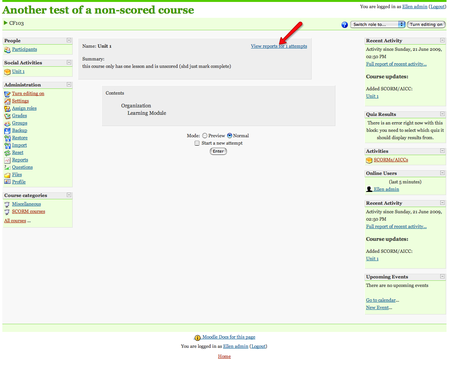
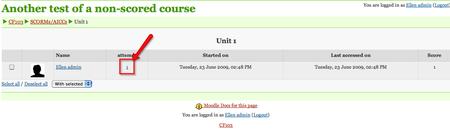
- In this example, I have only one attempt. To see more detail, click the attempt number as shown.
June 9, 2009
iPhone doesn't ring while locked
A while back, my iPhone stopped ringing while locked. It didn't seem to matter what settings I used, it simply would not ring. Calls were being missed, so I finally decided to look into it.
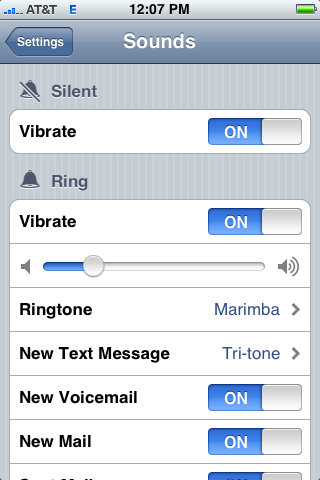
What actually seemed to fix it is weird: I went into Settings>Sounds>Ringtone and re-selected my ringtone. That plays the tone, and I guess sort of jars the phone into recognizing it again. After that, the same exact settings worked.
The settings that work are shown below:
How the endoscopy clinics were reusing syringes
Back in early 2008 I remember hearing about a cluster of cases of Hepatitis apparently caused by reusing needles at an endoscopy clinic in Nevada. I've heard other news stories like this over the years and always wondered who in this day and age would ever use a needle on more than one patient?
It never occurred to me that you can infect multiple patients by re-using needles on the same patient! How? If the medication vial you are drawing from is used on multiple patients, the medication itself will become contaminated from tiny amounts of blood punched back into the vial by the used needle.
This was exactly the case at Endoscopy Center of Nevada:
- A nurse would administer an injection of Propofol, an anesthetic, to put the patient to sleep before a colonoscopy. If the patient started to wake up before the procedure was finished, the nurse would use a syringe to draw more of the drug from the vial, using a fresh needle -- but reusing the syringe, allowing the vial to be contaminated with the patient's blood.
--From article in Las Vegas Sun, Mar. 2, 2008 LINK
Apparently the nurses were following the instructions of the clinic owner, who had told them to use the larger vials to save money. By October 23, 2008, there were 105 cases thought to be associated with this clinic.