May 23, 2008
Timing issues with IE6 and SWFObject
iPresent is new software for Windows that creates synchronized powerpoint and video presentations. It outputs to a variety of formats, but I purchased it for its Flash output capabilities. However, when I output a file using the latest version, I found that IE6 was giving an error whenever a Table of contents button or slide thumbnail was clicked on: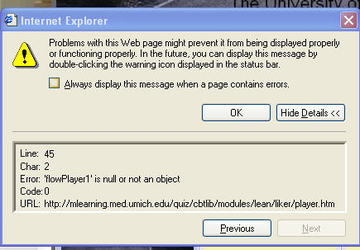
"flowPlayer1" is null or not an object.
A little research showed that this is a common issue with swfobject, and is really just a timing issue, not an issue that is specific to iPresent. The problem happens when you call functions on the player before it is really there. Firefox and IE7 did not seem to care, but IE6 does.
So, here is what doesn't work:
Untitled Document


<!DOCTYPE html PUBLIC "-//W3C//DTD XHTML 1.0 Transitional//EN" "http://www.w3.org/TR/xhtml1/DTD/xhtml1-transitional.dtd">
  <html xmlns="http://www.w3.org/1999/xhtml" xml:lang="en" lang="en">
  <head>
  <!-- saved from url=(0014)about:internet -->
  <meta http-equiv="Content-Type" content="text/html; charset=iso-8859-1" />
  <title>FlowPlayer</title>
  <style>
  body {
  margin: 0px 0px 0px 0px;
  padding: 0px 0px 0px 0px;
  background-color: #E5E5E5;
  color: #000000;
  font-size: 12px;
  font-family: verdana, "Lucida Grande", arial, helvetica, sans-serif;
  }
  #pres_link {
  font-size: 10px;
  }
  </style>
  <script type="text/javascript" src="swfobject.js"></script>
  <script  type="text/javascript">
  /*
  * Init and setup FlowPlayer.  This example file shows 'advanced' features like
  * playlists and configuring with JavaScript. FlowPlayer.html is a simpler example.
  */
var flowPlayer1;
  function init() {
  if (document.getElementById) {
  flowPlayer1 = document.getElementById("FlowPlayer");
  }
  }
// wait for the page to fully load before initializing
  window.onload = init;
/*
  * JavaScript event hanlders:
  */
var pStatus='PLAYING';
function seek(ms) {
  secs = Math.round(ms/1000);
  if (pStatus=='PAUSED' || pStatus=='STOPPED') {flowPlayer1.DoPlay();}
  flowPlayer1.Seek(secs);
  parent.frames['slidearea'].document.slide.src = parent.oPres.SLIDES[parent.GetSlideIdxByTimepoint(ms)].SlideFile;
  }
function getDuration() {
  var value = flowPlayer1.getDuration();
  }
function getPercentLoaded() {
  var value = flowPlayer1.getPercentLoaded();
  //var field = document.getElementById("loaded");
  //field.value = value;
  }

/*
  * Flash callback handlers. The player calls these on specific events:
  */
function onClipDone(clip) {
}
function onLoadBegin(clip) {
}
function onStartBuffering(clip) {
}
function onPlay(clip) {
  pStatus='PLAYING';
  }
function onStop(clip) {
  pStatus='STOPPED';
  }
function onPause(clip) {
  pStatus='PAUSED';
  }
function onResume(clip) {
}
function onCuePoint(cuePoint) {
  parent.frames['slidearea'].document.slide.src = cuePoint.thumb;
  seq=cuePoint.thumb.split('_');
  parent.SetCurrentSlide(seq[1]);
  }
</script>
  </head>
  <body>

 <div style="padding:5px 5px 2px 5px;"><strong>The Toyota Way</strong></div>
  <div id="pres_link" style="padding:0px 5px 7px 5px;">
  <a href="#" onclick="parent.NewWindow('details.htm','mywin2','640','320','yes','center');return false">[Presentation Details]</a>
  </div>

 <div id="flowplayerholder">
  This will be replaced by the player.
</div>
<script type="text/javascript">
var fo = new SWFObject("FlowPlayerWhite.swf", "FlowPlayer", "300", "240", "8", "#ffffff", true);
fo.addParam("AllowScriptAccess", "always");
fo.addParam("allowFullScreen", "true");
fo.addVariable("config", "{ playList: [ { url: '1.flv' } ], autoPlay: true, showPlayListButtons: true, initialScale: 'scale',showPlayList: false, bufferLength: 1, loop: false, hideControls: false, progressBarColor1: 0xFF0000, progressBarColor2: 0xFF0000, bufferBarColor1: 0x00FF00, bufferBarColor2: 0x00FF00, progressBarBorderColor1: 0xAAAAAA, progressBarBorderColor2: 0xAAAAAA, useNativeFullScreen: true, autoBuffering: true, showFullScreenButton: false, menuItems: [true,true,true,true,false,false] }");
fo.write("flowplayerholder");
</script>
</body>
  </html>
Note that the "init" function is called with a window.onload statement and that the swfobject player "write" statement comes just after the div which will contain the player. What did I change? I moved the "fo.write" statement into a new function called doLoad, and called both doLoad()and init() using the "body onload" event.
This works:
Untitled Document


<!DOCTYPE html PUBLIC "-//W3C//DTD XHTML 1.0 Transitional//EN" "http://www.w3.org/TR/xhtml1/DTD/xhtml1-transitional.dtd">
  <html xmlns="http://www.w3.org/1999/xhtml" xml:lang="en" lang="en">
  <head>
  <!-- saved from url=(0014)about:internet -->
  <meta http-equiv="Content-Type" content="text/html; charset=iso-8859-1" />
  <title>FlowPlayer</title>
  <style>
  body {
  margin: 0px 0px 0px 0px;
  padding: 0px 0px 0px 0px;
  background-color: #E5E5E5;
  color: #000000;
  font-size: 12px;
  font-family: verdana, "Lucida Grande", arial, helvetica, sans-serif;
  }
  #pres_link {
  font-size: 10px;
  }
  </style>
  <script type="text/javascript" src="swfobject.js"></script>
  <script  type="text/javascript">
  /*
  * Init and setup FlowPlayer.  This example file shows 'advanced' features like
  * playlists and configuring with JavaScript. FlowPlayer.html is a simpler example.
  */
var flowPlayer1;
  function init() {
  if (document.getElementById) {
  flowPlayer1 = document.getElementById("FlowPlayer");
  }
  }
  function doLoad(){
  var fo = new SWFObject("FlowPlayerWhite.swf", "FlowPlayer", "300", "240", "8", "#ffffff", true);
  fo.addParam("AllowScriptAccess", "always");
  fo.addParam("allowFullScreen", "true");
  fo.addVariable("config", "{ playList: [ { url: '1.flv' } ], autoPlay: true, showPlayListButtons: true, initialScale: 'scale',showPlayList: false, bufferLength: 1, loop: false, hideControls: false, progressBarColor1: 0xFF0000, progressBarColor2: 0xFF0000, bufferBarColor1: 0x00FF00, bufferBarColor2: 0x00FF00, progressBarBorderColor1: 0xAAAAAA, progressBarBorderColor2: 0xAAAAAA, useNativeFullScreen: true, autoBuffering: true, showFullScreenButton: false, menuItems: [true,true,true,true,false,false] }");
  fo.write("flowplayerholder");

}
/*
  * JavaScript event hanlders:
  */
  var pStatus='PLAYING';
function seek(ms) {
  secs = Math.round(ms/1000);
  if (pStatus=='PAUSED' || pStatus=='STOPPED') {flowPlayer1.DoPlay();}
  flowPlayer1.Seek(secs);
  parent.frames['slidearea'].document.slide.src = parent.oPres.SLIDES[parent.GetSlideIdxByTimepoint(ms)].SlideFile;
  }
function getDuration() {
  var value = flowPlayer1.getDuration();
  }
function getPercentLoaded() {
  var value = flowPlayer1.getPercentLoaded();
  //var field = document.getElementById("loaded");
  //field.value = value;
  }

/*
  * Flash callback handlers. The player calls these on specific events:
  */
function onClipDone(clip) {
}
function onLoadBegin(clip) {
}
function onStartBuffering(clip) {
}
function onPlay(clip) {
  pStatus='PLAYING';
  }
function onStop(clip) {
  pStatus='STOPPED';
  }
function onPause(clip) {
  pStatus='PAUSED';
  }
function onResume(clip) {
}
function onCuePoint(cuePoint) {
  parent.frames['slidearea'].document.slide.src = cuePoint.thumb;
  seq=cuePoint.thumb.split('_');
  parent.SetCurrentSlide(seq[1]);
  }
</script>
  </head>
  <body onLoad="doLoad();init();">

 <div style="padding:5px 5px 2px 5px;"><strong>The Toyota Way</strong></div>
  <div id="pres_link" style="padding:0px 5px 7px 5px;">
  <a href="#" onclick="parent.NewWindow('details.htm','mywin2','640','320','yes','center');return false">[Presentation Details]</a>
  </div>

 <div id="flowplayerholder">
  This will be replaced by the player.
  </div>
  <script type="text/javascript">
  /*  var fo = new SWFObject("FlowPlayerWhite.swf", "FlowPlayer", "300", "240", "8", "#ffffff", true);
  fo.addParam("AllowScriptAccess", "always");
  fo.addParam("allowFullScreen", "true");
  fo.addVariable("config", "{ playList: [ { url: '1.flv' } ], autoPlay: true, showPlayListButtons: true, initialScale: 'scale',showPlayList: false, bufferLength: 1, loop: false, hideControls: false, progressBarColor1: 0xFF0000, progressBarColor2: 0xFF0000, bufferBarColor1: 0x00FF00, bufferBarColor2: 0x00FF00, progressBarBorderColor1: 0xAAAAAA, progressBarBorderColor2: 0xAAAAAA, useNativeFullScreen: true, autoBuffering: true, showFullScreenButton: false, menuItems: [true,true,true,true,false,false] }");
  fo.write("flowplayerholder");*/
  </script>
</body>
  </html>
May 19, 2008
Pocket pigs

It seems a species of pig that was thought to be extinct was really just hiding out in people's gardens. They have been rescued from the brink, and are being re-introduced to the wild in Assam, India by the Durrell foundation.
I don't know about you but I wouldn't mind having a herd of these on my desktop. The ones shown here are baby pigs, but the adults are tiny also.

May 18, 2008
Dealing with comment spam on Gallery 2
Finally! I found a query that effectively deletes the comment spam from the Gallery 2 database. These can be run through phpMyAdmin, but my next task is to turn this into a php script that can be run as a cron job.
To delete comments posted by an IP, or a few IPs, run this SQL statement:
delete ce, e, co from g2_ChildEntity ce, g2_Entity e, g2_Comment co where ce.g_id=e.g_id and e.g_id=co.g_id and e.g_entityType='GalleryComment' and (co.g_host='67.104.112.176' or co.g_host='209.31.123.128')
To delete comments based on the comment itself, run this SQL statement:
delete ce, e, co from g2_ChildEntity ce, g2_Entity e, g2_Comment co where ce.g_id=e.g_id and e.g_id=co.g_id and e.g_entityType='GalleryComment' and (co.g_comment like '%[url=http://%')
To delete comments by a specific author or authors, run this SQL statement:
delete ce, e, co from g2_ChildEntity ce, g2_Entity e, g2_Comment co where ce.g_id=e.g_id and e.g_id=co.g_id and e.g_entityType='GalleryComment' and (co.g_author like '%ialis%' or co.g_author like '%iagra%')
Many thanks to Ned Martin at Hard Answers.net
May 13, 2008
iPhone gets very hot when on wireless and battery drains
The other day I pulled my iphone out and nearly dropped it! It was burning hot and there was a big red low battery indicator in the middle of the screen! I had charged it only a couple of hours earlier so it was not likely that normal use had caused this condition.
I was in a wireless area, and had been checking my gmail earlier. The little activity indicator at top left was twirling.
A search through Apple support and discussions led me to this article. It seems that the iphone can get stuck in a checking-mail loop, particularly on certain IMAP accounts like gMail.
An Apple support article also says that a flaw in the Mail application in v. 1.1.3 causes it to persistently generate server activity even when it is not checking mail per user settings. Persistent mail checking can quickly drain the battery.
From the article:
"One fix that has proven especially effective for users experiencing this issue after the 1.1.3 update: Force-quit the Mail application every time you are done using it. This can be accomplished by holding down the Home button for several seconds while in the Mail application until the home screen reappears."
They go on to suggest you delete and reestablish email accounts if the problems persist. A more complete set of fixes is located in this article. Fixes and suggestions covered include:
Images in Word docs created on Mac cannot be seen on Windows
If you add screenshot images to a Word or Powerpoint document on a Mac, by either dragging them onto the page or pasting them in, chances are they will not be visible on a PC. PC users will see a gray box placeholder instead, containing the words "QuickTime™ and a TIFF (LZW) decompressor are needed to see this picture."
The trick is to edit the images slightly within Word, by clicking the redeye tool on each picture. This forces Word to save it in a compatible format.
Thanks very much to Peter Clark for this just-in-time clue!
The trick is to edit the images slightly within Word, by clicking the redeye tool on each picture. This forces Word to save it in a compatible format.
Thanks very much to Peter Clark for this just-in-time clue!
May 11, 2008
Window names cannot contain spaces in "window.open" scripts for IE
A customer's course was crashing Internet Explorer when a popup window script executed. It turns out that the name of the new window contained a space. This didn't bother Safari or Firefox, but Internet Explorer will not tolerate it:
This will crash Internet Explorer:
javascript:void(newWindow=window.open('movies/ChemoSynopsis/ChemoSynopsis.htm','The Synopsis',

'menubar=no,scrollbars=no,resizable=no,width=800,height=600,left=0,top=0'));

newWindow.focus();
This corrects the problem:
javascript:void(newWindow=window.open('movies/ChemoSynopsis/ChemoSynopsis.htm',

'TheSynopsis',

'menubar=no,scrollbars=no,resizable=no,width=800,height=600,left=0,top=0'));

newWindow.focus();
This is something to watch for when you are naming Captivate files, because their names - including any spaces - are used in the file names and scripts generated along with the HTML.
Drupal admin: Changing the default Open or Collapsed state of filters and fieldsets in Node editing screens
As you add modules to Drupal, the "Edit" screen of each node can start piling up a lot of optional filters and settings that you can apply to the node. These include comment settings, input filters, image pickers and browsers, authoring settings, etc. The general term for all these added features on the node edit screen is "fieldsets."
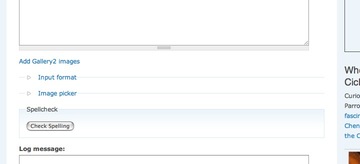
Most of them are collapsed when you first open the screen, which makes it easy to scroll down to the "submit" button or the lower fieldsets. However some modules set themselves to be open by default. This can be a problem if you have to edit a lot of nodes - it causes a lot of extra scrolling and is visually confusing.
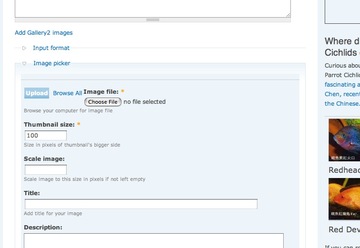
Here is how I changed that setting in the Imagepicker module.
I store the modules in the /mysite/sites/all/modules/ folder.
In /mysite/sites/all/modules/imagepicker/imagepicker.module I searched for "collaps" and found this function:
function imagepicker_form_alter($form_id, &$form) {
	if (imagepicker_get_access()) {
		if (preg_match('/node_form$/i', $form_id)) {
			$form['body_filter']['file_upload'] = array(
				'#type' => 'fieldset',
				'#title' => 'Image picker',
				'#collapsible' => 1,
				'#collapsed' => 0,
				'#weight' => 1,
				'#validate' => array(),
				'#theme' => 'imagepicker_iframe',
				1 => array()
			);
		}
	}
}
Changing
'#collapsed' => 0,
to
'#collapsed' => 1,
sets the default view of that fieldset to collapsed.
May 9, 2008
Maximizing the Captivate window automatically
We found that some of our users did not know how to maximize windows (or even that it was possible!), and so never saw the navigation bar and buttons on the bottom of a Captivate-based course they had to take.
The customer who designed the course asked that we add instructions on maximizing the window, but I thought that it would make more sense just to make the window maximize itself.
It's been a while since I used window sizing functions, so I went hunting for a script that works across all browsers.
After trying several, I found that some "auto-maximize window" scripts don't even work every time on ANY browser. The one that worked best on every browser I tested it on is available free from Dynamic Drive, here.
How it works:
First it moves the window to the top left, then if the browser is IE, it uses the "resizeTo()" function to resize the screen.
If the browser is Netscape, Mozilla, Safari, or any other, it checks if the window width or height is less than the screen maximum width or height, and sets those values to the screen maximum
To make the Captivate course maximize itself automatically when it launches, I simply added the Dynamic Drive script to the head area of the HTML wrapper's source. It appears to work perfectly in IE 6 & 7, Firefox for both Mac and Windows and Safari for Mac.
DOM:window.resizeTo
May 3, 2008
Mail error: "The server response was: From: address not verified;"
I have about 5 email accounts, and use Mail.app to manage them. Recently I started seeing this obnoxious and cryptic message when trying to send from anything but my att.yahoo. account.
The server response was: From: address not verified; see http://help.yahoo.com/l/us/yahoo/mail/original/manage/sendfrom-07.htmlUse the pop-up menu below to try a different outgoing mail server. All messages will use this server until you quit Mail or change your network settings
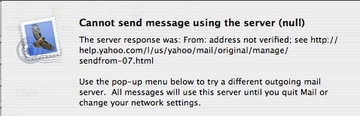
Apparently you need to verify all your email accounts now to use yahoo's smtp server. Of course these days, due to no-mail-relay policies on most smtp servers, there is no easy alternative to using the smtp server of your ISP service.
The process of verification isn't quite straightforward, though, so I'll describe how I did it.
If you follow the link in the error message (http://help.yahoo.com/l/us/yahoo/mail/original/manage/sendfrom-07.html),
you'll see this page:
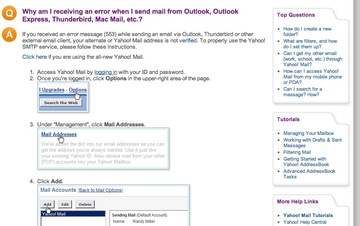
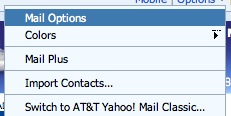
Upon logging in, following the steps in the instructions, I looked for Mail Options. Perhaps it's a different interface, but I found I had to click "Options" first,

... then Mail Options.
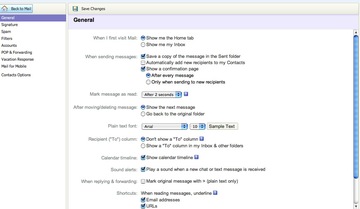
Next you are supposed to look for Management, which I couldn't find at all. Under the non-existent Management, you are supposed to click on Mail addresses, but in my interface there is no Mail addresses...
...so I tried Accounts instead, and got this message:
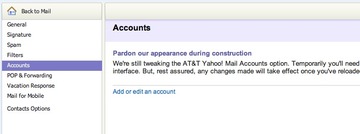
Clicking Add or Edit an Account switches the interface to "Classic" mode, and brought me to this somewhat confusing page.
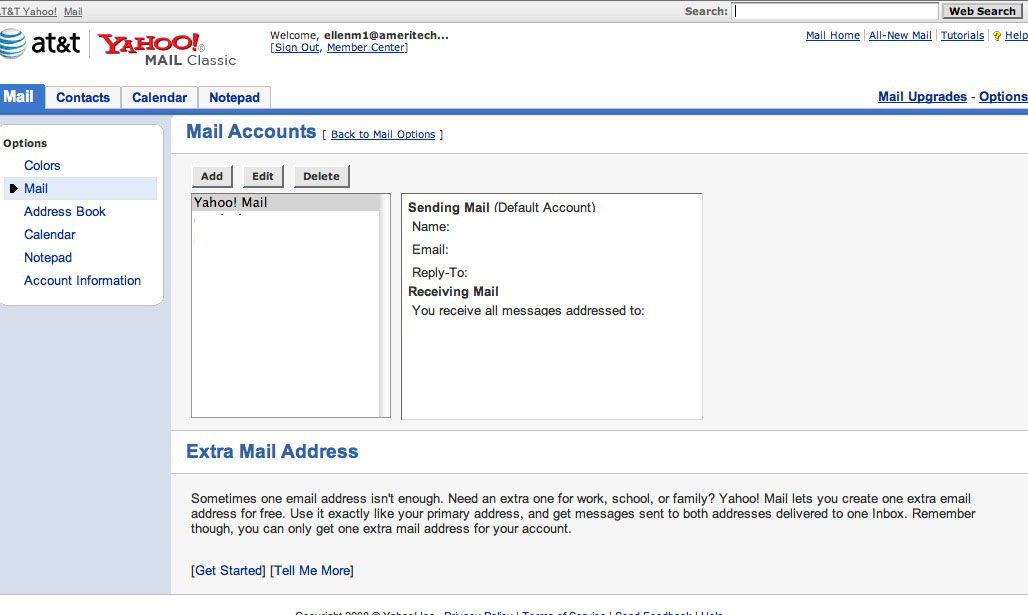
I looked at the title Add or Edit an Account , then at the heading
Extra Mail Address, and assumed that they were talking about the same thing: An account IS an extra email address, after all. The warning says you are only allowed one extra address for free, which was disturbing considering I have 5 addresses I want to be able to use and have no option but the att.yahoo smtp server.
However, I pressed on. Clicking the Add button brought me to this page:
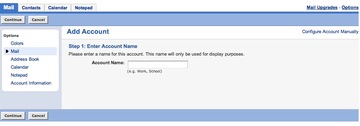
After typing in a name and clicking Continue, this error message appeared:
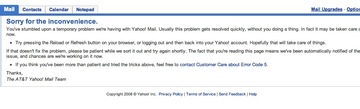
Hitting Refresh got me this error:
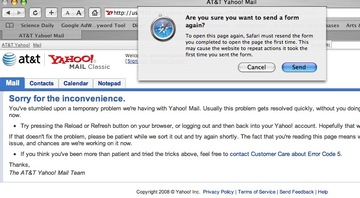
But I have patience, so I tried Refresh again. Then I got this error:

I signed out then logged back in and tried again. Still no luck. I restarted the browser, tried again and STILL got errors a couple more times. Finally the settings screens appeared:

After that it was pretty straightforward verification - you enter the email address, Yahoo sends a verification code to that address and you simply type it in to the box provided. My code arrived almost instantly - to my junk mail folder.
I've since repeated the process with several more addresses, so the one-free-address limit probably applies only to att.yahoo addresses.