April 29, 2008
Printers disappear, "server-error-service-unavailable" error
My G5 at the office is running Tiger, and is on a Windows network. I had several printers set up to use, but one day they all simply disappeared from my print dialogs!
When I tried to add them again, the error "server-error-service-unavailable" would come up.
I found a solution here:
http://docs.info.apple.com/article.html?artnum=107054
You must be logged in as an Admin user.
Follow these steps:
- Open Terminal (/Applications/Utilities/).
- At the prompt type: cd /var/spool/
- Press Return.
- Type: sudo mkdir cups
- Press Return.
- Type your Admin user password when prompted, then press Return.
- Type: sudo chown daemon:admin cups
- Press Return.
- Type: sudo chmod 700 cups
- Press Return.
- Quit Terminal.
- Restart the computer.
April 27, 2008
Error: user warning: Duplicate entry "n" for key 1...
After doing a user import via csv into a new Drupal site, some new users could no longer register. When I attempted to create the users manually, I got this error:
user error: Duplicate entry ''348' for key 1...
I found the answer in the Drupal troubleshooting FAQ:
- Access your database. Check the affected table. In this case, the error tells us that it is the node table (query: INSERT INTO node). This also happens with other tables, modify these instructions accordingly.
- This is the node table, so the problem is the node id (nid). Each node has a unique id. Look at your table, and find the highest node id (nid). If you have many nodes, it may help to sort your table by nid to find the highest one.
- Go to your sequences table. Change the node id in the sequences table to a number higher than the id you found in step 2.
There is also a detailed explanation of what causes this error (See "The problem (long form):")
April 25, 2008
"Certificate couldn't be read" errors in Mail.app
Corporate mail servers often used SSL certificates, and sometimes these certificates expire. At that point you may start getting "Certificate couldn't be read" errors in Apple's Mail.app.
According to Apple, permanently accepting a self-signed SSL certificate may fix the problem.
- Click the Show Certificate button in the error message.
- Hold down the option key and drag the certificate icon out of the error window to your desktop.
- Double-click the certificate icon on the desktop, and choose X.509 Anchors from the pop-up menu. Click Add. You must have permission to administer the computer for this procedure to work.
If this doesn't work, you can try this procedure.
- Take note of what the name of the certificate file is on the Desktop.
- Open Keychain Access.app (it's in Applications > Utilities)
- Find that certificate in the Certificates list.
- Double-click it so it opens in a new window.
- Click open the Trust section and select Always Trust from the dropdown menu.
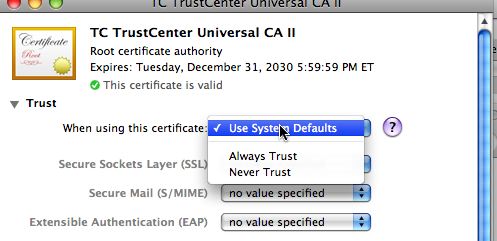
Sometimes this works when nothing else does.
April 11, 2008
Safari rejects expired certificate or can't verify certificate
If Safari gives you the following error
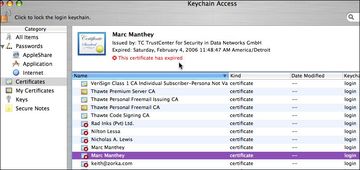
"Client certificate rejected" and shows you a white page, try this. Open Keychain Access, find the expired certificate and delete it. There may be two certificates with the same title.
Sometimes Safari finds the first certificate that matches the name, even if it is expired.
Thanks to Albert Willis for the answer to this.
In the example below, you can see 2 certificates for Mark Manthey. Selecting the expired one and deleting it will fix the problem.
Sometimes Safari will reject the certificate for other reasons. You may get an error like:
"Safari can't verify the identity of the website .... The certificate for this website was signed by an unknown certifying authority....etc."
You can fix this issue by telling Safari to trust the certificate by selecting "Always Trust" from the Trust settings in the warning box as shown here.
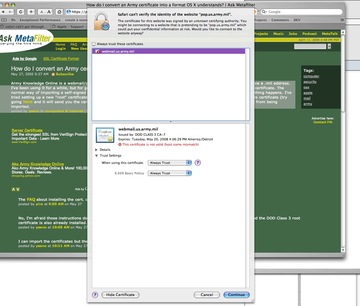
Try it by clicking this link to pop.us.army.mil
Captivate 3 Quizzes marking "failed" when quiz is not completed
We use Captivate 3 quizzes sometimes with our Docent 6.5 LMS. Usually the quizzes have multiple parts or "SCOs" but occasionally we build one that has only one part.
Sometimes people launch a quiz but need to quit before they are done taking it, and in such cases we would prefer it be marked "incomplete" and allow them another chance to take the quiz. Usually we would also prefer any failed quiz to be allowed to be retaken.
But, by default, Captivate sees any failure to reach the mastery score as completions.
There is an easy fix,
suggested by Franck Buland on the Adobe Captivate forums
- simply modify the [project].htm file at lines 95, 96, 97.
Change this:
} else if ( strFSCmd == "LMSSetValue" || strFSCmd=="SetValue") {

strErr = eval('g_objAPI.' + strFSCmd + '(\"' + strFSArg1 + '\",\"' + strFSArg2 + '\");');

CaptivateObj.SetVariable(strFSArg3, strErr);
to this:
} else if ( strFSCmd == "LMSSetValue" || strFSCmd=="SetValue") {

if (strFSArg1=="cmi.core.lesson_status") {

if (strFSArg2 == "failed") strFSArg2 ="incomplete";

}

strErr = eval('g_objAPI.' + strFSCmd + '(\"' + strFSArg1 + '\",\"' + strFSArg2 + '\");');

CaptivateObj.SetVariable(strFSArg3, strErr);
The bold text is what is inserted. It tests the value of what the captivate quiz is sending for cmi.core.lesson_status. If it is failed, it is changed to "incomplete".
April 9, 2008
Incorrect "register globals enabled" error in Drupal on hostgator
When I installed a new version of Drupal on one of my sites, an error showed up on the administration page:

The status page reports:

Checking phpinfo() showed that Register Globals was "off". This thread on Drupal.org, discusses the fact that even if phpinfo() shows that Register Globals is OFF, this error may still show up, because of a bug in some versions of Drupal.
According to php.net, Register globals can be turned off in .htaccess files like this:
# PHP 4, Apache 2.

<IfModule sapi_apache2.c>

# add the following directive to the list:

  php_flag register_globals                 off

</IfModule>
- Drupal.org thread on the register_globals error bug
- php.net: how to change register_globals setting in .htaccess file
However, I've found that the simplest way to correct this issue on Hostgator is to upload a file called php.ini containing this line to the directory containing drupal :
php5_flag register_globals off
April 8, 2008
Java error message: Several Java Virtual Machines running in the same process
When attempting to launch browser-based SCORM courseware, people have been getting the error: "Several Java Virtual Machines running in the same process caused an error"
Apparently many people have this issue since upgrading java. I came across it because it can affect the delivery of elearning courses if the learning management system relies on a java-applet based scorm adaptor to communicate.
This is caused by a change in the way the java plugin operates, and has supposedly been fixed by a new release:
Java SE 6 Update N Early Access
Java SE 6 Update N Early Access > New Java Plug-In Release Notes for the Next-Generation Java* Plug-In Technology The new plug-in immediately fixes several longstanding bugs, among them the following:
- 6359309 Large setting for -Xmx param prevents plugin from starting in Internet Explorer
- 6433218 Java applet fails with Large Java Runtime Parameter setting
- 6504236 Implement IE Broker process for File I/O on Vista
- 6516270 Java applet failure with IE7 displaying "Several Java Virtual Machines running" error
etc., etc.
More information on the specific bug 6516270 is available here
April 6, 2008
"The sender address was rejected by the server" error on att.yahoo.com mail accounts
Over the last few days Mail.app started refusing to send my emails from any of my email accounts. I use only one smtp server for all the accounts: smtp.att.yahoo.com, on port 25 with non SSL authentication.
The solution that worked for me was to simply replace the "att" in the mail server name with "mail". It seems that some of the machines that are used behind the dns name smtp.att.yahoo.com started having this problem, but not all: the server smtp.mail.yahoo.com is still OK.
Thanks to Steve McGarrett for this solution.