February 22, 2010
"Camera communication error" on Canon PowerShot camera
I carry a little Canon PowerShot SD 990 camera everywhere. After all, you never know when you'll see something worthy of memorializing. But a consequence of my "shoot now, ask questions later" attitude is that memory cards fill up very fast!
A while back, I decided to handle the problem once and for all, and got a 32GB SD card. Most of the time only about 8 GB of it is really full, but sometimes if I shoot a lot of video clips, it can get higher.
This has caused several issues. iPhoto began crashing on trying to display the new images when I connected the camera directly. Switching to a card reader, the iMac (running Leopard) still had trouble sometimes mounting the SD card on the desktop. There were so many files in one folder, I was nearing some kind of ultimate limit for the OS.
Luckily I had access to another computer that was able to mount the card, and cleared it off. After that, I found that setting the camera to Auto Create a new folder daily fixed the problem:
(Menu button > Click the Tools tab > Select Create Folder > Auto Create > Daily).
A second issue came up much later, when a lot of those Daily folders had accumulated on the card. I connected the camera directly to the computer using a USB cable, but found only a "Camera Communication Error" message on the camera's display screen. There was no indication on the Mac that it knew the camera was connected.
Apparently there is a limit on either number of folders or total size of files that the Canon can handle. Deleting folders from the card using a card reader fixed that problem, and I'll just have to be more careful.
February 17, 2010
"Another meeting room running" meeting error in DimDim meetings
I've been using DimDim lately to share screens and host impromptu meetings. I recently hosted a three-person meeting for the purpose of screensharing an application we were all working on. Previous meetings of this type had gone well, but this time we kept having problems with "Another meeting room running" errors which prevented screensharing.
I didn't notice that this time, several of us were using Safari. This problem appears to be a known issue with the Snow Leopard DimDim plugin installation. You have the choice of either switching to Firefox (I found this did not work, but it may have been because I had already started the meeting in Safari) or you can open Safari in 32 bit mode.
- Quit Safari (Safari > Quit)
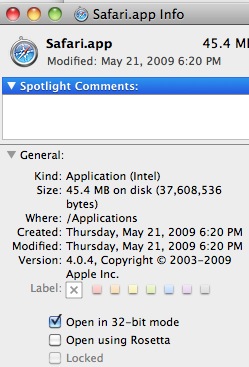
- Open the Applications Folder, right-click the Safari icon and select Get Info from the popup menu.
- Click the checkbox next to Open in 32-bit mode and close the Info window.
JQuery UI tabs causes IE7 to freeze
I started hearing complaints that a particular learning module completed a few weeks ago was freezing up at random. It took a while to isolate the problem down to the use of JQuery UI tabs on a couple of pages.
I had a combination of jQuery UI 1.6rc6 and jQuery 1.3.1. Apparently, at least as far as IE 1.7 is concerned (it doesn't seem to bother Firefox or Safari) jQuery UI versions below 1.7 are not supported on jQuery 1.3. You must either upgrade jQuery UI to 1.7+ or downgrade jQuery to 1.2.
February 15, 2010
Annotate reality with the LiveScribe smartpen
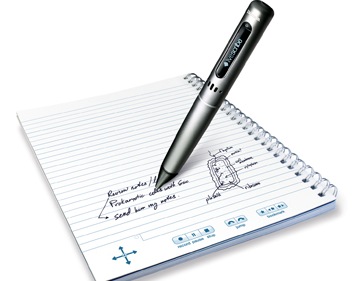
When I first heard of the LiveScribe Pulse smartpen, I wondered:
"OK, it's a pen that records a lecture. I already carry with me two or three devices that can record audio and video. Why would I want another ?
After trying it out, I can tell you why you might want this. It is a lot more than a recording device. When the Pulse smartpen records audio, it syncs that recording to whatever you are writing or drawing at the time. Then it OCR's your notes (even if your handwriting is terrible!), and makes them searchable. You can search the lecture for keywords based on your notes. Then copy and paste the text of your notes into other applications.
Lecture capture that is more than just powerpoint.
The obvious use for the smartpen that comes to mind first is for taking notes at lectures. It captures the notes you take, diagrams and equations and syncs them all to the recorded audio. But once you start thinking about what it really is, there are lots of other possibilities, anywhere you might want to annotate reality, record your drawing, writing, and sound.
Like:
- A doctor taking notes as they ask a patient for information about their condition.
- A reporter annotating an interview or discussion.
- A video editor making notes over an audio track.
- A psychiatrist taking notes during a patient session.
- A reviewer or professor annotating a musical composition.
- A teacher sketching a diagram and verbally annotating it as you sketch.
- Architects or engineers brainstorming a new design on paper and capturing the discussion while drawing.
Your entire session can then be played back, and the diagrams and handwritten notes are re-drawn exactly as you originally drew or wrote them. So it can be used for recorded demos that need to be drawn by hand. This is artist's screen-capture software.
Now here's where it gets really cool: the smartpen can understand printed or DRAWN graphics as controls. In other words, the buttons and commands that control or the pen's various applications are printed on paper, or drawn by the user. The covers of the pen's notebooks contain printed calculators, including statistical, financial and scientific, as well as a keyboard for "typing" with the pen.
The "Nav Plus"  symbol is what you touch with the pen to navigate up, down, left and right through the pen's menus. If you DRAW a cross on the page, and click the center, it will recognize that as a navigation symbol. Use the navigation to enter the Piano application, and it will lead you through drawing 8 "keys" after which you can play your little 1-octave synthesizer, complete with multiple instruments and rhythm tracks.
Click anything you have written on the page, and it will play back whatever audio was going on at the moment you wrote that note. It's quite fast at jumping from place to place in the audio - you could use it to piece together words or phrases.
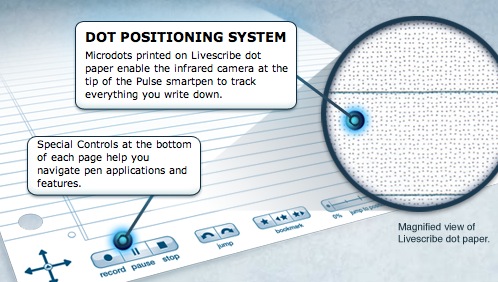
Though the pen will write on anything that a ballpoint pen would, the recording features require that you use "dot paper" with a unique ultra-fine dot pattern in the background. The pattern is so fine that it is difficult to see without magnification, so it will not interfere with your writing. If you have a color laser printer, you can print your own, but the dot paper notebooks aren't expensive.
The best thing about the pen is that it has an open API, and active developer support, as well as an app store. There are already lots of applications, including games, language assistance and educational apps.
On their educational blog, elivescribe.com, there are ideas for using it for teaching math, music, for assistive technologies, making anatomy study guides, etc.
Blue sky ideas for the future
Ideally, it would be nice to be freed from the special paper, or perhaps to make the paper act like a monitor in designated areas - designated on the fly, by drawing! Draw a rectangle, start writing a URL, and the rectangle fills with a mobile-sized website. Draw a button, write "Bookmarks", and open up a list of bookmarks. Write a note to someone, click a button and email it right from the paper.
Well, you get the idea. Sort of like...
Annotate whatever you hear
February 14, 2010
Troubleshooting "No Service" messages on iPhone, part 2
There has been so much interest recently in my post on the No Service error message that appears to be plaguing particularly 3G iPhones, that it seemed appropriate to put up a more detailed summary of possible fixes for the "No Service" message on the iPhone.
Below is a summary of all the suggestions from the many comments on the original post (thanks to all the commenters!) and from several sites around the web.
- First, try a complete reboot of the iPhone. Hold down the Sleep/wake button at the top right of the phone and the round Home button below the screen on the front of the phone at the same time, until the screen goes black and an Apple logo appears. At this point you can release the buttons and wait for it to finish rebooting.
- Try switching Airplane mode on and off.
- Disable 3G. Sometimes the iPhone is not fast enough in switching between 3G and 2G. [LINK]
- Dock the phone or attach a USB cable (attached to nothing on the other side)
- Charge the phone fully, using the wall adapter.
- Reset Network Settings.
- Important: The following fix will lose any wifi settings and passwords you have set up. You may want to note them before going forward.
- Go to Settings: General: Reset
- Click Reset Network Settings
- Enter your passcode if you have created one
- Click the red button: Reset Network Settings
- The iPhone will take a minute to shut down then it will reboot.
- Re-seat your SIM card.
- Insert the end of a paperclip into the hole on the SIM tray (look for a tiny hole in the long, narrow rectangular metal shield in the center of the top edge of your iphone. NOT the headphone jack - it is a much smaller hole.)
- Press it in until the SIM tray pops out. This is sort of the way we used to eject jammed CD trays - push a paper clip into the eject hole.
- Remove and replace the SIM back into the tray.
- Push the tray back in.
- Attach a small piece of Scotch tape to the outer side of the SIM card (the side withoug contacts). This put just enough pressure on the contacts to increase signal strength for some people. LINK
- Restore your iPhone using the latest version of iTunes.
Other possible fixes (untested, try these at your own risk!):
- Use old SIM cardSome people have had luck with putting the old SIM card from their old iPhone into their new 3G phone. LINK]
- Open the iPhone, find the 3 points where the antenna wires connect and press the connection points with the point of a tiny jeweler's screwdriver to create a dimple or hole (I have NO idea what this is supposed to accomplish) then put folded aluminum foil pieces over them. I don't recommend this, but am including it for completeness:
- Purchase a signal booster. Here's an entire site devoted to boosting iPhone antenna signal strength.
. NOTE: I have no idea if any of these signal booster devices work - buyer beware.
February 12, 2010
Confluence: Remove page icons from old-school PageTree macro
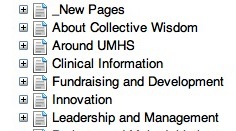
The pagetree plugin for Confluence is a commonly used navigation widget for the popular wiki. There are now 2 versions: the older "pagetree" and the newer "pagetree2" which has several improvements, including a less cluttered look. The older version displays the standard Confluence page icons next to each node of the tree, whereas these can be hidden (and usually are) in the newer version.
Old-style "pagetree" New-style "pagetree2"
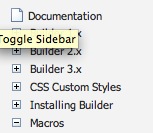
If you are running Confluence with an older version of Theme Builder than 3.0, you will find the newer pagetree2 plugin doesn't work well, so you are probably stuck with the older version. The tree does not seem to expand properly when a node is selected, and javascript errors result in some conditions. So those of us still on earlier versions of Theme Builder than 3.0 need a work-around.
The older version of pagetree does not have any built-in settings to allow you to shut off the page icons, but they can be hidden using a style declaration to hide them.
Here is an the code used to insert the standard pagetree plugin:
{pagetree:@home|sort=natural|showIcons=false|startDepth=1|expandCollapseAll=true|searchBox=true}
And the resulting tree:
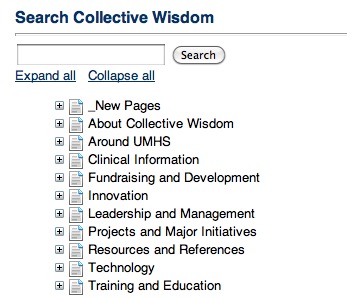
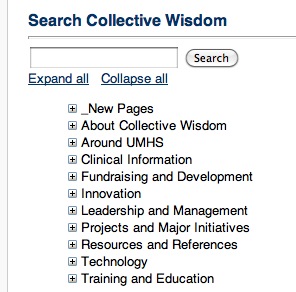
Here is the same tree, with an added style declaration to remove the page icons:
{style}li span img {display:none} li {line-height:115%}{style}
{pagetree:@home|sort=natural|showIcons=false|startDepth=1|expandCollapseAll=true|searchBox=true}
Check out this little elephant whipping the water around!
Baby Elephant's First Swim! from Zoos Victoria on Vimeo.
February 10, 2010
Sometimes masking tape is all you need: Brother Laser Printer cartridges
I have an old Brother HL-5250DN Laser Printer that's been giving good service for years. Seems like forever since I replaced the toner cartridge (TN350 Black Toner Cartridge). But the other day, it simply stopped printing! It was out of toner, apparently. There must have been a "toner low" message, but I missed it.
Unfortunately it is quite unforgiving. Once it is below a certain point it simply stops functioning. Of course it was a most inconvenient moment for it to stop working.
All I could do was go look at Amazon for a new cartridge. Lo and behold, the customer reviewers there have come up with a quick fix to get the printer back up and running while you are waiting for the new cartridge to arrive.
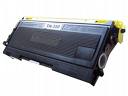
Look for the clear round plastic window on both sides of the cartridge. When the toner is full, the window is blocked. When the toner falls below the level of the hole, a laser can shine through to the other side, signaling the printer to shut down until the cartridge is replaced.
A simple piece of masking tape across one or both plastic windows will allow you to use the rest of the toner - often 30% or more.
One person found that simply shaking the cartridge had the same effect. I love fixes like this!
Many thanks to David Tutwiler and C. MacPhail for this tip.
February 7, 2010
IE 7 & 8: Navigation to the webpage was cancelled, revisited
If you get the error "Navigation to the webpage was cancelled" while browsing, chances are a security setting needs to be corrected. In a previous post, I suggested a "scorched earth" settings-reset procedure, but I've found that that isn't always sufficient. Sometimes the settings need to be relaxed beyond factory defaults.
For instance, our Learning Management System (LMS) uses mixed https and http content, and Internet Explorer is often set to block mixed content entirely. Sometimes it will prompt the user but often it will simply give the error "Navigation to the webpage was cancelled." In the case of our LMS, a large clue to what is going on is that the login page appears completely unstyled, because the style sheets and images are part of the blocked content.
Adding the site to the user's Trusted Sites and setting the Trusted Sites security settings correctly has proven to be a reliable way to fix the problem, however I have to make the following disclaimer:
IMPORTANT! Only add a site to your trusted sites if you are SURE it is OK. We use this method because the site is a known site, and protected behind a firewall. Do not go any furtherunless you are certain the site is not a malicious site.
- In
Internet Explorer (your web browser), select
Tools > Internet Options from the menu at the top.
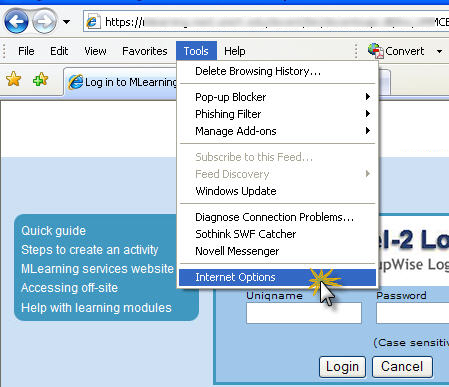
- The
Internet Options window will appear. Select the
Security tab.
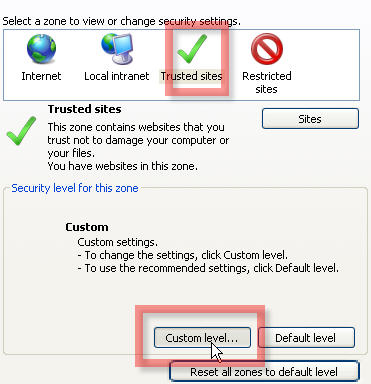
Then click on the Trusted sites icon.

- Click the
Sites button.
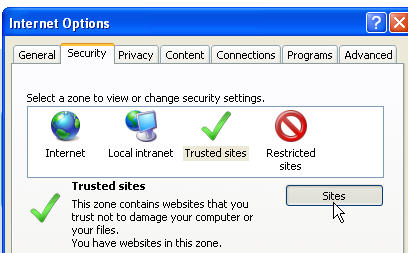
- The
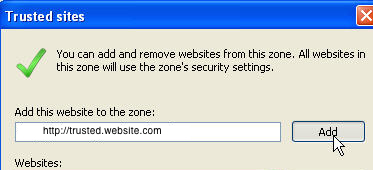
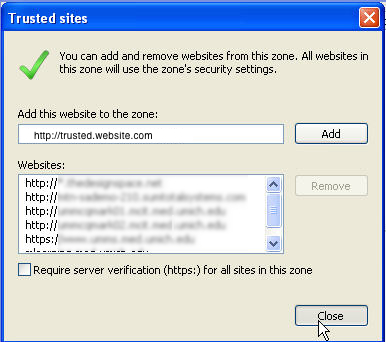
Trusted sites window will open. Type the URL of the site in the website box as shown. Click
Add. Then add an "
s" after the
http (i.e. make the address look like: "
https
://trusted.website.com"). Click
Add again.
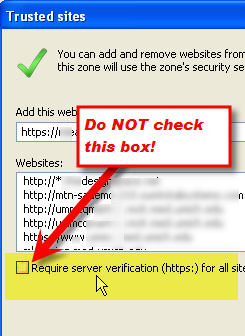
- Be
certain that you do NOT check the box for
Require server verification (https). Check it twice!
- Click the
Close button.
- With
Trusted sites still selected, click "
Custom Level".
- The
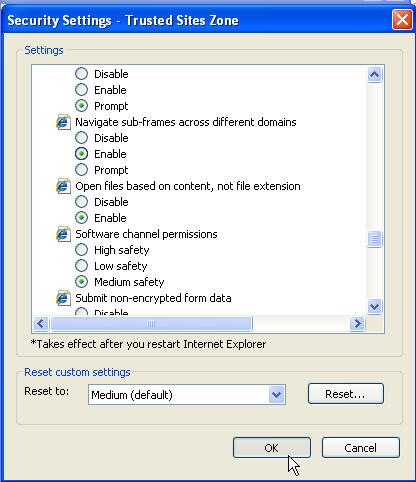
Security Settings - Trusted Sites Zone window will open. Scroll down until you see "
Display mixed content". Select
Enable.
-
For advanced users only: This fix may not be necessary - if you are pretty sure an iframe is involved and pages that should be opening within the same window are opening in new windows or not opening at all. Scroll down to
Navigate sub-frames across different domains. Click "
Prompt." Then click
OK to close the window.
- Back on the
Internet Options window, click
OK to save the changes. Try the site again to see if it works better with these settings.

February 5, 2010
Pass data to a Qualtrics survey and display it in the survey and reports
Qualtrics is an online survey application with many capabilities that aren't obvious at first glance. I'm currently using Qualtrics to create a feedback form that will be used in several hundred learning modules. This form needs to recognize from which learning module it's being accessed, and it should determine the author of the module and email them a copy of the user's feedback. Qualtrics has a feature called "embedded data" which allows you to pass any arbitrary arguments in the link to the survey. We'll use this to add metadata to the feedback.
There are three steps:
- Set up a link to the survey that passes "Embedded Data" values
- Set up the survey to access the Embedded Data
- Do something with the Embedded Data
1. Set up a special link to the Qualtrics survey that passes Embedded Data values:
- We need to pass the values of three properties of the learning module:
- The current page URL
- the TITLE of the learning module
- and the author's EMAIL address.
The title, and author properties were already exposed in variables in the code for the modules, and the URL property is always available as "document.location":

- Here's an example of a javascript function that will append the required values (derived from properties that already exist on the learning module page) to the end of a Qualtrics survey link.

- The printFeedbackLInk() function is called when the navbar for the module is built with Javascript:

- This shows the path generated by the javascript - URL, title and email are all appended to the survey link.The added parameters are URL, TITLE and EMAIL.

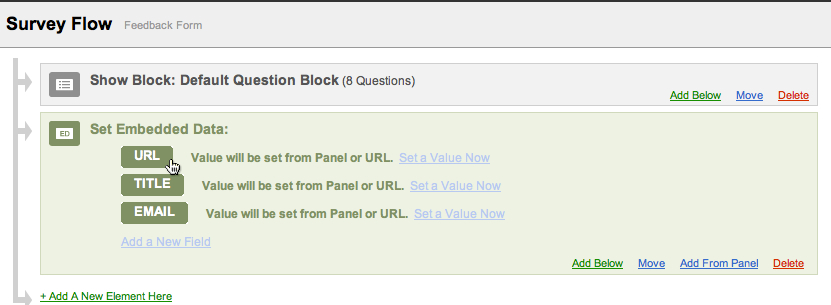
- Open and edit the survey in Qualtrics.
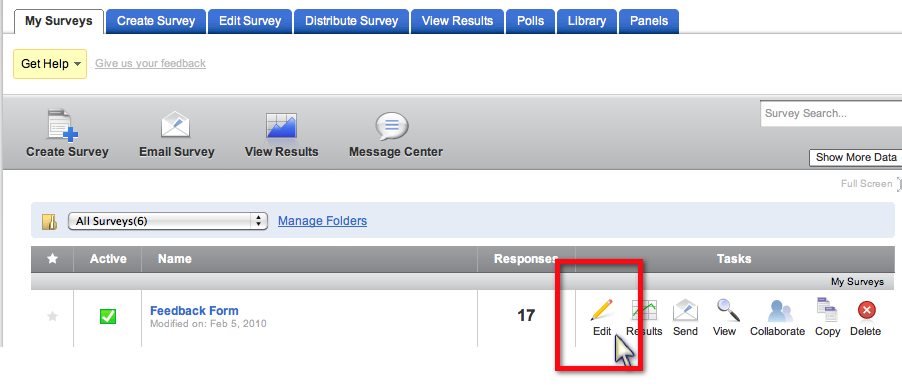
- Click Survey Flow.

- Click "Add Below" to add another step. Click Embedded Data.

- Add the parameter names used in your survey link.

- In this case I've added URL, TITLE, and EMAIL.
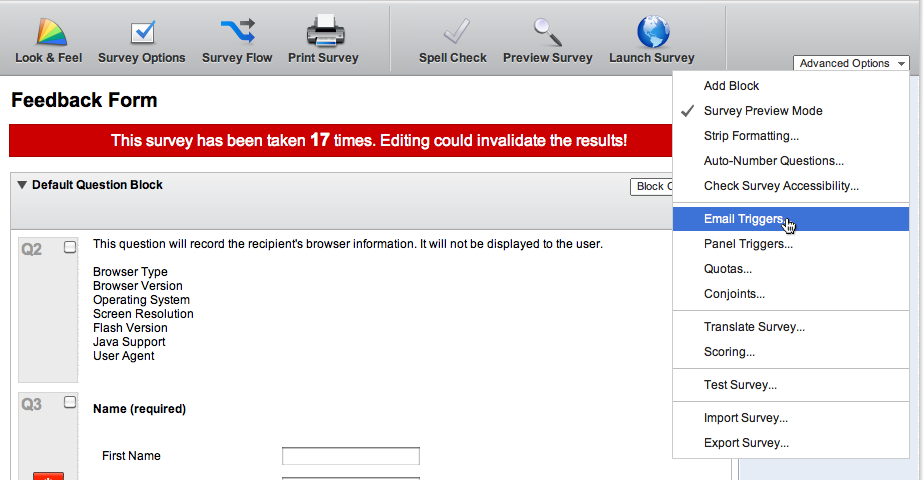
- Select Email Triggers...
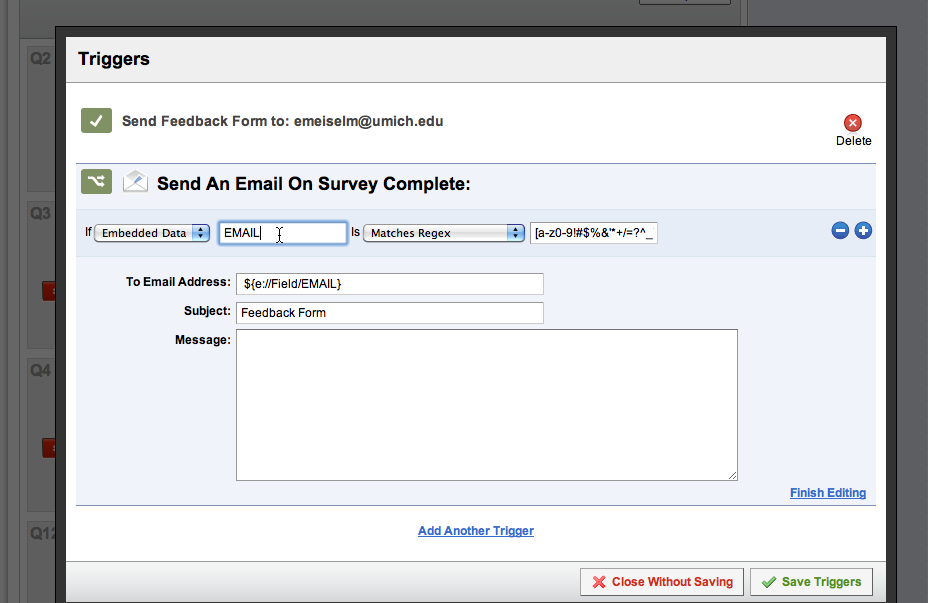
- Set up a rule to send an email to the author. I've added a check that the value of EMAIL looks like an email address.
To do this select: "If Embedded Data [EMAIL] is Matches Regex and paste in this regular expression:
[a-z0-9!#$%&'*+/=?^_`{|}~-]+(?:\.[a-z0-9!#$%&'*+/=?^_`{|}~-]+)*@(?:[a-z0-9](?:[a-z0-9-]*[a-z0-9])?\.)+[a-z0-9](?:[a-z0-9-]*[a-z0-9])?
Note: additional, more sophisticated regex formulas for validating email addresses are available HERE.
Click Finish Editing and then Save Triggers.
- Make the title of the learning module show up in the survey itself.
Create a Descriptive Block type question, with Rich Text format.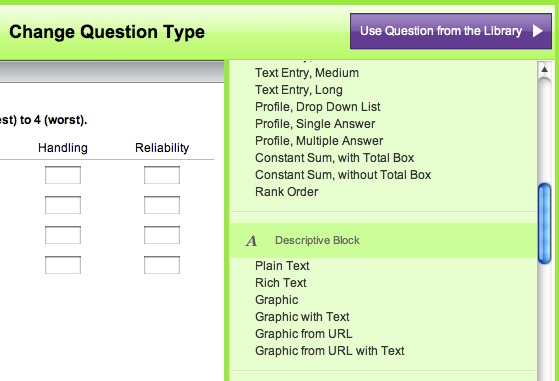
- Clicking Insert will drop some code into your question.
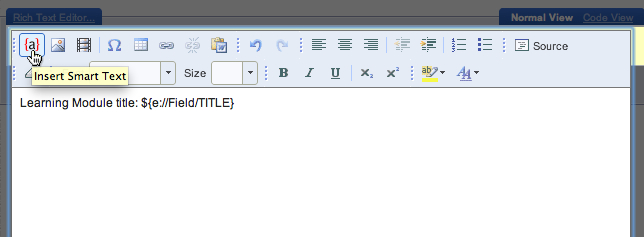
2. Set up the survey to access the Embedded Data
3. Now let's do something with the Embedded Data
We'll do three things with the embedded data: we'll trigger an email to be send to the module author, display the title of the learning module in the survey to the user, and we'll report on the title and page number the user was on when they clicked the survey link.
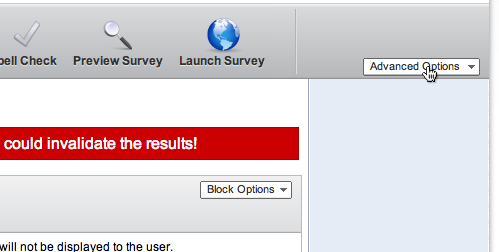
Set up the email trigger to email the feedback to the author of the learning module. Click the Advanced Options dropdown.
In the toolbar of the editing window, click the {a} icon. Select Embeded Data Field and type the name of the field you want to display within the block of text. In this case it is TITLE.
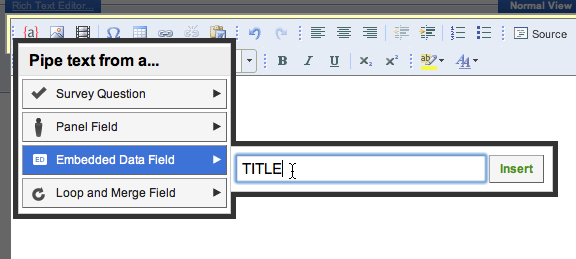
Close the editing window to save the change.
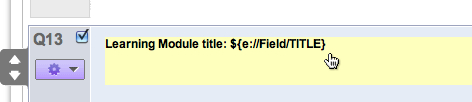
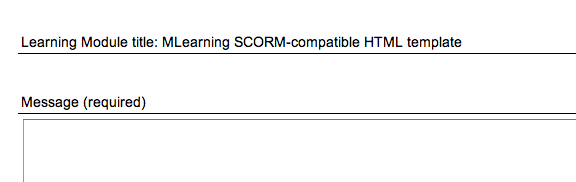
This is what the user will see
Reporting:
Reporting on the embedded data is simple. The values for the current module and page are displayed in the emailed feedback as well as in online reports. Here's a view of the question selectors in the Reporting window in Qualtrics. You can see the Embedded Data items have been added in the reporting area, so they can be used in conditional filters, in sorting, etc.
February 2, 2010
Fish oil prevents onset of schizophrenia: treatment breakthrough
Research starting in the early 90's has suggested a neurodevelopmental basis for schizophrenia. Other studies suggest a biochemical basis for this abnormal development in schizophrenics related to insufficient fatty acids - fatty acids that contribute to the phospholipids which are the building blocks of neuronal membranes. Growth of axons and dendrites, making new synaptic connections and pruning of old ones, involves the synthesis and breakdown of phospholipids.
Based on findings of reduced fatty acids in people with schizophrenia, researchers have been studying whether giving Long-chane omega-3 polyunsaturated fatty acids (PUFAs) to patients at high risk for developing psychotic disorder would prevent them from developing psychotic disorder.
Patients were selected for participation if they were aged 13 to 25 years and met criteria for 1 or more of three groups of risk factors for psychosis: attenuated positive psychotic symptoms, transient psychosis and genetic risk plus a decrease in functioning. People meeting these criteria have a higher risk (up to 40%) of becoming psychotic within a 12-month period.
They found that a daily dose of 4 capsules providing approximately 1.2 g of omega-3 fatty acids significantly prevented conversion to psychosis. After 12 months in the study, 4.9% (2 of 41) in the omega-3 group and 27.5% (11 of 40) in the placebo group hat converted to psychotic disorder.
In addition, the group differences were sustained after cessation of the intervention.
- G. Paul Amminger; Miriam R. Schafer; Konstantinos Papageorgiou; Claudia M. Klier; Sue M. Cotton; Susan M. Harrigan; Andrew Mackinnon; Patrick D. McGorry; Gregor E. Berger. Long-Chain ω-3 Fatty Acids for Indicated Prevention of Psychotic Disorders: A Randomized, Placebo-Controlled Trial. Arch Gen Psychiatry, 2010; 67 (2): 146-154 [LINK]
- The membrane phospholipid hypothesis as a biochemical basis for the neurodevelopmental concept of schizophrenia Schizophrenia Research, Volume 30, Issue 3, 10 April 1998, Pages 193-208 David F. Horrobin [LINK]
- JAMA and Archives Journals (2010, February 2). Fish oil may reduce the risk of psychotic disorders in high-risk individuals. ScienceDaily. Retrieved February 3, 2010, from http://www.sciencedaily.com /releases/2010/02/100201171521.htm