March 31, 2010
Firefox wants to use the font... on OS X
Ever since I spent some time adding and organizing some new fonts, Firefox has developed the annoying habit of showing repeated alerts that ask:
Firefox wants to use the font "__" on the volume _____". This font is not installed. Allow Firefox to use this font?
If I click "Don't ask me again for Firefox," it completely ignores it. Really, why do they even have that checkbox if it makes no difference!
This minor irritation became more critical today when it would not stop popping up those messages. Finally, I found the answer:
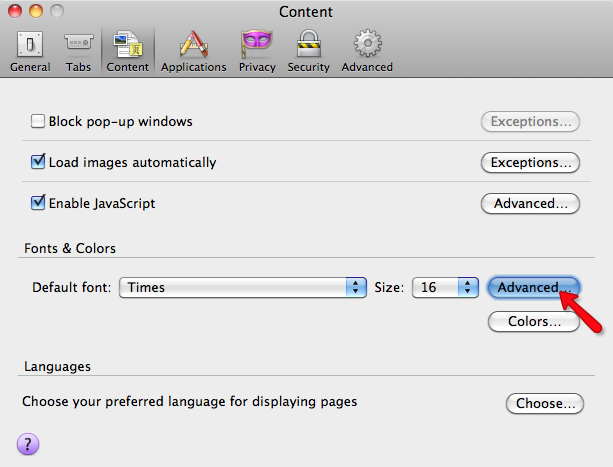
Open Firefox > Preferences, and click "Content". Click the Advanced button as shown:
Uncheck "Allow pages to choose their own fonts instead of my selections above."
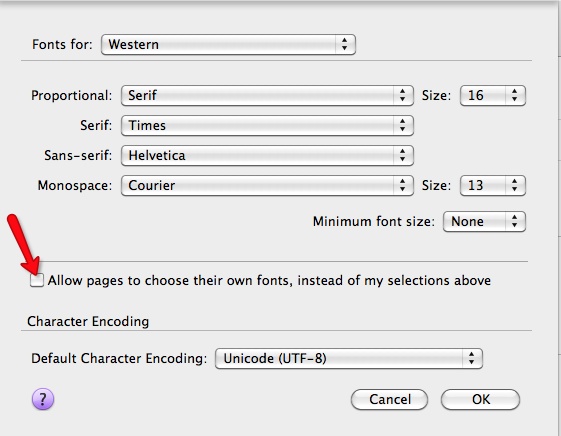
Then restart Firefox.
Thanks to Richard A Milewski for the answer.
March 13, 2010
Speed up Mail.app
Mail.app has been misbehaving lately on my iMac. It seems to be slowing down in general. I see way too much of the spinning beachball, so I've been trying all sorts of fixes, most of which don't seem to help.
However, this Applescript by Sebastian Morsch actually seemed to speed Mail up. It performs a "vacuum subjects" command on the Mail.app database. It's worth a try if you are having problems with slowdowns in Mail.