July 30, 2007
Speed control widgets for Captivate
These 2 widgets allow your users to alter the speed (in frames per second) of the Captivate presentation they are viewing. To use them, go to the first slide you want the widget to appear on, select Insert: Animation and set the animation Options:Timing to Display for rest of project, and No transition. When you publish, make sure to copy the animation .swf file to the folder containing your published files, since Captivate will not do this for you.
The first one is a slider which goes from 0-130 fps. Download file
The second is a set of buttons which increment and decrement the speed in units of ten fps, down to zero, with no ceiling. Download file
The slider is based on Slider bar smart clip by Patrick Mineault"
Both files contain frames-per-second indicators, but you can hide them. Both widgets can be reskinned: I have included the source flash files in the zip archives.
July 24, 2007
z-index problem in IE
In IE 6, the border of a block element will cover up a contained item which should appear on top of it, even if the z-index of the contained item is set higher than the container.
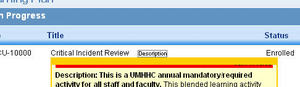
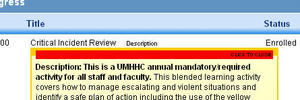
In the example below, the yellow div with the thick top border is styled "position:relative".
An "a" tag (shown with a red background to make it easy to visualize) contained within the div is styled "display:block" to completely fill the area of the top border.
In the first image, the "a" tag is covered up by the yellow border in IE6. No positioning is explicity specified for the a tag.
In the second image, I've specified "position:relative" for the "a" tag as well as for the yellow container div, and the border no longer covers the contained "a" element.
For more information, see Bitten by the IE z-index bug
July 23, 2007
PhpSuexec and Movabletype
Recently, my webhost enabled phpsuexec on the server, and several of the web applications on my site stopped working. Movabletype began rebuilding pages with the wrong permissions, so browsing an affected page would generate a 500 error.
The way to fix this problem is to add
DBUmask 0022

HTMLUmask 0022

UploadUmask 0022

DirUmask 0022
to your mt-config.cgi file
More information on this is available at:
July 21, 2007
Fixing "Too many redirects" error in MediaWiki
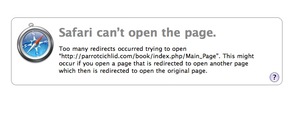
I run a wiki for my ParrotCichlid.com fish fancier's site, based on "MediaWiki." It had been running fine, except for an increasing problem with spam, but one day it simply stopped working. Browsing to the site would result in the following error message:
Too many redirects occurred trying to open "http://parrotcichlid.com/book/index.php/Main_Page". This might occur if you open a page that is redirected to open another page which then is redirected to open the original page.
I checked the database thoroughly to determine if I had made any recent revisions that might have redirected one page to another, but it did not appear to be the case. I even restored the database to a backup from several months ago, and it did not help matters. The .htaccess files all appeared to be untouched.
I found that URL's of the type:
http://parrotcichlid.com/book/index.php/some_title
always resulted in the error. However using the long form,
http://parrotichlid.com/book/index.php?title=some_title
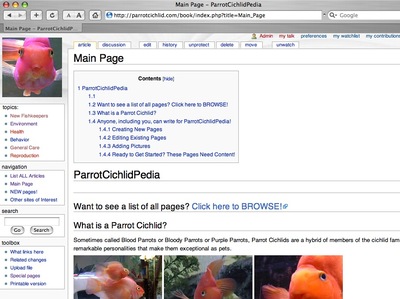
worked fine. I found that in localsettings.php, you can choose whether to use the ugly URLs or the pretty ones. Setting them to pretty now results in the redirect error on my site.

Setting them to "ugly" works fine.
I can only assume that some change was made to the apache settings by my webhost which affected this type of redirect.
Update: It turned out this was caused by the webhost enabling PhpSuexec on the server. Additional information on this is here:
July 18, 2007
Using trace function to print out all properties of an object in Flash
The trace() function in flash is used much like alert() in Javascript. You can use it to print the contents of a variable or the result of an expression.
For example
var theNumber = 2
trace("theNumber= "+ theNumber)
output: theNumber=2
Even more useful is the ability to print out ALL PROPERTIES of a clip, when you aren't sure what is there.
this.createTextField("someClip", this.getNextHighestDepth(), 0, 0, 100, 22);

for (var i in someClip) {

trace("someClip."+i+" = "+someClip[i]);

}
This can be used recursively to find the properties of one clip, then one of its children, etc.
I find this useful to determine the correct path to a target property when I am not sure which of the children of the current clip is the one that contains the target. If you aren't sure what properties or methods are associated with an object, this will display them.
July 14, 2007
Resolving Error code 0xE8000025 when activating iPhone
When I hooked up my iPhone to iTunes the first time, I got "Can't connect to iTunes" with an error code of 0xE8000025.
After a quick browse of the forums and web, I tried several things, but I am not sure which is ultimately responsible for fixing the error and allowing the iPhone to hook up and activate:
1. I had been too lazy at first to swap out the old iPod cable with the new iPhone cable, figuring it was the same thing. It turns out to be slightly different, but I am not sure how different. I put the new cable in its place.
2. Delete the itunes preferences from the user>library>preferences. Thanks to psychotwo for that one.
3. Restarted the iPhone and the computer.
A big NO thanks to apple's knowledgebase which had only This article on the issue when it occurs on a PC, but nothing for Mac.
July 13, 2007
iPhone review
I've been using a Blackberry 8700c through Cingular for a couple of years now, and I really like being able to check all my email accounts on it and using the google apps wherever I happen to be. Typing on it is pretty easy. However there were many reasons I was looking for a replacement.
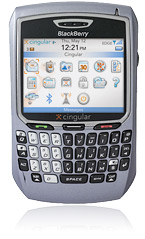
- Email is merely forwarded, so you aren't dealing with the actual imap server you use when at home or work. So junk mail rules aren't followed, any deletions or drafts are not seen by your other mail clients, etc. You used to be able to set up filters on the blackberry web client, but they removed that feature last year.
- Both Cingular and Blackberry browsers are SLOOOOW, and lack support for many standard web features. For example, having multiple pages open at one time, standard style sheets, increasing text size etc. are not supported.
- The screen is too small!
- The phone is too heavy for what it does.
- No camera
- No music - I have to carry an iPod also
- There are some aspects of the keyboard that are too difficult if you don't use them constantly:
- When dialing a new number, the qwerty keyboard puts the digits in an unusual configuration, so it is harder to dial until you memorize the layout.
- I never became great at finding symbols
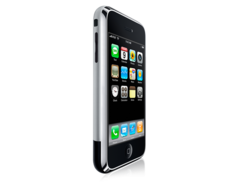
So the other day I went to the local AT&T store to look at the iPhone. I wasn't impressed by the staff's knowledge of the new gadget and they didn't have one in stock, but they did let me try the sample. That was enough to sell me on it, and I purchased it. I was told it would take 5-6 weeks to arrive, so I was prepared for a long wait. Surprisingly, it showed up not two days later!
So far, I am so floored by it, that even if it were to break tomorrow, I would still say it is a complete technological triumph.
Input
First and foremost there is the multi-touch screen. The screen understands gestures. It knows the difference between a stroke or "flick" of the fingers, a squeeze, a tap and a double tap.
The fact that there are no physical keys to feel while you are typing, has proven to be much less of an issue because of the visual feedback the keyboard gives you when you hit a key. You know right away what key it thinks you are on.
It also offers guesses as to what you are typing, which seem to be improving the more it is used. To accept a guess and move straight on to the next word you merely hit the space key.
Wide Screen
The wide screen is such a relief! When surfing the web or viewing videos or scanning for songs, if you turn the phone to either side, the screen layout changes to horizontal, and you see MORE. Text and images become larger, and there is more real estate for everything. This is important when typing or selecting because even the smallest fingers need some room to hit their mark.
For some reason the email client does not rotate, which is odd, since it would benefit from the wide screen also.
"Real" Web browsing
Web pages look pretty much like the real thing. Not every plugin is supported - for example, you cannot play amazon sound samples in realmedia or windows media formats yet, but I imagine someone will come up with a solution for that. And the browser is fast! Not as fast as a desktop browser, but about 10 times faster than the Blackberry. What makes it even better is that you can have multiple pages open, so while one is loading you can be looking at another.
Support for tired eyes!
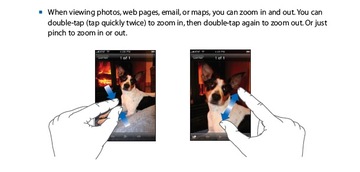
Most images and text screens will respond to a double tap by zooming in or out, depending on their current state. So tiny type on those styled web pages is readable. And there is room to see a whole zoomed-in column.
Camera
The camera utilizes the wide screen viewport - it seems huge compared to the LCD screen on my little camera. You don't have zoom and focus controls, nor flash, but the images are very good anyway. And you can look at them more quickly than you can on a normal camera. It is very fast to switch back and forth between reviewing images and shooting. Need I mention that it syncs with iPhoto, so while you are updating your contacts and charging, whatever images you have shot are automatically backed up as well.
iPod
I have had an iPod for many years - it's an older model which supports photos but not video. I held off getting the video model, because I couldn't figure out what good it was with the small screen. That problem has been completely solved. The new iPhone plays music, lets you riffle through your album covers and podcasts, and it plays video beautifully. The video controls are well behaved, hiding when you flick them out of the way.
In general, the iPhone is an improvement over the Blackberry and every other smartphone I've seen so far, by an order of magnitude.
But I also want...
Almost immediately you start wondering about new features.
Why isn't there a google search immediately available from the home screen? Currently you have to click to Safari then click the bottom of the location bar to get to it.How do I remove items on the Home screen I don't want to use? How do I add items I do want to use? (I have seen a third party app for this, but haven't had a chance to try it yet).
I want to be able to browse the iTunes store and download new music from my phone!
Why can't I play some of the podcast video formats?
I want infinite zoom on every screen, so that if text is extremely small, I can still read it comfortably. [UPDATE: This was a case of "READ THE MANUAL"! The way to zoom in on any part of any screen is to use the "pinch" technique described in the graphic below.
Every screen should be able to rotate to a horizontal mode.
It would be useful to have wireless keyboard support.
And the biggest issue for me so far is the lack of search in Mail, Contacts, Calendar, etc. Search, plus dynamic filtering would be even better!
Fortunately there seems to be a lot of support for development of new applications, so we can probably expect new features and improvements to come rapidly.
July 1, 2007
Using dynamic text to toggle a play/pause button
I've been building a simple flash video player based on the one here and had the idea to use dynamic text to easily toggle the play button between the play and pause states. The Webdings font character for the play state is "4" and for the pause state is ";"
To avoid problems with fonts not displaying on some machines, click the "Embed" button on the text properties panel when creating the dynamic text, and embed the numerals.
The line of script that does the toggling is:
play_btn.play_symbol_txt.text = (isPaused ? "4" : ";");
which means "if isPaused is true, set the text property of the dynamicText "play_symbol_txt" within the "play_btn" movieclip to 4 ("play"). Else, set it to ";" ("pause").
Click here to see the demo of the play/pause button
The complete function that assigns the correct action to the button is:
play_btn.onRelease = pause_btn.onRelease = function(){

	ns.pause();

	isPaused = !isPaused;

	play_btn.play_symbol_txt.text = (isPaused ? "4" : ";");

}
The basic syntax to reach the text property of a piece of dynamic text is:
_root.myClip_mc.dynamicText_text.text