April 29, 2007
dotProject Recipe: colorize Project rows by Project Status
On the main Project page, we changed the meaning of the background color of each project row to reflect the project status.

To make this change, in System Admin: System Lookup Values: ProjectStatusColor add the correct hex color values for each status

Click to enlarge
In each idx page (vw_idx_active.php, ivw_dx_proposed, etc.) search for "GLOBAL" and add in $project_status_color, since you need to work with those values.
<?php /* PROJECTS $Id: vw_idx_proposed.php,v 1.22.6.1 2005/09/12 11:45:38 pedroix Exp $ */
GLOBAL $AppUI, $projects, $project_priority, $company_id, $pstatus, $project_types, $currentTabId, $currentTabName; $project_priority_color; $project_status_color;$project_contacts;$contact_first_name;$contact_last_name; $project_type;$IDprojects;
Define a new variable, $projectStatusColor, to be whatever the current value of ProjectStatusColor is.
$projectPriority = dPgetSysVal( 'ProjectPriority' );
$projectPriorityColor = dPgetSysVal( 'ProjectPriorityColor' );
$projectType = dPgetSysVal('ProjectType');
$projectStatusColor = dPgetSysVal( 'ProjectStatusColor' );</b> // added definition here
In each of the vw_idx_ ... files where you want the colors to show up, add the background-color code to each td of the project listing rows:
$s .= $CR . '<td align="center" style="background-color:'.$projectStatusColor[$row["project_status"]].'">'. ($start_date ? $start_date->format( $df ) : '-') .'</td>';

$s .= $CR . '<td nowrap="nowrap" style="background-color:'.$projectStatusColor[$row["project_status"]].'">' . htmlspecialchars( $row["user_username"], ENT_QUOTES ) . '</td>'
dotProject Recipe: changing the tab names and content

The Projects page comes with a set of tabs, based on a combination of the project status fields and whether or not a project is active or archived, and includes a Gannt chart tab.
We changed the values used for Project Status to
0|Not Defined 2|Pending Content 3|In Progress 4|In Review 5|Complete
(to do this use: System Admin: System Lookup Values:click edit icon next to ProjectStatus)
Of course we wanted the tabs on the Project page to reflect these new status categories, but simply changing these values is not enough to change the content of the tabs. To do that, you will need to make the following changes:
In modules/projects/index.php
search for the line "$titleBlock->show();" and add the new tab names to the list as shown.
$titleBlock->show();$project_types = dPgetSysVal("ProjectStatus");
$active = 0;
$complete = 0;
$pending = 0; //added new
$review = 0; //added new
$archive = 0;
$proposed = 0;
Search for
"if (is_array($projects)) {
foreach ($projects as $p)"
and add in the conditions that will determine whether an individual project shows up under a given tab:
if (is_array($projects)) {
        foreach ($projects as $p)
        {
               if ($p['project_active'] > 0 && $p['project_status'] == 3)
                        ++$active;
               else if ($p['project_active'] > 0 && $p['project_status'] == 5)
                        ++$complete;
		 else if ($p['project_active'] > 0 && $p['project_status'] == 4) //added
                        ++$review;
		 else if ($p['project_active'] > 0 && $p['project_status'] == 2)  //added
                        ++$pending;

               else if ($p['project_active'] < 1)
                        ++$archive;
               else
                        ++$proposed;
        }
}
Search for "$fixed_project_type_file = array("
and add in the names of the tabs you are adding or changing, and the files they reference (e.g. "vw_idx_in_review")
$fixed_project_type_file = array(

        $AppUI->_('In Progress', UI_OUTPUT_RAW) . ' (' . $active . ')' => "vw_idx_active",

        $AppUI->_('Complete', UI_OUTPUT_RAW) . ' (' . $complete . ')'    => "vw_idx_complete",

        $AppUI->_('Archived', UI_OUTPUT_RAW) . ' (' . $archive . ')'    => "vw_idx_archived",

	$AppUI->_('In Review', UI_OUTPUT_RAW) . ' (' . $review . ')'    => "vw_idx_in_review",  // added

	$AppUI->_('Pending Content', UI_OUTPUT_RAW) . ' (' . $pending . ')' => "vw_idx_pending_content");

		//added
You may want to change the default view. To do this, search for
"* Now, we will figure out which vw_idx file are available
* for each project type using the $fixed_project_type_file array
*/
$project_type_file = array();
"
and change file referenced by the "else" statement to whatever you want.
/** * Now, we will figure out which vw_idx file are available * for each project type using the $fixed_project_type_file array */ $project_type_file = array();foreach($project_types as $project_type){
$project_type = trim($project_type);
if(isset($fixed_project_type_file[$project_type])){
$project_file_type[$project_type] = $fixed_project_type_file[$project_type];
} else { // if there is no fixed vw_idx file, we will use vw_idx_proposed
//$project_file_type[$project_type] = "vw_idx_proposed";
$project_file_type[$project_type] = "vw_idx_active"; // changed default view to in-progress
}
}
Mac OS X: Open a selected folder in a new window in the Finder
Because I am constantly forgetting this Finder shortcut, here it is:
To open a folder in a new window, use "Command - double click" on the folder.
April 27, 2007
Randomizing Captivate Quizzes
Captivate quizzes are easy to create, but they lack some often-requested features. Even using version 2, it is difficult, if not impossible, to randomize questions within Captivate. The following method will alter the html wrapper generated when you publish a Captivate project so that it chooses from a bank of alternate Captivate SWF files when the page opens.
Download example HTML wrapper file
When you publish to Flash (SWF) in Captivate, Captivate creates an HTML wrapper which contains the SWF file in an object tag. (Usually titled "ProjectTitle.htm") There is a variable, "strURLFile ," which determines which Captivate file is launched. In the unaltered file, this variable is set to the project title you set when you published.
To randomize the quizzes, you need to replace this hard-coded value with a function. So, around line 8 of the HTML file, insert the following lines:
	//********begin randomization function
	       	 var strURLFile
			function chooseSwf() {
			var number = 0;
			var swf = new Array()
	//********add your alternate SWF file names into this array
			swf[number++] = "TestQuiz01.swf"
			swf[number++] = "TestQuiz02.swf"
			swf[number++] = "TestQuiz03.swf"
			swf[number++] = "TestQuiz04.swf"
	//****** end of array
			var increment = Math.floor(Math.random() * number);
			strURLFile= swf[increment];
			return strURLFile;
			}
           strURLFile = chooseSwf();
 //********end randomization function
Be sure to add all the SWF names into the array where indicated.
Around line 25, be sure to comment out the original variable definition:
// var strURLFile = "TestQuiz03.swf"; // Name of the flash file
That is all you have to do. Of course, the more alternate SWF's you create, the less likely someone will see the same one twice in a row. Create several alternate versions, output them all in the same format, and drop the alternate SWF's into the same folder as the custom HTML wrapper and the first SWF.
April 10, 2007
Download my flame file for Apophysis
Here are my flame settings for Apophysis, the fractal flame editor for Windows. These are the result of a lot of experimenting and tinkering. Feel free to use them as the basis for your own artwork.
Many, but not all, of the images shown here are included.

Download them here
See larger sample images here
April 6, 2007
Display:block causes Safari and Firefox to hide list bullets
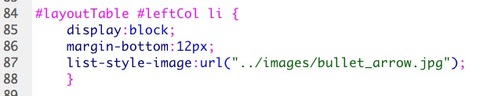
If you style an li tag as "display:block" IE 6 and 7 will display the list bullets, whether they are standard markers or images, but Firefox and Safari will not.
Here is an example of the way the list items should look:
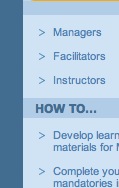
The CSS "display" property is set to "list-item" (it could also be left out, since it is the default).

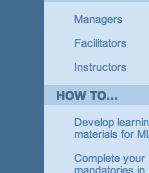
If the display property is changed to block, the list bullets no longer show in Safari or Firefox. However IE 6 and 7 display them.
April 5, 2007
Disappearing background in Safari when "top" is used in CSS background positioning
In setting up some sliding door tabs, I found there are situations when Safari will not show the background of an element if the background positioning is set to "top".
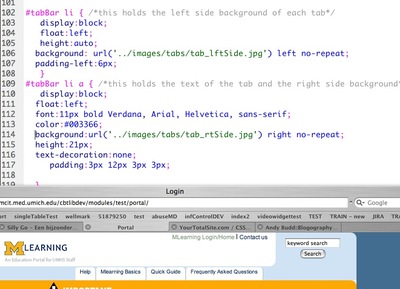
This example shows how it SHOULD look. There are rounded corner backgrounds in each tab. Not that the background styles for the #tabBar li a and #tabBar li elements does not include "top".
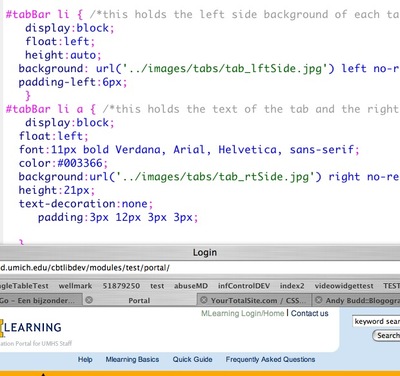
This example shows how it looks in Safari 2.0.4 when "top" is added to the background styles. The background vanishes. This does not happen in IE or Firefox.