March 31, 2007
Starting out with Terragen: sky doesn't render
My first attempts with Terragen convinced me it was an easy way to experiment with landscapes, with an intuitive interface, and quick results. However after the first few tries, once I started experimenting with atmosphere settings, the sky disappeared. I thought at first I had set the camera too low, or perhaps inside or touching some piece of the terrain, but it turned out to be the size and distance of the sky.
The settings for sky size and altitude are under "cloudscape" and under "atmosphere" are half-height settings for haze, atmospheric blue, and light decay.
March 30, 2007
A cross-browser keypress detection javascript
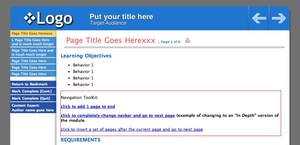
We have learning modules that have a lot of pages, and it occurred to me it would be easier on people's hands if they could simply use the right and left arrow keys to navigate through the module.
After a day of great frustration, I realized that it's nearly hopeless. Not only do all the browsers report different keycodes for the right and left arrow keys, but Firefox and Safari report both of them as "0" which makes it impossible to distinguish between them.
But I found that if the "4" and "6" keys on the number keypad are used instead, browsers are consistent. So the the following code is based on
How to cancel a keystroke before it is displayed in a text input box in NS6 by Loofa Sponge and Jim Fuqua. and uses the "4" and "6" keys to turn pages.
I've commented out all the keypress events I don't need in my script, but left them in in case you need to use them in yours. The final "if" statement contains functions called "PreviousPage()" and "NextPage()" which are specific to my own application. You can replace them with whatever function you want to occur onKeypress.
self.focus();
document.onkeypress = function (evt) {
  var r = '';
  if (document.all) {
   // r += event.ctrlKey ? 'Ctrl-' : '';
   // r += event.altKey ? 'Alt-' : '';
   // r += event.shiftKey ? 'Shift-' : '';
    r += event.keyCode;
  }
  else if (document.getElementById) {
   // r += evt.Left ? 'left-' : ''; //left and right arrow keys produce different results on every browser - and can't be distinguished accurately.
    //r += evt.ctrlKey ? 'Ctrl-' : '';
   // r += evt.altKey ? 'Alt-' : '';
  // r += evt.shiftKey ? 'Shift-' : '';
     r += evt.charCode;
  }
  else if (document.layers) {
   // r += evt.modifiers & Event.CONTROL_MASK ? 'Ctrl-' : '';
   // r += evt.modifiers & Event.ALT_MASK ? 'Alt-' : '';
  //  r += evt.modifiers & Event.SHIFT_MASK ? 'Shift-' : '';
    r += evt.which;
  }
// alert(r);
if (r==52){PreviousPage();}   //replace my PreviousPage() function with your own function
else if (r==54){NextPage();} //replace my NextPage() function with your own function

  return true;

}
IPod: "Disc cannot be written to" message AGAIN
Well, I am just about fed up with this iPod! The "Disc cannot be written to" message is back again, and I can't sync or copy ANYTHING to it, no matter what method or format I use. On any computer! This is getting a little tiresome. Time to write Apple service again.
Their page on the topic is not terribly helpful, since it suggests the issue is my other USB and firewire items. It would be odd this is true on 4 computers, both windows and mac. If so, I can't be unplugging my firewire drives and USB tablet, etc. every time I want to sync up the iPod. Touchy little thing!
Update! I found this page on Apple's support site which among many other items has this comment:
Conflict with third-party hardwareThird-party USB or FireWire devices may also interfer with iTunes' ability to communicate with your iPod. Remove all USB and FireWire devices except the keyboard and mouse before reconnecting your iPod to the computer.
Bad hardware
Hardware failure or non-compliant hardware can cause these errors. This could be an issue with iPod hardware or with the cable or dock you're using, but more often it's an issue with the USB or FireWire card or interface in your computer. Some USB and FireWire interfaces just don't work very well. If you isolate the issue to the USB or FireWire interface in your computer, you may want to try a different port, get the computer serviced, or replace the card or interface with a better one.
After reading that, I took the iPod home again, disconnected all non-standard USB items - I have a Wacom tablet, printer, etc. hooked up - and put the iPod back in. Presto, it completely worked. I have tablets on all my computers, so perhaps they interfere in some way. Or who knows?
OS X 10.4.9 Cron+Firewire = cpu pegged at 100%
Late last night I tried to do some work on my G5 iMac. It has a large external firewire drive attached. Everything was slow, and the CPU was pegged at 100%. The firewire drive was making continual noises, and when I looked in the hierarchical view in Activity monitor, it showed Perl, associated with Cron, taking up most of the CPU.
I assume this was some nightly cleanup task going on, but it has never been this disruptive. I unmounted the drive, and the symptoms disappeared. Only difference has been the recent upgrade to Tiger 10.4.9.
March 26, 2007
CSS expression crashes IE6
Since IE 6 does not have a "min-width" ccss attribute, I sometimes emulate it, using CSS expressions. For example:
width:expression(document.body.clientWidth <750? "750px" : "98%");
english translation:
width = (if browser window width is less than 750 pixels, set element width to 750 pixels, else set it to 98%)
This usually works fine, but I had one case where it would load the page fine, then crash if the window were resized.
I found out it was because if IE6 is in standards mode, you have to factor in the total width of your margins, padding, and borders to use an expression that tests for width. Otherwise the expression can enter an infinite loop.
A complete discussion of this issue is here:
Tom-Lee.blogspot.com
In the article a complex and no doubt highly precise answer to the issue is given: a very long javascript expression.
I found though that you can also resolve the issue by simply making the width you are testing for slightly larger than the minimum width you are trying to set:
See Paul Haine's post for more information.
The expression that was crashing was:
width:expression(document.body.clientWidth <750? "750px" : "98%");
And the one that worked was:
width:expression(document.body.clientWidth <755? "750px" : "98%");
March 25, 2007
Create a search form or quick report in asp
The example code below shows how to set up a form using Dreamweaver and ASP that queries a database based on the value of one or more form fields.
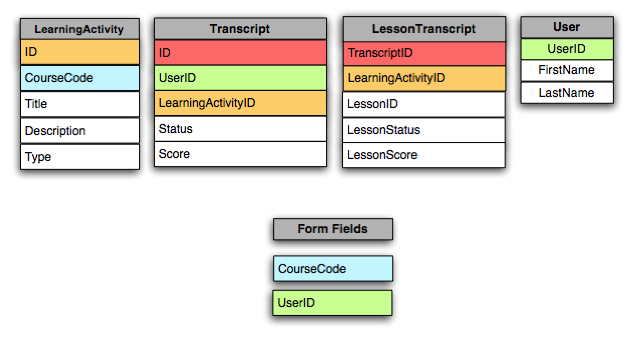
We have a database containing the transcripts of the results of courses taken in our online learning management system. Each online SCORM course has several sections or lessons. This form checks the status and score on each individual lesson, given the user's id and the course code.
The tables and fields involved are:
- Create a new ASP/VB script site in Dreamweaver. Follow the steps in setting up a testing server and database connection to your database.
- Create a form with the appropriate fields needed to fill in the parameters to run your query. (See "form1" in the example"). Name each field as shown in the example.
- Replace the query "Recordset1_cmd.CommandText" with your own query. Replace all mentions of my field names with your own, throughout the script.
- In the area "div id="results", create your own HTML results, using appropriate fields from the tables in your query.
<%@LANGUAGE="VBSCRIPT"%> <!--#include file="../../../Connections/yourdatabase.asp" --> <% 'table scormmoduletranscript contains scores and statuses for each individual module ("SCOs") in a scorm course. 'table 'define a variable to use in the query Dim Recordset1__courseCode 'if something is typed into the form field "courseCode" then set the variable Recordset1__courseCode to that value If (Request.Form("courseCode") <> "") Then Recordset1__courseCode = Request.Form("courseCode") End If 'define another variable to use in the query Dim Recordset1__userid If (Request.Form("userid") <> "") Then Recordset1__userid = Request.Form("user") End If %> <% Dim Recordset1 Dim Recordset1_cmd Dim Recordset1_numRows 'define Recordset1_cmd as an ADODB command 'The ADO Command object is used to execute a single query against a database. The query can perform actions like creating, adding, retrieving, deleting or updating records. Set Recordset1_cmd = Server.CreateObject ("ADODB.Command") Recordset1_cmd.ActiveConnection = MM_lmsp_STRING 'text of the SQL query Recordset1_cmd.CommandText = "SELECT * FROM LESSONTRANSCRIPT WHERE TRANSCRIPTID IN (select ID from TRANSCRIPT where USERID IN (SELECT USERID from USERS WHERE USERID = '" & Recordset1__userid & "') AND LEARNINGACTIVITYID IN (SELECT ID from LEARNINGACTIVITY where CODE LIKE '%" & Recordset1__courseCode & "%'))"
Recordset1_cmd.Prepared = true 'execute the ADODB command Set Recordset1 = Recordset1_cmd.Execute
%>
<!DOCTYPE html PUBLIC "-//W3C//DTD XHTML 1.0 Transitional//EN" "http://www.w3.org/TR/xhtml1/DTD/xhtml1-transitional.dtd"> <html xmlns="http://www.w3.org/1999/xhtml"> <head> <meta http-equiv="Content-Type" content="text/html; charset=ISO-8859-1" /> <title>Untitled Document</title> <style> #results td { border-bottom:1px solid #CCC; padding-left:12px; font:12px Arial, Helvetica, sans-serif; height:18px; } </style> </head>
<body> <p> </p> <p>This page will find the individual SCORM module transcript rows for a particular user and SCORM course that you specify. </p> <p>Enter a course code (note: use ALL CAPS for the letters) and 8-digit user id:</p> <form id="form1" name="form1" method="post" action="aiccTranscript.asp?mode=s" > <label>User ID (example: 58461328 ) <input name="userid" type="text" id="userid" value="" /> <br /> <br /> Course code (examples: HIST-20003 or HIST or 20003) <input name="courseCode" type="text" id="courseCode" value="" /> </label> <input type="submit" name="Submit" value="Submit" /> </form> <p> <div id="results" style="display:block;border:1px solid #000;width:500px;height:auto"> <table cellpadding=0 cellspacing="0" id="results"> <tr> <td><b>transcript id</b></td><td><b>learningactivity id</b></td><td><b>SCORM module (SCO)</b></td><td><b>score</b></td><td><b>learning status</b></td>
</tr> <tr>
<%
if request.querystring("mode")="s" then while not recordset1.eof response.write ("<td>" & recordset1("transcriptid") & "</td>") response.write ("<td>" & recordset1("learningactivityid") & "</td>") response.write ("<td>" & recordset1("userid") & "</td>") response.write ("<td>" & recordset1("score") & "</td>") response.write ("<td>" & recordset1("lessonstatus") & "</td></tr>")
recordset1.movenext wend
end if%>
</table> </div> </body> </html> <% Recordset1.Close() Set Recordset1 = Nothing %>
Posted by ellen at 12:22 PM
March 19, 2007
dotProject Recipe: add a "Complete this task" checkbox to todo list

To allow one-click completion of a task, we added a checkbox to each row of the task "to-do" lists in dotProject.
Usually I try to borrow functions from other places in the application and adapt them to the new location. In this case the completion function was borrowed from the "progress" drop-down menu, on the add-edit Task screen.
The check box submits the same values as if 100% were selected from the drop-down menu.
In modules/tasks/tasks.class.php, search for the first row of the task listing table
$s = "\n"\n\t<tr style='".$style."' id='taskRow'">"
This is the area where the HTML for the task list table is generated. Find the spot in the list of table cells where you want to insert the checkbox, and add:
$s .= "\n\t<td align=\"center\" width=\"15\">";


$s .= "<form name='taskCompleteForm".$a['task_id']."'  action='?m=tasks&a=view' method='post'>";


$s .= "<input name='dosql' type='hidden' value='do_task_aed' />";


$s .= "<input type = 'hidden'  name='task_id' value='".$a['task_id']."'>";


$s .= "<input type = 'hidden'  name='task_percent_complete' value='100'>";


$s .= "<input type='checkbox' name='completeIt' onclick='document.taskCompleteForm".$a['task_id'].".submit();'>";


$s .= intval( $a["task_percent_complete"] ).'%';


$s .= "</form>";
March 12, 2007
Easy way to escape text using Dreamweaver
Do you ever need to escape HTML in your blog posts, so that it will not execute as code? I've been using Accessify.com's quick escape tool, but realized that there was another tool even closer at hand: Dreamweaver!
If you paste code into Dreamweaver's Design view, then open Code view, it will be escaped automatically, ready for you to copy and paste into your blog or whatever.
March 11, 2007
Implementing search using indexing services and asp
I wanted to add a search function to the learning modules housed in our learning management system. These modules are of several types, most are HTML/javascript-based modules, but there are also flash, pdf, and MS producer ones as well. Many of them are meant to be viewed while under SCORM control, so it is important that the search feature not interfere with SCORM communication by allowing the user to navigating away from the current module or by removing the surrounding frameset.
When under SCORM control, the script must be able to detect which module is current, and search only within that directory. When not under SCORM control, the user can have the option of searching all content on the server.
It is also important to be able to hold obsolete or private items out of the search.
I used this excellent article by Chris Maunder as a basis for the project:
Adding a search facility to your website
When I first set up indexing, I assumed the best way to set up the catalog was to make a catalog that would search only the items I wanted searched, as detailed in the article. So besides the 2 standard catalogs that indexing services creates, "System" and "Web", I created a new one. Unfortunately I found that I had better luck simply using the "web" catalog and restricting my query to find what I needed. I am still not sure what I did wrong, but I could never get the new catalog to function properly.
Setting up the query
I wanted to exclude any javascript, css or includes files from the search. Also, Dreamweaver generates "notes" folders which had to be excluded, and we use folders called "z_old" to contain backups of obsolete versions of modules. (the "z" is to keep them at the bottom in alphabetical listings) . The search also had to be limited to files with the extensions .htm, .html, .doc, .pdf, or .swf.
Based on these requirements our query reads:
strQuery = "((NOT #vpath *\_notes*) AND (NOT #vpath *\js*) AND (NOT #vpath *\css*) AND " &_Search for a complete phrase
"(NOT #vpath *\z_old*) AND (NOT #vpath *\includes*) AND (NOT #vpath *\prototypes*))" &_
" AND ((#filename *.htm) OR (#filename *.swf) OR (#filename *.html) OR (#filename *doc))" &_
" AND (" & target & ")"
To change the above query to find only the entire phrase, change the last line of the query from
" AND (" & target & ")"
to:
" AND (@contents " & target & ")"Restricting the search to the current module's folder
The function "util.AddScopeToQuery" will limit the results to items found within whatever scope you define. So I wrote a little function to look at the current URL of the learning module and split off the last directory, and add that to a common path. Since I want only the files within This will work as long as the modules are at the same depth, which they are in our case.
dim str0, folderarray, lastone, thisfolder
str0 = request.ServerVariables("url")
folderarray=Split(str0, "/")
lastone = UBound(folderarray)-2
thisfolder = folderarray(lastone)
Using a virtual directoryThe biggest challenge was the fact that our learning modules are on a server which is accessed solely through a virtual directory on the learning management server. In other words, if the LMS server domain is: http://lmsdomain.com, the learning modules are accessed by "http://lmsdomain.com/content," even though they are actually on another server, and in another domain.
It turns out that in this configuration, the catalog and indexing services must reside on the main server with the domain, not the server whose domain is being masked by use of the virtual directory. So I turned on indexing services on the learning management server. Conveniently, when you create a virtual directory on IIS, it automatically adds that directory's content to the indexing services Web catalog.
The AddScopeToQuery path needed to be set up using the virtual directory path to the content, not the actual filesystem path.
util.AddScopeToQuery ixQuery, Server.MapPath("/content/modules/"& thisfolder), "deep" "thisfolder" is the variable created with the string functions shown above. Document titles suddenly increase in importance
We have not been very careful about titling each and every HTML page, but it is now worth it to go back and do that for all of our modules. It makes a huge difference in the usability of the results.
The final script is shown below, and is included in each module.<% option explicit
' Search scripts
'Modified from a script written by ' C Maunder (cmaunder@mail.com)
' www.codeproject.com
%><html><head><title>Search This Learning Module</title>
<style>
body, td {
font:normal 11px Arial, Helvetica, sans-serif;
}a.resultTitle:link, a.resultTitle a.resultTitle:visited {font:16px;color:blue;}
</style>
</head><body><%
'/////////////////////////////////////////////////////////////////////////////////
'// Initialisation' Declare variables.
'Response.Write Request.ServerVariables("PATH_TRANSLATED")
dim target, firstRow, rowCount
' Get the request parameters.
target = Request("target") ' The search request
firstRow = Request("fr") ' First row of results to display
rowCount = Request("rc") ' Record Count - number of rows to show
' Set default values if none found
if firstRow = "" or not IsNumeric(firstRow) Then
firstRow = 1
else
firstRow = CInt(firstRow)
End If
if rowCount = "" or not IsNumeric(rowCount) Then
rowCount = 50
else
rowCount = CInt(rowCount)
End IfDim ScriptName, ServerName
ScriptName = Request.ServerVariables("SCRIPT_NAME")
ServerName = Request.ServerVariables("SERVER_NAME")' Construct base URL for navigation buttons
dim URL
URL = ScriptName & "?target=" & Server.URLEncode(target)
URL = URL & "&rc=" & Server.URLEncode(rowCount)'/////////////////////////////////////////////////////////////////////////////////
'// The search form%>
<form name="searchForm" action="<%=ScriptName%>" onsubmit="javascript:window.resizeTo(800,600);">
<b>Search this learning module:</b>
<INPUT TYPE="text" NAME="target" SIZE="45" MAXLENGTH="100" VALUE="<%=target%>">
<INPUT TYPE="submit" VALUE=" Search ">
<br>
</form><hr size=2 noshade><br>
<%'response.write(Server.MapPath("."))
dim str0, str1, str2, str3, str4, folderarray, lastone, thisfolder
str0 = request.ServerVariables("url")
folderarray=Split(str0, "/")
lastone = UBound(folderarray)-2
thisfolder = folderarray(lastone)
'response.write(folderarray(lastone))%>
<%
DoSearch target'/////////////////////////////////////////////////////////////////////////////////
'// Perform the searchsub DoSearch(target)
on error resume next
if target <> "" thendim strQuery
 strQuery = "((NOT #vpath *\_notes*) AND (NOT #vpath *\js*) AND (NOT #vpath *\css*) AND " &_

  "(NOT #vpath *\z_old*) AND (NOT #vpath *\includes*) AND (NOT #vpath *\prototypes*))" &_

  " AND  ((#filename *.htm) OR (#filename *.swf) OR (#filename *.html) OR (#filename *doc))" &_

  " AND (" & target & ")"
dim strQuerytest
' Create the Index Server query object, setting the columns, the sort to
' descending, the max records to 300, and the query string to the given
' target. Note that the query string specifies, with NOT and the
' #vpath operators, that any files in the *\_vti path, should be excluded.
' (_vti* directories contain FrontPage Extension files, and we don't want
' users browsing them.)
dim ixQuery ' Index Server query object.
set ixQuery = Server.CreateObject("ixsso.Query")
if (Err.description <> "") Then
Response.Write ("<p><b>Query object Error: " & Err.description & ".</b></p>" & vbCRLF)
Exit sub
end if
ixQuery.Columns = "doctitle, path, vpath, filename, size, write, characterization, rank"
ixQuery.SortBy = "rank[d], doctitle"
ixQuery.MaxRecords = 300
ixQuery.Query = strQueryLocal
ixQuery.Catalog = "Web" ' Specify you catalog here if it's not the default' Create a search utility object to allow us to specify the search type as 'deep',
' meaning it will search recursively down through the directories
dim util
set util = Server.CreateObject("ixsso.Util")
util.AddScopeToQuery ixQuery, Server.MapPath("/content/modules/"& thisfolder), "deep"
if (Err.description <> "") Then
Response.Write ("<p><b>Search Utility Error: " & Err.description & ".</b></p>" & vbCRLF)
Exit sub
end if
' Run the query (i.e. create the recordset).
dim queryRS ' Query recordset.
set queryRS = ixQuery.CreateRecordSet("nonsequential")' Check the query result. If it timed out or return no records, then show
' an appropriate message. Otherwise, show the hits.
if (Err.description <> "") Then
Response.Write ("<p><b>Search Recordset Error: " & Err.description & ".</b></p>" & vbCRLF)
Exit sub
Else
if queryRS is Nothing Then
Response.Write ("<p>Query returned no matches.</p>" & vbCRLF)
elseif (ixQuery.QueryTimedOut) then
Response.Write ("<p><b>Error: " & timedOut_Text & ".</b></p>" & vbCRLF)
elseif (queryRS.EOF or queryRS.BOF or queryRS.RecordCount <= 0) then
Response.Write ("<p>No matches found.</p>" & vbCRLF)
else
queryRS.PageSize = rowCount
call showHits(queryRS)
if (Err.number <> 0) Then
Response.Write ("<p><b>Record Display Error: " & Err.description & ".</b></p>" & vbCRLF)
End If
end if
End If
' Clean up
queryRS.close
set queryRS = nothing
set ixQuery = nothing
set util = nothing
End if
end Sub' showHits(): Displays the query hits from the query recordset.
'
sub showHits(queryRS)
dim recordNumber ' record number
dim docTitle ' document title
dim endRow ' last row being displayed
dim prevRow ' row to display for "prev" option
dim nextRow ' row to display for "next" option
dim lastRow ' row to display for "last" option
dim remainder ' remainder (used to determine if last page is short)
dim recordCount ' numner of records returned
recordCount = queryRS.RecordCount
if firstRow > recordCount Then firstRow = 1
endRow = firstRow + RowCount-1 ' Last row on page to show
if endRow > recordCount Then endRow = recordCount
prevRow = firstRow - RowCount ' Start of previous page's rows
if PrevRow < 1 Then PrevRow = 1
nextRow = endRow + 1 ' Start of next pages rows. May be > CommentCount
remainder = recordCount mod RowCount
if remainder = 0 Then
lastRow = recordCount - RowCount + 1
else
lastRow = recordCount - remainder + 1
End If
if lastRow < 1 Then lastRow = 1 ' Start of last pages rows' Go to the top of the record set, then move forward to the record that
' corresponds to the first row.
queryRS.MoveFirst()if (firstRow > 1) then
queryRS.Move(CInt(firstRow) - 1)
end if' Show the summary info.: # of records found and range showing.
%>
<table border=0>
<tr><td colspan=2><table border=0 width=100%><tr>
<td nowrap><b>Found:</b> <%=queryRS.RecordCount%> <b>Showing:</b> <%=firstRow%> - <%=endRow%></td>
<td align=right nowrap>
<% if firstRow <> "1" Then %>
<a href="<%=URL&"&fr=1"%>">First</a> |
<% Else %>
First |
<% End If %>
<% if firstRow <> "1" Then %>
<a href="<%=URL&"&fr="&prevRow%>">Prev</a> |
<% Else %>
Prev |
<% End If %>
<% if firstRow + RowCount <= recordCount Then %>
<a href="<%=URL&"&fr="&nextRow%>">Next</a> |
<% Else %>
Next |
<% End If %>
<% if firstRow + RowCount <= recordCount Then %>
<a href="<%=URL&"&fr="&lastRow%>">Last</a>
<% Else %>
Last
<% End If %>
</td></tr>
</table></td></tr><tr><td colspan=2> </td></tr>
<%
' Show the records.recordNumber = firstRow
do while ((not queryRS.EOF) and (recordNumber <= endRow))
' Get the document title. If it's blank, set it to "Untitled".
docTitle = queryRS("doctitle")if docTitle = "" then docTitle = "Untitled"
' Show the record #, link to the document, URL, and characterization.
Response.Write "<tr >"
Response.Write "<td valign=top style='border-top:1px solid #CCC;padding:6px;'>" & recordNumber & ".</td>"
Response.Write "<td valign=top style='border-top:1px solid #CCC;padding-bottom:12px;'>"
Response.Write "<a href='" & queryRS("vpath") & "' target='myStage' class='resultTitle'>" & ">" & docTitle &"</a><br>"
Response.Write Server.HTMLEncode(queryRS("characterization"))
Response.Write "<p><span style='font:9px Courier, Verdana, Arial, Helvetica, sans-serif'><b>URL: </b> <a href='" & queryRS("vpath") & "' target='myStage'>http://" & ServerName & queryRS("vpath") & "</a></span></p>"
Response.Write "</td>"
Response.Write "</tr>"recordNumber = recordNumber + 1
queryRS.MoveNext()
loop' Display the navigation links.
%>
<tr><td colspan=2> </td></tr><tr><td colspan=2 align=center>
<% if firstRow <> "1" Then %>
<a href="<%=URL&"&fr=1"%>">First</a> |
<% Else %>
First |
<% End If %>
<% if firstRow <> "1" Then %>
<a href="<%=URL&"&fr="&prevRow%>">Prev</a> |
<% Else %>
Prev |
<% End If %>
<% if firstRow + RowCount <= recordCount Then %>
<a href="<%=URL&"&fr="&nextRow%>">Next</a> |
<% Else %>
Next |
<% End If %>
<% if firstRow + RowCount <= recordCount Then %>
<a href="<%=URL&"&fr="&lastRow%>">Last</a>
<% Else %>
Last
<% End If %>
</td></tr></table>
<% end sub %>
</body>
</html>