 |
| Example of a finished module based on the template. Note: the look of the navigation column has changed slightly since this article was first written. |
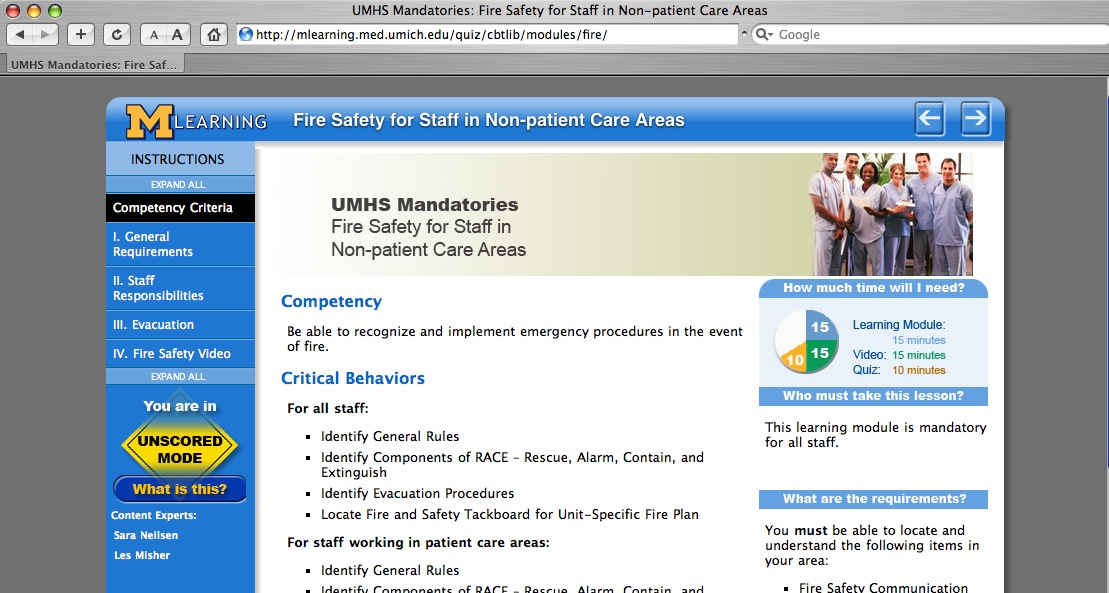 |
| Another example of a module based on the template. The navigation bar shown here is the latest version. |
>> View a live demo of the template here >> Download the template files here
Features
This HTML template is designed to simplify the creation of SCORM-compatible learning modules. Some of the features include:
- SCORM compatibility: The required elearning SCORM communication functions are built in so the module can communicate its status to a Learning Management System (LMS).
- Can be used with no LMS as well -scorm-function buttons are hidden when module is viewed outside an LMS
- Requires no server-side languages or processing other than Server Side Includes (SSI's). Javascript/DHTML-based. NOTE: Your server must be set up to process the extension ".htm" for SSI's. This can usually be done even if you are on a hosted server, using the control panel. Instructions for making this change on an IIS server are here.
- Bookmarking: last page browsed is automatically stored in the LMS.
- Dynamic navigation: The navigation, page titles, and pages left to view are all automatically generated.
- Built-in styles: The look and feel has been set up so all you need to do is add text and use styles like H1, H2, and a few classes. The styles adapt to different browsers and screen sizes.
- Pretty printing: Navbar disappears when printing, creating a cleaner, more efficient printout.
- Branching capability:
- replace entire page list with a single click to create another version of the module.
- Insert pages with a single click.
- Add pages to end of current page list.
- Deep linking. Although the module is structured as a frameset by necessity, linking directly to specific pages is possible, now both when under scorm control and when used outside the LMS.< /li>
- Versions: easily make multiple versions from the same set of pages.
- Embedded Questionmark Perception Quizzes (requires Questionmark server and an LMS)
- Soon to come: Embedded Captivate Quizzes
Getting Started
Module-specific folders
You will notice that several of the directories have two versions - a "global" version and a "local" version ("css-local," "includes-local," and "js-local"). There is also a "media" folder which is where you will put your module-specific images. This is because on our production server, we use a version control process where the global folders are replaced with symlinks, so that changes to the template will immediately update all templates on the server. Changes made in the local folders will affect that module only.
The files in the "local" directories and files can be modified as needed, and can be used to override many global settings. For example, the CSS styles can be changed by adding styles to the file "css-local/userStyles.css."

Outline your module's structure
Start by outlining your entire learning module. List all the pages you want to include. You can change the list after you get started, so don't worry if there are items you aren't sure about.The module structure can be very simple as shown in Example 1, or more structured with chapters and sections as shown in Example 2. This template can accommodate up to four levels if needed.
Example 1The outline below shows a flat structure, with all pages on the same hierarchical level. In this example, all items would be on level 1. |
This is the navbar that results from this outline. Links to all items are visible at all times. |
|
 |

Example 2This outline shows a more complex hierarchical structure with chapters and sub-sections. In this example, the Competency Criteria page and the Chapter Introductions would be on level 1 and the Subtopics would all be on level 2. |
This is the navbar that results from this outline. Only the top level (level1) items are visible at all times. Other levels are visible when browsing any page in the respective chapter. NOTE: each page on level 1 should have a different chapter number. |
|
 |

 Comments
 Post a comment