October 24, 2006
Psychedelic Video Display: embedded Windows Media Player
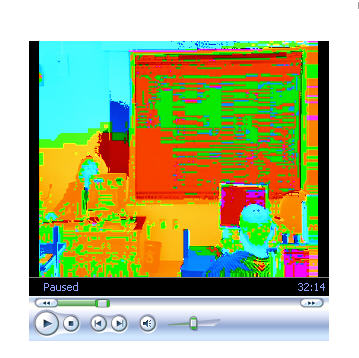
A new computer running Windows XP was having a problem displaying some video produced a few years ago with Windows Media 7 format. The video image resembled a 60's flashback, as shown below:
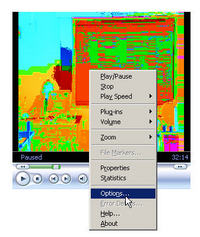
To get normal video again, right click in the middle of the video player. Select Options from the popup menu.
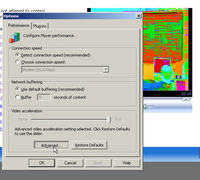
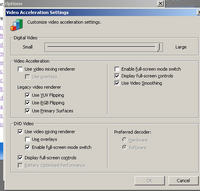
Click Advanced:
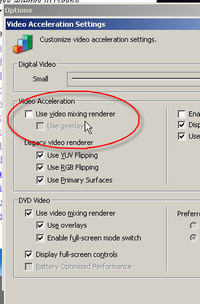
Deselect Video Mixing Rendering
And the correct video image should return:
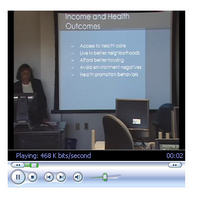
Of course to shoot a screenshot of the working video, I had to deselect Overlays because the video normally displays in another "overlay" over the screen, which is not captured in screenshots.
October 13, 2006
Can't paste text into a file within Dreamweaver 8
Working on a Dreamweaver site the other day, I tried to paste text from an email into the page. When CTR-V didn't work, I tried the menu - but the paste option was grayed out.
It turns out this has something to do with having moved the site files panel over to the left monitor. (Yet another glitch in Window's implementation of a two monitor setup.)
The solution is:
Close DW8 and Navigate as follows:
- Documents and settings
- Administrator or whatever your user account name is
- Application data
- Macromedia
- DW8
- rename the "configuration" folder
Restart Dreamweaver 8 - the problem should be gone.
Dreamweaver recreates the configuration folder which apparently fixes the problem. You can then delete the renamed folder.
Thanks to Pat Jones and Phil on the Macromedia Dreamweaver Google Group for the answer to this bug.
Other people have suggested the following:
- Change the panels layout.
- Delete this folder:
Configuration\Menus\Cache
http://forums.adobe.com/message/8934#8934 - Quit Dreamweaver, then delete this file -
C:\Documents and Settings\\Application Data\Macromedia\Dreamweaver
8\Configuration\WinFileCache-*.dat
(these folders are normally hidden - you may have to use Explorer > Tools >
Folder Options to unhide them)
Restart DW.
http://forums.adobe.com/message/21981#21981 - And see this Adobe Technote:
http://kb2.adobe.com/cps/550/dd550772.htmlPosted by ellen at 5:07 PM
October 8, 2006
Various solutions to the IE Active X issue
For your convenience, all in one place, here is a list of sites that offer solutions to the new Internet Explorer ActiveX behavior. Includes links to Microsoft, Apple, Real Networks and Adobe pages on the issue.
Patent Magic
SWFMagic:
onChange="document.form.submit()" doesn't work
Have you ever used the onChange event to submit a form?
onChange="document.form1.submit();"If you are creating a form that submits as soon as a change is made to any selection, make sure you remove the "submit" button first, or you will get a javascript error similar to:
"document.form1.submit is not a function"
This is because it is confusing the "submit" button object (name="submit") with the function "submit()".
See this test for an example.
Browser treatment of this varies - I haven't tested it thoroughly in all of them.
Also note: radio buttons don't support the onChange event in Safari, so I have used onClick on the radio buttons.
Thanks to Webprodevelopment for the tip
<!DOCTYPE html PUBLIC \"-//W3C//DTD XHTML 1.0 Transitional//EN\" \"http://www.w3.org/TR/xhtml1/DTD/xhtml1-transitional.dtd\">
<html xmlns=\"http://www.w3.org/1999/xhtml\">
<head>
<meta http-equiv=\"Content-Type\" content=\"text/html; charset=ISO-8859-1\" />
<title>onChange test</title>
</head><body>
This form has both a submit button and onChange and onClick events that call the function \"submit()\"
<form name=\"form1\" method=\"get\" action=\"resultPage.htm\" >
<select name=\"select1\" size=\"3\" onChange=\"document.form1.submit();\">
<option value=\"1\" selected=\"selected\" >option 1</option>
<option value=\"2\">option 2</option>
<option value=\"3\">option 3</option>
</select><p>
<label>
<input type=\"radio\" name=\"Radio1\" value=\"radio1\" onChange=\"document.form1.submit();\" />
Radio1</label>
<br />
<label>
<input type=\"radio\" name=\"Radio2\" value=\"radio2\" onClick=\"document.form1.submit();\"/>
Radio2</label>
<p><input type=\"button\" name=\"submit\" value=\"Go\" />
</form>
<hr />
This form has only the onChange and onClick events that call the function \"submit()\"
<form name=\"form2\" method=\"get\" action=\"resultPage.htm\"></p>
<select name=\"select2\" size=\"3\" onChange=\"document.form2.submit();\">
<option value=\"1\" selected=\"selected\" >option 1</option>
<option value=\"2\">option 2</option>
<option value=\"3\">option 3</option>
</select>
<p>
<label >
<input type=\"radio\" name=\"RadioGroup2\" value=\"radio1\" onClick=\"document.form2.submit();\"/>
Radio1</label>
<br />
<label>
<input type=\"radio\" name=\"RadioGroup2\" value=\"radio2\" onClick=\"document.form2.submit();\"/>
Radio2</label>
<br />
</form>
</body>
</html>
October 7, 2006
Slow, jerky playback of iTunes video
After upgrading to iTunes 7, playback of videos purchased from the iTunes store became unwatchably slow and jerky. The video would play for about 1 second, then freeze, then play, then freeze.
The solution was to turn off the Internal microphone in sound control panel under "Input".
Thanks to Wmatthies on the Apple discussion forums for this idea.
October 3, 2006
Working with ODBC databases on a Mac
The ODBC Administrator
If you do much work with databases on a PC you'll be familiar with the ODBC Data Source control panel in Windows. But where is the corresponding control panel on a Mac?It is an application, called "ODBC Administrator," and hidden in the Utilities folder inside the Applications folder.
You will first need to install a driver for whatever database you are trying to access, and those can be purchased from companies like ActualTechnologies
No need to set up a datasource for some applications
If you are simply trying to access the database for development purposes (writing and testing queries, quick reports, etc.), definitely try Aqua Data Studio. It's a free IDE for database developers, with lots of functionality. It is almost as good as Toad on the PC, but considerably cheaper!
Aqua Data Studio does not require you to install drivers or configure the ODBC data sources - all that support is integrated within the application. Version 7 has RDBMS Support: for Oracle - 11g/10g/9i/8i, DB2 iSeries, DB2 LUW - 9/8/7, MS SQL Server - 2005/2000/7/MSDE, Sybase ASE - 15/12.x/11.x, Sybase Anywhere - 10/9/8, Sybase IQ - 12.x, Informix IDS - 11/10/9.x/7.x, PostgreSQL - 8.x/7.x, MySQL - 5/4.x/3.x, Apache Derby 10.x, Generic JDBC Platform, Generic ODBC.