June 22, 2003
Architectural Photoshop Brushes
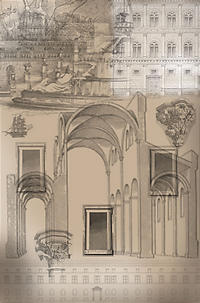
New Photoshop Brushes based on antique architectural engravings. Get 'em right here! The file is zipped, but is still around 2.2MB.
June 20, 2003
Photoshop Battles - Art with attitude
In the increasingly popular "BattleBay" format, multiple opponents create a smooth vertical or horizontal transition from the previous image to their own new one, usually incorporating the web version of graffiti tags (their web name or their site URL) and any appropriate symbolism. It helps to have a very cool name, and a logo so you can be inserted in people's "respect" areas. All the efforts are combined in a single long horizontal or vertical scrolling page.
Artists with confidence in their Photoshop Chops are battling it out all over the web. Photoshop Battles (sometimes called Photoshop Tennis) allow you to smackdown your opponent with nothing more than a Wacom Pen and overwhelming ego. One person creates a file in Photoshop and sends it off to their opponent, who then adds a layer and "improves" the image, usually covering it up almost entirely with their own contribution.
I believe the originators of Photoshop Tennis were Coudal Partners, in their Photoshop Tennis area, and their volleys tend to have a little more humor (not to mention commentary) than many of the BattleBay efforts I've seen so far.
Good places to start: -
Graphic Forums Battle Grid
Designologue.com
Brainpixels Community Battle Arena
Nice BattleBays:
Allstarr
Digitalmind
di.wie:sign
Björgvin Gudmundsson
Photoshop Tennis:
Kjantzen
"Disappearing" Entries in Movable Type
Yesterday I found that all the entries had disappeared off my main moveable type index page. I had recently posted an entry about popup windows, and another about Photoshop brushes, so I knew there should be something in "recent entries."
I spent several hours experimenting with the templates and combing the support forum - finally I realized the answer. I take a long time to write my posts. I rarely finish a post on the same day I start writing it. In fact sometimes it can be a week or more. In "Blog Config:Preferences" there is a setting for the number of days' entries you would like displayed on your index page. It was set at the default, 7, and my last post had been started over 7 days ago. When I reset it to 15, my entries were back! From now on, when I finish an entry that was started several days before, I'll change the date to the day it is actually published.
June 18, 2003
Pop-up Menus Revisited
One of the most popular parts of my site seems to be the collapsible menu shootout - a comparison of various collapsible menu approaches (menus that shift downward to reveal submenus.) At the time I wrote it, I did not bother to address the problem of "popup" or "dropdown" menus (see YSM OB/GYN for an example of a Fireworks generated menu system because I assumed everyone knew how easy they are to make in Macromedia's Fireworks. But I've found that really isn't the case. People aren't generally aware that Fireworks has that capability, nor how to use it if they are.
Fireworks is probably the easiest way to make popup menus. You design them visually: the menus can be positioned by dragging to the right spot. The popup menu editor makes selecting stylistic options simple and you can always get into it in more detail if you care to get into the javascript that is generated. And they integrate nicely with Dreamweaver.
To create a menu in Fireworks, you first have to create slices, which may be why the function is missed sometimes. The slice or "web" layer is where the javascript elements and behaviors reside, not in the graphics layers. Select a slice, click the little registration mark in the center, and select Popup Menu from the - well - popup menu.
The wizard makes it pretty obvious how to add items, and to create a sub-menu, simply select some items and click the tiny "indent" icon at the top of the Content panel.
The only complicated part of all this is how to handle the generated scripts. Fireworks generates one external script, but puts all the site-specific code inside the header of the html page it generates from the graphics.
I usually cut the script for the menus out of the head section of the html page, and save it as a linked external .js page. I also make sure that all the URL's in the menus are absolute - in other words they start with http://....
This is so that you can use a single script to run the navigation for the entire site, and the URLs will work no matter how far down you drill - no matter how many directories in a page is located.
June 10, 2003
Photoshop Brushes based on Ernst Haeckel's engravings

For my first contribution to the Photoshop Brushes community, I made a few high-resolution brushes from some of the more elaborate items in Ernst Haeckel's Kunstformen in Natur. There are only 3 brushes in this first pack, but there will be more!
CLICK HERE TO DOWNLOAD (645.3K)
June 4, 2003
Photoshop Brush Fever!
Photoshop brushes are incredible! I just discovered them and have been playing with them for two days straight.
They're like rubber stamps on steroids. You can control the brush dynamics - the separation of each individual "stamp", the color and brightness "jitter", randomness, edges, etc.
I've found many sites that offer free brush sets, but

Truly-Sarah.com
and

AnnikaVonHoldt.com
are my current favorites. AnnikaVonHoldt's brushes are like instant creativity! You will be creating beautiful and mysterious fantasy images almost automatically.
Update: the Truly-sarah.com site is no longer online, but some of her brushes can be found at trulysarah.deviantart.com
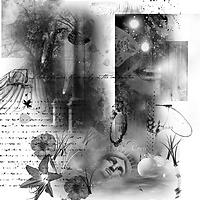
My first attempt using brushes from these sites:
Other Resources
- View my Photoshop Brushes
- DeviantArt.com Photoshop Brushes browser
- Photoshop Brushes.com: downloads, tutorials and galleries
- Social networking for digital artists and traditional artists
- Photoshop Tutorials
- veredgf.fredfarm.com