March 27, 2013
Safari Error: "The website requires a client certificate"
While experimenting with LDAP connections in Safari, errors like this one started popping up:
"The website _____ requires a client certificate"
A dialog would open, listing some old MobileMe certificates. Apparently if any old, expired or corrupt MobileMe certificates are still lodged in the Keychain, you may get this error sometimes. MobileMe has been disabled and signed out on my Mac for years, but the fact that the certs were still there caused the problem.
To fix this:
In the Finder, open a new window, then go to Applications > Utilities >Keychain Access.
Search for MobileMe. Delete all MobileMe certificates.
You may have to restart Safari but I found it simply started working from there.
Wordpress: Notice: has_cap was called with an argument that is deprecated since version 2.0!
I've been experimenting with LDAP and Cosign login plugins for WordPress. Most of them are out of date and are more or less incompatible with WordPress v.3.5. Usually the first error that comes up is
Notice: has_cap was called with an argument that is deprecated since version 2.0!All this means is that instead of using the numerical role identifier argument in a function that adds a menu or submenu, the required capability should be used instead.
For example, in the Simple LDAP Login plugin, the number 10 in a function that creates a settings submenu:
add_options_page("Simple LDAP Login", "Simple LDAP Login", 10, "simple-ldap-login", "simpleldap_menu");needed to be replaced with
add_options_page("Simple LDAP Login", "Simple LDAP Login", create_users, "simple-ldap-login", "simpleldap_menu");within a function that requires administrator or Super Admin privileges to run.
This does mean that you need to figure out what capability the user needs to be allowed to see the menu or submenu in question.
Roles and Capabilities are listed here in the WordPress Codex
Resources
Mandelbulb 3D: enable realtime visual feedback on parameter changes
Something that is not always immediately obvious to new Mandelbulb 3D users is that the 3D navigator window also functions to give realtime visual feedback on the effects of parameter changes.
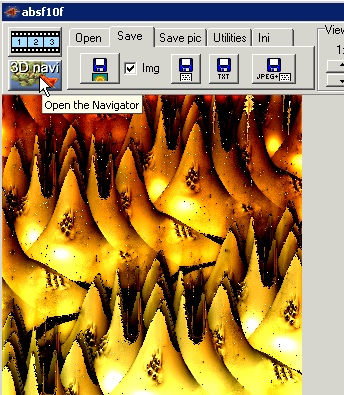
To enable it, click on the 3D navi button. The 3D navigator window will open.
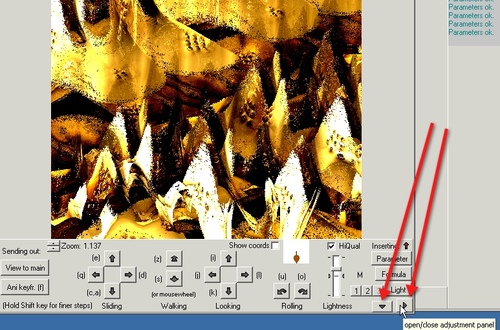
Click both the toggle arrows shown to open the camera and parameter control panels.
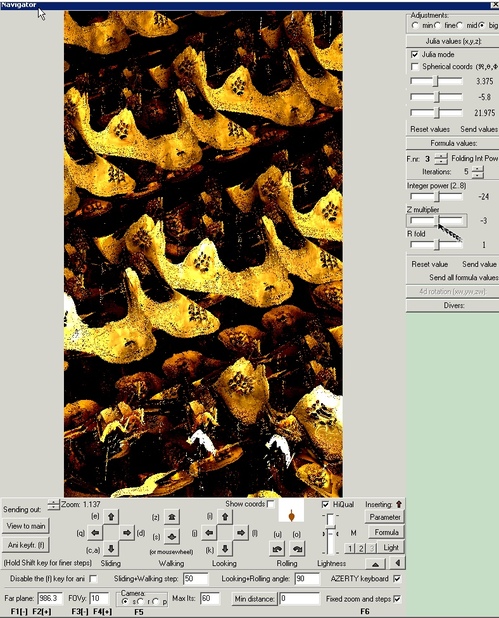
As you change values in either panel, you'll see the effect in the window. It greatly speeds up your work and your learning process, since it's much easier to see the impact of specific changes.
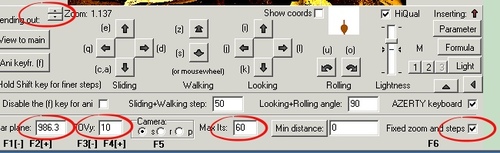
The camera settings allow keyboard navigation through the mandelbulb space. If you find that everything disappears as you move forward, pay particular attention to the Far plane values: it may help to increase the value by a factor of 10 or more
.
Resources
- Get Mandelbulb 3D at Fractal Forums: downloads: Mandelbulb 3d
- Browse all my Mandelbulb 3D parameters and settings
- Hal Tenny's Mandelbulb 3D Tutorial 1
- Hal Tenny's Mandelbulb 3D Tutorial 2
- Hal Tenny's Mandelbulb3D Tutorial 3
March 7, 2013
Mac: The document "filename.pdf" could not be exported as filename.pdf
The error "The document "filename.pdf" could not be exported as filename.pdf" started appearing in Safari on attempting to save PDFs from the browser.
The problem appears to be update-related: apparently a recent Acrobat update left an old file in the plugins directory that needs to be deleted.
To fix, go to:
Macintosh HD/Library/Internet-Plug-Ins/
and drag Adobe PDF Viewer.plugin or any other items that have the letters PDF in the name to the trash.
Quit and restart Safari then test downloading a PDF before emptying the trash.
