November 27, 2012
The Usability of Windows 8
Just finished reading a fairly devastating review of Windows 8 by Jakob Nielsen. I have to wonder if some of the choices they made in designing the interface were forced because of patent considerations, considering all the air has been sucked out of the room in that regard by Apple.
Worth a read, if you are wondering what to expect of a tablet interface that has been shoehorned onto a PC. Perhaps it will make more sense if they start selling 70" touch screen high-performance tablet PCs. We'll all work standing up next to the wall or something, waving our arms. It will be better for our figures, at least.
Windows 8 -- Disappointing Usability for Both Novice and Power Users
--Jakob Nielsen's Alertbox, November 19, 2012 http://www.useit.com/alertbox/windows-8.html
Summary:
Hidden features, reduced discoverability, cognitive overhead from dual environments, and reduced power from a single-window UI and low information density. Too bad.
Some of the highlights:
- Double Desktop = Cognitive Overhead and Added Memory Load
- Lack of Multiple Windows = Memory Overload for Complex Tasks
- Flat Style Reduces Discoverability
- Low Information Density
- Overly Live Tiles Backfire
- Charms Are Hidden Generic Commands
- Error-Prone Gestures
- Windows 8 UX: Weak on Tablets, Terrible for PCs
November 17, 2012
Thoughts on the TinCan API after a week with hands-on.
The Tin Can API (Experience API ) is the next generation evolution of the SCORM elearning standard, but it does far more than simply improve SCORM.Although the immediate benefit for the health care organization I work for will come from the elimination of some of the technical limitations of SCORM, the main point is the thoroughly transformative nature of Tin Can. It will take years to demonstrate how deep the rabbit hole goes. But I can tell you the direction it is heading right now:
We're out of the learning management business and into the big-data business.
The infrastructure for figuring out "what really works" is now here. The infrastructure for relating actions to outcomes is here. Assuming, of course, infinite access to all possible sources of data everywhere, we could now ask questions like:
- "what are the actions of high-performing teams with good patient outcomes"
- "what does competence really mean with respect to this procedure or skill?"
- "what exactly needs to be done to get there? How much practice is necessary?"
- "what performance support methods are actually being used to help people do their jobs?"
- "what are people with X characteristics interested in?"
- "who else might be interested in those same things?"
- "what are people having trouble understanding?"
- "what are some interesting patterns that we never suspected?"
Because there are enormous business, privacy and technical challenges to getting some of the most useful data sources onboard, one of our main missions now is evangelizing and incentivising possible sources to contribute to that data stream.
The enterprise learning management system now becomes something of a sideshow to the main event which is located in that place where people really do most of their learning, i.e. everywhere BUT the LMS. Although I'm sure we'll continue to run an enterprise learning management system for years to come, every part of what we do needs to be re-examined for it's main strength, and we need to ask if those functions ought to be in one system anymore, or would be better delivered by a more modular approach.
In my department's case, the learning management system's main strengths include the ability to push required learning to an incredibly granular audience, using thousands of combinations of attributes, and an instructor-led course registration system. In healthcare, at least, required learning will be part of the landscape for the forseeable future, but exactly how it is delivered and how fast it evolves is about to change.
November 11, 2012
Getting and setting data from Captivate 6 for custom integrations
We use Captivate with our LMS both as standalone SCORM modules that communicate directly with the LMS, and as embedded quizzes inside custom learning modules. Communication of the Captivate score back to the learning module was done using a trick suggested by Adobe's Andrew Chemey which involved redefining the built-in sendMail function Captivate used to send an email report of the quiz results.
Captivate 6 removed the built-in email functions, so we're now using the very powerful Captivate API to do the same thing. The new API is very powerful and makes it much easier to get and set variables from outside the Captivate, using javascript.
Here's how to get started:
1. Set up a quiz in Captivate. The quiz does not need to be set up to do any sort of reporting (SCORM, Adobe Connect, etc.).
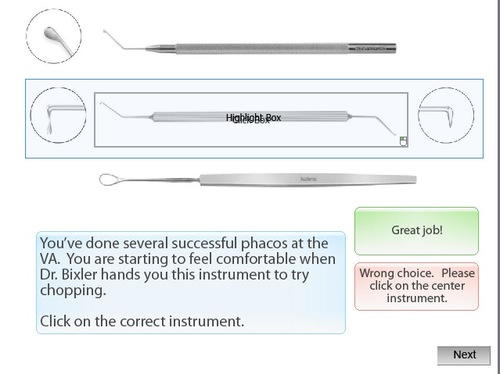
2. Choose a button or event that can be set to execute a javascript. For this example, I use the On Enter event of the slide that follows the score page. This is a good choice, because it is not possible to put scripted buttons on the Score Page.
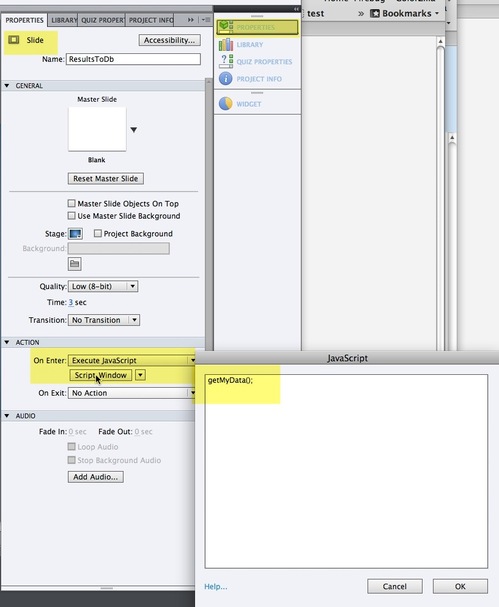
Choose Execute JavaScript from the On Enter menu on the Slide Properties panel.
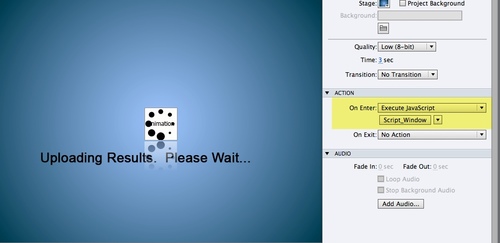
Click Script_Window, and add a javascript function call: getMyData(); ( You can call the function anything you like.)
Publish the Captivate file.
Add a link to jquery to the head of the document, so we can use a shortcut in writing our script.
<script src="//ajax.googleapis.com/ajax/libs/jquery/1.8.2/jquery.min.js"></script>
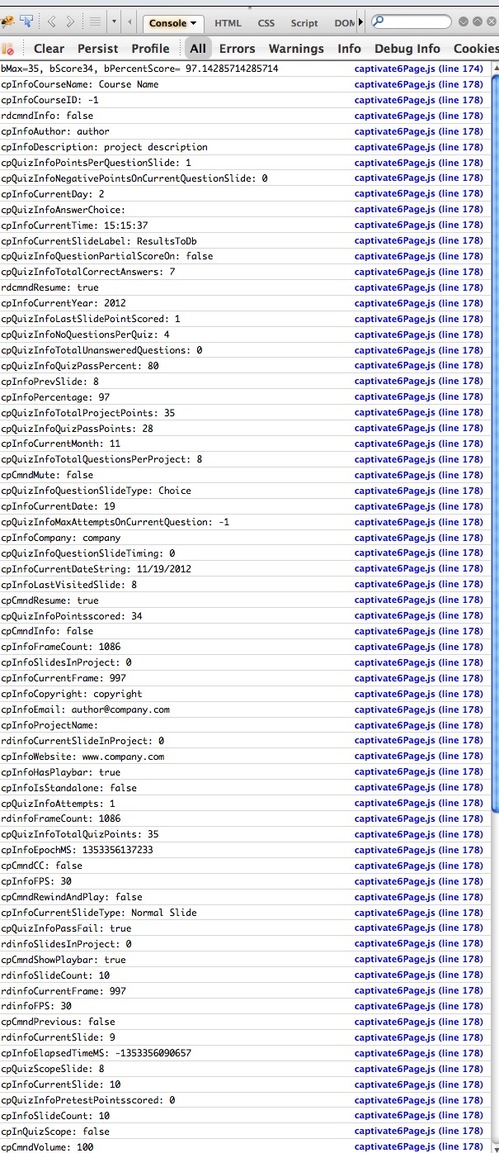
Now we have to define the function we called. Add a script tag to the HTML file that will contain the Captivate quiz and write a function that does whatever you need to have done with the data. In the function below, it first sets the value of some javascript variables, displays them in a firebug console, then it iterates through all properties of the Captivate object and lists them in the console.
<script type="text/javascript">
//for debugging
var testing = true; //turn to true to show debugging information for this script
if (typeof console == "undefined" || typeof console.log == "undefined") var console = { log: function() {} };function getMyData()
{
cp = document.Captivate;
//display some data in the console
var bMax = cp.cpEIGetValue('m_VarHandle.cpQuizInfoTotalQuizPoints');
var bScore = cp.cpEIGetValue('m_VarHandle.cpQuizInfoPointsscored');
var aPercentScore = bMax!=0?bScore/bMax:1;//if max points are zero, then user got 100 no matter what.
var bPercentScore = aPercentScore*100;
if(testing){console.log('bMax='+bMax+', bScore'+bScore+', bPercentScore= '+ bPercentScore );}
//now lets get EVERYTHING and print it out
$.each(cp.cpEIGetValue('m_VarHandle'), function(name, value)
{
if(testing){console.log(name + ": " + value);} //logs value of every single property of the current captivate object (long!)
});
}
</script>
And here's what gets printed in the Firebug console: