October 23, 2012
Javascript: use setTimeout() for detecting whether an object or element exists yet
This is an example of the use of setTimeout() to detect if an element or object exists yet. In Javascript, timing is crucial. If an element hasn't been loaded or rendered on the page yet, you can't do something with it, so it is necessary to test for the existence of items that take a while to load. This script was originally written to check if a lengthy array of objects had loaded yet.
var counter = 0;
functionThatRequiresMyObject()
{
    var myObject = [something that may or may not be defined yet]

      //if myObject doesn't exist yet, and the counter is set at less than 10 times
      if((typeof myObject=="undefined")&&(counter<10))
     {
           //increment the counter
           counter++;
          //wait 1/2 second, then check for myObject again
          setTimeout("functionThatRequiresMyObject();",500);
     }
     else
     {
          //do something with myObject
     }
}
or, similarly:
var counter = 0;
functionThatRequiresMyObject()
{
    //test for object is located elsewhere, perhaps in an init() function.
     if(myObjectIsLoaded ==true)
     {
          //do something with myObject
     }

     else{
	   if(counter<10)
           {
              setTimeout("functionThatRequiresMyObject();",500  );
	   }
	  else
          {
	   //do something with myObject
	  }
	  counter++
  }
Friction
Something I've been thinking a lot about lately, since we have been looking at learning systems, is the idea of friction. My definition of friction is anything that either lowers our expectations of the results we can get from a particular tool or process to the point that we either change our expectations of the results or abandon them altogether.
Examples of friction include: bad usability, frustration, unexpected results, bad user experience, steep learning curves, cognitive overload, lack of critical mass of the right participants, hardware problems (slowness, breakdowns, etc.) - in short just about any sort of obstacle. It is anything that gets in our way enough to make us change what we hope to get out of the process we are engaged in, even if only slightly. Friction plays a part in how we choose to use devices, apps, and services and even what route we choose on the way home.
Friction is what causes us to unconsciously lower our expectations of something because using it simply takes too long, is just a little too frustrating, results in poor output or is physically difficult to use, past the point where it is worth it to get the ideal result.
For example, what kinds of things do you choose to do on a your laptop rather than on your tablet? What do you do on a tablet that you would not do on a smartphone? What do you do with a yellow pad or post-it notes that you couldn't do on any device? And what are you simply not able to do, period?
When I got my original first-generation iPhone, although the web browser was a huge leap from the Blackberry I had been using, it was simply too slow to use for looking things up quickly. As a result I barely used the browser. The next generation iPhone was just fast enough to make the difference between it being worth it to use and not. Now I use it constantly, but I'm sure there are things I still don't do because it is a little slower than it could be. The original phone wasn't useless, but I couldn't use it for the same things. A relatively small speed gain removed the main obstacle.
Similarly people prefer to use a pen and yellow pad to do their thinking, or prefer to use post-it notes or index cards to organize information. The disconnect between what their hands and fingers can do on paper, compared with a keyboard or even with a touch interface, and the rapidity with which they can make changes makes the difference.
The problem of performance support in healthcare jobs is another example: if looking something up requires any interruption in the task at hand, or stopping to log in to a computer or smartphone, it may be enough of an obstacle to make do with simply asking someone or winging it. I've seen systems that require repeated logins where that alone is an insurmountable barrier to the use of the system.
Each device or process has its advantages, but each also has disadvantages that subtly change the kind of communication and the kind of work you can do on them.
When we use certain tools, we make allowances for their failings and decide that we don't need the optimal result - only what we can get. So the output and what we do changes.
We don't really need to get to the best destination badly enough, don't need to communicate fully, don't really need to to find a better solution, at least not enough to get past the friction of whatever process that is available to us. I'm not saying we are being lazy when we give up some expectations: we must constantly make choices about what is worth doing, using our own internal personal calculus. A change in workflow, a change in UI, a change in the intelligence or speed of the device could make a huge change in what we can expect and what we are willing to do.
Friction is also involved with modifying the choices we make with big purchases and investments, because it is difficult and very expensive to figure out what you are really buying. And apparently is almost impossible to answer questions like these accurately:
"What's the true value of those mortgage-backed securities - how risky are they, really?" "What's the real value of a corporation like Autonomy?"
Right now, it is so difficult to get accurate data about these types of purchases in a useful form that even huge corporations can't do it. We are in a situation where the evaluation piece of the system cannot keep up with the marketing end. Imagine if you could reliably determine the value of complex packages with some sort of supercharged Google. How would that change things?
I was also thinking of friction the other day after talking to a friend who is making a big change in her teaching career. She has taught a very complicated, artistic skill set for many years. It requires a lot of detailed manual grading and at this point, she's just plain tired of it.
Perhaps, she could have used an online quizzing application that would grade automatically, but she would have had to substantially change the content and course objectives to fit the existing technology. Perhaps if she had an instructional designer to help, she could have overcome this by building a custom application that would get at the important concepts and give meaningful feedback in all cases. But all this is way too much friction.
A younger instructor might just pragmatically change the course content or change the evaluation process to suit the existing technology, and in fact I'm sure this has already happened somewhere. But what if you could magically teach a system to grade very complex skills like a human?
Friction is one reason why people communicate different types of ideas with different tools, and why the style, format and length of communication, which I think mirrors our quality of thought, have changed over time. When looking at process or tool improvement, we should always keep asking the question: "what's standing in the way of what people REALLY want to do?" But maybe we should also phrase the question, "how is the inherent friction of using the current tool changing how we think and what we are able to communicate?" and is it for the better or worse?
.NET Error: httpRuntime requestValidationMode="2.0"
If you get .NET errors that reference<system.web> <httpRuntime requestValidationMode="2.0" /> <!-- everything else --> </system.web>It means that the application you are trying to run has set the property requestValidationMode to function the way it acted under .NET 2.0, but this directive only makes any sense under .NET 4.0 or greater, and your website is not set up to use .NET 4. You need to run the application in a separate application pool and set it to run under .NET 4.0 (which, of course, needs to be installed before it can be used). To fix it:
- Create a dedicated application pool for the site.
- Assign Application process identity as "Network Services".
- Set .Net Framwework version to: V4.0
- Set managed Pipeline Mode to: Integrated
- Now assign Modify permissions on IUSER and Network services on Httpdocs folder and all child domains.
October 10, 2012
Integrating the Rustici SCORM Engine with our LMS: part 2
<< Back to Part 1, Determining Scope, Course Import
A phased approach was used to integrate our aging LMS and the SCORM Engine. Starting with a "bare-bones integration" we assessed the user workflow and determined next steps.
Course Delivery
When users log in to our LMS, they are presented with a Learning Plan screen which lists required learning and current enrollments.
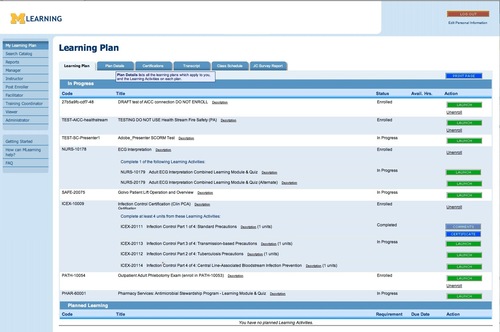
Learning Plan
In general, we knew that the existing Docent course-enrollment and launch workflow was inefficient and frustrating to the user. When there is a choice, we usually have a preference for shorter paths to the user's desired target, and decided to take this opportunity to try to approach a 1-page workflow.
For the "bare-bones" integration phase, the only thing that was changed in the course-delivery workflow was the function of the green Launch button to the right of each course.

The course Launch button enrolls the user and launches the course when they are not already enrolled, or simply launches the course when the user is already enrolled.
In the original Docent workflow, clicking Launch used to open a second page - the "SCO-tree" page - which listed the sections or SCOs of the course, with corresponding Enter the Lesson buttons. We'd always considered that second page to be an unnecessary step, although the information it conveys is useful to the user. Besides adding to page-load time, another drawback of this page was that it was only viewable while the course was in progress. Once the course was completed, only summary course status and score were accessible to the user.
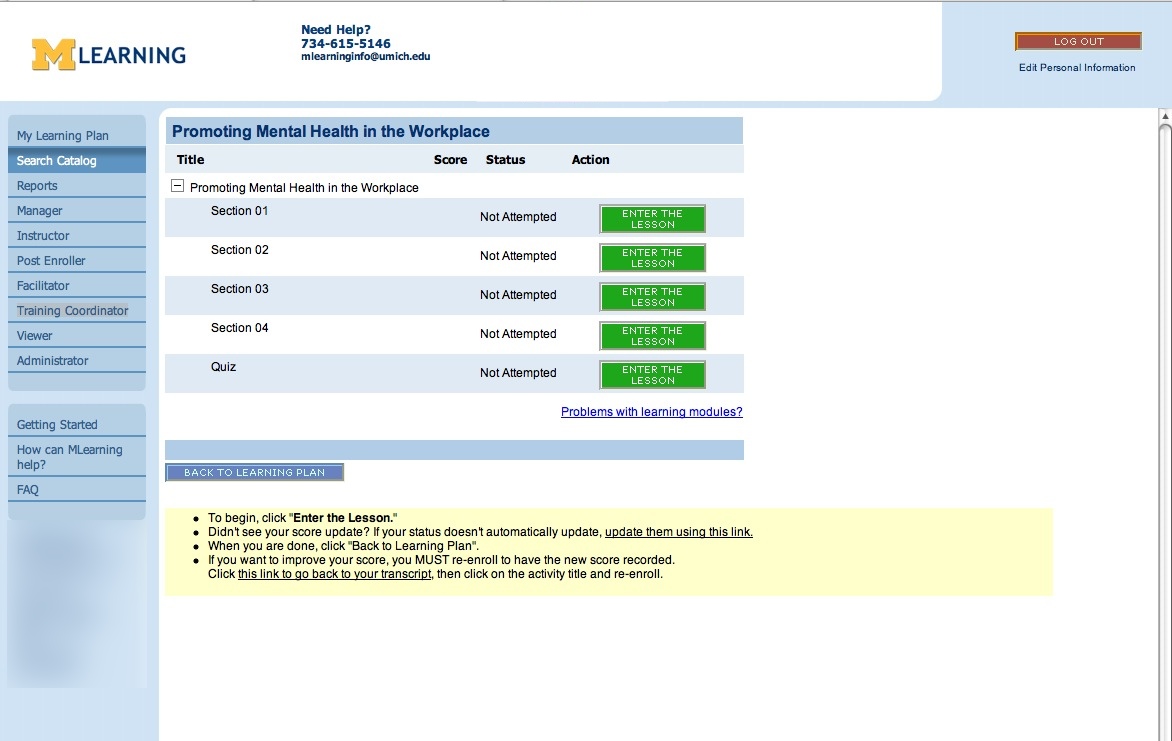
The old SCO-tree page
In the bare-bones integration phase, the Launch buttons on the Learning Plan were altered to open the course window directly, without first navigating to the SCO-tree page, in keeping with our desire to reduce clicks and page-loads as much as possible.
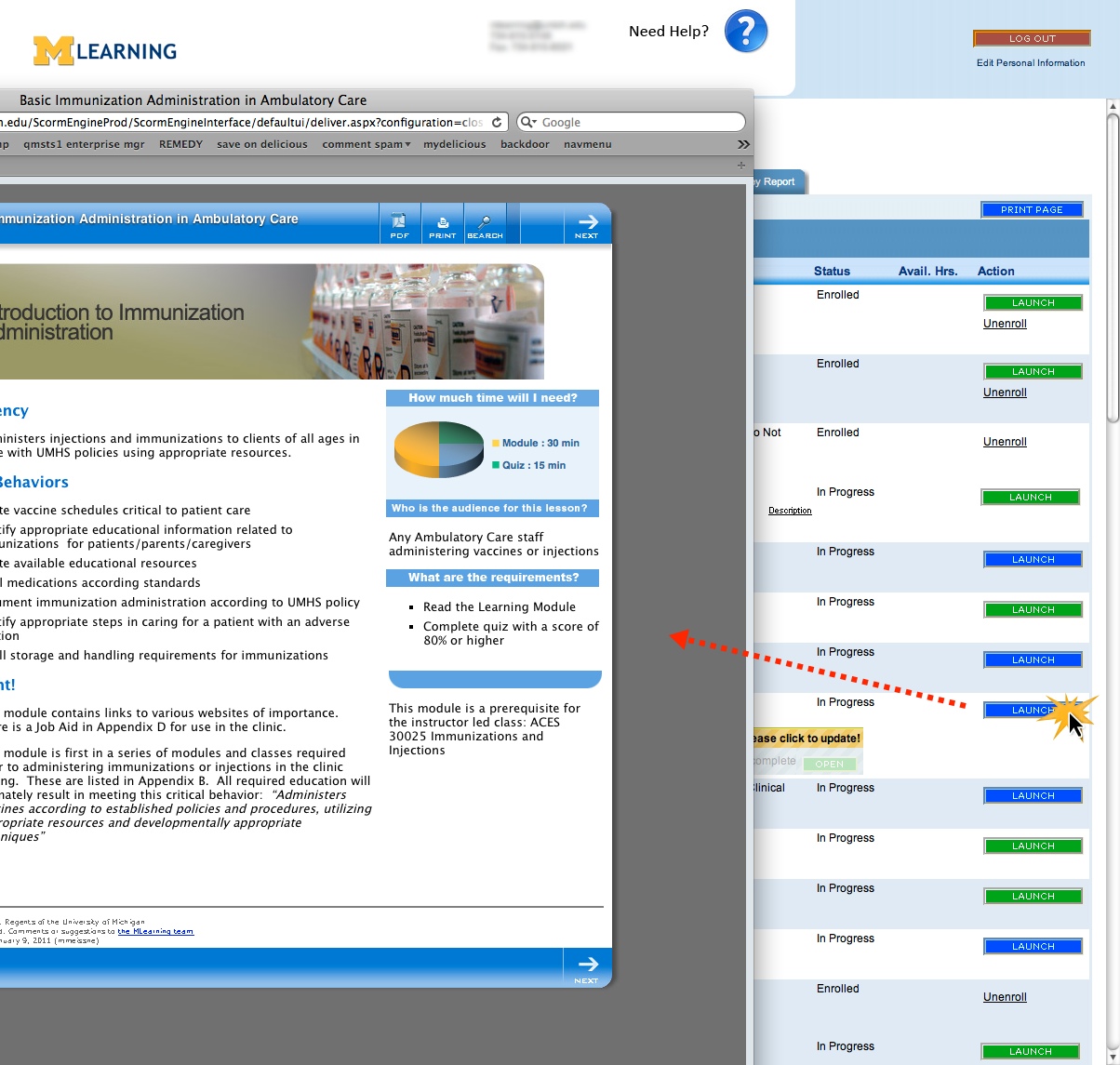
The new Launch button opens the course directly.
Problem area #1: individual SCOs' score and status were missing from the user's view.
When testing the bare-bones workflow, we realized that although launching the course directly from the Learning Plan was quicker, we had lost necessary information about the status and score of each SCO. The Learning Plan does display summary status and score information for each course, but no internal detail.
We considered using the Rustici-provided SCORM-tree navigation to provide some of the missing information. If enabled, a navigation panel displays complete/incomplete status for each SCO. However this feature was rejected as an insufficient solution because it does not display scores, the information is not available once the course is closed, and also because our usability specialists thought it was confusing, redundant and took up too much screen real-estate.
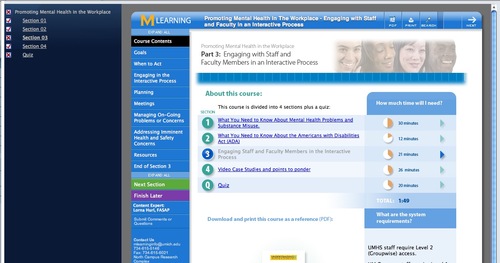
Problem area #2: no way to jump directly into a specific section.
Many of our courses are one-sco courses with detailed Tables of Contents, allowing the user full control over how to navigate the course. But there ARE some multiple-sco courses, and now there was now no way to navigate directly to a specific SCO.
What we did to fix both problems:
We created a "SCORM-Tree" display on the Learning Plan, right under each course title. This displays each SCO in the course, with accompanying score and status and a corresponding "Open" button that jumps the user into that SCO. Although it is possible in SCORM 2004 to force sequential order between SCOs, and thus conflict with providing automatic "Open" buttons to each SCO, we have never used SCORM 2004 on any courses, and are unlikely to do so before migrating to another LMS, if at all, so we did not provide any logic to shut off the "open" buttons for that use case.
Courses which require special sequencing are typically created within a single monolithic SCO in our environment. We decided the benefits of providing this type of display outweighed any possible conflicts with sequenced courses.
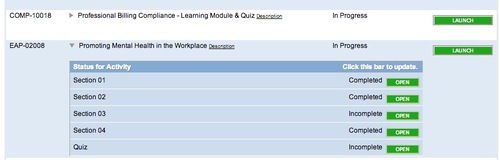
A five-SCO course, with the SCORM-Tree open.
When the Learning plan Loads, all SCORM-Trees are closed, to keep the view as clean as possible.
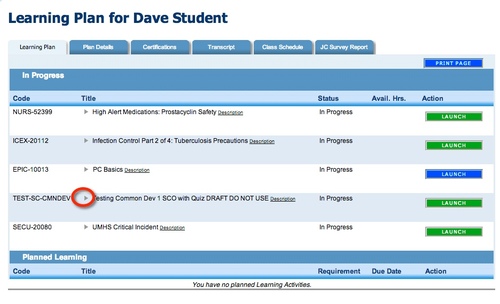
A tiny toggle beside each course opens the SCORM-Tree.
There are two ways to open the SCORM-Tree. The user can open it manually by clicking the little triangles to the left of each course title. The tree also opens automatically when the course is launched. On closing the course window, the data is automatically refreshed via ajax.

The SCORM-Tree display is designed to work whether or not the user notices the little toggle triangles. They were kept small to avoid cluttering up the screen with more controls.
The SCORM-Tree draws its data directly from the SCORM Engine database, so it is always as accurate and up-to-date as possible.
Problem area: SCORM Tree not always updated automatically
The course window "Close" event is not always captured for various reasons, so the SCORM Tree sometimes does not update automatically.
What we did to fix it:
The first step was to provide a fall-back, so the user would be prompted to manually update the SCORM-Tree data.
When the course launches, the SCORM-Tree opens if it is not open already, and shows the message "Statuses shown below may be old. Please click to update!" When the user responds by clicking the yellow bar, the Tree updates via Ajax.

Since the course window opens on top of the Learning Plan window, if the course window is closed correctly, the user will never see this message because it disappears when the course rolls up. But, if the user closes the window too abruptly for the rollup to occur, they will see the "please update" message.
The second step will be to address the root cause of the failure to capture the window close event, and we are currently working on improving reliability and optimizing the steps that happen on return from the course.
Problem area: inconsistent launch behavior between use cases:
Launching a course from the catalog, from the learning plan, when enrolling first, or in already-enrolled courses each behaved slightly differently. We wanted the user not to have to guess or even understand the differences - there should be no thinking involved, and there should be fallbacks whenever user mistakes were possible.
What we did to fix it:
Every possible method of enrolling or launching was tested, and the desired workflow diagrammed, developed and tested again to make sure it was as consistent and streamlined as possible. It turned out to be so intuitive that users needed no instruction on the changes when the SCORM Engine launched.
We did discover usability problems with our courses in the process, which are as important as fixing problems in the LMS, since to the user, they are the same thing.
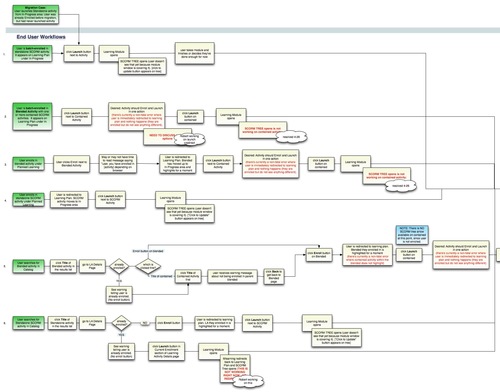
Problem area: Course opens in multiple windows accidentally or intentionally
Users sometimes double-click the Launch button and open two intances of a course, one window right on top of another. To the SCORM Engine, these represent two attempts. If the user completes the course in the top window, it closes, and then they see the other window. When they try to close the second window, it checks to see if the course status is complete or not, then finds that it is NOT, because it is checking a cached copy of the status created when it opened. So it resets the status to "incomplete" and exits with "Suspend".
Under Docent's SCORM control, if users accidentally opened a second window it would not reset, because the course was checking the "real" status in the database.
What we did to fix it: A function was added to the launch button that hides the launch button on the first click, and replaces it with a little "loading" spinner. After a second, the launch button returns, but this prevents double-clicks and so prevents at least some of the causes of double-windows.
It was also determined that if a user opens a course, then right-clicks and opens one of its pages in a new tab, it does not register as a second attempt, and so the statuses are accurate on both pages.
Problem area: Learning modules not entirely conformant to the SCORM standard
Rustici's settings will compensate for nearly any type of course setup, but we found some issues that had to be fixed in the courses. One was that when a scored SCO was closed abruptly before getting to the quiz, it would simply complete. This had never been an issue before, but setting a score of 0 immediately upon course-load fixed it.
Problem area: Learning modules had some Docent-specific code in them
Docent had provided some special javascript extensions to the SCORM standard that allowed the user to jump between SCOS right from buttons inside the course. We used this both for branching and for giving the user more navigational control on a few courses. Another javascript extension allowed the course to check if there were any more SCOs. We had used this to change the options available to the user at the end of the course depending on if the SCO was a middle or the last one.
Both these extensions are non-standard and had to be removed from all courses.
What we did to fix it:
Our courses are all linked to a master template containing the scripts and assets, so we simply removed these functions from the master template.
Problem area: Use of Suspend mode much more important now than under Docent's SCORM control.
Under Docent, simply closing a course without explicitly Completing it would cause it to retain an Incomplete status. Our courses regularly saved Objective and Interaction data, so as long as the course status behaved correctly we didn't worry about using Suspend every time it should have been used. Under the SCORM Engine, an incomplete SCO would often be marked Failed or Completed when closed, if it were not exited correctly with "Suspend."
What we did to fix it: Logic that incorporates the Suspend function where appropriate has been added to all possible ways to exit the course. We added code that auto-generates correctly coded exit or suspend buttons in the course's internal navigation bar, depending on what the overall course structure is, whether the current sco is a middle or last sco, whether the course is scored or not, and what the contents of the next sco are. Functions can be added or changed on the buttons from a single central script.
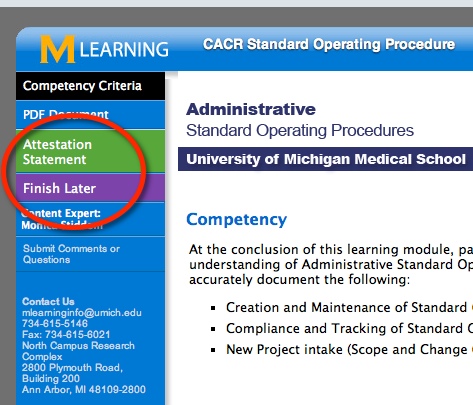
Instructional designers put a code into the config file for each SCO that represents the type of learning module it is, and thus the SCORM buttons that are required, and can optionally override the automatic text for each buttons for custom situations.

Course Rollup and Reporting
Problem area: On completion of the course, Docent had required a "close-the-window" function in the course-exit button because it did not automatically close the course window. Closing the window manually stopped the SCORM Engine from rolling up the course correctly.
What we did to fix it:
Since Docent would never close the course window automatically, we added that step to the buttons that sent SCORM calls to the LMS. But the SCORM Engine must execute a rollup process before the window can be safely closed -then it closes it automatically. To cede control over closing the window to the SCORM Engine, we removed the "window.close()" function from course-exit buttons on the master course template. Some of these buttons were on local files not under master-template control, though, so another function wipes out the old buttons so they can be replaced with correctly written ones.
Problem area: Summary statuses don't match expected results based on SCO statuses.
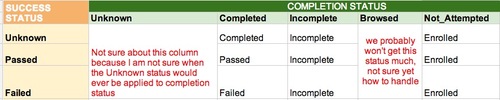
Docent's summary statuses did not always match what we expected given the individual SCO statuses. For example, we would expect the overall status to be "In Progress" as soon as any individual SCO status was set to Incomplete, or left In Progress if a 1-SCO course was Failed. These summary statuses are controlled by the interface between the SCORM Engine and the LMS, and are determined by a combination of the overall completion status and success status for the course, which are controlled by the Rustici settings panel. Some of our initial guesses about the business rules for setting these values in Docent needed to be revised.
We created a matrix of statuses to guide those revisions, and I suspect that we'll be changing some of these again as we discover new special cases.
Problem area: Remote completion data not available to the SCORM Engine, causing conflicts.
There are a few situations where we have devised custom interfaces to complete the course remotely, from the back-end, outside a SCORM session. These interfaces include one that allows a training coordinator to manually complete a SCORM course for the student for whatever reason, and one that allows a remote application to enroll and complete a course.
These have caused various types of conflicts between systems, because the SCORM Engine is not aware of changes on the Docent side, and its data becomes out of sync with the Docent data. Worse, if a user opens a course which has been completed on the Docent side, Rustici is not aware of the completed status, and will "Un-Complete" the course by sending an "Incomplete" through the interface because there are no business rules to prevent that yet.
What we did to fix it:
We're still debating exactly how to handle each of these situations, but I suspect that we will use TinCan for remote completions in the future, and perhaps add a trigger to the Training Coordinator manual course-completer function so that it also updates the SCORM Engine tables. Rustici also suggested adding a "rachet-upward-only" rule to the Interface between systems to prevent overwriting any Docent status with a lower status, which we will probably do.
Problem area: Transcript view of a course was now inconsistent with the one on the Learning Plan.
Once a course was completed, the Docent view of a course on the user's transcript had never included per-SCO statuses and scores, but now that users had the SCORM-Tree on the Learning Plan, we found in testing we wanted to see it on the Transcript page as well.
What we did to fix it:
We added a modified version of the SCORM-Tree to the Transcript page. It shows a "frozen" view of the interior statuses of the course, with no update function and no "Open" buttons.

Problem area: No visual confirmation of course completion
On course completion, the standard Docent behavior was to move the course off the Learning Plan onto the Transcript page. In the basic integration, this would happen without any explanation, so that the user would not necessarily understand why the course had vanished from the Learning Plan, and needed reassurance that the course was indeed complete.
What we did to fix it: At first we considered redirecting the user to the transcript page upon course completion but that did not fit the one-page workflow concept. Instead, when the course window closes, and the SCORM-Tree is automatically updated, if the summary status changes to Completed or Passed, a completion message is displayed that that waits for a user response to move the course off the page.
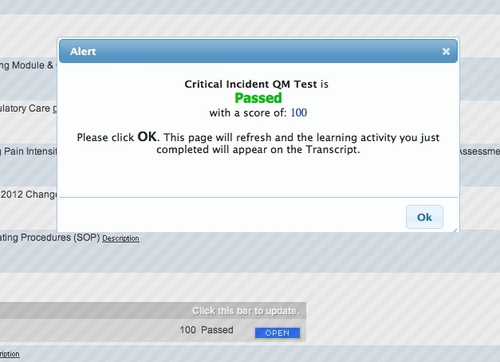
A successful launch:
Despite various challenges, this integration project has completely eliminated java-related problems with launching and tracking courses for us. It has also made the LMS compatible with iPads and the new VPN system, as well as with types of courses that never worked well previously.
The user interface and workflow surrounding enrollment and launching online courses has also been streamlined and shortened. However during testing, we uncovered usability problems in the courses themselves, that will take longer to fix.
Next steps:
Integrations with Drupal or WordPress, more Mobile content: We are currently implementing Rustici's TinCan upgrade and hope to use it to facilitate integrations with various blogging platforms and the ability to provide better mobile and disconnected content.
The Vanishing LMS: One of our goals is to make the LMS "disappear" when not needed - which is most of the time. For most users, there is no compelling reason to log into a special website to take a course. While integrating the SCORM Engine, we added capabiliities that will allow users to enroll in and launch a course in one step, directly from an emailed or posted link and receive whatever confirmations they need right from the course window.
October 8, 2012
Integrating the Rustici SCORM Engine with our LMS: part 1
Our aging Docent learning management system is scheduled to be replaced over the next couple of years, but last year it became clear that we chould not wait until then to replace the SCORM elements of the system.
We were nearing a sort of "technical cliff" if you will, where most home computers would have enormous security surrounding Java applets, and the circa 1992 factory-original Java-based SCORM adaptor would pretty much be out of business in modern browsers. The applet-based SCORM adaptor was also completely incompatible with a new authentication and VPN system that was coming online. To stay in the game, we needed to modernize this part of the system, and in the process we took the opportunity to add new capabilities and improve the user experience. We chose the Rustici SCORM Engine because of the depth of knowledge they have surrounding SCORM, and also because they are on the cutting edge of the new standards.
The integration project gave our LMS quite a face-lift, and added some exciting new capabilities like the ability to use TinCan to track learning. But as with all projects, there were some learning experiences that we didn't expect, as well as some shareable solutions.
Determining scope
We began with a very basic, "bare-bones" integration between Docent and the SCORM Engine, to see what might be missing from the three main SCORM touch-points: course import, course delivery, and viewing results in the LMS.
Course Import
The course creation workflow necessarily straddles both systems. Importing a SCORM package creates an entry in the Rustici Scorm Package table, and also populates certain Docent course properties with some of the information from the SCORM manifest. So our process creates an empty "temp" course in Docent, and then waits for the import to complete to finalize it.
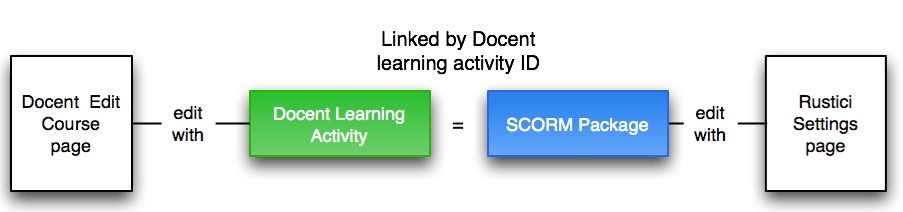
Rustici's import page was inserted into Docent's SCORM course creation process. Starting in Docent, an instructional designer clicks "Create a new course" and selects SCORM as the type. This creates a temporary, empty shell of a course and prompts the ID to import the manifest. Once the course is imported, the Course Code and Title are populated from the manifest, and then all the Docent-specific properties are finished manually.

Problem area: Manifests
We knew from the beginning that many of the SCORM manifests we had been using were incomplete and not 100% conformant. The Docent LMS was very forgiving, and would accept and use flawed manifests. And as well, there are many elements inthe scorm specification that we simply don't need. So the same manifest would often do just fine for multiple courses. We could change the launch link, course code and title within the LMS after import. We knew we'd have to create distinct and confomant manifests for all 700+ courses before importing them into the new system.
What we did to fix it:
For one-time use during the migration to the SCORM Engine, our Docent consultant created a spreadsheet that generated then imported clean manifests for all existing SCORM courses in two clicks.
For manifest creation after the migration, we created a "simple manifest maker" that generates a valid SCORM 1.2 manifest for a course of any number of SCOs, and drops it right into the course folder on the webserver. From there, it can be uploaded using the standard Rustici import control. We leave our courses out on a web server rather than zipping them and storing them "in" the LMS.
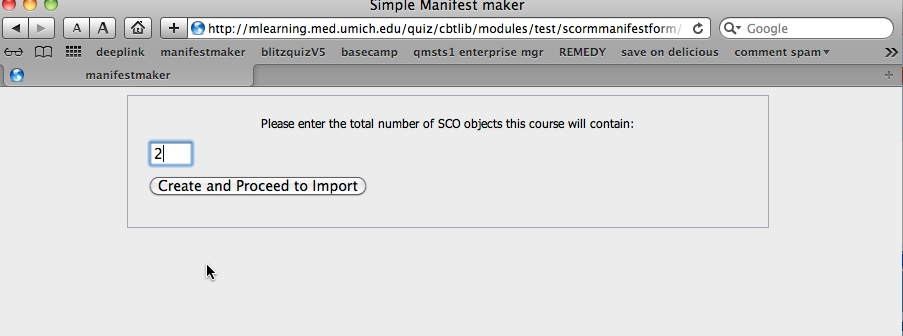

Uploading zipped SCORM packages never made much sense in our environment: besides the fact that the instant a course is uploaded, in our experience the instant a course is uploaded, someone inevitably discovers a typo or wants a revision, and it has to be re-uploaded. Also, there's no business reason for restricting access to most of our courses, so we make them accessible and searchable on the corporate intranet. Specific course pages can be accessed directly from the search results, as part of our reasoning that if the course was worth looking at once, it's probably worth using again as reference. Only the quizzes are hidden unless there is a SCORM API present.
Problem area: Settings management and the lack of retroactively alterable presets
Once it is imported, Rustici provides hundreds of settings which improve the compatibility of just about any type of SCORM course, and can also alter its behavior and navigational controls.In the basic integration there was no specified way to manage or change these settings. We decided to use a copy of the Noddy LMS settings page as our interface. This interface also allows you to create presets from a group of settings, which can then be applied to other courses at the click of a button. But there was no way to change the settings across all courses that had had a certain preset applied to them. The preset was not stored with the course, just the settings. To change presets on a group of courses it would be necessary to go into each course and apply a new preset.
There are hundreds of settings, and each type of course (1-SCO unscored, Multi-SCO scored, Captivate, etc.) uses a very specific combination of them. We currently only use about 6 or 7 different presets at the moment, but eventually it may grow into 10-15 types as we devise new course structures or purchase new course creation software. Over time we expect to change some settings for specific course types as we learn more about what works best.
What we did to fix it:
We decided to create a method of storing the settings preset with the course by classifying courses, so they could be changed as a group when necessary. We call these settings presets "course categories."
The Rustici settings interface:
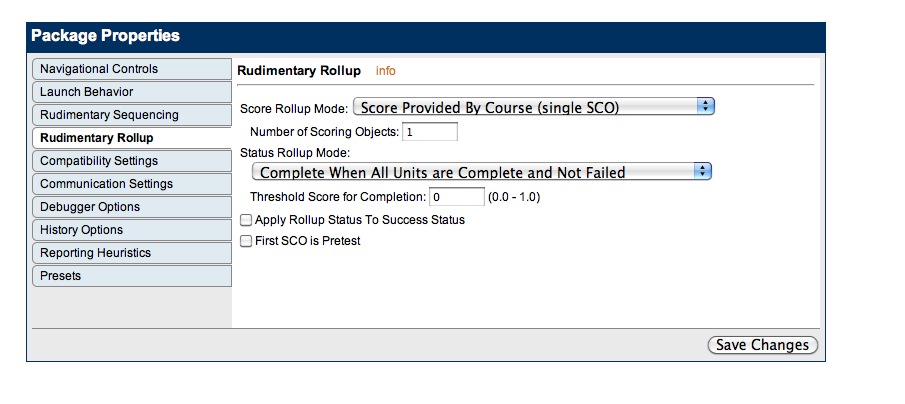
A Course Category can be any set of courses different enough to warrant using its own set of settings for any reason. The criteria distinguishing these groups of courses can be structural: e.g. "1-SCO Unscored course" or "Multi-SCO Scored course", or vendor-specific: e.g. "Articulate" or "Adobe Presenter".
Course categories are added by making a new "template course" which has applied to it the settings required by the new type of course. Template courses are flagged in such a way that they are recognized as category templates by the system. Each new SCORM course must have a category applied to it before it is saved the first time.
Category menu:
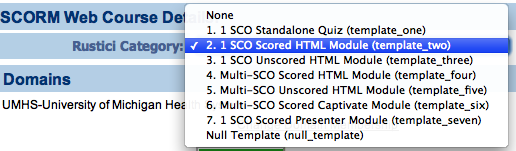
After applying a Category template, settings can be altered on an individual course, and if necessary, the course can be held out from future settings updates associated with its template.
If at some point the settings associated with a course category need to change, they are simply altered on the appropriate template course, tested, then a database query reapplies the new settings to all courses of that type.
Problem area: no way to edit SCORM data without reimporting manifests.
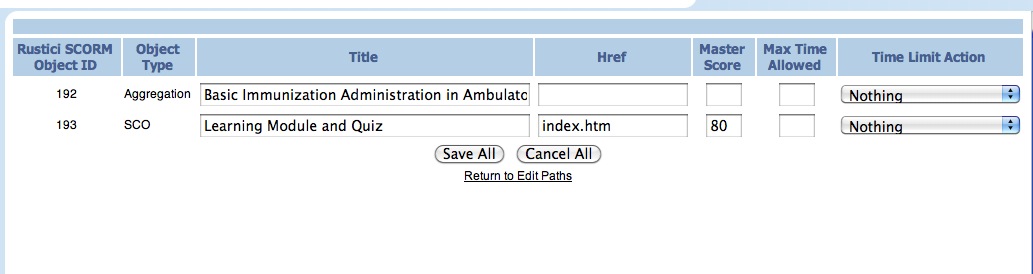
Docent had a convenient interface for editing some SCORM 1.2 properties such as main launch link, SCO titles and mastery scores right in the LMS without needing to re-import. There was no way to make quick edits like that in Rustici's system without re-importing the course. There are times the launch link for a SCO or mastery score needs to change and we don't want to import a new version of the course.
What we did to fix it:
We created an interface in the Docent course editing area that allows us to alter certain SCORM properties for each SCO of each version of the course. This allows quick fixes to mastery scores, SCO titles and launch links. Re-importing a course creates a new version, and we found it necessary to configure the SCORM Engine to only show that version to users who are newly enrolled. If a user is already enrolled for the course they will not see the new version. So for many reasons we prefer to use this interface for certain changes.
Each version is listed separately, with an editable launch link.
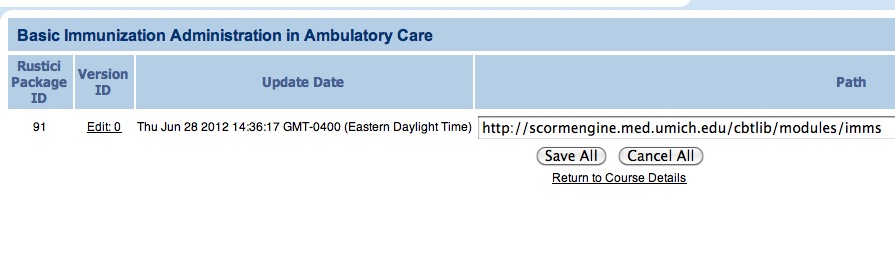
Drilling down into each version displays editable fields for SCO titles, launch links, mastery scores and other data.