June 20, 2012
How to delete a few Time Machine backups, safely
Sometimes for whatever reason, Time Machine doesn't auto-delete backups to make space for new ones. If you have this problem you might try getting it going again by manually deleting one or two of the oldest ones. Here's how to safely do this, using the Time Machine interface.
Enter Time Machine and select the backup you want to delete.
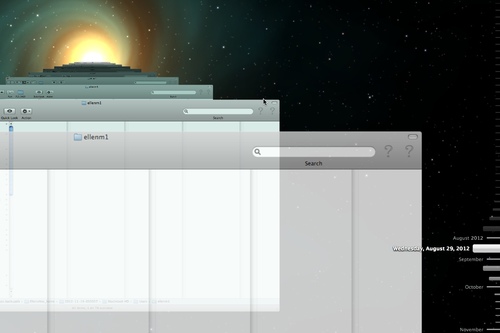
Click the gear in that backup's window toolbar.

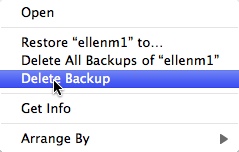
Select Delete Backup.
Use BBEdit to replace the entire contents of multiple files
A few months ago, I needed to revise an HTML file that is used many times across a large website. Most of the key code associated with this file is contained in centrally-located includes, but as luck would have it, this time the entire file needed to be revised - even the user-customized bits. That meant that almost a thousand files would have to be replaced. Worse, they were not entirely the same, since they were customized by the users to some extent.
After checking a few of them, I found there were enough commonalities to serve as the basis of a regular expression search. They always started with a comment, like this:
<!--/ *v Each file also had this line somewhere in the middle...
<noframes>This module requires frames to function correctly. If you are unable to use frames, please contact us at [email] for an alternative.</noframes>and they all ended with
<\/html>It was relatively easy to perform the replacement using a BBEdit Grep search. If you're not familiar with Grep, it's a sort of language for specifying character patterns in text. It takes the idea of a wildcard and kicks it up a notch. You can use it to search for specific characters, for lines that begin with one phrase and end with another, with anything in between, for specific numbers of spaces or tabs, and so on and so on. BBEdit make it simple to use Grep searches in single files or across multiple directories and even multiple servers.
The expression that worked best was:
(?s)(<!--/\*v)(.*?)(<noframes>This module requires frames to function correctly.  If you are unable to use frames, please contact us at [email] for an alternative.</noframes>)<br />
(.*?)(<\/html>)
To perform a mass replacement like this, first make sure everything is backed up. Never try this on a production site without extensive testing.
In BBEdit, select Multi-File Search from the Search Menu, and paste your chosen expression into the Find: box.
Paste the replacement text into the Replace box and make sure Grep is checked under Matching.
Scan the Replace text for red text which indicates special characters that may need to be escaped.
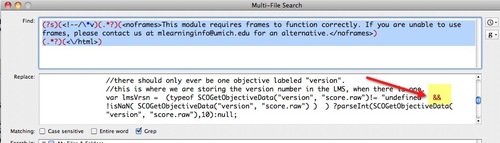
More on escaping characters in replacement patterns
You may want to add a file filter in BBEdit, so only files of a certain type, or with a specific naming convention will be searched.
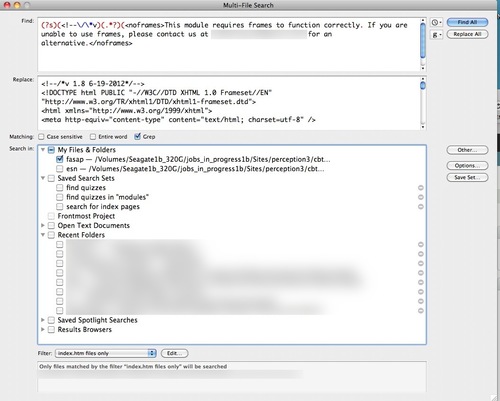
You can further restrict the search by specifying a directory using the Search in box.
Resources
BareBones Software - makers of BBEdit
For more information on Grep patterns in BBEdit, see BBEdit Grep Tutorial
or visit the BBEdit Talk group on Google Groups