August 26, 2011
How to find Directory Utility in Snow Leopard (OS X 10.6)
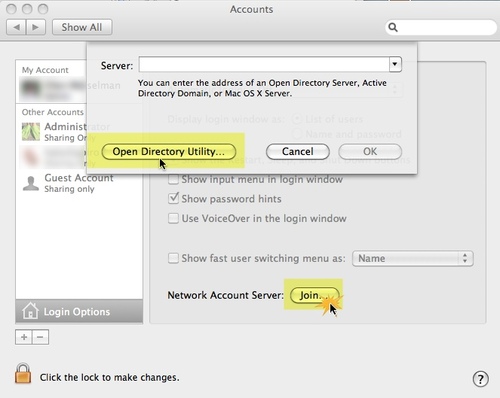
I used to use Directory Utility occasionally, and was surprised not to be able to find it anymore in the Utilities folder in Snow Leopard. It turns out it's been moved to the \System\Library\Core Services\ folder, but the best way to access it is now through System Preferences.
Open System Preferences, and click on Accounts > Login Options. Then click Open Directory Utility.
OS X 10.6: The application Finder.app can't be opened.
I use several large external drives with my iMac to manage photos and multiple systems. Lately I've had a frequent problem with Finder crashes. Using Force Quit to "Relaunch" the finder does cause it to quit, but it never restarts.
Trying to restart it from the dock by control clicking the finder icon and selecting "Open" resulted in the error
The application Finder.app can't be opened.
-10810
The terminal command
ps -ax
showed several zombie (Finder) processes going. From the blank state of the Desktop, it was obvious none were in working order.
I diligently killed each one after noting its PID using the command:
kill -HUP [pid]
like this:
$ kill -HUP 281

$ kill -HUP 27398

$ kill -HUP 27404
Then tried to restart the Finder but found the only way to restart it was with this terminal command:
/System/Library/CoreServices/Finder.app/Contents/MacOS/Finder & disown
It did not really help: it crashed again, soon after. Restarting the machine always fixes it, but that won't help you if you can't isolate the source of the problem.
In my case, I've tentatively located the source to one of the external drives, an old iOmega 1TB drive, although it verifies in Disk Utility. Apparently the "Finder.app can't be opened" error is a very common problem, often related to the use of external drives or Drobos, but sometimes other causes as well. Some people report that Lion clears it up, but that has not been my experience.
Reference
iPhone error message: "This accessory is not made to work with the iPhone"
If your iphone starts flashing the error message "This accessory is not made to work with the iphone" whenever you plug it in to try to sync it with iTunes, try plugging it directly into the computer, with no hub or dock in between.
Dirt or corrosion in the socket in the iPhone can also cause this, and sometimes it can be solved by scrubbing the socket with a clean dry toothbrush.
August 25, 2011
Installing PHP on Windows: if PHP pages work but phpinfo is blank?
When installing PHP on IIS, I ran into this: in general, php files worked, but phpinfo.php files were not. They were blank when browsed.
The problem was I had left out the "php" in the opening tag:
<? where I should have used:
<? phpThe first example will work only if short tags are enabled in php.in configuration file. There are reasons NOT to use this, as described in the comments in a standard php.ini file:
; Allow the <? tag.  Otherwise, only <?php and <script> tags are recognized.
; NOTE: Using short tags should be avoided when developing applications or
; libraries that are meant for redistribution, or deployment on PHP
; servers which are not under your control, because short tags may not
; be supported on the target server. For portable, redistributable code,
; be sure not to use short tags.
short_open_tag = On
Mcrypt extension error after installing phpMyAdmin on IIS
If you install phpMyAdmin on IIS and get the error:
PROBLEM: cannot load mcrypt extension. please check your php configurationTry installing the extension using the installer:
- "If you used the PHP installer, go to Add/remove programs and reconfigure the PHP installation. During the process you'll be asked what items to install. From the list choose PHP > Extensions. From the list of extensions choose which extension(s) you wish to install/use. Finish the installation by clicking next.
Restart IIS and the extensions you choose during installation should be available. Restart the relevant application pool(s) also.
Move libmcrypt.dll to system32 directory
- On Windows installations, for the dynamic extension (extension=php_mcrypt.dll) to load properly, you must copy libmcrypt.dll from your PHP root folder (e.g. C:\PHP) to the following location:
C:\WINDOWS\system32
With this done, the dynamic extension will load up just fine.--php.net post
Double-check the extension_dir path listed in php.ini
Add the path to the extension directory to php.ini, if it is not already there. If it IS there, double-check the path to make sure it is correct for your installation. Make sure extension_dir sn't listed again, farther down the page, with a different path. If you make any changes or corrections, restart both IIS and the application pool.
; Directory in which the loadable extensions (modules) reside.
;extension_dir = "./"
extension_dir = "C:\Program Files\PHP\v5.2\ext"
Double-check that php_mcrypt is listed in the ExtensionList area of php.ini.
Add the name to the list as shown below. Double check the spelling. Double-check that there is only one ExtensionList in the php.ini file. If you make any changes or corrections, restart both IIS and the application pool.
[ExtensionList]
extension=php_mysql.dll
extension=php_mysqli.dll
extension=php_mbstring.dll
extension=php_gd2.dll
extension=php_gettext.dll
extension=php_curl.dll
extension=php_exif.dll
extension=php_xmlrpc.dll
extension=php_openssl.dll
extension=php_soap.dll
extension=php_pdo.dll
extension=php_pdo_mysql.dll
extension=php_pdo_sqlite.dll
extension=php_zip.dll
extension=php_imap.dll
extension=php_tidy.dll
extension=php_mcrypt.dll
August 24, 2011
Mandelbulb 3D Formula: One perfect globe
For the Mandelbulb 3D enthusiasts out there, I'm putting up some of my best images along with their formulas. Click here to see the complete list.

Mandelbulb3Dv17{
Q......1....A...M7...2A....L4brqa6gnzYDyV8nEc8.Ebe0rl4qh5zfqbP/RqPplzEG0e55NHzwD
................................Chig19/y.02........Y./..................y.2.....
.................Q.1/....6Uh....D/....E......6HuWupag2iD/Q.........c./...wH/OaNa
z.....cD12..12ED8Qxckp1..dkpX0LD8wzjg53iSIsu1.A............u1....y1...sD...../..
.wXaNadDcUsMP68iWvXotGt2w1CqycJCYbpPUUijDFXFu7N3FvnUogZYYHcvy4px8Ezkq6hjT5Ah15.l
dv9g5Fm9TMIcyukvZysgAGij......I9....M.........kD.2....sD.2E..ckpX0LD8Qwj........
.............dkpXm1...........KRe4..qdO.UObe/.oRe4.srdO..Wbe/.GSe4..............
................e0kz.kmB9/UQ.A7.z....g6...E7....20...I1...k9....O/...E1.....wNK/
...U.0aZcD6M6/naBauloKIFx..M0c..zrhe.Q6Fbf24LNvDPt41pmERrz9...........W68.UQgk0.
dKFcRtBvvzPeJ2OLSnyyz...........U6V0..3B6/...........YHbG7eFT5wj..........E/0c..
6V2G.YHbG7eFT5uDtodIWOorVy1..........IU.8.kzzzD.................................
JI01xH9OG/.305b792UvzaRdHng129vjjyDGa9yBPz9...pPI/U6jU/.axlKyR6.MZqM..bDtGvJ.2tX
E0.lRl3cb0kece8.Tt5inO4.TStZ.EaTj4Mf.YNGw..Ny/4Ha/UNiV4.YtLc0R6.zSgl.EaTIZ2c.Mfg
f0.wzJZg6/UZ/86....y3q/.zz/k.1A.yz1yAT2.xzpaqa9.................................
E....E....E/....2....A....EEh3aSdtqNU6oPs/UQ..........................k/9.......
.....................h53iSIsuFrD..........2.....................................
................................................................................
.....................I.....3.........wJKklKRnBJOid3..sqNl.......................
..............................zDaNaNaNaNazXNaNaNaNatzMaNaNaNaNyDOaNaNaNa7zXaNaNa
NaNmzcNaNaNaNawDOaNaNaNadzXNaNaNaNaxz.........zj........kz1.....................
................................r....M....k.....4x4PYZaPb/GGiF56ExqR............
..........U0.U............................2........B.1.......U.E........kz1.....
................................................................................
...........................................1....I....M....EE0x4SK3aQtBpMVlKNoE4.
......................k/..E........................4.dNaNaNaNauD........kz1.....
..............zD................................................................
........................................................}
August 12, 2011
IIS error: "The network location cannot be reached.."
If you have change the IP address that an IIS website is pointing to, then find that when you try to restart IIS services you get the error:
The network location cannot be reached.
...you may need to use a utility called httpcfg to tell IIS to listen specifically to the new IP.
To see what IP IIS is listening on, type this in a command prompt:
httpcfg query iplisten
Tell IIS to listen on a new IP address by
httpcfg set iplisten -i [ip address]
To install httpcfg, you may need to download and run Windows Support tools as described here:
It may be enough to restart the application pool and the website, but you may have to reboot the server to get the change to take effect.
August 10, 2011
Supporting informal learning in the workplace
Supporting Informal Learning
Informal learning is particularly useful where learners are not novices in a subject area and have some background, but are trying to add skills or need additional support for the details of unfamiliar tasks. Training people to find the information they need when they need it may work as well as training them to remember all the information they need, especially if they will not be putting the new skills to use frequently enough to keep it all memorized.This type of "pull" learning can be supported and made more efficient by making it easier to find experts, providing high quality search, knowledgebases, job aids, decision support tools, communication tools, and "how-to" videos. Taking things a little further in this direction, augmenting an inherently complex application so that it prompts the user based on user activity could also be considered informal learning.
Elements of a "Pull" Workscape from Working Smarter Fieldbook: 2011 Edition:
"Findable expertise across departments and silos, knowledge-bases, culture of contributing, simulations are all pieces that support a "pull" learning culture."
Both infrastructure and cultural supports are needed
Excellent search functionality and careful attention to findability and logical information architecture are crucial pieces for building an infrastructure to support informal learning. Equally important is the content that is being searched for: people need to be confident that there is something relevant and up-to-date to find, or they won't bother to search. There's an economy of time and effort: people always do these calculations in their head without realizing it. Equally important, if content experts know that what they put online can be found easily, they are more likely to put their own content out there. So both a culture of knowledge-sharing and a selection of easy-to-use tools or spaces for sharing, collaborating and publishing must be present.What specific technologies might make informal learning more efficient?
Although social media, reference tools and mobile apps usually come to mind first when performance support or informal learning are mentioned, it can be useful to broadly define the term "informal learning" to include other types of performance support as well.In a recent study in a medical intensive care unit, intervention team physicians were actively prompted to address items from a checklist during their rounds. Compared to the non-prompted control group, and may have improved mortality and length of stay, compared to a stand-alone checklist. The manner in which checklists are implemented is of great consequence in the care of critically ill patients. [LINK]
- Better search/findability of ideas, methods, people, experts, solutions, cases, books
- Easier ways to put useful information online: ways that do not interrupt workflow and don't require people to remember to write something up after work
- Culture of collaboration in person and online
- Protected spaces for publishing useful case studies and information that may be confidential
- Usability studies and improvement on task-centered reference/tutorials sites
- Provide multiple ways to learn - let the learner decide
- Embedded technologies that enable the user to visualize data and provide feedback on the spot
- Realtime feedback loops on difficult to learn tasks or complex processes
- Indexing of information that is not in written form
- On-demand concierge experts, either in-person or on live-chat
- Anything that exposes necessary but hidden data to view during the process of use
References:
- Decision Support Tools - New Ways to Create e-Learning, Janet Emery (webinar) [LINK]
- A conversation with Jay Cross [LINK]
- Working Smarter Fieldbook: 2011 Edition
- Marc Rosenberg "Technology Euphoria" [LINK]
- Harnessing the Power of Feedback Loops By Thomas Goetz [LINK]
- Prompting Physicians to Address a Daily Checklist and Process of Care and Clinical Outcomes: A Single-Site Study. PMID: 21616996 [LINK]
Javascript testing for NaN: why doesn't !="NaN" work?
A couple of weeks ago, I was working on a custom HTML wrapper for Captivate quizzes that would behave one way if a score were already stored for that quiz, and another if the score were non-existent or zero.
So, how best to test for the existence of a score? Usually I test for the existence of a value with
if (typeof foo != "undefined"){do something}
When a quiz is not yet taken, the value of quiz.score is "NaN" (Not-a-Number). It seemed logical to assume that the type of "NaN" is "undefined".
So I tried:
if (typeof quiz.score !="undefined") {do something}
But this test failed, because it turned out that typeof quiz score always registered as "number" even when the score's value was "NaN." That made no sense to me, but I forged ahead anyway and tried to test for the value "NaN" by using
if (score !='NaN'){do something}
But this didn't work either! It took me a little while to figure out why my attempts to test for NaN weren't working. This is because NaN is a property of the Javascript Number object, and as such it's type is "number".
isNaN() is the function that tests whether something is Not-a-Number, so the correct syntax is:
if(!isNaN(score)){do something}