June 29, 2010
When Firefox won't launch Java applets
If Firefox won't launch java applets, but Internet Explorer will, you may need to change some settings in the Java control panel to turn on Applet support for Firefox. (Expert users: One sign that this is the issue rather than some Java security exception is that the Java console will be completely blank when you try to launch the applet in Firefox. _
Unfortunately on many PC's, the Java control panel can be a challenge to find. First, check in the control panels area for "Java." If it is not there, you may have to look in
C:\Program Files\Java
for JRE (Java Runtime Environment) folders.
In the image below there are several of them. Usually you should pick the most recent one, as that is the one that is probably in use.

Inside the jre[xx] folder, you will find a "bin" folder. Inside that, click on either javacpl.cpl (may not exist in earlier versions) or javacpl.exe. The Java Control Panel will open.

Click the Advanced tab. Depending on which version of JRE you have, you may see "Applet Tag Support" (earlier versions)
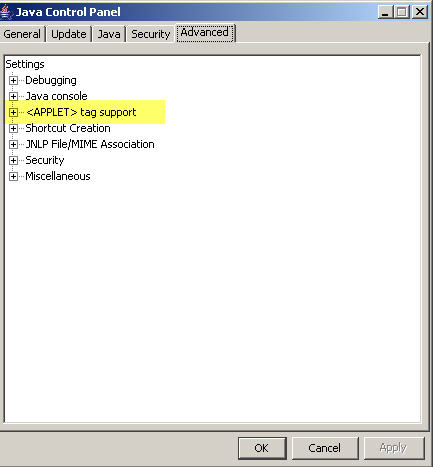
or Default Java for browsers (later versions).
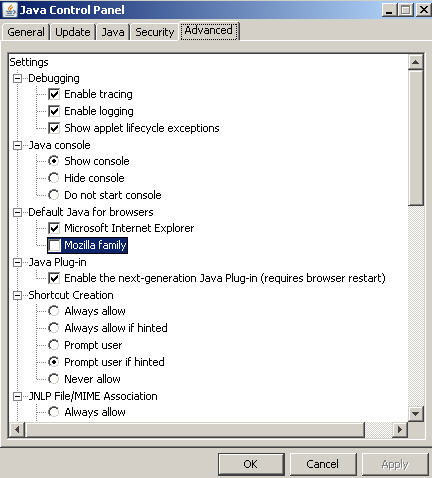
Expand whichever one you see, and look to see if Mozilla family (or Mozilla and Netscape) is checked. If not, check it, click "Apply" and restart Firefox.

You may have noticed that the Java console settings are in the same tab under "Debugging. Check all three items under "Debugging" to turn on the Java console and have it launch whenever Java is called in the browser so that you can see what's happening.
June 23, 2010
Create an iCal file from your data using ASP
Google Calendar and many other calendar apps will import or subscribe to iCal format files (.ics) If your event data is locked away in a database, you may find it useful to display and distribute it using Google's extensive calendaring features. Following is an example of an ASP file that will write an iCal file. Generate the iCal file in a web-accessible directory, then have Google Calendar or other iCal compatible application subscribe to it.This produces an iCal file similar to the following file:<title>Generates an ical feed for HREG-HFST classes</title>
<%@LANGUAGE="VBSCRIPT"%>
<!--#include file=".\Connections\yourdatabase.asp" -->
<%
'see for more info on the lines below http://bytes.com/topic/asp-classic/answers/637751-create-rss-feed-data-database
CONST ForReading = 1
CONST ForWriting = 2
CONST ForAppending = 8function tidyxml(text)
If text <> "" Then
text = replace(text,Chr(180),"'")
text = replace(text,chr(10),"")
text = replace(text,chr(13),"")
text = replace(text,"&","&")
text = replace(text,"'","'")
text = replace(text,"'","'")
text = replace(text,"<b>","")
text = replace(text,"</b>","")
text = replace(text,"<p>"," ")
text = replace(text,"</p>"," ")
text = replace(text,"<br>"," ")
text = replace(text,"<br/>"," ")
text = replace(text,"<br />"," ")
text = replace(text,"<font>","")
text = replace(text,"</font>","")
text = replace(text,"<a href=""mailto:","")
text = replace(text,"<ahref=""mailto:","")
text = replace(text,"<a href="," ")
text = replace(text,"</a>"," ")
text = replace(text,"<strong>","")
text = replace(text,"</strong>","")
text = replace(text,"<img>","")
text = replace(text,"</img>","")
text = replace(text,""">"," ")
text = replace(text,"-","-")
'text = replace(text,"<"," <")
'text = replace(text,">",">")'text = replace(text,"<","<")
'text = replace(text,">",">")
tidyxml = text
end if
End functiondim rs, rs_cmd, rs_numRows,conn_numRows, FirstName, LastName, d_todayYR, d_todayMONTH, d_todayDAY, descSHORT,gnumber
Set rs_cmd = Server.CreateObject ("ADODB.Command")
rs_cmd.ActiveConnection = MM_YOURDATABASE_STRING
rs_cmd.Prepared = true
rs_cmd.CommandText = "SELECT la.code as code, lai.code as instcode, lai.id as instid, la.title as title, la.outlinelink as link, to_char(laim.meetingstart, 'YYYYMMDD' ) as startdate, to_char(new_time(laim.meetingstart, 'GMT','EDT'), 'HH24MISS') as starttime, to_char(laim.meetingend, 'YYYYMMDD') as enddate, to_char(new_time(laim.meetingend, 'GMT','EDT'), 'HH24MISS') as endtime, res.name as room, la.description as gdescription, loc.name as location, loc.address as address FROM drlearningactivity la, DRLEARNINGACTIVITYINSTANCE lai, DRLAINSTANCEMEETING laim, drlocation loc, drresourcereservation reser, drresource res WHERE (la.code like 'HFST%' or la.code like 'HREG%') and la.id=lai.learningactivityid and laim.LEARNINGACTIVITYINSTANCEID = lai.id and lai.locationid=loc.id and reser.lainstancemeetingid=laim.id and reser.resourceid=res.id and res.resourcetypeid=2 and laim.meetingstart >=current_date order by la.code,lai.code"
set rs = rs_cmd.execute
d_todayYR=Year(Date)
d_MONTH=Month(Date)
d_todayMONTH=String(2 - Len(d_Month), "0") & d_MONTH
d_DAY=Day(Date)
d_todayDAY = String(2 - Len(d_Day), "0") & d_DAY
d_todayHOUR=Hour(Time)
d_todayMINUTE=Minute(Time)d_timestamp=d_todayYR & d_todayMONTH & d_todayDAY & d_todayHOUR & d_todayMINUTE
response.write("RSS feed is being updated. This is just a demo - NOT FINAL ." & " " & d_timestamp & "<br/>")
'See http://icalendar.rubyforge.org for explanation of some of the items below
filename = "rss/icalDemo.ics"
set fso = createobject("scripting.filesystemobject")
set icsfile = fso.createtextfile(server.mappath("icalDemo.ics"),true)
icsfile.writeline("BEGIN:VCALENDAR")
icsfile.writeline("PRODID:MLearning")
icsfile.writeline("VERSION:2.0")
icsfile.writeline("CALSCALE:GREGORIAN")
icsfile.writeline("METHOD:PUBLISH")
icsfile.writeline("X-WR-CALNAME:Upcoming HREG and HFST courses in MLearning")
icsfile.writeline("X-WR-TIMEZONE:America/New_York")
icsfile.writeline("BEGIN:VTIMEZONE")
icsfile.writeline("TZID:America/New_York")
icsfile.writeline("X-LIC-LOCATION:America/New_York")
icsfile.writeline("BEGIN:DAYLIGHT")
icsfile.writeline("TZOFFSETFROM:-0500")
icsfile.writeline("TZOFFSETTO:-0400")
icsfile.writeline("TZNAME:EDT")
icsfile.writeline("DTSTART:19700308T020000")
icsfile.writeline("RRULE:FREQ=YEARLY;BYMONTH=3;BYDAY=2SU")
icsfile.writeline("END:DAYLIGHT")
icsfile.writeline("BEGIN:STANDARD")
icsfile.writeline("TZOFFSETFROM:-0400")
icsfile.writeline("TZOFFSETTO:-0500")
icsfile.writeline("TZNAME:EST")
icsfile.writeline("DTSTART:19701101T020000")
icsfile.writeline("RRULE:FREQ=YEARLY;BYMONTH=11;BYDAY=1SU")
icsfile.writeline("END:STANDARD")
icsfile.writeline("END:VTIMEZONE")
icsfile.writeline("TZNAME:EST")
icsfile.writeline("TZNAME:EST")
While Not rs.EOF
startdate = rs.Fields.Item("startdate").Value
enddate = rs.Fields.Item("enddate").Value
starttime = rs.Fields.Item("starttime").Value
endtime = rs.Fields.Item("endtime").Value
room = rs.Fields.Item("room").Value
location = rs.Fields.Item("location").Value
address = rs.Fields.Item("address").Value
location = rs.Fields.Item("location").Value
code = rs.Fields.Item("code").Value
instid = rs.Fields.Item("instid").Value
instcode = rs.Fields.Item("instcode").Value
title = rs.Fields.Item("title").Value
link = rs.Fields.Item("link").Value'truncate the description at the ### symbols
gdescription = rs.Fields.Item("gdescription").Value
gnumber = Instr(gdescription,"###") -1
'Response.Write(gdescription)
If gnumber > 0 Then
gdescription = Left(gdescription,gnumber)
ElseIf gnumber=0 Then
gdescription = gdescriptionEnd If
icsfile.writeline("BEGIN:VEVENT")
icsfile.writeline("DTSTART;TZID=America/New_York:" & startdate & "T" & starttime)
icsfile.writeline("DTEND;TZID=America/New_York:" & enddate &"T" & endtime)
icsfile.writeline("DTSTAMP:20100521T162341Z")
icsfile.writeline("UID:"& code &instcode)
icsfile.writeline("CREATED:20100523T175642Z")
icsfile.writeline("DESCRIPTION:"& code &"-" & instcode & " " & tidyxml(gdescription) & " http://yourserver.com?quot; & instid)
icsfile.writeline("LAST-MODIFIED:20100430T153745Z")
icsfile.writeline("LOCATION:" & address & " " & location & " " & room)
icsfile.writeline("SUMMARY:"& code &"-" & instcode &" " & title & "\n")
icsfile.writeline("TRANSP:TRANSPARENT")
icsfile.writeline("SEQUENCE:2")
icsfile.writeline("URL:http://your.server.com?event=" & instid )
icsfile.writeline("END:VEVENT")rs.movenext
wend
icsfile.writeline("END:VCALENDAR")
rs.close()
set rs = nothing
set fso = nothing
%>
BEGIN:VCALENDAR

PRODID:MLearning

VERSION:2.0

CALSCALE:GREGORIAN

METHOD:PUBLISH

X-WR-CALNAME:Upcoming HREG and HFST courses

X-WR-TIMEZONE:America/New_York

BEGIN:VTIMEZONE

TZID:America/New_York

X-LIC-LOCATION:America/New_York

BEGIN:DAYLIGHT

TZOFFSETFROM:-0500

TZOFFSETTO:-0400

TZNAME:EDT

DTSTART:19700308T020000

RRULE:FREQ=YEARLY;BYMONTH=3;BYDAY=2SU

END:DAYLIGHT

BEGIN:STANDARD

TZOFFSETFROM:-0400

TZOFFSETTO:-0500

TZNAME:EST

DTSTART:19701101T020000

RRULE:FREQ=YEARLY;BYMONTH=11;BYDAY=1SU

END:STANDARD

END:VTIMEZONE

TZNAME:EST

TZNAME:EST

BEGIN:VEVENT

DTSTART;TZID=America/New_York:20100713T090000

DTEND;TZID=America/New_York:20100713T120000

DTSTAMP:20100521T162341Z

UID:HFST-100020039

CREATED:20100523T175642Z

DESCRIPTION:HFST-10002-0039 Description goes here

LAST-MODIFIED:20100430T153745Z

LOCATION:address goes here

SUMMARY:HFST-10002-0039 Brio Query Basics\n

TRANSP:TRANSPARENT

SEQUENCE:2

URL:http://yourserver.com?11223

END:VEVENT

BEGIN:VEVENT

DTSTART;TZID=America/New_York:20100629T123000

DTEND;TZID=America/New_York:20100629T153000

DTSTAMP:20100521T162341Z

UID:HREG-100270001

CREATED:20100523T175642Z

DESCRIPTION:HREG-10027-0001 DESCRIPTION: Description goes here

LAST-MODIFIED:20100430T153745Z

LOCATION:address goes here

SUMMARY:HREG-10027-0001 Title goes here

TRANSP:TRANSPARENT

SEQUENCE:2

URL:http://yourserver.com?29293

END:VEVENT

END:VCALENDAR
Set up a Cron job in Windows to run an ASP script
If you are used to Linux environments, and working on a web application which needs to execute a function at regular intervals, you'd use a cron job. On Windows, you'd use a scheduled task instead. There is one part of the process that isn't obvious, so here are the steps involved:
- Create the web page that executes the desired tasks - sending email, creating files, etc. For example, I have some ASP scripts that create RSS and iCal feeds from a proprietary database, that need to run daily. Record the URL for later.
- You will also need a domain account that can run the task, or a server account that can be used in perpetuity to run these types of tasks. I usually have a "fake" account that will never expire created for this type of thing.
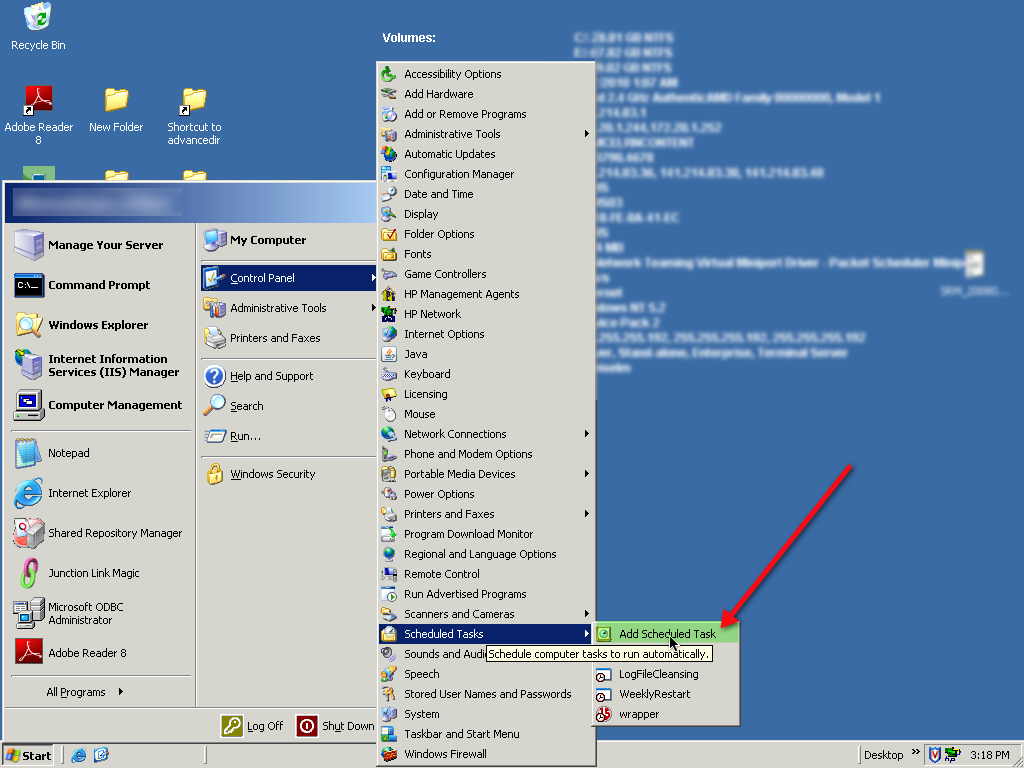
- Select Start > Control Panels > Scheduled Tasks > Add a Scheduled Task
You can also get there through:
Start > Programs > Accessories > Scheduled Tasks > Add a Scheduled Task
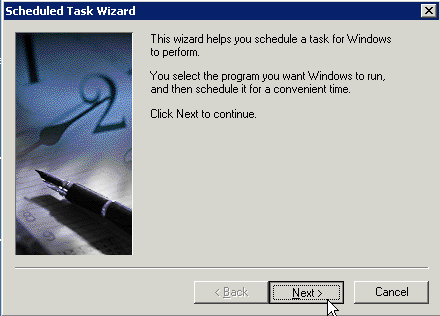
- Click Next to start the wizard.
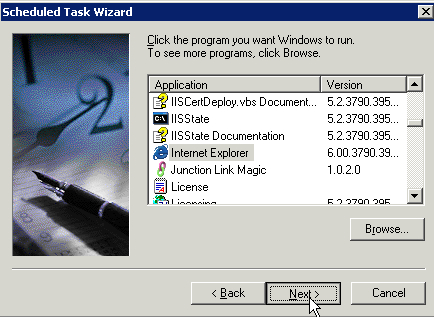
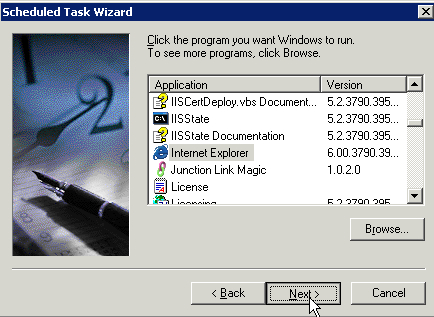
- Pick Internet Explorer from the applications list.
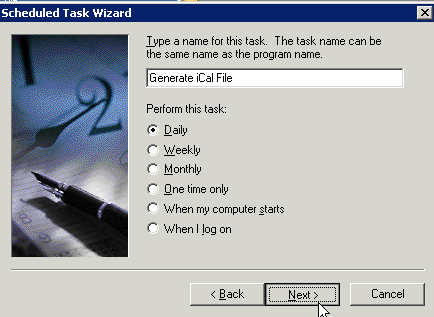
- Give the task a unique, descriptive name.
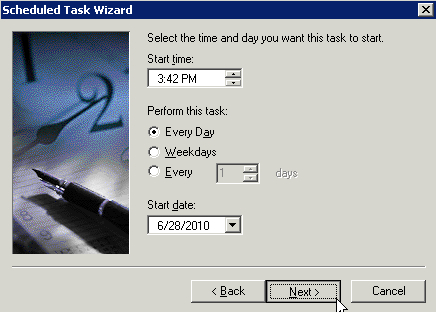
- Specify the times the task should run.
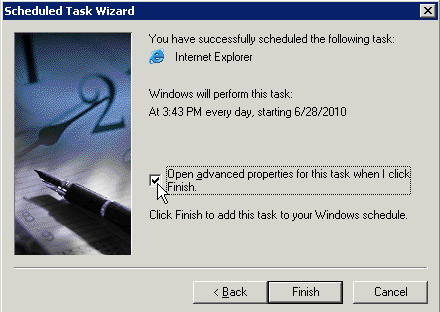
- Check Open advanced properties for this task when I click finish.
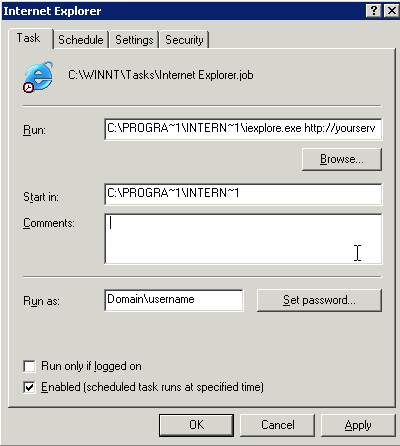
- In the Run field, after the path to Internet Explorer which will be filled in for you, type a space, followed by the URL of the webpage you created earlier. This should be a WEB path, not a FILE path.
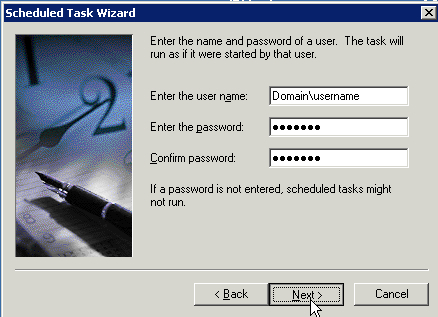
- Enter the username and password for the domain account, then hit Next. It will show you a summary of your choices. Click Finish to complete the setup.
June 21, 2010
Silence the startup "Bong" on an Intel iMac
It used to be possible to silence the loud "Bong" sound that all Macs make on startup by simply hitting the "Mute" key on the keyboard before starting the computer. This no longer works on the Intel iMacs, nor does adjusting any sound settings in the System Preferences.
However it turns out there is a Preference Pane you can install that will give you full control over the irritating chime. Download StartupSound.prefPane from Arcana Research, install it, and adjust the new Startup Sound setting however you like.
Many thanks to Alex Brie, of Hack The Day for this tip.
June 4, 2010
Missing scrollbars on the iPad in some webpages
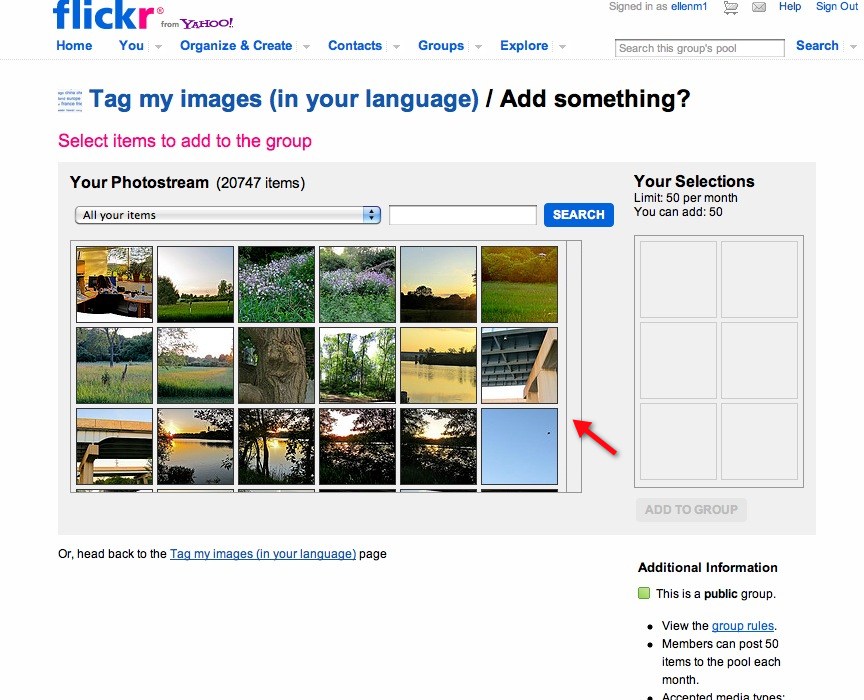
When browsing certain sites like Flickr on the iPad, you may be frustrated by an apparent bug in Safari that causes scrollbars within elements on the page to disappear. This can make it impossible to perform certain functions.
For example without the scrollbars in the photo selection window, it's very difficult to select the right images to add to Flickr's Groups.
It turns out this behavior is not a bug, it is by design. Scrolling these elements on the iPad is done using a two finger scroll. Hold two fingers together and brush up and to the right across the area you want to scroll. If two fingers does not seem to work, try three. When it is working it is quite easy and smooth.