I got a new 30" Cinema display, and the high resolution setting is wonderful for working, but the system fonts are too small in some cases for my tired eyes.
Here's how to increase their size, but this technique can cause problems with dashboard widgets and other things.
Install the developer tools.
Start up "Quartz Debug" in the folder Developer Tools/Performance Tools/
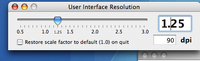
Select Show Interface Resolution from the Tools menu.
Then increase the resolution slightly - this will increase menu and window title sizes. However it may cause problems with Widgets, since they do not stretch to accomodate large text, and parts get cropped off.
 Comments
 Post a comment