May 28, 2004
Background-image style fails to display on Mac browsers
If the background-image property you have set in a stylesheet displays on PC, but not on Mac, make sure you haven't accidentally specified the height or width of the div without a unit designation (i.e. no px or %). I do that sometimes (accidentally harkening back to HTML properties) and it will break the style on a Mac, in Safari, Netscape AND IE 5.2. Works OK on a PC, though, on IE 5.5 and 6.
In other words be sure it reads:
width:1024px;

    height:768px;
not
width:1024;

    height:768;
If that doesn't solve your background-image display problem, make sure you specify the style as
background-image:url(http://foo.com/image.gif)with NO single or double quotation marks around the path.
Did you remember to upload the image to the server?
If all else fails make sure you have your semi-colon at the end of the line!
May 25, 2004
Doctype again - and color names
When editing Questionmark Perception's quiz templates, you will quickly find that you must not use the # symbol in hex color names, since Perception recognizes it as a comment.
In redoing a complicated quiz template I added a doctype, as shown below. The colors stopped working. It turns out if the doctype is set to transitional, the # symbol must be used or color names are not recognized. Solution - go back to and all was well again. Maybe it will break in a few years when they upgrade the browsers to IE 12, but I doubt we'll be using this quiz at that time.
<!DOCTYPE HTML PUBLIC \"-//W3C//DTD HTML 4.01 Transitional//EN\"
\"http://www.w3.org/TR/html4/loose.dtd\">
May 23, 2004
Troubleshooting AOL connections on OS X
If your AOL suddenly stops connection or never would connect on OS X, here is a possible solution:
Do you connect through a Linksys Router? If so, go to their site and get the firmware upgrade for it. However, in order to install it, you will need to run MacTFTP client, available HERE.
Stuffit expander will probably expand the linksys upgrade file, but you may have to manually unstuff the mactftp client.
Start the client , type in your router's address, just like you would in your browser to get to the administration page, type in your router password, then select the "code.bin" file in the folder containing the firmware upgrade, and hit Send.
The process starts out slowly but speeds up as it goes. Then restart the router, restart the mac, and see if you can get to the web. If not, access the router's administration page, and click the Setup tab. I had to change the WAN setup pulldown menu from obtain an IP automatically to PPOE. When you select PPoE, you get fields to type in your user name and password to your ISP account. type those in and hit Apply. You should now be up and running, and be ready to try AOL again.
Thanks very much to the people on MacFixit, and to Barry Diamond specifically for this tip.
See this page for more info. Be sure to scroll down the page or you'll miss the solution which is contained in the comments.
May 22, 2004
The story of Eggdrop, Part I
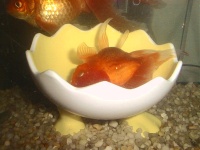
Eggdrop was born with "flotation-disorder" which means he can't swim! He rolls around helplessly in the water, sometimes floats near the surface, sometimes sinks to the bottom, and generally has a tough time getting anywhere. His floppy little fins aren't very strong either - he doesn't have any reliable means of propulsion or steering.
So how does he get around? It depends on what kind of day it is. If it's a "sideways" day, he scrabbles about sideways like a crab, using one fin to push along the gravel, and the other for stabilizing, with added boost from shooting water out of his mouth like a squid. If it's a "headstanding" day, he bounces along on his mouth, like a balloon. Sometimes flotation disorder is caused by a blockage of the swim bladder which modulates buoyancy in fish, but in Eggie's case, I think it is caused by the extremely abbreviated shape of his body, so his swim-bladder is too deformed to function normally. We have tried treating it with naladixic acid (an antibiotic) and by feeding him peas, all to no avail.
 |
| A sideways sort of day |
I first saw Eggdrop in The Fish Doctors store in Ypsilanti, MI. He was small, but bright eyed and perfect - with beautiful fins and a little bit of the oranda headgrowth.
He was sitting all alone in his little shoebox-sized tank, next to the section which held some of his relatives. He wasn't moving, mostly because he was wedged between the wall of the tank and an air tube.
When I saw him, stuck behind the tube, I assumed he was trapped and might die! I reached in, moved the airtube away, and freed him. He swam out, wobbled a little, and it became apparent he couldn't swim very well without rolling over. Then he paddled his way back to the tube and jammed himself in again, clearly on purpose. He had found a way to hold himself steady!
When I saw that, I knew I had to buy him! $36.00 later, we brought Eggdrop and his little brother, Tottle, home in a plastic bag. They didn't seem to be upset at all by the drive home - they merely hunted around on the botttom of the bag for crumbs of food.

|
| Eggie and Tottle soon after their arrival. Magoo is off to the side, munching on a yellow squash. |
 |
| Piggum giving Eggie a little reassurance. |
 |
| Eggie, Magoo and Piggum sleeping. Eggie had to lie on his side, but somehow he made it over there. |
However a problem soon developed! Eggdrop had figured out that the best way to hold himself steady was to squeeze his body between the intake strainer and the glass wall!
The suction and pressure held him still, but it also made big red suction marks on his sides. I thought I could foil him by putting an artificial hollow log - a tank decoration we had bought for a catfish - around the intake, like a sleeve. The log was elbow-shaped with lots of holes, as if it was partly rotted. The lower half of the elbow lay horizontally on the ground.
About two hours after I put it in, I looked in the tank. Eggdrop was gone! I looked everywhere, then finally I took the log off the intake and looked inside.
He had crawled into the lower half and made his way up to the intake again! Now he was stuck in the log. It took some serious shaking to get him out again. His fins were ragged from the suction, and his red marks were worse.
After that, we moved him to a little hospital tank and covered the intake with a sponge.
 |
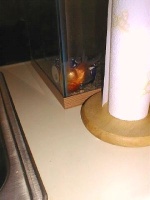 |
| Eggdrop's favorite spot was behind the mug | The hospital tank on the kitchen counter |
After a few weeks, we put him back in the goldfish tank, this time with a big sponge around the intake. Everyone was glad to see him again! The nuzzling and fishie hugs went on constantly. Tottle, who had gotten much bigger by this time and lost his black markings, couldn't think of a better way to show his affection than to sit on Eggdrop.
 |
 |
| When your best friend sleeps on his side, there's only one way to snuggle. Sit on him! | Eggdrop would sleep inside the mug, and Magoo would sleep just behind the mug, standing up in the corner! |
We moved the mug into the tank with Eggdrop, and he finally decided to use it as a house. Continue on to Part II!
May 19, 2004
Mistakes I make when editing Questionmark Templates
The single biggest mistake I make REPEATEDLY in editing Questionmark's templates is: ::drumroll::
adding in the # symbol in color specifications.
Questionmark interprets the # symbol as a comment, and omits everything after the # up to the next line break. This can make for some interesting troubleshooting sessions.
The second biggest mistake I ever made was to forget to ensure that my text editor was set to "linebreaks: CR LF (Windows) "
Using Unix type linebreaks will work, but not entirely.
Using Macintosh type linebreaks will cause the template to break.
May 15, 2004
Accessing elements on the parent page of an iFrame
How do you cause events to fire on the parent page of an iFrame'd page?
Take this page structure:
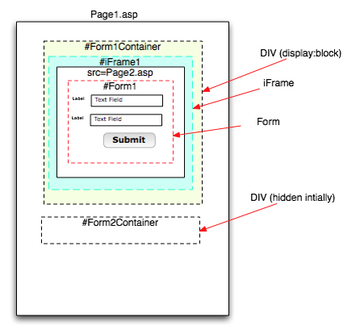
Page1.htm
--DIV id="Form1Container" (display:block)
----iFrame name="iFrame1"
-----Page2.asp
------Form id=Form1
--DIV id="Form2Container" (display:none)
---Form id="Form2"
In this example, there are 2 forms on Page1.htm.
Form1 is on an iFramed page: Page2.asp, and is visible when the page loads.
The second form, Form2 is outside the iFrame, on Page1.htm but is hidden.
When the user completes Form1 and clicks the Submit button, the iFrame should disappear, and Form2 becomes visible.
So what we want to have happen is:
Page1.htm

--DIV id="Form1Container" (display:none)


----iFrame name="iFrame1"

-----Page2.asp

------Form id=Form1


--DIV id="Form2Container" (display:block)

---Form id="Form2"
To make this happen, the onSubmit event on Page2.asp must fire a script that changes the style of #Form2Container on Page1.htm.
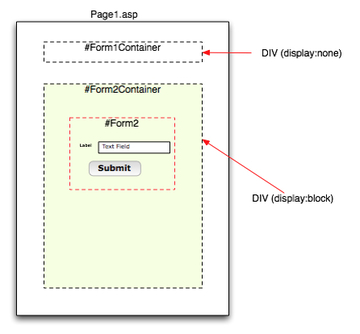
In the frame tree, Page1.htm is considered the "Parent" page of Page2.asp, so the path from Form1 to #Form2Container is:
parent.document.getElementById('Form2Container')...
So to hide Form1Container and show Form2Container at the same time, the script would look like:
<FORM name="Form1" method="post" action="somepage.asp" onsubmit="parent.document.getElementById('Form1Container').style.display = 'none'; parent.document.getElementById('Form2Container').style.display = 'block';"&rt;
or better:
(in head area)
function swapDivs(){
parent.document.getElementById('Form1Container').style.display = 'none';
parent.document.getElementById('Form2Container').style.display = 'block';
}
(in form tag)<FORM name="Form1" method="post" action="somepage.asp" onsubmit="swapDivs();"&rt;
Links to references on the subject of addressing elements in and around iFrames:
submit a page present in IFrame
Example of iFrame'd form
External HTML > Hidden Iframe > Div ?
Scripting iFrames - Tutorials and Examples
Setting height in nested divs
Note to self: USE THE RIGHT DOCTYPE!One of the first things we web developers usually do upon starting to using CSS is to try to recreate our old HTML multi- column layouts. which were invariably built with tables.
This turns out to be quite a challenge, particularly getting columns to be equal in height. In other words it's difficult to get CSS-styled elements to act like a table. I've found that many of the so-called 2 and 3-column CSS-only layouts get around the difficulty of making equal-height columns by using a background image in a container div that makes it appear as if the columns have backgrounds which are the same size. Clever, but it adds a little complexity and some inflexibility to the layout.
When I was first starting to convert my pages to CSS-based layouts, one of the methods I tried was to surround the columns with a container element which I hoped would transfer the height of the tallest div to the other one through the use of "height:auto" and "height:100%". It was a dismal failure, but I learned a few things in the process. Here's what I tried:
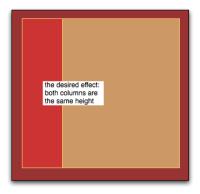 (click to enlarge image)
This diagram shows the three basic elements: A container div, and two column divs. The idea is to make the tallest column govern the height of the other one, the way cells in a table row do.
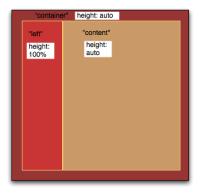 (click to enlarge image)
My idea was to set the tallest column to "height:auto." (Knowing which column will be tallest should not be necessary in an ideal world, but let's assume we know that the Content column will always be the tallest) Setting it to "height:auto" would cause it would stretch to fit its contents as needed. Then I set the Container column to "height:auto" and I hoped it would thus take ITS height from the largest contained column.
The Left column was set to height:100%, and I hoped this meant it would take its height to be 100% of the available space, or 100% of the Container whose size was controlled by the Content column. This turned out not to be the case.
At first, I used code similar to that shown below. You will notice there is no doctype.
<html xmlns="http://www.w3.org/1999/xhtml">
<head>
<meta http-equiv="Content-Type" content="text/html; charset=ISO-8859-1" />
<title>Height:Auto test, NO Doctype</title>
<style type="text/css">
<!--
#container, #left, #content {
padding:6px;
font:normal 14px Palatino, Georgia, "Times New Roman", Times, serif;
border:1px solid #FFCC66;
}
#container {
	height: auto;
	background:#993333;
	display:block;
	width:100%;
	border:1px solid black;


}
#left {
height:100%;
width:20%;
background:#CC3333;
display:block;
float:left;
padding:6px;

}

#content{
height:auto;
width:70%;
background:#CC9966;
display:block;
float:left;
padding:6px;
border:1px solid #FFCC66;
}
-->
</style>
</head>

<body>
<div id="container">
	<div id="left">
	<li>Item 1</li>
	<li>Item 2</li>
	<li>Item 3</li>
	</div>
	<div id="content">
	Fusce eros. Etiam feugiat diam ac erat. Cras eu pede sit amet pede sodales blandit. Cras hendrerit aliquam felis. Curabitur sapien ipsum, vehicula sit amet, auctor vitae, dictum nec, eros. Nulla tincidunt. Aenean vitae felis in sem congue cursus. Vestibulum ultrices, risus eget interdum pulvinar, odio sapien tincidunt mauris, quis vehicula diam velit sed magna. Morbi tellus augue, aliquet sed, consequat vel, viverra ac, mauris. Nulla facilisi. Integer adipiscing, mauris eu auctor mollis, augue libero dictum nunc, in ullamcorper velit velit et metus. Nam blandit est sed sem. Nulla facilisi. Quisque imperdiet purus sed dui. Aenean id orci ac urna malesuada egestas.</div>
	<div style="clear:both;"></div>
</div>
</body>
</html>
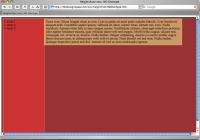 (shown in Safari - click to enlarge)
With no Doctype, the Container stretches to fill 100% of the window, rather than merely accomodating the height of its longest contained column. The Left column then stretches to 100% of the Container, which is correct.
If we add an explicit height to the Container, such as 300px, the Left column fills it to a height of 100% plus the padding - or 6 px. in this case. IE 6 does not add the padding, but otherwise the behavior is the same.
At least the Content column is behaving correctly, stretching to accomodate its contents.
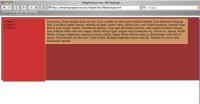 (shown in Safari - click to enlarge)
If we add the Doctype show below, the Container column starts behaving correctly, sizing itself to the height of the longest column. However the Left column now behaves as if it is set to "height:auto" instead of "height:100%". I've found that only if the Container has an explicit height, will the Left column stretch to fill the Container.
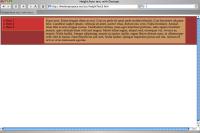 (shown in Safari - click to enlarge)
<!DOCTYPE html PUBLIC "-//W3C//DTD XHTML 1.0 Transitional//EN" "http://www.w3.org/TR/xhtml1/DTD/xhtml1-transitional.dtd">
<html xmlns="http://www.w3.org/1999/xhtml">
<head>
<meta http-equiv="Content-Type" content="text/html; charset=ISO-8859-1" />
<title>Height:Auto test, with Doctype</title>
<style type="text/css">
<!--
#container, #left, #content {
padding:6px;
font:normal 14px Palatino, Georgia, "Times New Roman", Times, serif;
border:1px solid #FFCC66;
}
#container {
	height: auto;
	background:#993333;
	display:block;
	width:100%;
	border:1px solid black;


}
#left {
height:100%;
width:20%;
background:#CC3333;
display:block;
float:left;
padding:6px;

}

#content{
height:auto;
width:70%;
background:#CC9966;
display:block;
float:left;
padding:6px;
border:1px solid #FFCC66;
}
-->
</style>
</head>

<body>
<div id="container">
	<div id="left">
	<li>Item 1</li>
	<li>Item 2</li>
	<li>Item 3</li>
	</div>
	<div id="content">
	Fusce eros. Etiam feugiat diam ac erat. Cras eu pede sit amet pede sodales blandit. Cras hendrerit aliquam felis. Curabitur sapien ipsum, vehicula sit amet, auctor vitae, dictum nec, eros. Nulla tincidunt. Aenean vitae felis in sem congue cursus. Vestibulum ultrices, risus eget interdum pulvinar, odio sapien tincidunt mauris, quis vehicula diam velit sed magna. Morbi tellus augue, aliquet sed, consequat vel, viverra ac, mauris. Nulla facilisi. Integer adipiscing, mauris eu auctor mollis, augue libero dictum nunc, in ullamcorper velit velit et metus. Nam blandit est sed sem. Nulla facilisi. Quisque imperdiet purus sed dui. Aenean id orci ac urna malesuada egestas.</div>
	<div style="clear:both;"></div>
</div>
</body>
</html>
I hoped that perhaps the issue was the order of execution: if the browser first figured out the height of the longest column, THEN the shorter column, perhaps then the height of the Container would be "known" and the shortest column would stretch to fill it. So I switched the columns around, but no luck.</a> So an explicit height is definitely required!
Below are some test pages showing what happens when you use height: auto, height: inherit, and height:100% inside containers that have explicitly stated heights.
Three sets of 2 nested divs each using
height:inherit
height:auto   or
height:100%
with doctype set as
Note: as shown in the screenshot below, in the example on the left, Safari apparently sets the height of the text contained in the nested div ( styled "height:inherit") to the height of the body element, although the nested div itself grows only to the height of the container div. Netscape 7 does the same.
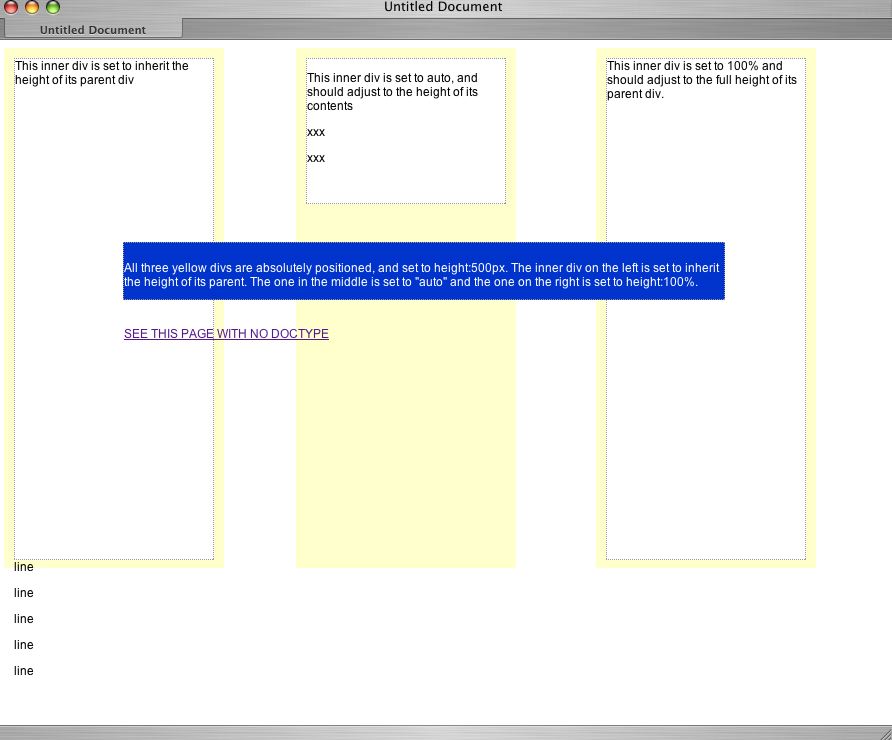
Three sets of nested divs of 2 nested divs each using
height:inherit, height:auto, height:100%
with NO DOCTYPE.
Three sets of three nested divs each using height:inherit, height:auto, height:100% with doctype set as
Three sets of three nested divs each using height:inherit, height:auto, height:100% with NO DOCTYPE.
Out of the three browsers I've tried so far - Safari, Mozilla and IE for mac, IE is the most sensitive to the DocType declaration.
References: Got Doctype? By Molly E. Holzschlag and Eric A. Meye
W3C Markup Validation Service a service that checks documents like HTML and XHTML for conformance to W3C Recommendations and other standards.
Also Dreamweaver MX2004 now has continuous error-checking/validation - if you turn it on, so you will know if your pages are set up to current standards, and will have the best chance of rendering correctly.
May 8, 2004
Using Transparent PNG's as Background Images in DIVs
Using CSS to create cross-platform compatible transparent PNG's
One more piece I just added to my transparent PNG "toolkit" is a method of making transparent PNG's work as the background-image in a div, in Internet Explorer 6 and 5.5. (Versions of IE below 5.5 will not work with these techniques.) The second part of this trick is how to get hrefs and form elements inside the layer to be clickable.
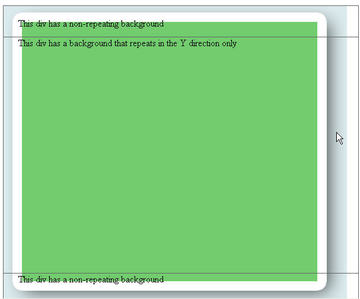
...and here's how the example page looks WITH the fix. Note that the blue-gray background behind the shadow is gone.
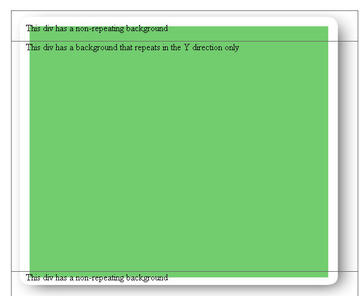
Basic Instructions:
- Create an empty div but give it an id (for example: id="yourDiv").
- Create a style that adds in a background image ("yourImage.png"), either in the head of your page or in an external style sheet, linked into your page.
<style type="text/css"> <!-- DIV#yourDiv { width:600px; height:400px; background-image: url(images/yourImage.png); background-repeat: repeat-y; position:absolute; top: 82px; left: 46px; padding-left: 25px; } --> </style> - Add a conditional comment that sniffs for IE 6 and down in which case it uses an IE-only filter which displays the image transparently inside the div, between the div background (which will be reset to "none") and any content you want to put in the div. To do this, insert this in the head of your page, below the style shown above( or if you used an external style sheet, below the link to the external stylesheet):
<!--[if lte IE 6]>
<style>
DIV#yourDiv
{
 background-image: none;
 filter:
progid:DXImageTransform.Microsoft.AlphaImageLoader(src=images/yourImage.png,
sizingMethod='scale');
}


</style>

<![endif]-->
The idea is that you are redefining the style for DIV#yourDiv, but only IE 6 and below will be able to see the new definition.
Fixing clickable elements within the div
There is one major problem with this technique: form elements and links within the div will not be clickable, unless the height of the background image tile is reduced to 1 pixel. Although Microsoft's spec clearly states that the AlphaImageLoader:- "Displays an image within the boundaries of the object and between the object background and content...."
The only way I have found to retain the functionality of links and form elements within the div is to reduce the height of the background image tile to 1 pixel. A very extensive discussion of this bug in IE's AlphaImageLoader is HERE (Search for Addendum: IE Link bug)
An example showing clickable form elements within a div styled using the AlphaImageLoader solution and a 1pixel high image is HERE
May 6, 2004
Combining Transparent PNG's with animated gifs
Thanks to Bob Osola's javascript solution to the problem of Internet Explorer for PC not displaying PNG's correctly, I can now use them in the mostly-PC user environment I develop for. I have to say, it's been a freeing experience! Now, instead of simulating transparent effects by clever slicing and dicing, I simply layer transparent png's on top of each other.
An example using soft glowing text layered above running lights (an animated gif) is shown HERE.
May 1, 2004
Cover the Uninsured Week
According to the site: Cover the Uninsured Week.Org, May 10-16 is "Cover the Uninsured Week," a weeklong series of national and local activities that is part of a year-round, nonpartisan effort in support of securing health care coverage for every man, woman and child in the United States.
The site is devoted to organizing and distributing information related to the weeklong event, with Fact Sheets, data on the uninsured in America, suggestions for events you can plan, etc. It also has a lot of information for individuals who need insurance, including guides to finding insurance in your own state no matter what your situation, information on free or low-cost insurance for your kids, information on community health centers, guides to the legal protections you may have under the law in all 50 states, and more. I took a look at some of the guides, they are definitely worth a read if you need insurance.
One thing I've found that the site doesn't seem to have is a list of companies that offer major medical coverage or primary care coverage for those that are not getting insurance through their jobs, but can afford some coverage if it is not too expensive.
Back when I was self-employed, I used to purchase major medical coverage through Blue Cross, but that didn't include primary care coverage. Even back then I recall it cost around 88.00/month for myself and covered 80% of major medical expenses, but not doctor visits - at least until a certain deductible was reached, which I can't remember now.
So I tried a few online insurance sites, to see what the rates are like now.
I got rates from about 44.00/month for a 1-6 month short term policy with major medical coverage only, to almost 300/month for major medical plus doctor visits and very low deductibles.
Most were around $100.00 - $180/month with deductibles ranging from $5000 to $1000.00. Adjusting the deductible or copay seems to be the area which results in the best deals - if you are mostly worried about catastrophic coverage (more than $5000.00), you can get reasonable prices. I was surprised to see that Blue Cross/Anthem seems to have pretty good plans for around a total cost of about 1700/year (140.00/year).
A starting point for your research:
Google search for health insurance plans
Some major health Insurance providers - I found these may have quotes as good or better than the comparison shopping sites:
Blue Cross (Anthem)
Humana-One
Aetna
A directory of health plans available by state
Comparison shopping sites:
ehealthinsurance.com
insure.com
HealthInsurance.com
InsuranceQuotesmarket.com
Consumer guides on getting and keeping health insurance in each state are located here
An interesting article on the uninsured generation and some tips on where to go when you need medical services in New York:
No insurance? Here's where to go when...