May 14, 2011
VMWare Fusion error: The unattend answer file contains an invalid product key"
When installing Windows 7 in VMWare Fusion or Parallels, if you get the following error:
The unattend answer file contains an invalid product key"
simply open the VMWare Settings or in Parallels, select Virtual Machine > Configure and disconnect the floppy drive.
May 13, 2011
Enable the Debug Menu in Safari
I find the new debugging tools in Safari almost as useful as Firebug. There's a Web Inspector that lets you see exactly how the HTML is formed, a Javascript console that lets you see errors and debugging messages written into the code and much more.
But to use them you must enable the Debug menu in Safari. Open Safari preferences in the Safari Menu, click Advanced, and select Show Develop menu in menu bar.
What can you do with the new menu?
By far the most important item for me is Show Error Console. When this is selected, you can view the underlying HTML for the page, Javascripts and a FireBug-style error console with syntax errors and warnings. The error console also displays other messages from console.log, console.error, console.warn, console.assert, and console.info functions inserted into code.
Other selections include:
- Open Page With, which lets you open the displayed webpage using a different web browser on your computer.
- User Agent lets you change how your web browser is identified by the web server. This is useful when a site is serving different pages or css to different browsers. Changing this does NOT emulate the browser, just fools web server into thinking that you are using some other browser.
- Show Web Inspector: The Web Inspector lists the assets associated with the webpage being displayed, such as documents, style sheets, and scripts. Clicking with the inspector on the page will highlight the code and assets for that element.
- Show Snippet Editor to quickly test small fragments of HTML without opening an entire webpage.
- Show Extension Builder a tool used by developers to package and provide metadata for extensions they create.
- Start Debugging JavaScript turns on script debugging.
- Start Profiling JavaScript starts recording a profile of any JavaScript scripts being run by the current webpage.
- Disable Caches causes Safari to retrieve a subresource from the web server each time the subresource is accessed, rather than using a cached copy.
- Disable Images Causes Safari to show the alternate content for images instead of the images themselves. Great for checking accessibility of images.
- Disable Styles shuts of all CSS styles.
- Disable JavaScript shuts off JavaScript.
- Disable Runaway JavaScript Timer The Runaway JavaScript Timer interrupts the execution of very slow scripts, so you can regain control of Safari. This shuts it off.
- Disable Site-specific Hacks Shuts off special code that allows incompatible webpages to behave normally.
May 12, 2011
Google Docs adds drag n' drop to list upload!
Sometimes a web app hits it square on target for me, and for once, Google Docs has done that with its new Drag to list to upload functionality. It's as direct as dragging something to a folder with no intermediate step. Nice!
Just drag a document to the documents list as shown.
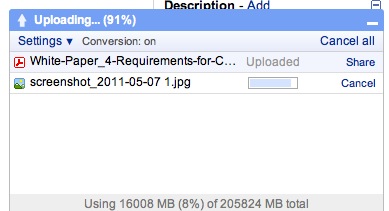
If you have Confirm settings before each upload checked, you'll see this screen. If not, you won't.

Et voila! It now shows up in the documents list.

May 11, 2011
Review button on Captivate quizzes won't show up on Score slide
In Adobe Captivate, if you check Allow User to Review Quiz in the quiz settings in Preferences, a button should appear on the Score page that allows the user to go back and see what they answered and any available feedback for each question slide. Sometimes this button doesn't display, even if this setting is checked.
To fix, try unchecking Allow User To Review Quiz, then hit OK to save the setting and close the Preferences window.
Then re-open the Preferences window, check Allow User To Review Quiz and hit OK again!
May 10, 2011
Clicking a link results in blank page with "true" in IE7
If clicking on a link containing a javascript results in a white page contining nothing but the word "true" or "false", check the link to see if it is written in the form:
<a href="javascript:yourfunction();">link text</a>
If so, try rewriting it in the form:
<a href="#" onclick="yourfunction();">link text</a>
Certain browsers, particularly IE, will show the return value of the function rather than executing it under certain conditions. I've found this issue when using swfObject to write a Captivate swf to the page like this:
<a href="javascript:so.write("CaptivateContent")">Click to show movie</a>
results in blank page containing "true" in IE7. Using the onclick statement fixes the problem.
May 2, 2011
How to override the !important CSS style attribute using Javascript
I've worked on a few projects where a CSS style on some page element has been specified as "!important" and it interferes with the way the page functions. Ordinarily, I would just change the original style, but sometimes I don't have control over the stylesheet or script that is generating the style. One example is a recent project where an embedded Captivate player is written to a custom HTML wrapper at by the javascript SWFObject.js. SWFObject writes style attributes to the page dynamically to hide the Captivate player as required until it is fully loaded:
object, embed {
              visibility:hidden !important;
}
We don't really have control over the content of the SWFObject script itself, so when we want to override the visibility attribute for a custom function, it is necessary to programmatically tell the Captivate to "show itself" after being written to the page.
However, the !important attribute prevents the normal method of overriding the visibility style . For instance, a statement like this will not change the style of an element marked "visibility:hidden !important;":
document.getElementByID('player').style.visibility = visible;
Thanks to Premasagar on Stackoverflow, I've found a working method for overriding the visibilty style: use the cssText property:
document.getElementById("player").style.cssText = 'visibility:visible !important'