I just walked in on a Monday morning to find the Power Mac G5 off. Pressing the power button did nothing, although the power light was on. Pulling the plug for a moment did nothing either. Fortunately I found this technote from Apple which got things working again:
Power Mac G5 (Late 2005)
To reset the SMU on a Power Mac G5 (Late 2005) computer, either use the steps listed above for the Power Mac G5 (Late 2004) or:
- Turn off the computer by selecting Shut Down from the Apple menu or by holding the power button until the computer turns off.
- Open and remove both the metallic outer door and the inner plastic air deflector.
- Remove the fan assembly immediately to the left of the processor module.
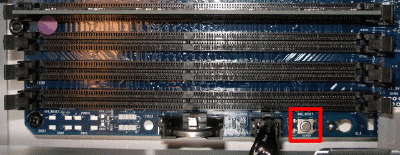
- Press the SMU reset button on the logic board.
- Replace the fan assembly, air deflector, and outer door.
- Turn on the computer.
 Comments
 Post a comment