May 29, 2006
Magoo, the world's smartest goldfish
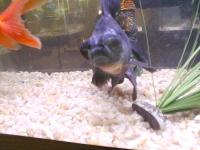
Magoo inspecting the camera.
One of the first fish we ever bought was "Magoo," a little black moor goldfish with big eyes, and loads of personality. We didn't realize it when we got him, but Magoo was an innovator. Like the famous potato-washing Japanese macaque monkeys, Magoo would invent new behaviors, and teach them to others in the tank.
One characteristic of goldfish as a species is their non-linear thinking. If you ever watch a goldfish try to attain an objective, for instance swimming across the tank to get some food, it may sometimes appear as if the goldfish will forget the goal, then remember, then forget, then remember again, all the way to the other side. They are much more interested in the journey than the goal. In this, Goldfish are the opposite of cichlids, who singlemindedly focus on their agendas better than most people. However this non-linear mental state should not be mistaken for stupidity. Several of our goldfish have been remarkably intelligent. However our orange fantail, Piggum, is not one of them!

Magoo eating a yellow squash. Piggum is sitting next to him for comfort.
When we first got Piggum, he swam back and forth across the tank for a whole day without stopping. We realized he had probably never been alone before, and was looking for other fish. So we went out and bought Magoo right away. When we dropped Magoo into the tank, Piggum didn't know what to do! He immediately stopped swimming back and forth, dropped to the bottom, and stayed there with his chin on the gravel for a long time. Magoo was unconcerned: he just started searching the gravel for food. Within a day or so, Piggum and Magoo became best friends. They would sleep side by side, and Piggum would do whatever Magoo was doing. Piggum is definitely not a self-starter.
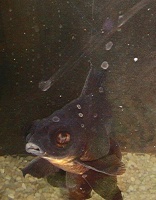
Magoo watching us.
Until Magoo arrived, Piggum had been accustomed to eat from the surface. We fed them flakes, and he would zip around the top of the tank, snatching flakes off the surface. He would ignore any that fell to the ground. When Magoo arrived, he brought new ideas, however. He would eat a little off the surface, but his flake-targeting ability wasn't so great, probably because of the big eyes. He preferred to spend a lot of time systematically turning over every gravel piece in the tank. He was truly tireless at cleaning the gravel. After a few weeks, Piggum started searching the gravel also. He was never as diligent and systematic as Magoo, but he would consistently hunt in the gravel once he learned the new technique.
Magoo also taught Piggum and all the other goldfish we eventually purchased to use gravel to chew with - sort of the way a chicken uses gravel in their gizzard. None of the goldfish used gravel in that manner until spending some time with Magoo. Magoo's procedure for eating was:
Get a mouthful of flakes.
Pick up some gravel.
Swim to the top of the tank and get a bubble of air.
Chew thoroughly with your pebble teeth.
Repeat!
One of Magoo's most endearing characteristics was his interest in the outside world. He spent a lot of time looking out of the tank. If we came up to look, he would tilt his head to the right, and start "yapping" furiously. Despite the lack of noise, it seemed clear that Magoo was trying to communicate with us. He would do this even when he wasn't hungry - food wasn't his biggest motivator.

Magoo in mid-click
Then one day, Magoo made a big conceptual leap. He figured out a way to make noise! He realized that clicking a glass thermometer against the tank wall would get us to come see what was going on. After that, Magoo was in business. He would click anytime he wanted attention. If we called his name, he would "Click!" If we dared to walk by the tank without saying "Hi," Magoo would click at us. If we left the room, he would make a loud "Click!" At night when we shut off the last light to go to sleep, we would hear "CLICK!" One night I decided to test his hearing. I went upstairs after shutting off the living room light, and called "Magoo!" "CLICK!"
Every morning, at dawn, Magoo would announce the fact that he was awake with "Click, click!"
Magoo would hang out by the clicker, looking out at us, ready to make a statement. If he did get our attention, he would start "talking" - moving his mouth as if he was giving a speech at the microphone.

Here is Magoo, waiting for a good reason to click the "Magoozaphone."
After about 4 years, Magoo suddenly changed color from nearly all black to half gold and half black. The advantage of this was that you can now see his face clearly! He looked like a wise little old man. He also grew a tiny bit of "oranda" cap, and his face had a lot of character.
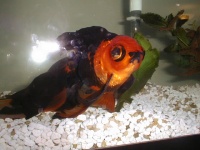
This is one trick he didn't teach anyone else: none of the other fish ever expressed any serious interest in the clicker, except Piggum would go out of his way to whack it with his tail sometimes as he went by.
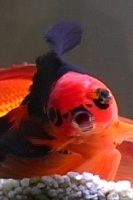
Click the image to see a movie of Magoo "talking"
May 13, 2006
Make any web-based Powerpoint presentation scorm compatible
It's easy to export Powerpoint presentations to the web, but they aren't automatically scorm compatible. To add simple scorm capability to your web-export, do the following:
This will add a button that will allow the user to mark the sco complete.
1. Add this to the head section of outline.htm or the final slide.
Add the following onload statement to the body tag:
<body onload=\"mm_adlOnload(); Load()\">To add a button that lets the user manually set the sco status to "completed", find the text of the last slide title (the text of the last link in the navbar on the left) and add this button after it.
To have the sco automatically mark itself complete upon closing, add the following onunload and onbeforeunload statements to the body tag:
onbeforeunload="mm_finishFrm" onunload="mm_finishFrm"
May 11, 2006
Debugging and troubleshooting HTML and javascript

Firefox, the web developer's debugging tool of choice
The best browser to use to check javascript errors is Firefox, hands down. Other browsers have some error reporting, but none give you anywhere near the detailed information as Firebug, an addon to Firefox. The extensions available allow you to snoop into every aspect of your page, and into the communication between page and server.
You will need to get several Firefox extensions:
Firebug
Firebug is the one extension I can't live without. It shows errors in javascript, css, allows you to inspect the HTML source, computed style, events, etc.
View Source Chart
Creates a Colorful Chart of a Webpage's Rendered Source Code
Displays Source in its Altered State After the DOM has been Manipulated by JavaScript
JSView
Easily view the source code of external js files.
Hypertext DOM Browser
Hypertext DOM browser for Web developers and Firefox developers (and JavaScript calculator). You traverse DOM tree just like a normal Web site. It can display and set DOM properties and call DOM functions. Type "content" to show the properties of the content window, "content.document" to show properties of the HTML document in the calling window.
Savegenpage
See exactly what HTML code your javascript is generating. Incredibly useful for generated menus and the like.
Internet Explorer
Since IE never works quite the same as other browsers, you will find you need to debug in that environment also. Unfortunately it is not nearly as well set up for that as Firefox. If you have Microsoft Office, pop the install discs back in the drive and install the Microsoft Script Editor (use custom install and install it individually). Then you will need to go to Tools->Internet Options...->Advanced->Disable Script Debugging (Internet Explorer) Tools->Internet Options...->Advanced->Disable Script Debugging (Other) and UNCHECK those options. When you run into a javascript error, an alert will pop up asking if you want to debug. It is much more cumbersome than Firebug and much less informative, but better than nothing! If you are running IE 7 and above, there are Developer Toolbar addons that will help you debug CSS and layout issues. Web development bookmarkletsA fantastic selection of debugging scripts that allow you to click within a page, and see various items, like all the Javascript variables and their properties available on the page, or all the classes used in the document.
Desktop Applications:
Dreamweaver does a basic job of checking for errors in your HTML syntax. Use the "highlight invalid code" command under Code View options. You can also validate to various Web standards using the "check page" command in the File menu.This is where Adobe GoLive comes in: it has a very detailed error checking utility: use the "Check Syntax" command in the Edit menu to see just about everything you could ever want to know. GoLive also has a great Javascript development environment and javascript debugging utility.I hope Adobe keeps maintaining GoLive, it has a lot of features Dreamweaver doesn't have.