Reload Editor Tutorial Part I - Create a package and import resources
With an emphasis on use for SumTotal 6.5 and SCORM 1.2
Once you have completed building a single learning module (called a "SCO" or "Shareable Content Object" in SCORM terms), you will probably want to link it together with a quiz or with other learning module SCO's.
To piece together multiple SCO's into a single learning module, you will need to replace the manifests created with each SCO with a single manifest that lists all of them. The Reload Editor is a tool which will allow you to create manifests which aggregate all types of learning modules together into a larger package.
The Reload Editor is available free from http://www.reload.ac.uk. The Reload editor works on Mac or PC, and requires the Java Runtime Environment which will have to be installed on a PC. (see instructions that come with the editor.)
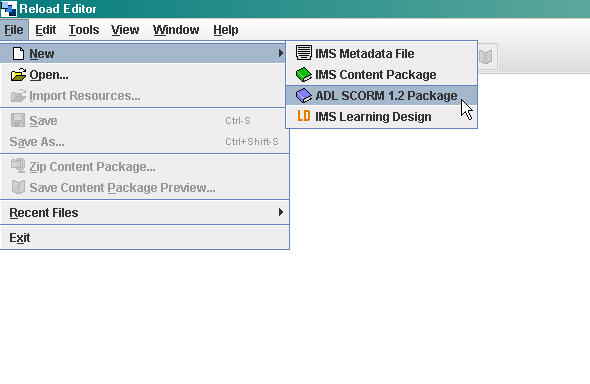
- Create a new ADL SCORM 1.2 package:
- Save the newly created package file to a new folder. The new file screen looks like this:
- Import the SCO files that will be used in this combined module by clicking the Import icon:
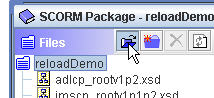
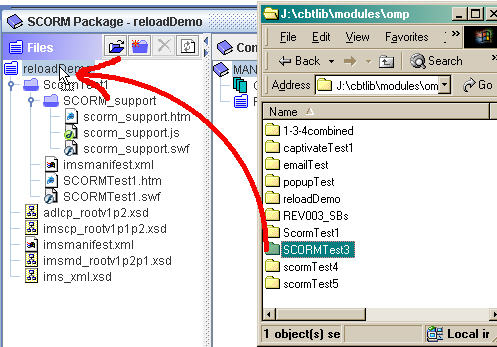
You can also simply drag them into the package Files folder:
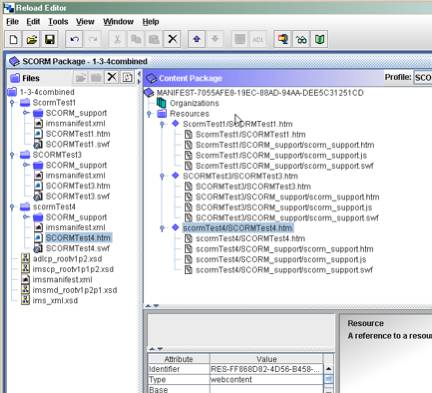
- Your project should now look like something like this:
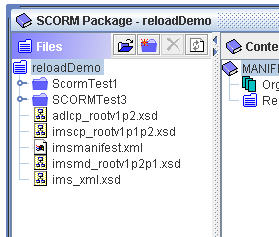
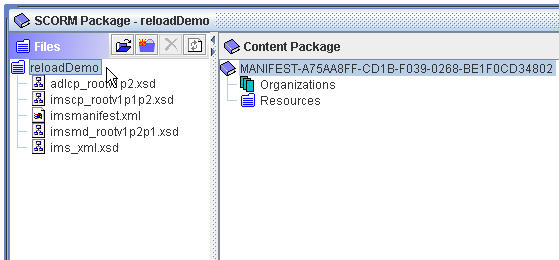
or this example, with three items (shown opened to display their resources)

Hi,
It seems you made a great job here.
I discovered your blog as I've got a problem with reload editor. In fact I launch the editor and when I try to create a new package, I've got this:
Could not create New Document
Could not load Profile: CP Default Profile
Have you already experienced that?
I you solved the problem, could you share please.
Best regards
Ludovic
Posted by: Ludovic Havet on November 16, 2006 3:33 PM