Anytime you create an interaction in Captivate, such as a click-box, button, or quiz question, and you have turned on Reporting in the Quiz Manager, the interaction will be included in the quiz.
To examine or change these settings on any interaction object, right-click the object, and click on the Reporting tab.
Anytime you create an interaction in Captivate, such as a click-box, button, or quiz question, and you have turned on Reporting in the Quiz Manager, the interaction will be included in the quiz.
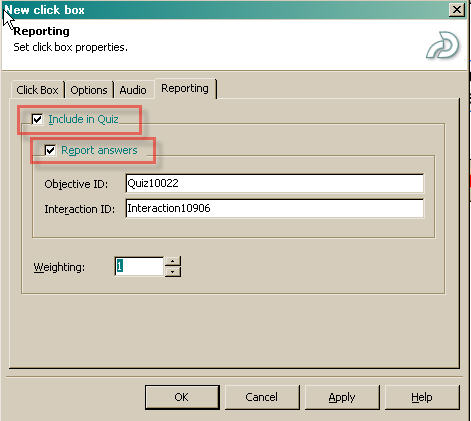
To examine or change these settings on any interaction object, right-click the object, and click on the Reporting tab. For items you want to score, select both "Include in Quiz" and "Report answers." SumTotal 6.5 will store results of the interactions, as well as the score. If you want some interactions to be worth more than others you may assign weights to them. Weights are relative to each other, so plan carefully so that your mastery score will work out correctly.
Important Captivate Resources
- Exploring Quizzing in Macromedia Captivate
- The following article is the key to using captivate tracking output in javascript or other frameworks.
Storing Captivate Test Scores in a Database and Exporting Them To Excel with ColdFusion - See thewhitepaper: "Tips and Tricks: Secrets to Macromedia Captivate & SCORM-Compliant Learning Management System Integration."
- Navigation in Quizzes stops Interactions from being reported
- Adobe - Developer Center : Output Options in Captivate � Part 3: SCORM Tracking
- Tune up your Tracking: Getting your Content to Work in your LMS

It's test.
Posted by: Jourgenz on March 29, 2008 9:10 PMI could't post a message...