August 23, 2005
CSS: table-layout:fixed keeps Netscape 7 in line
Netscape 7 was squashing some table cells down, ignoring widths I had specified in the css.
The code for the table:
Without the style
table-layout:fixed;
#learningPlanTabsTable {
width:100%;
}

#learningPlanTabsTable td.action {
	width:136px;
	height:25px;
	background-image: url(images/tabs/deselected/tab_01.gif);
	background-repeat: no-repeat;
	margin:0px;
	font-family:Trebuchet MS, Helvetica, Arial, sans-serif;
	font-size:13px;
	background-color:;
}
View image
With table-layout:fixed;
#learningPlanTabsTable {
/*table-layout:fixed is necessary to keep mozilla browsers from squashing the tab cells*/
table-layout:fixed;
width:100%;
}

#learningPlanTabsTable td.action {
	width:136px;
	height:25px;
	background-image: url(images/tabs/deselected/tab_01.gif);
	background-repeat: no-repeat;
	margin:0px;
	font-family:Trebuchet MS, Helvetica, Arial, sans-serif;
	font-size:13px;
	background-color:;
}
View image
Thanks much to Quirksmode for the tip.
Posted by ellen at 1:11 PM
August 17, 2005
Java console on Mac
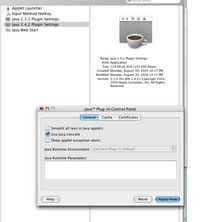
It's not obvious when using Safari on the Mac how to get the Java console to start up.
Go to Applications/Utilities/Java/Java 1.x/x Plugin Settings and turn it on there. Then it will show up whenever Java is active in Safari.
This also works in Firefox, although that has menu items you can download as extensions that will show the console or not.
Posted by ellen at 12:06 PM
August 15, 2005
Preventing Printing on web pages
A tip I picked up from various sites, including This One
Very useful for preventing printing of Perception quizzes, when you cannot use Questionmark's secure browser.
Stick this in the template for the quiz:
for non-questionmark-related printing prevention, just stick
HTML_HEADER=

<!--open HTML_HEADER-->

<STYLE media="print">BODY {display:none}</STYLE>


<!--close HTML_HEADER-->
<STYLE media="print">BODY {display:none}</STYLE>
in the head of the document.
Seems to work in Netscape for PC also, but I haven't yet tried it on the mac.
Posted by ellen at 1:46 PM