February 25, 2005
Leaving Checkpoint VPN client ON but not connected blocks URL
After testing out Checkpoint' VPN client on my Mac, I disconnected from the server, but left the client on. In other words, the icon was still visible in the menu bar.
It seems this can actually block your ability to receive mail from the server if it is in the same domain or possibly the IP range as the internal network which the VPN client covers. It also seems to block the web - even if the pages in question are on the public network.
So even when it is off, it is active in some way. Only by turning it off completely was I able to get connect to the mail server.
February 24, 2005
Norton Ghost will not backup unless a non-USB mouse is attached
I've found that Norton Ghost will not go into DOS mode to perform a disk backup unless a non-USB mouse is attached to the machine. Probably you could also get around this by fiddling with USB drivers for DOS, but I found it easier to dig up an old mouse and plug it in.
February 20, 2005
Checkpoint VPN for Mac OS X
Maybe I was dreaming, but I was certain that the last time I looked, the only way to get a Checkpoint VPN client for the Mac was to buy one - for around $100.00.
Many months of fruitless attempts to get connected with other clients and combinations of utilities and clients later, I happened to do a search on Checkpoint and OS X, and landed on this page which allows you to download it for free. It actually worked the first time I tried it! Another piece in my Mac-in-a Windows-network connectivity toolbox, along with ProSoft Engineering's Novell NetWare client.
Fix for Checkpoint SecureRemote Client under OS X 10.3.9
Leaving Checkpoint VPN client ON but not connected blocks URL
Search for all articles mentioning Checkpoint VPN
February 18, 2005
Use server-side application variables to drive client-side scripts
You can use serverside variables to drive client-side javascripts. Server-side variables get processed and the results output by the time the page is rendered, so the value of the variable can be used in client-side functions.
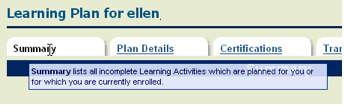
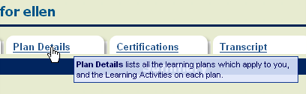
In an ASP application I'm working with, I wanted a different tooltip to show up on each tab, depending on what the tab title was. There is a server-side variable called "tabs[i].title". So I created a little client-side function to test the value of the title on each tab.
<script> var tabName ;function whichTab(tabTitle){
if (tabTitle == \'Summary\'){
tabName = Summary;
}
else if (tabTitle == \'Plan Details\'){
tabName = PlanDetails;
}
else if (tabTitle == \'Certifications\'){
tabName = Certifications;
}
else if (tabTitle == \'Transcript\'){
tabName = Transcript;
}
}
</script>
The html for the selected tab is:
<td>
  <strong onMouseOver=\"whichTab(\'${quoteHTML(tabs[i].title)}\');this.T_STICKY=true;
this.T_WIDTH=400; this.T_TEMP=5500;return escape(tabName);\">${quoteHTML(tabs
[i].title)}</strong></td>
and for the unselected tab:
<td> <a href=\"${href}\" onMouseOver=\"whichTab(\'${quoteHTML(tabs[i].title)}\');this.T_STICKY=true; this.T_WIDTH=300; this.T_TEMP=5500;return escape(tabName);\">${quoteHTML(tabs[i].title)}</a> </td>
the function "whichTab()" uses the result of the serverside variable "tabs[i].title" to trigger a
tooltip generating script. "T_Sticky=true" turns on the tooltip for that link.
The results are here:


February 17, 2005
Link to specific page or spot in a pdf
Links to PDF's can be made to target specific places in the document by appending a number/pound (#) sign to the end of the URL, followed by "page=[number]:
Example: target page 10
http://server.com/title.pdf#page=10
Example: Target a named destination:
http://server.com/title.pdf#destination_name
Thanks to the PowerPoint FAQ for this tip.
It is also possible to control what happens when the document opens - which view, what zoom, etc. See Link to PDFs from HTML -- The PowerPoint FAQ for more details.
Note: this works most consistently with absolute links, and not at all with file-system links (c:\folder\)
Relative links that target specific pages within a pdf may work in some browsers, but some people will merely be directed to the first page of the pdf.
February 14, 2005
Troubleshooting Coursebuilder installation in Dreamweaver MX 2004
Coursebuilder is a Dreamweaver extension that creates learning interactions, like quiz questions. When I installed the extension in Dreamweaver MX 2004, it seemed to work fine, until I got to the point of using the Actions manager tab in any given interaction. then I would get an error message that said"Actions Manager Data was invalid," then another dialog came up that said
"While executing onLoad in CourseBuilder Interaction.htm the following JavaScript error(s) occurred:
"At line 141 of file "MyHardDrive:Applications:Macromedia Dreamweaver MX 2004:Configuration: Shared:CourseBuilder:Scripts: amTreeClass.js":TypeError:tr eeData[chnkStart[0]]has no properties"
Coursebuilder worked properly only after I reinstalled DWMX2004 in my USER Applications folder (HD:Users:UserName:Applications). In this configuration I found I could not use the Extension Manager that was installed with the new instance of DWMX within the user/applications folder. When I would navigate to it using File:Open from within that instnace of Extension Manager, it was grayed out.
To get around this, I doubleclicked the Coursebuilder .mxp file itself, and let it open whatever ext. mgr it wanted. It did then show up in the new DWMX application when I opened that instance, and did indeed work completely.
February 7, 2005
Powerpoint Text jagged when published to web
A client sent me a powerpoint with revisions from last year's version. Over the year, they must have found the "Animation Schemes" button because the presentation was filled with animated text. When I exported the presentation I found that most but not all of the text had gone jaggy.
A quick search of Googleprovided a clue on the Powerpoint for Mac webpage, even though I was using the PC version. In the section on making Powerpoint Movies on the Mac, it noted that "Antialiased text loses its antialiasing if the text is animated."
I went back to the presentation. It wasn't enough to select all slides in the left column and click "No Animation - Apply to All Slides" under Animation Schemes.
By each slide icon in the left column there were still tell-tale animation icons (the little star). I had to select the Custom Animation Pane (in the right hand task pane) go into each slide and select and remove all the animation effects shown in the task pane.
However it was worth it. Now all text comes out clean when published to the web.
February 1, 2005
Troubleshooting Questionmark Perception database connections
We've had just about every sort of database connection issue with our two Questionmark Perception servers, so in the interest of saving someone else the kind of struggles we've gone through, here are some things to look for.
- tnsnames.ora issues:
There is a file that lives in a subdirectory of the Oracle folder - this directory may be called Oracle_Home, Oracle9 etc, and is often but not always in the root directory of the server.
A typical path to the tnsnames.ora file on a server is
E:\\Oracle_Home\network\Admin\tnsnames.oraThere are a variety of things that could be incorrect in this file.
- Hidden control characters brought in during copy and paste:
If you copy and paste the settings from some email programs into this file, you may be adding hidden control characters to the tnsnames.ora file. You won't be able to see them but they're there, and they're screwing things up.
To avoid this, either use the net assistant to set up the tnsnames.ora file, or type the settings in by hand using notepad. Or go ahead and copy and paste, but if you have problems check the file in an application that allows you to see all the spaces, tabs, etc. I use BBEdit, a Mac application. - missing punctuation
Oracle expects certain brackets and other punctuation to be in the right place. Type carefully! Use another entry as an example. Double check your work. - SID is wrong: The SID identifies the Oracle system ID of the database server to which to connect. The TNSNAMES.ORA file uses the same SID defined in the server's LISTENER.ORA file. Our connection failed because we had left in a ".world" suffix in the SID where it wasn't expecting one.
Look to see if there is also a sqlnet.ora file in the same directory. If there is, and if it contains a line like:
NAMES.DEFAULT_DOMAIN = company.com
or
NAMES.DEFAULT_DOMAIN = .worldthen your SID or SERVICE_NAME in the tnsnames.ora file should not have the suffix stated in sqlnet.ora appended to it.
so for instance if the sqlnet.ora contains
NAMES.DEFAULT_DOMAIN = company.com
then the SERVICE_NAME in tnsnames.ora should be
dbname
and not
dbname.company.com
See Avoiding the "ORA-12154: TNS: could not resolve service name" error for more information on tnsnames configuration.
- Hidden control characters brought in during copy and paste:
If you copy and paste the settings from some email programs into this file, you may be adding hidden control characters to the tnsnames.ora file. You won't be able to see them but they're there, and they're screwing things up.
This is set in the Data Sources (ODBC) control panel.
ODBC driver DSN server name does not match tnsnames entry name (the name before the "=" at the top of each entry