August 8, 2004
When MovableType won't recognize ImageMagick
Recently my web-host restored the server I use after some problems which necessitated wiping it and starting from scratch. After doing this my installation of MovableType was no longer able to create thumbnails. The thumbnail option no longer appeared in the upload dialog. When I looked at the config file, all the thumbnail options were commented out - in other words it was defaulting to use ImageMagick.If you read the verbiage in that file carefully, which I did not, it says:
Specifies the image toolkit used to create thumbnails from uploaded images.
# By default, the ImageMagick library and Image::Magick Perl module are used;
# if your system does not have these, you can use the NetPBM tools instead
# (assuming that your system has these tools installed). Possible values for
# this setting are "ImageMagick" or "NetPBM".
#
# ImageDriver NetPBM
This means it must have the Image::Magick Perl module installed also. I never would have caught this if I hadn't read this thread which refers to it.
"....Solution: You need to install the ImageMagick-perl rpm. I installed this, yelled, "Thumbnail options, show thyself!" and I had instant gratification! As I'm using apt-rpm, all I had to do was type: apt-get install perl-ImageMagick..."
Once installed by my kindly system administrator, thumbnails worked fine again.
JCAHO Trivia Game Part II: Entry Pages
<<=Part I "Introduction" | Part III "Building the Game"=>>
Part II: JCAHO Trivia: Construction of Choose-A-Team and Login Pages.The environment: Our computing environment is fairly uniform. For better or worse, it is 100% PC. The JCAHO Trivia game is only accessed from within the work environment, so no home computers are involved. The internal network is very fast, so huge graphics are no problem.
- Operating Systems: There is some variation in operating system versions, and Windows NT, Windows 2000 and XP are all in use, although the number of NT users is quickly decreasing. The hardware is nearly all fairly recent low-end Dell desktop computers with flat panel displays with reasonably high resolution and color spaces, but there are still quite a few old-style low resolution monitors (800x600).
-
Browsers and PNG Graphic display capabilities: The only browser used is Internet Explorer, mostly later versions than v.5.5, but I found there were a few stragglers still running 5.1. This became significant because IE 5.1 will not display the transparent PNG graphics I wanted to use. Actually no version of IE currently out will display transparent PNG's correctly, but it is possible to get them to display properly using one of Microsoft's Filters and Transitions (DXImageTransform). However this works ONLY in IE versions 5.5 and later.
(see Combining Transparent PNG's with animated gifs and Using Transparent PNG's as Background Images in DIV's for instructions on using PNG graphics with IE ).
Older browsers will simply not display the filters, so the graphics will not appear. If the filters are NOT used with the PNG's on Internet Explorer, any transparent section will appear as a solid gray area. I could have sniffed for old browsers, and had it swap out the PNG's with transparent GIF's, but it would have been more work, and I found that the sniff wasn't always successful between versions 5.5 and 5.1 sometimes browsers don't give out accurate information about their version numbers. This problem was resolved when I was able to get an agreement from the IT team that they would upgrade any computer that was found to have an older version of IE on it.
The Choose-A-Team Page: Questionmark Perception needs at least two pieces of information to log in a user - a username and a group. We determined early on that each team would be entered into the system as a group in Perception, since team scores could easily be tracked by group. Perception can only receive these two variables from the login page. In a normal Perception setup, a participant would type in their username (and password if required) and select a group from a drop-down list of groups. However we realized we'd have to break this process up into two pieces, since most people would not know what group (team) they were in. So we created a pre-login team chart page.
The fact that most shaped how we handled security was that drawing up accurate and complete team rosters was impossible. Neither could we make use of LDAP or any other directory system for various reasons. This meant that we could not authenticate to any list, so security had to be handled by restricting access to the server by IP.
- Teams and Groups of Teams: To help people figure out what team they are on , I created a team chart page which shows all the teams, listing which nursing units are in each team. Teams are further divided into five groups and each team only competes against the others in its group. The five groups each contain 5-10 teams, and one team wins in each group every month. The team chart page shows the organization of the teams in their respective groups, so players will know who their competition is. The chart also functions as 1/2 of the login process, since when you click on the team name, it sends that team name to the "Group" field of the login page.
- Mascots: To make this long list of teams more exciting, I went on a hunt for copyright-free animated pixel art all across the internet and came up with some amazing "critters". Each team gets a critter mascot, and though there have been some disputes about who gets which critter, all have been resolved peacefully so far.
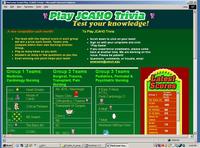
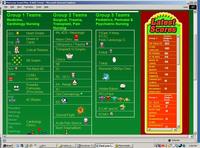
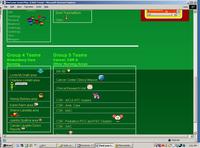
The team chart/Entry page
- Live Scoreboard: The chart also features the first of several live scoreboards that appear throughout the game and keep players informed as to how their team is doing at any moment. The scoreboard updates whenever the page is refreshed. The scoreboards are .asp pages embedded in iFrames. This was necessary because Perception generates its quiz pages dynamically from a non-web-enabled directory, and I needed the scoreboards to be in an .asp-enabled section of the server. So all the .asp code goes into separate scoreboard pages, and they show up within iFrames on the Entry page, the Login page and the Final Score page of the game. More on the scoreboards in a later section.
- Choosing a team: Each team name on the chart is a live link. Clicking any of these team links fires a javascript that sends that team name to the "group" field of the insecure login page, and also opens that page in the browser.
Here is the code for the javascript that sends the team name to the next page://this part goes in the head area of the team chart page
<script language="JavaScript" type="text/JavaScript">
// this defines the variable "teamName" and sets it to nothing at the moment.
var teamName='';
// this function opens the login window and runs the function "populate"
function openwindow()
{
winHandle=window.open('http://our.questionmark.server/q/open.dll?login=jcahoTrivia&session=9244441523615266','','');
setTimeout("populate()",1000);
}
// this sends the team name to the GROUP field in the form "login" on the newly opened window.
function populate(){
winHandle.document.login.GROUP.value=teamName;
}
</script>
# This is the onClick event for every team link on the team chart page. It runs the script above, and defines what the current value of teamName will be for each link:
<a href="#" onClick="teamName='Transplant/ GI Surgery Clinics'; openwindow();">Transplant/ GI Surgery Clinics </a><
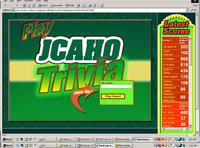
To complete the login process, the player types their username into the login page and hits the "start game" button.
Your Game in Lights! The Perception login page has been dressed up to look as glitzy as possible.There are glowing transparencies, animated running lights, and wild fluorescent colors. For inspiration I visited game sites and online casino sites, which tend to use elaborate graphics.
Stylesheet magic: The login page sniffs the screen resolution of the monitor it is being viewed on, and changes layout completely if on a low resolution monitor.
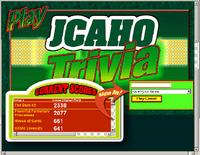
High resolution version - - - Low resolution version
This is done by swapping style sheets. Not only fonts and colors, but images can be entirely swapped and moved around using style sheets , since the images are used as background-images in absolutely positioned divs. For example, the position and look of the scoreboard are determined by the class ".scoreboard." (Note: I used classes rather than ID's in my CSS stylesheets because Questionmark sees # symbols as comments, although I later realized I could have done ID's by using a double ## symbol which would be interpreted correctly.)
.scoreboard {<br>

position:absolute;<br>

width:200px;<br>

height:605px;<br>

z-index:5;<br>

left:800px;<br>

top: 0px;<br>

background-image:url(http://our.questionmark.server/em/jcahoTrivia/images/login/LongScoreboard/LongScoreboard_full.png);<br>

background-repeat:no-repeat;<br>

/* IE 5.5+ */<br>

background-image:none;<br>

filter:progid:DXImageTransform.Microsoft.AlphaImageLoader(src=http://our.questionmark.server/em/jcahoTrivia/images/login/LongScoreboard/LongScoreboard_full.png, sizingMethod='image');<br>

}</p>
Scoreboard style for narrow screens, where the scoreboard is short and wide, and positioned at the bottom left corner:
.scoreboard {

position:absolute; //these 6 lines describe the position of the scoreboard and it's overall size.

width:537px;

height:317px;

z-index:5;

left: 10px;

top: 289px;

background-image:url(http://our.questionmark.server/em/jcahoTrivia/images/login/scoreboard_whole.png);    // this specifies the scoreboard image to use for "normal" browsers - sort of gratuitous because at the moment the game only completely works in IE. But I have plans to fix that, and wanted to build in as much cross platform operability as possible.

background-repeat:no-repeat;

/* IE 5.5+ */  //this specifies how to display the image in IE 5.5 or later. It removes the background image, and displays the PNG above the background using DXImageTransform filter. There are some problems with this because it gets in the way of form elements and links (they are no longer clickable, although they are visible), and a workaround is described in http://thedesignspace.net/MT2archives/000103.php

background-image:none;filter:progid:DXImageTransform.Microsoft.AlphaImageLoader(src=http://our.questionmark.server/em/jcahoTrivia/images/login/scoreboard_whole.png, sizingMethod='image');

}
Not only does the whole login page change layout, but the red score chart in the middle of the green scoreboards also senses the resolution of the monitor and swaps styles as well, switching from a tall narrow format to a wider format. This chart is actually a separate .ASP page displayed within an iFrame inside the scoreboard graphic, a
The scoreboards are .ASP pages so that they can dynamically update the scores from the database as people move through the game. They were mostly coded in Dreamweaver, but I had a programmer help write the queries to work with SQL server. All scoreboard pages use the same queries, which are contained in an include, named "SQLqueries.asp".
This is the .asp code for the size-swapping scoreboard:
<%@LANGUAGE="VBSCRIPT" CODEPAGE="1252"%>
<!--#include file="./Connections/jcahoGame.asp" -->
<!--#include file="./SQLqueries.asp" -->
<%
Dim Repeat1__numRows
Dim Repeat1__indexRepeat1__numRows = -1
Repeat1__index = 0
Group1_numRows = Group1_numRows + Repeat1__numRows
%>
<%
Dim Repeat2__numRows
Dim Repeat2__indexRepeat2__numRows = -1
Repeat2__index = 0
Group2_numRows = Group2_numRows + Repeat2__numRows
%>
<%
Dim Repeat3__numRows
Dim Repeat3__indexRepeat3__numRows = 10
Repeat3__index = 0
Group3_numRows = Group3_numRows + Repeat3__numRows
%>
<%
Dim Repeat4__numRows
Dim Repeat4__indexRepeat4__numRows = -1
Repeat4__index = 0
Group4_numRows = Group4_numRows + Repeat4__numRows
%>
<%
Dim Repeat5__numRows
Dim Repeat5__indexRepeat5__numRows = -1
Repeat5__index = 0
Group5_numRows = Group5_numRows + Repeat5__numRows
%>
<!--<!DOCTYPE html PUBLIC "-//W3C//DTD XHTML 1.0 Transitional//EN" "http://www.w3.org/TR/xhtml1/DTD/xhtml1-transitional.dtd">
<html xmlns="http://www.w3.org/1999/xhtml">-->
<HTML>
<head>
<meta http-equiv="Content-Type" content="text/html; charset=iso-8859-1" />
<title>team scores - units</title>
<link href="css/scores.css" rel="stylesheet" type="text/css" />
<script language="JavaScript" src="http://our.questionmark.server/em/jcahoTrivia/javascript/scoreBoardStyleSwitcher.js"></script></head>
<body>
<table border="0" cellpadding="0" cellspacing="0" class="group1Background">
<tr>
<td class="scoreTitles">Group 1 </td>
<td class="scoreTitles">Scores <span style="font-size:9px;">(Highest First)</span></td>
</tr>
<% While ((Repeat1__numRows <> 0) AND (NOT Group1.EOF)) %>
<tr>
<td class="teamName"><%=(Group1.Fields.Item("MEMBER_GROUP").Value)%></td>
<td class="scores"><%=(Group1.Fields.Item("SCORE").Value)%></td>
</tr>
<%
Repeat1__index=Repeat1__index+1
Repeat1__numRows=Repeat1__numRows-1
Group1.MoveNext()
Wend
%>
</table>
<table cellpadding="0" cellspacing="0" class="group2Background">
<tr>
<td class="scoreTitles">Group 2 </td>
<td class="scoreTitles">Scores <span style="font-size:9px;">(Highest First)</span></td>
</tr>
<% While ((Repeat2__numRows <> 0) AND (NOT Group2.EOF)) %>
<tr >
<td class="teamName"><%=(Group2.Fields.Item("MEMBER_GROUP").Value)%></td>
<td class="scores"><%=(Group2.Fields.Item("SCORE").Value)%></td>
</tr>
<%
Repeat2__index=Repeat2__index+1
Repeat2__numRows=Repeat2__numRows-1
Group2.MoveNext()
Wend
%>
</table>
<table cellpadding="0" cellspacing="0" class="group3Background">
<tr>
<td class="scoreTitles">Group 3 </td>
<td class="scoreTitles">Scores <span style="font-size:9px;">(Highest First)</span></td>
</tr>
<% While ((Repeat3__numRows <> 0) AND (NOT Group3.EOF)) %>
<tr>
<td class="teamName"><%=(Group3.Fields.Item("MEMBER_GROUP").Value)%></td>
<td class="scores"><%=(Group3.Fields.Item("SCORE").Value)%></td>
</tr>
<%
Repeat3__index=Repeat3__index+1
Repeat3__numRows=Repeat3__numRows-1
Group3.MoveNext()
Wend
%>
</table>
<table border="0" cellpadding="0" cellspacing="0" class="group4Background">
<tr>
<td class="scoreTitles">Group 4 </td>
<td class="scoreTitles">Scores <span style="font-size:9px;">(Highest First)</span></td>
</tr>
<% While ((Repeat4__numRows <> 0) AND (NOT Group4.EOF)) %>
<tr>
<td class="teamName"><%=(Group4.Fields.Item("MEMBER_GROUP").Value)%></td>
<td class="scores"><%=(Group4.Fields.Item("SCORE").Value)%></td>
</tr>
<%
Repeat4__index=Repeat4__index+1
Repeat4__numRows=Repeat4__numRows-1
Group4.MoveNext()
Wend
%>
</table>
<table border="0" cellpadding="0" cellspacing="0" class="group5Background">
<tr>
<td class="scoreTitles">Group 5 </td>
<td class="scoreTitles">Scores <span style="font-size:9px;">(Highest First)</span></td>
</tr>
<% While ((Repeat5__numRows <> 0) AND (NOT Group5.EOF)) %>
<tr>
<td class="teamName"><%=(Group5.Fields.Item("MEMBER_GROUP").Value)%></td>
<td class="scores"><%=(Group5.Fields.Item("SCORE").Value)%></td>
</tr>
<%
Repeat5__index=Repeat5__index+1
Repeat5__numRows=Repeat5__numRows-1
Group5.MoveNext()
Wend
%>
</table></body>
</html>
<%
Group1.Close()
Set Group1 = Nothing
%>
<%
Group3.Close()
Set Group3 = Nothing
%>
<%
Group4.Close()
Set Group4 = Nothing
%>
<%
Group5.Close()
Set Group5 = Nothing
%>
<%
Group2.Close()
Set Group2 = Nothing
%>
This is the include file "SQLqueries.asp":
<p><%<br />
Dim Group1<br />
Dim Group1_numRows</p>
<p>Set Group1 = Server.CreateObject("ADODB.Recordset")<br />
Group1.ActiveConnection = MM_qmrp_STRING<br />
Group1.Source = "SELECT a_result.member_group, sum(a_result.total_score) as score FROM a_result, a_session WHERE a_session.session_name = 'JCAHO Trivia Game' and a_result.member_group in ('Heart Smarts','House of Cards','6B Swarm','The Back 4D','CCMU Lovecats','Powerful Pulmonary Princesses','4C Blades','Cardiology Clinics') and a_result.session_mid = a_session.session_mid and a_result.session_lid = a_session.session_lid and a_result.when_started > '2004-06-01' and a_result.when_started < '2004-07-01' group by a_result.member_group ORDER BY score desc"<br />
</p>
<p>Group1.CursorType = 0<br />
Group1.CursorLocation = 2<br />
Group1.LockType = 1<br />
Group1.Open()</p>
<p>Group1_numRows = 0<br />
%></p>
<p><%<br />
Dim Group2<br />
Dim Group2_numRows</p>
<p>Set Group2 = Server.CreateObject("ADODB.Recordset")<br />
Group2.ActiveConnection = MM_qmrp_STRING<br />
Group2.Source = "SELECT a_result.member_group, sum(a_result.total_score) as score FROM a_result, a_session WHERE a_session.session_name = 'JCAHO Trivia Game' and a_result.member_group in ('4A Clinic','Orthopedics/ Trauma','Transplant/ GI Surgery Clinics','SICU','Rehab','Oto/ Dermatology','ED','Acute Pain Service','Burn/ Trauma/Burn Clinic') and a_result.session_mid = a_session.session_mid and a_result.session_lid = a_session.session_lid and a_result.when_started > '2004-06-01' and a_result.when_started < '2004-07-01' group by a_result.member_group ORDER BY score desc"<br />
Group2.CursorType = 0<br />
Group2.CursorLocation = 2<br />
Group2.LockType = 1<br />
Group2.Open()</p>
<p>Group2_numRows = 0<br />
%><br />
<%<br />
Dim Group3<br />
Dim Group3_numRows</p>
<p>Set Group3 = Server.CreateObject("ADODB.Recordset")<br />
Group3.ActiveConnection = MM_qmrp_STRING<br />
Group3.Source = "SELECT a_result.member_group, sum(a_result.total_score) as score FROM a_result, a_session WHERE a_session.session_name = 'JCAHO Trivia Game' and a_result.member_group in ('5 East, 5 West, PCTU, Peds Cardiology Cl.','6 Mott','7 Mott','Womens/ OB/Gyn Clinic','Holden Babes','Baby Bunch','PremiUMs','PICU Pack','Adult and Child','ECMO') and a_result.session_mid = a_session.session_mid and a_result.session_lid = a_session.session_lid and a_result.when_started > '2004-06-01' and a_result.when_started < '2004-07-01' group by a_result.member_group ORDER BY score desc"<br />
Group3.CursorType = 0<br />
Group3.CursorLocation = 2<br />
Group3.LockType = 1<br />
Group3.Open()</p>
<p>Group3_numRows = 0<br />
%><br />
</p>
<p><%<br />
Dim Group4<br />
Dim Group4_numRows</p>
<p>Set Group4 = Server.CreateObject("ADODB.Recordset")<br />
Group4.ActiveConnection = MM_qmrp_STRING<br />
Group4.Source = "SELECT a_result.member_group, sum(a_result.total_score) as score FROM a_result, a_session WHERE a_session.session_name = 'JCAHO Trivia Game' and a_result.member_group in ('LM area','CA area','WB area','KD area','SS area ','JJ area','CCD Direct Reports') and a_result.session_mid = a_session.session_mid and a_result.session_lid = a_session.session_lid and a_result.when_started > '2004-06-01' and a_result.when_started < '2004-07-01' group by a_result.member_group ORDER BY score desc"<br />
Group4.CursorType = 0<br />
Group4.CursorLocation = 2<br />
Group4.LockType = 1<br />
Group4.Open()</p>
<p>Group4_numRows = 0<br />
%><br />
<%<br />
Dim Group5<br />
Dim Group5_numRows</p>
<p>Set Group5 = Server.CreateObject("ADODB.Recordset")<br />
Group5.ActiveConnection = MM_qmrp_STRING<br />
Group5.Source = "SELECT a_result.member_group, sum(a_result.total_score) as score FROM a_result, a_session WHERE a_session.session_name = 'JCAHO Trivia Game' and a_result.member_group in ('8A','Cancer Clinics/','Clinical Research','CSR','CSR - Pediatrics','Dialysis','Administration') and a_result.session_mid = a_session.session_mid and a_result.session_lid = a_session.session_lid and a_result.when_started > '2004-06-01' and a_result.when_started < '2004-07-01' group by a_result.member_group ORDER BY score desc"<br />
Group5.CursorType = 0<br />
Group5.CursorLocation = 2<br />
Group5.LockType = 1<br />
Group5.Open()</p>
<p>Group5_numRows = 0<br />
%></p>
It was necessary to use a separate page inside an iFrame rather than simply making the ASP code part of the various pages, since the directory that Perception uses to generate its pages is not actually web-enabled. It generates whatever page is needed from a series of templates and spits it out into a temp directory.
So I put the scoreboard in the /em/ directory which is normally used only for administrative and reporting pages on the server. That directory is web and .asp enabled, and I tend to use it for everything, including the images needed. I've found it's more reliable to put resources there than using the various resource directories provided by Perception. For whatever reason, images and other elements I put there don't always show up. Since there was no security issue with putting the images out on the /em/ directory in this case, I used that method to keep everything organized in one folder for the game. The only parts that could not go there were the login template (/format/jcahoTrivia.login) and the game template (layout/templates/qxqonjcahoTrivia.template).
A cool plus of these scoreboard pages is that if players want to save a snapshot of their teams scores, they can right-click their group's table in the scoreboard - and select "save as Excel spreadsheet".
<<=Part I "Introduction" | Part III "Building the Game"=>>
August 2, 2004
A Trivia Game built with Questionmark Perception Part I
I. JCAHO Trivia - Background, objectives, and game play
Jump to Part III - Building the Game.=>
(click to enlarge image)
In June, as a small part of a larger hospital staff training project, I built an educational online game for the nursing department. There were several requirements that helped determine the shape of the final result.
Synchronous game play vs. Asynchronous: When considering what kind of game might be best for our purposes, we first considered one based on Jeopardy, since that format is so popular.
However, Jeopardy is not an asynchronous system. In other words, each Jeopardy round is a timed competition against several other players, all of whom must be playing simultaneously or "synchronously" as the elearning people call it.
Our players would definitely be playing asynchronously. They work in shifts all over the clock, and are lucky to grab a few minutes out of their busy schedules for any type of diversion, including this game. So game length had to be as flexible as possible.
Computer "Judging": Another issue with Jeopardy is that Jeopardy-style questions are of the "fill-in-the-blanks" variety, where slight variations of the answer may be correct. For example the answer to "The big apple" might be "what is New York?" or "what is New York City?" or even "what is NYC?" Such questions are difficult to program a computer to grade correctly because of all the possible right answers, each of which has to be anticipated and entered. Because of the huge volume of questions, we needed a much easier question structure, such as multiple choice.
Ease of loading new content: Even if using multiple choice, I did not want to edit and set up hundreds or perhaps thousands of questions myself! I needed a simple text-based content format that could be provided to me by the question authors, ready to import into the game.
People must WANT to compete! The one thing Jeopardy DOES have that we wanted to emulate was an intensely competitive game play. That appealed to everyone involved with the project, so we wanted to bring that to our own game somehow. A real-time scoreboard, showing live scores before and after every round of play seemed like a good way to keep people's interest up. If they could see their own contribution to the team's efforts, it would provide some very positive feedback.
No "Down Side" to the game: Another key element must be that there be no "down-side" to the game - no negatives. Players must not be penalized for wrong answers. We hoped to encourage everyone to play, even if only for a few minutes. We didn't want them to feel they had to prepare themselves, or worry if they got a few wrong - there should be no barrier to just sitting down and playing.
Since developing a game engine from scratch would be very expensive and time-consuming, I thought about what kind of game could be made using readily available software, including Questionmark Perception which we use for quizzes and tests. I decided that if we used Perception, it would be simpler to make this a Trivial Pursuit style game. I mocked up some screens, and "JCAHO Trivia" was approved for production. One thing was made clear to me, the game had to pass the "fun" test! It must not look like a regular quiz or no one would want to play! It turned out that we finally came up was so successful, that I'm posting a complete description since the same game could be modified for many teaching situations.
How the game is played: The nursing staff was broken up into 5 big groups, each of which created their own teams, which were composed of one or more nursing units. The teams within each group compete with each other. The one with the highest score at the end of the month wins. So there are 5 prizes awarded every month.
Players click on their team's link on the entry screen:
then enter their username on the login page:
(click to enlarge image)
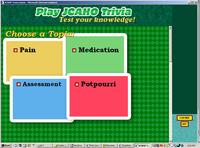
On choosing a topic, they get a bank of five questions at a time, randomly selected from about 100 in each topic. Clicking on the daisies brings up the next question in turn.
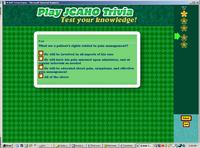
Players can answer as few or as many as they like of the five questions. As questions are answered, their "daisies" fill in.
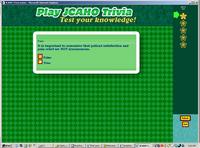
After finishing each bank of questions, the player gets a topic score and feedback on each question...
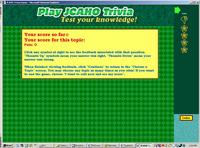
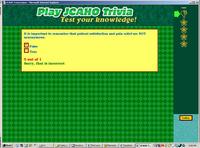
and then are returned to the "Choose a Topic" screen where they can choose to repeat the topic (with new questions) or choose another topic.
At this point they can also quit playing and get the final total score. As soon as their final score displays on screen, it also gets added to the red scoreboard which re-appears on the last page of the game.
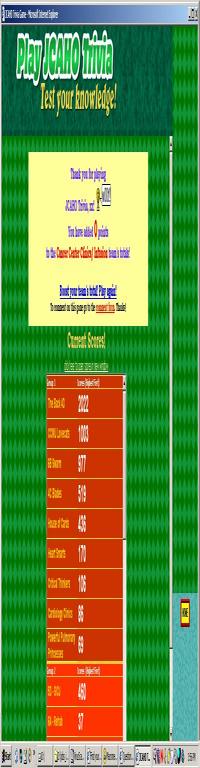
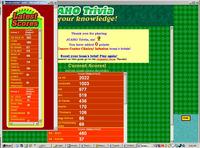
A single round of the game lasts one month, at which time the winning team in each section is given a prize to share amongst themselves (a party or trophy) and the game starts over with new topics and new questions. New questions are also added in the middle of each month to keep things fresh.