January 27, 2004
Free Closed captioning software that works!
I'm not quite ready to say it's the Holy Grail of closed captioning, but Subtitle Workshop by Urusoft.net for Windows is really pretty good. It is not buggy, like Magpie, and it saves to any of about 20 different formats, including SAMI.
It can be downloaded from HERE.
The formats supported are:
DVDSubtitle
IAuthor
JacoSUB 2.7+
MacSUB
MicroDVD
Phoenix Japanimation Society
PowerDivX
RealTime
SAMI Captioning
SonicDVD
SubRip
SubSonic
SubStation Alpha
SubViewer 1.0
SubViewer 2.0
TMPlayer
Turbo Titler
ZeroG
January 15, 2004
Why you should be afraid of catching the Flu
Having recently recovered from a bad case of the flu, I got to wondering why they can't just make a vaccine to take care of it once and for all, like the measles?It turns out the flu virus is unique in its ability to mutate and adapt, making it impossible to use a single vaccine to combat it. The situation is complicated by the fact that animals, both wild and domestic, are a sort of "mixing bowl" in which new strains of the virus are created.
The variation in the virulence of the flu is apparently due to the varying degrees to which our immune system recognizes the two types of proteins on the surface of the virus -hemagglutinin (H) and neuraminidase (N).
The virus strain is said to undergo "drift" when there are minor changes in the two proteins. This is what happens most years. But sometimes it undergoes a more major change, called "shift," which is due to reassortment of the viral genes, often when it is mixed with another strain in animals. This is a really bad thing because it means humans will have no antibodies that recognize the new strain, and so no immunity to it.
Flu can also jump from species to species without reassortment. For example the chicken flu that has jumped to humans in several cases recently. However it usually will not be easily transmitted between humans on first "jump." The danger is that someone will catch it that already has human flu virus in their cells, and then the avian virus can swap genes with the human version, and WILL be easily transmissable. This means it will be pretty much unknown to human immune systems, but have all the transmittability of the human varieties. Scientists think this may have been what happened in 1918-1919 pandemic swept the world causing the deaths of 20 million people.
As it is, the flu yearly causes the deaths of 20,000 to 40,000 people in the United States alone, making one wonder why it is considered just a "common ailment" instead of a scourge. Only recently have the US recommendations been for everyone to take the flu vaccine, and that was because they knew they were dealing with a particularly bad variety this year. Ironically, they recommended the vaccine to all in a year when it was unusually ineffective.
I have two friends, both in their late 30's, that nearly died in recent years of complications of the flu. Both of them were in good health otherwise, contradicting the usual idea that the flu only kills people who are old or weak. I find it very strange that the FDA and CDC and other such bodies worldwide have a relatively casual attitude toward a disease proven to be so dangerous, even in its less virulent years.
Additional reference:
The genetic genesis of a killer flu - From Science - How animal RNA makes human viruses worse
CDC Morbidity and Mortality Weekly Report: Preliminary Assessment of the Effectiveness of the 2003--04 Inactivated Influenza Vaccine --- Colorado, December 2003
Statistics about the Flu
Barnyard Blues
Thinking about skipping your flu shot this year?
Influenza, an Ever-evolving Disease, by Robert Heckert
January 11, 2004
Drupal: Suggestions for improving Drupal's Book Module - Part 2: Navigation
1. Navigation should be visible most of the time. The first time I looked through a book created with the Drupal's book module, I recall being confused about how to proceed through the document. My confusion resulted from starting on a long page, so that the "previous/up/next" navigation had fallen below the "fold." Since I was new to Drupal-based books, I wasn't even aware it was there.
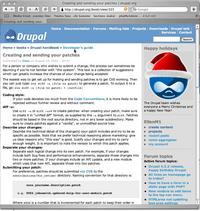
A long page where navigation has dropped below the fold.
The only other visible navigation which was relevant to the book was the breadcrumb trail at the top of the page, which allows the reader to jump "up" a level but not backwards and forwards between pages of a chapter.
I did figure the system out within a few minutes, but I've watched others who are less interested in "figuring things out" attempt fruitlessly to find their way around such issues, and pretty much give up. It is amazing how people don't think to look around the page, or having looked, misunderstand what they are seeing.
Sometimes I watch my users miss what I think is obvious, and all I can think of is "it's RIGHT THERE IN FRONT OF YOU!!!" but that is not a very useful attitude.
Many of the users I create sites for would get very frustrated with seeing no navigation immediately and would probably assume there was no way to get around in the book.
An easy way to fix this problem might be to duplicate the navigation at the top of the article also. I imagine this could be done with a little modification to the theme, or to the book module, calling the "Previous/Top/Next" navigation area twice. In my own experience I've found that users really do use that top navigation a lot. Lots of times people don't read to the bottom - they look at a page to see if there is anything of interest, then go to the next page.
To illustrate some of my suggestions, I'm using a non-Drupal learning module I'm working on at the moment.
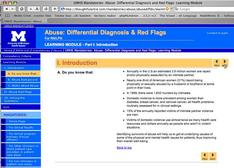 | 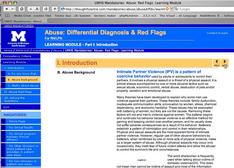 |
| Both top and bottom navigation arrows show up on short pages | Only the top ones show up on long pages, the bottom ones drop below fold. |
2. It should be clear where you are in the document at all times.
The current Drupal book module does a nice job of making a clickable outline of the entire book on the parent page of the book and an outline for each section or chapter on the parent page of that chapter. However when you are not on a parent page, no outline of the book is visible, nor is it clear how to find one.
I would like to see some kind of outline-style list generated for the whole book, which would appear in the main navigation column (on the X-template theme, it's the blue column on right or left.) There should also be some kind of indication of which page in the list you are on.
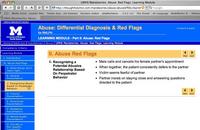
When a book is open, the book navigation should push all other navigation down and out of the way, or it should collapse to the minimum necessary. I would also add an "Exit from Book" link (probably just labeled "Exit" or "Back") somewhere on the page, which would kick you back to either a list of books or a sortable list of nodes (with nodes that are pages of books NOT showing separately!! - had to get my pet peeve in there, sorry!).
Menu items should not simply duplicate the title of a page. When creating a book page, there should be an option to enter a shorter phrase that would show up as the outline link for that page. So, if a theme took the navigation list and turned it into buttons, you could have an abbreviated title on each button and a much longer title on the actual page.
3. Reduce the number of elements on the page to what people really need
I've been searching for good models to use for ebook layout. There don't seem to be too many. Adobe Acrobat, in my opinion, is a good example of what not to do: leaving aside the time it takes to start up, an acrobat page is confusing. The toolbar has too many items on it, and surprisingly, it is not at all obvious to people what to do with the thumbnails/bookmarks, etc on the left. I use Acrobat at work, but it is the result of winnowing down bad solutions to the least bad, not preference. Drupal has a whopping advantage over Acrobat right off the bat, since it spits out good old html - add to that some usability, and you have a winner.
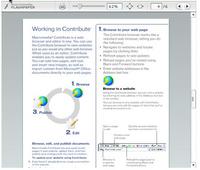
Macromedia FlashPaper
Macromedia's FlashPaper is an interesting solution, although I am not sure I like the idea of using Flash for something like an ebook. However, I definitely like the interface, at least as far as it goes. It's clear they held a lot of meetings for the purpose of eliminating buttons - there are so few you can try them all out in about 1 minute. It is a little ironic that they obviously have adopted the philosophy that people should be able to adjust the size of the content easily, yet the interface elements are so small, and fixed. Personally, I'd make some of the buttons easier to hit, but that's an individual thing - the selection and layout of buttons is good.
There is apparently no document outline navigation or table of contents yet - but I imagine they will remedy that somehow soon. What they have shown here would be OK for short documents, less so for long structured ones.
Texterity has an interesting solution, and one that might be applicable to Drupal. Their product is .asp and javascript based, and as a result loads quickly and seems to work in all browsers. They use a collapsing tree menu on the left, and keep all side to side navigation at the top.
4. Book pages should NOT act as separate nodes, once they are incorporated in a book.
This is squarely off the navigation topic, but I had to repeat this from last time.
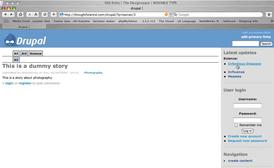
Clicking on a taxonomy link results in a list of nodes in that taxonomy. So far so good. Clicking on the TITLE PAGE node for the book results in seeing ONLY THE node itself, completely out of the book context. It doesn't bring the book along with it. No way to get to the rest of the book, and no way to tell that it actaully IS part of a book.
Clicking the title link does the same thing. You end up on the node itself, minus the book navigation. It's as if the node has gone off on it's own little cowboy mission, leaving the book behind. This is OK for some programmer/administrators who like to think of everything as the molecular node, but highly confusing for your readers.
|
| Clicking a taxo-link results in... |
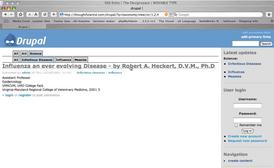 |
| This. Clicking the title of the node results in... |
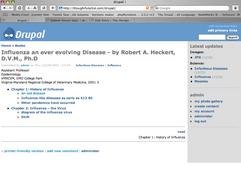
| This. |

Note: the main discussion regarding these suggestions is located HERE
January 9, 2004
Kensington Orbit loses settings
On my Mac, running Jaguar I use a Kensington Orbit trackball on my left hand to give my right hand some relief from common scrolling and dragging tasks. However sometimes the Orbit seems to lose its reversed settings, and reverts to the default, which is set up for right hand use. If you look in the preference pane for the Orbit when this happens, you'l l discover it doesn't think the Orbit is plugged in. After much fruitless searching of the support site I accidentally discovered the solution the other day. Just disconnect it and reconnect it again, and it will go back to normal.
January 8, 2004
Scripting a webpage hit in Windows Task Scheduler
I needed to schedule an automatic hit to a page that resets a server in windows. Problem is that the Windows task scheduler will not open a shortcut. It errors out with "Invalid filename" because it reads the URL stored in the shortcut as the filename for some reason, and URL's contain slashes. The page itself cannot be saved locally and opened - the URL itself is the information necessary.
My solution was to save a short html page to the desktop, containing only a redirect in the metatags. When the scheduler opens it, it automatically redirects to the Reset page.
<html>
<head>
<meta http-equiv=\"Content-Type\" content=\"text/html;
charset=iso-8859-1\">
<META HTTP-EQUIV=\"Refresh\" Content=\"5;
URL=http://my.reset.url.com\">
</head>
January 1, 2004
Suggestions for Improving Drupal's Book Module - Part 1: Administration
Note: a wiki containing this article and many other more in-depth discussions of drupal usability is HERE
A while back I promised to write up some suggestions for improving the book module. I finally got some time, so here they are. I'm posting this here because as far as I know, the drupal.org forums don't yet allow images to be posted.
I am mostly interested in improving the navigation for the end user of drupal-based books, but I will start with my suggestions for changing the administration of books. Navigation suggestions will follow in another post.
1. When you browse to any page of a book, and click "administer," you go to the editing screen for that one page.
At the very bottom of the editing screen, there is a button "Edit book outline" that allows you to administer the relationship of that one page to the outline of the rest of the book.
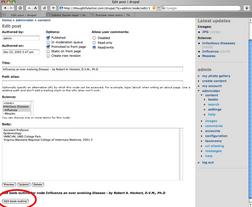 takes you to:
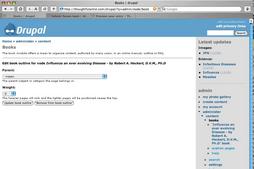
To edit any other page, you either have to browse to it, which can be a cumbersome multiclick process using the current navigation system, or you have to click in the side column: Administer: Content: Books: YourBook.
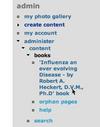
At THAT point you get a truly great screen that lets you see the whole book at a glance and choose from editing, viewing or changing the weight.
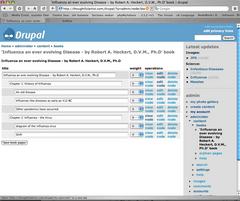
I like this particular screen a lot, but would add to it some facility for reordering and editing the relationships of the book's nodes (editing the outline en masse) right on this page. I don't know exactly how this should look yet, but it ought to be possible. I understand that changing the weight affects order and you CAN change the weight on this page, but I am not entirely happy with using weight to control order in the context of a book, where exact order is critical. Weight as an attribute of a node in a looser situation - i.e. a collection of articles - is fine.
So to recap: when I click administer on any book page, I would like to be able to choose from any page in the book. In other words, I would like to get:
http://www.mysite.com/?q=admin/node/book/1
instead of
http://www.mysite.com/?q=admin/node/edit/1
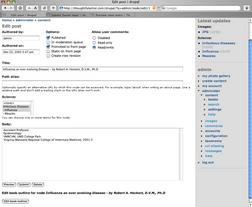
or at least I would like the CHOICE on each page of administer page/administer book.
I do understand this is not how the rest of Drupal's node editing features work, but it seems more intuitive to me for books. Less clicks, and less thinking.
2. if you select "Administer: Content: Books: YourBook, then edit a particular page, when you finish editing and click the "Submit" button, you go to a page that is pretty useless:
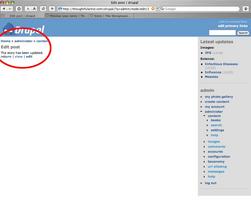
It says only "this page has been updated" and gives you the option of viewing, editing, or returning to the main book edit screen. This creates extra clicks if you want to continue editing other pages.
After hitting submit, I would like to be dropped right back to the book editing screen (http://www.mysite.com/?q=admin/node/book/1)
to choose another post or view the node you just edited. You have the same options of "view" and "edit" for each node on this screen, just like on the "The story has been updated" screen that is currently shown, but you also have a lot more options - ie. to go on to any other page in the book. Or, perhaps instead of just a "submit" button at the bottom of the node edit page, there could be a "submit and continue editing this page" button AND a "submit and edit another page in this book" button. The titles need some work, but something along those lines.
3. When you click "administer: content" I would like the option of the content of a book NOT to show up in the node list. I would like only the book title to show up. In other words, once a node is incorporated into a book, it is treated differently.
Then, when you would click the title of the book, you would go to that book-editing screen that I like so much, where all the pages in the book show up in order, and with all those options.
To my mind, the fact a node is in a book adds a lot of attributes to it that should be easily editable, and also makes the BOOK the main unit, so that it is actually confusing to have individual pages show up in the node list like they currently do. I am sure this will not be a popular suggestion, since it goes against the way the programmers think of nodes. Being a user, I think of a book page differently than I think of a regular node. If the page is removed from the book, it should drop back into the common "pile" of nodes and appear on the list again.
4. When you click "administer: content: books" you get a list of titles of books in the navigation column. If the titles are long, they can get pretty squished, and extend down a long way.
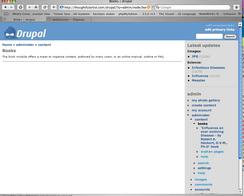
The main content area of this page is basically blank. Why not use all that nice white space for the clickable list of book titles instead of the boilerplate copy that describes the book module which is currently there? Of course, the list of book titles should be sortable by all available attributes, like title, author, date added, etc.