Using CSS to create cross-platform compatible transparent PNG's
One more piece I just added to my transparent PNG "toolkit" is a method of making transparent PNG's work as the background-image in a div, in Internet Explorer 6 and 5.5. (Versions of IE below 5.5 will not work with these techniques.) The second part of this trick is how to get hrefs and form elements inside the layer to be clickable.
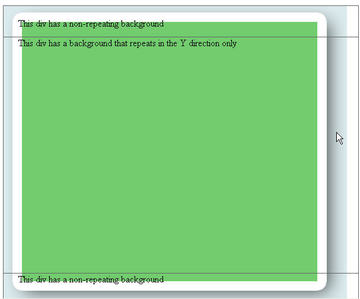
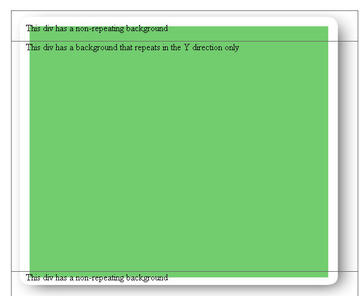
...and here's how the example page looks WITH the fix. Note that the blue-gray background behind the shadow is gone.
Basic Instructions:
- Create an empty div but give it an id (for example: id="yourDiv").
- Create a style that adds in a background image ("yourImage.png"), either in the head of your page or in an external style sheet, linked into your page.
<style type="text/css"> <!-- DIV#yourDiv { width:600px; height:400px; background-image: url(images/yourImage.png); background-repeat: repeat-y; position:absolute; top: 82px; left: 46px; padding-left: 25px; } --> </style> - Add a conditional comment that sniffs for IE 6 and down in which case it uses an IE-only filter which displays the image transparently inside the div, between the div background (which will be reset to "none") and any content you want to put in the div. To do this, insert this in the head of your page, below the style shown above( or if you used an external style sheet, below the link to the external stylesheet):
<!--[if lte IE 6]>
<style>
DIV#yourDiv
{
 background-image: none;
 filter:
progid:DXImageTransform.Microsoft.AlphaImageLoader(src=images/yourImage.png,
sizingMethod='scale');
}


</style>

<![endif]-->
The idea is that you are redefining the style for DIV#yourDiv, but only IE 6 and below will be able to see the new definition.
Fixing clickable elements within the div
There is one major problem with this technique: form elements and links within the div will not be clickable, unless the height of the background image tile is reduced to 1 pixel. Although Microsoft's spec clearly states that the AlphaImageLoader:- "Displays an image within the boundaries of the object and between the object background and content...."
The only way I have found to retain the functionality of links and form elements within the div is to reduce the height of the background image tile to 1 pixel. A very extensive discussion of this bug in IE's AlphaImageLoader is HERE (Search for Addendum: IE Link bug)
An example showing clickable form elements within a div styled using the AlphaImageLoader solution and a 1pixel high image is HERE

be nice if this actually worked however, a valiant effort..
Posted by: ted on April 19, 2007 9:21 AMI've been looking for a fix for transparent background images for SO long! Finally something that works although I had to go to 'view source' on your demo as the code above doesn't work. I needed to have variable height on the element (not fixed as in the example) so I replaced DIV# with TD# and gave the id to my TD with 100% height. Worked a treat thanks!!!
Posted by: tania on October 5, 2007 10:23 AMThere was a problem with some of the code not being escaped properly so it didn't show up right. I've fixed that and clarified the instructions, so it should be fine.
Posted by: Ellen on February 20, 2008 11:27 AMThanks so much this is a life saver
Posted by: Ben on March 3, 2008 1:02 PMI think that if you put a relative position on the elements they will become active again. Definitely test that first though because I haven't used this technique in a while
Posted by: Jeff on March 7, 2008 5:07 PMmany thanks.
Posted by: Sepehr Lajevardi on April 29, 2008 11:38 PMYou know, I've read the same tutorial on png transparency on different websites, and this is the first one to actually explain it well. I am very happy to finally get this effect to work. Using repeat-y background image for my drop shadow effect was the only way to accomplish the layout for my client and this helped me a lot. Some people on this page are saying, "be nice if this actually worked however, a valiant effort..", well I say to them, read the tutorial and pay attention and you will get it to work too. Any clearer and you might as well ask to have it done for you on your own hosting server / personal website. Good job man.
Posted by: Luis on May 8, 2008 1:47 AM