November 22, 2003
The Problem with Slashdot and other web archives
Something that's been kicking around in my head for a while, is the fact that I find most large web archives and blogs frustrating to various degrees. Including my own site!
The frustration has to do with what I would call, the "opacity" of sites to browsing, to discovery of information you do not know is there, and could not find because you aren't searching for it directly. There are times I am in search of "information inspiration"- the serendipitous discovery of what I really wanted to know but didn't know it.
Of course many sites have great search engines, and categorize articles by topic. But I feel that doesn't go far enough. There are times when I am not even aware of the right WORD to describe a concept, but could recognize articles associated with it if I scanned them for a second or two. Or I am aware of the right word, but want some way to find ideas related to it serendipitously. This is what I call information inspiration.
Slashdot (and many other news sites and blogs) are date oriented. What happens to the articles after their moment in the sun, though is that they become increasingly buried. If you browse by topic, you still are unlikely to see them, since there are so many under each topic. Slashdot's design discourages searching for topics.
First I have to say: don't get me wrong. This is not meant as a critique of Slashdot per se: I LOVE Slashdot. I read it every day, and have for years. However, I feel like something is missing in general from our arsenal of navigation techniques on the web, so I am using Slashdot as an example here.
Go to Slashdot. If you are logged in, log out so you are anonymous, and customizations you've made will disappear. Pretend you are a new person, vaguely interested in - you don't know what. But you want to see what there is here. So, you read the first page, then you may want to browse. You can easily see articles in no particular order dating back a couple of days by hitting the "older articles" area.
Back to the front page. On the left, you see a few sections listed:

In this context I have no idea what good the "7 more," "3 more" indications do me, since they are not clickable to reveal the missing sections.
In any case only a fraction of the topics are visible here - as well as the ones that are represented by the day's stories which are displayed as picture icons at the top of the page:

The only way to figure out what those are, is to find the box labeled "Stories" (which is what I kind of thought EVERYTHING on Slashdot was anyway, making that title somewhat redundant, except perhaps to the programmer that set it up)
Listed there are:

Clicking the word "Topics" once you find it, will bring you to a page of topic headings. Clicking any one of those brings you to another date-ordered list of thousands of articles under that topic. There is a search box at the top, which allows you to search the list, which I find too little too late, since you can not search by topic from the front page, and it can take you quite a while to find that "topics" link even if you know it is there.
Both Slashdot and Amazon make it fairly difficult to browse by topic.
Once under a product type heading (i.e. "Books"), Amazon does try to make educated guesses about what you would like to see. As soon as you make any choices at all, you start getting items related to those choices. If you are logged in, it already knows enough to guess.
However, there is still a big problem with getting to buried information. If you do a keyword search for a book, and get a big list, there is no easy way to sift through the thousands of results.
I've often wished I could simply export the results to a database of my own and perform my own queries on them. All you can do is organize by date published, featured or not, A-Z (useless in a query that returns thousands), but there is NO way to jump to the middle. It seems amazing to me that they only provide a "More Results" button at the bottom of each page results, rather than a full featured browser of some sort.
Yes, there is an advanced search and power search, but they are not much better than the main search in some ways. For example, the other day I wanted to look up books by or on Velikovsky, including current ones that might mention him. Except, since I read his stuff years ago, I was absolutely unable to remember his name. So, I tried searching with combinations of terms, in both search and power search using:
"extinctions, biblical floods, Mars, Venus, climate change, catastrophe theories" and "publish date: before 1980" ( since I was just trying to find the author's name at first, i wanted to exclude Alvarez-related books, and I knew that came in around 1980).
All searches resulted in either no results or thousands of results. I finally went back to Google, where I found it in minutes, using
mass extinction Mars theory
which pulled up a lot of very relevant results, including one in the first page with the word "catastrophism" in the title. This jogged my memory further, and I searched under that keyword.
About midway down the first page of results from "catastrophism" was Society for Interdisciplinary Studies which features resources on the subject of catastrophism. Right there on the page was a topic heading "Catastrophism and Velikovsky". Bingo! I was able to go back to Amazon and find what I needed.
One might be able to argue "well, that's just the way research is - you use whatever tools (Google instead of Amazon's search) work to find what you need" but I think it is a fundamental problem with the way Amazon and many other sites are set up.
If I had been in a book store or library, I might have been able to find the book by scanning a shelf on related subjects, or looking at the bibliography of related books. Not quite so easy to do on Amazon, although you have many more books to choose from.
Amazon's "people who bought this item also bought" feature, and their "browse subjects" features are both steps in the right direction.
To be continued...
November 19, 2003
A Browser Sniffer/Screen Resolution Sniffer that swaps stylesheets
This is based on two javascripts, combined. This script contains a browser sniffer that will test for Mac or PC, and will also test if the PC is 800x600 or a higher resolution. I figure most macs are set to a decent resolution, but have found much to my dismay that many PC's here are still set to 1997 standards.
This will swap style sheets depending on what is "sniffed".
I've included the locations for the original scripts, which contain other options you may wish to include.
* Browser/resolution sniffer - CSS switcher script
* based partially on:
/**********************************************
* Different CSS depending on OS (mac/pc)- © Dynamic Drive
* (www.dynamicdrive.com)
* This notice must stay intact for use
* Visit http://www.dynamicdrive.com/ for full source code
***********************************************//*
* and on:
* Screen Resolution Redirect
* © Eddie Traversa (nirvana.media3.net)
* To add more shock to your site, visit www.DHTML Shock.com* Combined version of the script available from http://thedesignspace.net */
var mac_css='http://url.of.macstylesheet/stylesMac.css' //put the url of your mac stylesheet here
var mactest=navigator.userAgent.indexOf("Mac")!=-1
var screen_height = screen.height;
var screen_width = screen.width;if (screen_height >= 650) {
var pc_css='http://url.of.pcstylesheet/stylesPC1024.css'; //put the url of your PC stylesheet for highrez screens here
document.write('')
}else {
var pc_externalcss='http://url.of.pcstylesheet/stylesPC800.css'; //put the url of your PC stylesheet for 800 x 600 rez screens heredocument.write('')
}
November 12, 2003
Alphabetical Title Browser for Drupal
Note: See also PHP Alternating Color Table Rows for Drupal or Dreamweaver sites
I needed an alphabetical browser of all published nodes, and couldn't figure out how to do it using existing Drupal tools, so created one in Dreamweaver and made a static page out of it. Maybe someone can make a Drupal module out of? it. It needs at least four big improvements that I can think of -
1. The Dreamweaver connection code needs to be Drupal-ized
2. It is written in the backwards Dreamweaver way - the php gets inserted into the html, rather than having the php output the html as part of the stream of code.
3. It needs to have the alternating table rows
4. It needs to be paged, when the list gets too long.
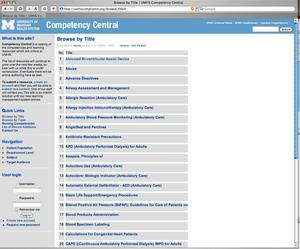
There are two files here - one is a connection file, probably best to store that outside the web root. the other is the code that gets inserted into your web page.
connectionfile.php: ---------------------------------------- <?php # FileName=\"Connection_php_mysql.htm\" # Type=\"MYSQL\" # HTTP=\"true\" $hostname_yourDatabase = \"localhost\"; $database_yourDatabase = \"yourDatabase3\"; $username_yourDatabase = \"username\"; $password_yourDatabase = \"password\"; $yourDatabase = mysql_pconnect($hostname_yourDatabase, $username_yourDatabase, $password_yourDatabase) or die(mysql_error()); ?> ---------------------------------------- Code that gets inserted into static page: ---------------------------------------- require_once(\'connectionfile.php\');mysql_select_db($database_yourDatabase, $yourDatabase);
$query_alphabeticalNodes = \"SELECT nid, type, title FROM node WHERE type = \'story\' ORDER BY title ASC\";$alphabeticalNodes = mysql_query($query_alphabeticalNodes, $yourDatabase) or die(mysql_error());
$row_alphabeticalNodes = mysql_fetch_assoc($alphabeticalNodes);
$totalRows_alphabeticalNodes = mysql_num_rows($alphabeticalNodes);isset($startRow_alphabeticalNodes)?$orderNum=$startRow_alphabeticalNodes:$orderNum=0;
?>
<HTML>
<HEAD>
<TITLE>Untitled Document</TITLE>
<META http-equiv=\"Content-Type\" content=\"text/html; charset=iso-8859-1\">
</HEAD><BODY>
<TABLE border=\"0\" cellpadding=\"0\" cellspacing=\"6\">
<TR valign=\"top\" class=\"dark\">
<TD>No.</TD>
<TD>Title</TD>
</TR>
<?php do { ?>
<TR valign=\"top\" class=\"dark\">
<TD><P> <?php echo ++$orderNum; ?></P>
</TD>
<TD><A href=\"http://yourDomain.com/node/view/<?php echo $row_alphabeticalNodes[\'nid\']; ?>\"><?php echo $row_alphabeticalNodes[\'title\']; ?></A></TD>
</TR>
<?php } while ($row_alphabeticalNodes = mysql_fetch_assoc($alphabeticalNodes)); ?>
</TABLE>
<P> </P>
<P> </P>
</BODY>
</HTML>
<?php
mysql_free_result($alphabeticalNodes);
?>
November 9, 2003
Applied Origami
Examples of origami used in science and engineering:
- Ultra-cheap micromotor technology, allows cellphone cameras to zoom and focus. Folding makes a thin sheet of a piezoelectric ceramic material work like a motor.
- The micro-origami technique used to fabricate directional-sensing photodetectors and corner cube mirrors provided with electrostatic actuation
- A folding segmented telescope lens (Eyeglass) and another article on Eyeglass
- Folding Deployable Membranes designed from folding Tree Leaves (pdf)
- Wrapping Fold Pattern for Deployable Membranes
- Deployable Structures
- Tom Hull's site has a series of abstracts on the subject of the mathematics of Origami from the 3rd International Meeting of Origami Science, Math, and Education which include items like The Energetics of Crumpling, Origami Numbers, and Circular Origami: a Survey of Recent Results
- An example of Tom Hull's origami art is in my "Museum of my Favorite Artists"
- Computational Origami, the geometry of paper folding, an interview in New Scientist with Eric Demaine.
- Bio-Origami: Protein Folding
- Origami and Math by Eric Anderson
- An article on David Huffman's origami work is here
"Lore" Knowledge Base/FAQ software
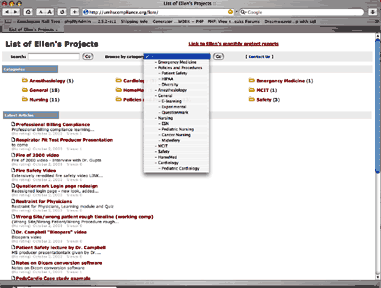
In searching for a solution for a web-based resource catalog, I happened upon ""Lore", a web application by Pineapple Technologies. Based on php/mysql, Lore is easy to set up, and has great support.
After testing Lore for a while, I found that it is wasn't quite right for my original intended use, because I needed a more complex category scheme than it can create. I needed to be able to restrict searches by 4 major vocabularies, with terms and subterms. So instead of using it as a resource catalog, I am now using it to classify my finished projects, and will be using it for a FAQ for the catalog site also.
I finally settled on Drupal for the resource catalog system, but it has many more bugs than Lore - Drupal is very much in development still.
Lore is not free (I think it now costs $85.00) but it comes with very active support, and they will absolutely make sure you are up and running. They are also very responsive to suggestions.
One of the chief advantages of Lore over the many free scripts that are available is that it has a slick, well thought out interface and administration section, which most of others do not. It looks businesslike, and it works.