February 26, 2008
Safari occasionally stops responding to mouse clicks
A rare but irritating problem I've had with Safari for a couple of years now is its habit of suddenly no longer responding to mouse clicks. It simply stops dead: you can't click links, type in textareas, or even use the scrollbar.
Strangely, it will still respond to the keyboard, but as far as I know, there is no keyboard equivalent of mouse clicks, so this is not a solution.
The only thing that seems to cure it is to quit and restart Safari.
Construct navigation for your Amazon aStore using php and YUI
Amazon "aStores" are very easy to set up, but you will probably find you want to customize the navigation, particularly if you want to integrate the store into your own site. I'm in the process of doing just that, and decided to construct my own navigation system for the DesignSpace book shop.. The php script that creates the tabs for the store is based on the YUI (Yahoo UI) "Tab View Control" and can be easily adapted to your own site.
This is just a down and dirty approach but it is a good start for you to build from.
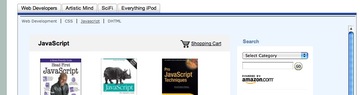
Using the script
- Create your aStore at Amazon if you haven't already. Note the node numbers from each of the permalinks on your categories.
- Decide what the top-level tab categories will be.
- Get the YUI tab view control and upload the files to your site.
- Create a list of tab-sets for the second level navigation. This is where the node numbers come in. Each category is denoted by its node number in the variable name, id and tab parameter:
$tabs6= '<ul class="yui-navset bd">';

$tabs6.='<li class="first selected" id="tab6"><a href="shop.php?tab=6" >Web Development</a></li>';

$tabs6.='<li class="" id="tab180"><a href="shop.php?tab=180" >CSS</a></li>';

$tabs6.='<li class=" " id="tab183"><a href="shop.php?tab=183">Javascript</a></li>';

$tabs6.='<li class="last" id="tab181"><a href="shop.php?tab=181">DHTML</a></li>';

$tabs6.='</ul>';
Save the file as "tabs.php". A sample "tabs.php" file is shown here:
<?php
//-----"tabs.php"--------//
$tabs6= '<ul class="yui-navset bd">';
$tabs6.='<li class="first selected" id="tab6"><a href="shop.php?tab=6" >Web Development</a></li>';
$tabs6.='<li class="" id="tab180"><a href="shop.php?tab=180" >CSS</a></li>';
$tabs6.='<li class=" " id="tab183"><a href="shop.php?tab=183">Javascript</a></li>';
$tabs6.='<li class="last" id="tab181"><a href="shop.php?tab=181">DHTML</a></li>';
$tabs6.='</ul>';$tabs180= '<ul class="yui-navset bd">';
$tabs180.='<li class="first " id="tab6"><a href="shop.php?tab=6" >Web Development</a></li>';
$tabs180.='<li class="selected" id="tab180"><a href="shop.php?tab=180" >CSS</a></li>';
$tabs180.='<li class=" " id="tab183"><a href="shop.php?tab=183">Javascript</a></li>';
$tabs183.='<li class="last" id="tab181"><a href="shop.php?tab=181">DHTML</a></li>';
$tabs180.='</ul>';$tabs183= '<ul class="yui-navset bd">';
$tabs183.='<li class="first " id="tab6"><a href="shop.php?tab=6" >Web Development</a></li>';
$tabs183.='<li class="" id="tab180"><a href="shop.php?tab=180" >CSS</a></li>';
$tabs183.='<li class=" selected" id="tab183"><a href="shop.php?tab=183">Javascript</a></li>';
$tabs183.='<li class="last" id="tab181"><a href="shop.php?tab=181">DHTML</a></li>';
$tabs183.='</ul>';?>
$tabs181= '<ul class="yui-navset bd">';
$tabs181.='<li class="first " id="tab6"><a href="shop.php?tab=6" >Web Development</a></li>';
$tabs181.='<li class="" id="tab180"><a href="shop.php?tab=180" >CSS</a></li>';
$tabs181.='<li class="" id="tab183"><a href="shop.php?tab=183">Javascript</a></li>';
$tabs181.='<li class="last selected" id="tab181"><a href="shop.php?tab=181">DHTML</a></li>';
$tabs181.='</ul>';
//------Art tab-------//
$tabs231= '<ul class="yui-navset bd">';
$tabs231.='<li class="first selected" id="tab231"><a href="shop.php?tab=231" >Art</a></li>';
$tabs231.='<li class="" id="tab232"><a href="shop.php?tab=232" >Design</a></li>';
$tabs231.='<li class="last" id="tab236"><a href="shop.php?tab=236">How-to</a></li>';
$tabs231.='</ul>';$tabs232= '<ul class="yui-navset bd">';
$tabs232.='<li class="first " id="tab231"><a href="shop.php?tab=231" >Art</a></li>';
$tabs232.='<li class="selected" id="tab232"><a href="shop.php?tab=232" >Design</a></li>';
$tabs232.='<li class="last" id="tab236"><a href="shop.php?tab=236">How-to</a></li>';
$tabs232.='</ul>';$tabs236= '<ul class="yui-navset bd">';
$tabs236.='<li class="first" id="tab231"><a href="shop.php?tab=231" >Art</a></li>';
$tabs236.='<li class="" id="tab232"><a href="shop.php?tab=232" >Design</a></li>';
$tabs236.='<li class="last selected" id="tab236"><a href="shop.php?tab=236">How-to</a></li>';
$tabs236.='</ul>';//-----Sci Fi-------//
$tabs7= '<ul class="yui-navset bd">';
$tabs7.='<li class="first selected" id="tab7"><a href="shop.php?tab=7" >SciFi Favorites</a></li>';
$tabs7.='<li class="" id="tab9"><a href="shop.php?tab=9" >Fantasy Adventure</a></li>';
$tabs7.='<li class="last" id="tab261"><a href="shop.php?tab=261">Graphic Novels</a></li>';
$tabs7.='</ul>';
$tabs9= '<ul class="yui-navset bd">';
$tabs9.='<li class="first " id="tab7"><a href="shop.php?tab=7" >SciFi Favorites</a></li>';
$tabs9.='<li class="selected" id="tab9"><a href="shop.php?tab=9" >Fantasy Adventure</a></li>';
$tabs9.='<li class="last" id="tab261"><a href="shop.php?tab=261">Graphic Novels</a></li>';
$tabs9.='</ul>';$tabs261= '<ul class="yui-navset bd">';
$tabs261.='<li class="first " id="tab7"><a href="shop.php?tab=7" >SciFi Favorites</a></li>';
$tabs261.='<li class="" id="tab9"><a href="shop.php?tab=9" >Fantasy Adventure</a></li>';
$tabs261.='<li class="last selected" id="tab261"><a href="shop.php?tab=261">Graphic Novels</a></li>';
$tabs261.='</ul>';
//-----Gizmos-------//
$tabs231= '<ul class="yui-navset bd">';
$tabs231.='<li class="first selected" id="tab231"><a href="shop.php?tab=231" >Art</a></li>';
$tabs231.='<li class="" id="tab232"><a href="shop.php?tab=232" >Design</a></li>';
$tabs231.='<li class="last" id="tab236"><a href="shop.php?tab=236">How-to</a></li>';
$tabs231.='</ul>';?>
- Create a php page using your site theme, which will display the tabs, and the store's pages within an iframe. Example code is shown here:
<!DOCTYPE html PUBLIC "-//W3C//DTD XHTML 1.0 Transitional//EN" "http://www.w3.org/TR/xhtml1/DTD/xhtml1-transitional.dtd">
  <html xmlns="http://www.w3.org/1999/xhtml">
  <head>
  <meta http-equiv="Content-Type" content="text/html; charset=ISO-8859-1" />
  <title>Your Store Title</title>
  <link type="text/css" rel="stylesheet" href="css/site2007.css" />
  <link rel="stylesheet" type="text/css" href="/yui/build/fonts/fonts-min.css" />
  <link rel="stylesheet" type="text/css" href="/yui/build/tabview/assets/skins/sam/tabview.css" />
  <script language="JavaScript" type="text/javascript" src="js/querystring.js"></script>
  <script language="JavaScript" type="text/javascript" src="js/toggleChapter.js"></script>
  <script> var gtopic= qsParm['tab'];</script>
<style type="text/css">
  <!--
  html, body, #main {height:auto;}
  #smallTitle{ float:none;position:relative; margin:24px 25px 24px 25px;  }
  iframe {width:100%;height:780px;scroll:auto; }
  .yui-navset {width:100%;} /* IE: width */
  .yui-navset a {text-decoration:none;}
  .yui-navset ul, .navset li {margin:0;padding:0;list-style:none;}
  .yui-navset li {float:left;display:inline;}
  .yui-navset li a:hover {text-decoration:underline;}
  .yui-navset ul:after {clear:both;content:'.';display:block;height:0;visibility:hidden;} /* clear non-IE */
  .yui-navset ul {zoom:1;} /* clear IE */
  .yui-navset .bd ul {border-top-width:1px;border-top-style:solid;font:78%/1.2em verdana;margin:0;padding:.6em 0 .6em .4em;}
  .yui-navset .bd li {border-left-style:solid;border-left-width:1px;display:inline;padding:0 1em;}
  .yui-navset .bd li.first {padding-left:0;border:0;}
  .yui-navset .bd li.selected a {text-decoration:underline;}

  -->
  </style>
  <!--[if IE ]>
  <style type="text/css">
iframe{ width:830px;height:800px;  }
  </style>
  <![endif]-->
  <?php
  require_once('includes_shop/tabs.php');
  if(!$_GET['tab']){$tab=183;}
  else if($_GET["tab"]){ $tab=($_GET["tab"]); }
  ?>
</head>
<body class=" yui-skin-sam" >
<div id="main" >
  <?php include('navbar.php'); ?>

  <div id="smalltitle">
  <span class="style1">Your Site Title <span class="dots">::</span>
  <span class="st">Your Store Title</span></div>


  <div class="clear" style="margin-bottom:16px;"></div>

  <table id="layoutTable" border="0" style="width:100%;height:100%;">
  <tr valign="top">
  <td id="left2cols"  valign="top" >
  <ul><h2 style="text-align:left;color:#003366;font-size:16px;">Want to know more about the topics on this site?  </h2></ul>
<div id="level1tabs" class="yui-navset">
  <ul class="yui-nav ">
  <li id="maintab6"><a href="shop.php?tab=6"><em>Web Developers</em></a></li>
  <li id="maintab232"><a href="shop.php?tab=232"><em>Art</em></a></li>
  <li id="maintab7"><a href="shop.php?tab=7"><em>SciFi</em></a></li>
  <li id="maintab260"><a href="shop.php?tab=260"><em>Everything iPod</em></a></li>
  </ul>

  <div class="yui-content bd toggle" id="tab<?php  echo $tab ?>">
  <?php
  print ${'tabs'.$tab};

  ?>
  <iframe src="http://astore.amazon.com/thedesignspac-20?%5Fencoding=UTF8&node=<?php echo $tab ?>"   frameborder="0" name="storeFrame" style="padding-left:-18px;"></iframe>

  </div><!--/yui-content bd toggle-->


  </div><!--/id="level1tabs"-->


  </td>

  <!--<td width="1" id="rightCol"  valign="top">


  </td>-->

  </tr></table>


  </div> <!--end left2col"-->

  </div><!--end main-->


  </body>

  </html>
Posted by ellen at 11:24 AM
February 24, 2008
Construct a variable name in PHP from a string and another variable
The "Shop" page of this site is a php page which displays an amazon a-store category and the second level tabs appropriate to that category, using a "node id". The html for the tabs is defined in an included page like this:<?php //-------------// $tabs6= '<ul class="yui-navset bd">'; $tabs6.='<li class="first selected" id="tab6"><a href="shop.php?tab=6" >Web Development</a></li>'; $tabs6.='<li class="" id="tab180"><a href="shop.php?tab=180" >CSS</a></li>'; $tabs6.='<li class=" " id="tab183"><a href="shop.php?tab=183">Javascript</a></li>'; $tabs6.='<li class="last" id="tab181"><a href="shop.php?tab=181">DHTML</a></li>'; $tabs6.='</ul>'; $tabs180= '<ul class="yui-navset bd">'; $tabs180.='<li class="first " id="tab6"><a href="shop.php?tab=6" >Web Development</a></li>'; $tabs180.='<li class="selected" id="tab180"><a href="shop.php?tab=180" >CSS</a></li>'; $tabs180.='<li class=" " id="tab183"><a href="shop.php?tab=183">Javascript</a></li>'; $tabs183.='<li class="last" id="tab181"><a href="shop.php?tab=181">DHTML</a></li>'; $tabs180.='</ul>'; $tabs183= '<ul class="yui-navset bd">'; $tabs183.='<li class="first " id="tab6"><a href="shop.php?tab=6" >Web Development</a></li>'; $tabs183.='<li class="" id="tab180"><a href="shop.php?tab=180" >CSS</a></li>'; $tabs183.='<li class=" selected" id="tab183"><a href="shop.php?tab=183">Javascript</a></li>'; $tabs183.='<li class="last" id="tab181"><a href="shop.php?tab=181">DHTML</a></li>'; $tabs183.='</ul>'; ?>Each tab link has a parameter containing the node id:
http://thedesignspace.net/shop.php?tab=183The value of "tab" from the query string is used to populate a variable "$tab" which is used in several places on the page. One of those spots is the line which prints out the correct bank of tabs. In this case, a new variable name is constructed by concatenating "$tab" with a string. The code that displays the correct bank of tabs is simply:
<?php
print ${'tabs'.$tab};
?>
February 17, 2008
Site Optimization: use Google Suggest and Google Trends to determine top searches
Google Suggest and Google Trends are easy-to-use tools you might not have thought of using for search engine optimization (SEO).
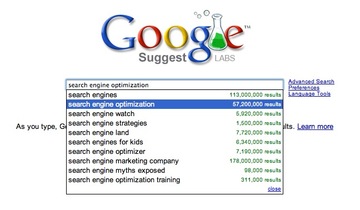
Google Suggest suggests terms related to whatever keywords you type in, and lists the number of results for each one. According to the FAQ, it uses data about the overall popularity of various searches to help rank the refinements it offers.
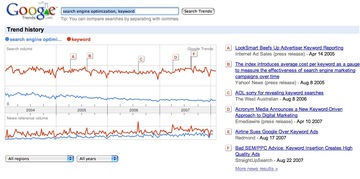
Google Trends allows you to compare the relative popularity of two search terms. Type in two keywords or phrases, separated by commas, and it displays a graph of their relative popularity. A nice plus are the markers that show when news stories came out related to the terms you entered.
What I want in an ebook reader
After a trip to the new Borders in Ann Arbor yesterday, and another disgruntled look at their Sony ebook reader, I've come up with a wishlist for the perfect ebook reader.
- It folds up, into something the size of the iphone or smaller.
- It unfolds into a wide screen e-paper style display. Maybe 12 or 15" wide by 10" tall.
- It is vanishingly thin.
- The display is in full color.
- It has wifi and wireless (cellphone) capabilities.
- It has all the other capabilities of an iphone with the addition of the ability to use a pen on it and either use the onscreen touch keyboard (like on the iphone) or use a small, extremely thin, and foldable bluetooth keyboard.
- It should function in some way as a phone and music player and perhaps for video even when folded up. In other words there is still some display when folded up.
- It should have at least 12 hour battery life with an on-board solar panel or maybe a crank for charging.
- The cabling and cords should not be a bigger object to carry than the gadget itself.
- It should be able to read any format, DRM or not.
- 40+Gigs storage, minimum.
- The browser should be a standard Firefox or Safari style browser with all the usual capabilities including flash, and preferably addons for debugging and other functions.
- You should be able to purchase books and other media instantly similar to the Kindle, AND select from free, out of copyright, non-DRM and competitive media vendors in the same interface.
Amazon, Apple, Sony, Borders: are you listening? I'd buy this thing instantly if you were selling it.
Update 2-25-08: The prototype Readius roll-away screen is getting very close to what I want in a screen size. At least the concept is right!

February 13, 2008
SyncServer can take up 100% of CPU on OS X
On an underpowered G5 iMac running OS X 10.4, I spent a lot of time troubleshooting performance issues. One of them was the "spinning beachball" effect, where some process would take over for a moment, resulting in everything else hanging until it released some CPU.
On at least one of these instances, launching Activity Monitor showed that Sync Server was taking up 100% of the CPU every few minutes.
Apparently this is a common problem on both 10.4 and 10.5:
SyncServer Problem Post on Mac Forums
OS X 10.5, SyncServer takes 100% of CPU
This article suggested resetting Sync Services, following the instructions in this Apple Technote:
Open Terminal and paste in the following command, then press Return:/System/Library/Frameworks/SyncServices.framework/Versions/A/Resources/resetsync.pl full
February 5, 2008
Voice recording with the iPhone
Now you can record your voice with the iPhone (or any other phone), and get speech to text functionality as well!
One of the features the iPhone still lacks is a way to record your own voice. A new website, Jott.com, goes a long way to filling the gap. The service is still in beta, but it already works well.
After you sign up for the service, you make a list of contact names for your messages. Then, when you want to record a message, you call the Jott number on your iPhone. It will ask you who you want to send the message to, (it can be yourself), and you start speaking. There is a time limit on the length.
The cool part is that your voice message can be sent both as email or text to yourself or your friends. If you "Jott" yourself an event reminder, they will send the reminder 15 minutes before the event.
The text is transcribed by a combination of human and machine, and there is some privacy information in the FAQ to reassure you about having your messages intercepted in this way.
There are a lot of partner sites set up so you can also use Jott to blog or twitter with your voice. For a list of some of the things you can do with the service, take a look at the Jott Links list
For the moment, the service is free while it is in beta, and the API is available to create your own Jott Links.
Update! Since this was written, iPhone version 2 has come out and with it, all the iPhone native applications. There are several good alternatives for voice recording now, which still include Jott as one of the best. Now you have a choice whether to store the recordings on your iphone (as in "Voice Notes") or on the Jott server ("Jott for iPhone").
February 1, 2008
Timing Issues and Javascript
Sometimes, when you use javascript to make a change to some element on a page, you will get a Javascript error along the lines of: "element 'n' has no properties." You check your page, and yes, the element is definitely there, and it is definitely named correctly, and your syntax is definitely correct. So where is the problem?
Well, it may be a timing issue. If your script executes before the element targeted by the script has been rendered, it will not find the element. This can particularly be a problem with frames or iframes. The solution is to move the function call to the bottom of the page, after the element has loaded.
For example, in this test page, a script detects a parameter in the query string ("tp=javascript") and loads the corresponding topic page into an iframe. Or at least it is supposed to. What actually happens is that the default page remains loaded, and a javascript error occurs:
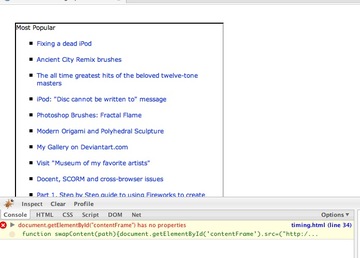
When the script is working, the list of articles loaded into the iframe should be titled "Javascript". When it is NOT working the list will be the default page that gets loaded even if javascript is not running: "Most Popular."
If you view the source of the page, you'll notice that the call to the swapContent() function is above the iFrame.
...snipped...
function swapContent(path){document.getElementById('contentFrame').src=("http://thedesignspace.net/MT2archives/"+path+"/index.html");}
  var gtopic= qsParm['tp'];
  if (gtopic!= null){swapContent(gtopic)}
  </script>
  </head>
  <div id="main">
  <table width="100%" height="900" border="0" >
  <tr valign="top">
  <td id="midCol" style="text-align:left;padding-left:24px;">

<iframe id="contentFrame" name="contentFrame" src="http://thedesignspace.net/MT2archives/_most_popular/"  scrolling="no" width="400" height="1200" frameborder="1"></iframe></td>

  </tr>

...snipped...
If the call to the function is moved to the end of the page, the script starts working. The iFrame will be loaded with the page corresponding to "tp=javascript" (topic=javascript).

Click here to try it.
However there is another way to get around the timing issue: tell the script to wait until everything has loaded before executing.
If you are working on a frameset page, however, browsers will not recognize scripts down below the frameset tag.
function changeframeSrc(){
     if(frames[0]){//alert('yes');
	 frames[0].location='page03.htm';}
     else{setTimeout("changeframeSrc()",100);}
      }


changeframeSrc();