December 30, 2007
Wet iPhone screen stops responding to touch
I pulled my iPhone out of its cradle to make a call today, but my hands were damp. As you probably know the iPhone's touch screen won't respond if you are wearing gloves, have damp hands, or any number of other conditions.
I dried my hands, then tried again to unlock it. Nothing! Tried pressing the home button or the sleep button - still nothing. Then, naturally I googled, iphone not responding to touch and an avalanche of messages poured out of the screen! Ouch, is this what I have to look forward to?
However, following the suggestions on many of the messages, I reset the iPhone by holding in the Home and Mute/Sleep button until it turned off. I let it sit for a few minutes then turned it on again and it rebooted. This time, at least, rebooting seems to have worked.
I've also noticed that as the battery runs low, it responds more slowly, or not at all.
December 28, 2007
Preview images crash Finder
When viewing items in column view, you have the option to display a Preview column, where a preview image of your image or movie will be displayed, along with some file info.
Sometimes, viewing that image will cause the Finder to crash. To fix this problem,
delete the Finder Preferences, located at:
/Users/yourusername/Library/Preferences/com.apple.Finder.plist
Finder column view showing a preview of a quicktime movie:
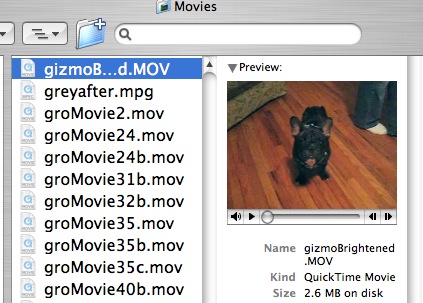
Thanks to Trevor on the MacOSXhints forum
JCAHO Trivia Game Part III: Building the Game
The JCAHO Trivia Game was originally constructed in Questionmark Perception version 3, but it should work similarly in later versions.
(Click the images to view at full size.)
Path through the game:

- Players click on their team's link on the entry screen, enter their name on the login page, then are presented with 4 topics to choose from.
- On choosing a topic, they get a block of five questions (Instructions + 4 trivia questions) at a time, randomly selected from banks of about 100 questions in each topic. Players can click back and forth among questions within the block.
When the participant chooses a topic, the questions are delivered in Question X Question (QxQ) format. There is an "explanation" question with instructions, then four trivia questions. Each round of four questions is designed to be very fast, so that busy nurses can contribute to their team's score by playing for only a few minutes. The other reason for such short blocks is there is positive feedback to the player very quickly. Blocks can be repeated infinitely: there are enough questions in the question bank to ensure that they won't often see the same ones over again.
At the end of each block, the participant returns to the "Choose A Topic Block" to pick another question topic or exit the game.
- Players can answer as few or as many as they like of the five questions. As questions are answered, the corresponding "daisies" fill in.
- After finishing each bank of questions, the player gets a topic score and feedback on each question...
- and then are returned to the "Choose a Topic" screen where they can choose to repeat the topic (with new questions) or choose another topic.
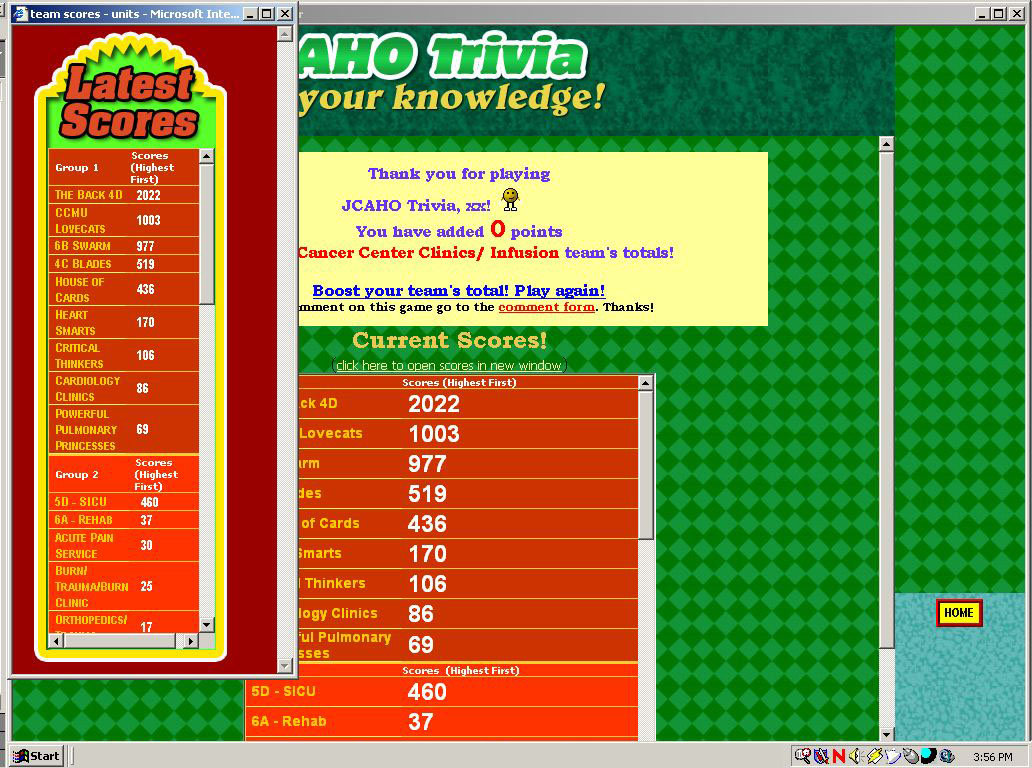
- At this point they can also quit playing and get the final total score. As soon as their final score displays on screen, it also gets added to the red scoreboard which re-appears on the last page of the game.
Structure of the game:
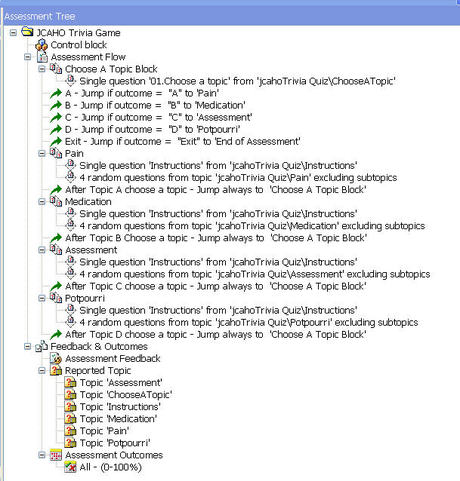
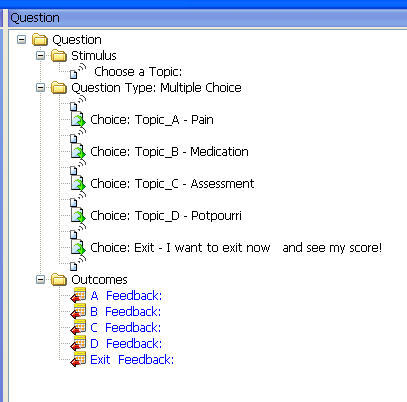
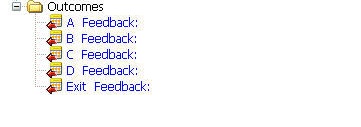
The assessment has 5 question blocks. The first block is the "Choose A Topic" Block. It contains only one Multiple Choice question with 5 choices, which is designed to look like four scattered trivia cards, one for each topic (the "Exit the Game" choice is displayed as text, near the cards. Each card contains one choice. The Choose A Topic question has five outcomes, one for each choice.
The Choose A Topic Question shown in Question View in the Assessment Manager:
What it looks like: (note: the "Exit the game" choice is not shown on this screenshot. It displays as text, near the cards.)

QML for the Choose a Topic question:
<?xml version="1.0" standalone="no"?>
<!DOCTYPE QML SYSTEM "QML_V3.dtd">
<QML>
<QUESTION ID="3135713192925876" DESCRIPTION="01.Choose a topic" TOPIC="jcahoTrivia Quiz\ChooseATopic" STATUS="Normal">
<CONTENT TYPE="text/html"><![CDATA[<div id="TransparentPNG" style="position:absolute; top:30; left:0; z-index:1;"> <img src="%RESOURCES%/jcahoTrivia/images/TopicPage/topics_cards.png" width="694" height="499"><div id="TopicChoiceTable" style="position:absolute; top:-34; left:20;"><div style="color:FFCC33; font-size:32pt; font-weight: bolder; font-style:italic; font-family:Bookman Old Style, Tahoma, Arial Black, Helvetica Black; z-index:4;">Choose a Topic:</div>]]></CONTENT>
<ANSWER QTYPE="MC">
<CONTENT TYPE="text/html"><![CDATA[<div style="position:absolute; top:0; left:20; z-index:2;"><table width="650" height="500" border="0" > <tr height="250"> <td style="font-size:36px; font-weight:bold; font-family:Bookman Old Style; width:320; text-indent: 16pt; "> ]]></CONTENT>
<CHOICE ID="Topic_A">
<CONTENT TYPE="text/html"><![CDATA[Pain]]></CONTENT>
</CHOICE>
<CONTENT TYPE="text/html"><![CDATA[</td><td style="font-size:36px; font-weight:bold; font-family:Bookman Old Style; text-indent:0pt;">]]></CONTENT>
<CHOICE ID="Topic_B">
<CONTENT TYPE="NULL"><![CDATA[Medication]]></CONTENT>
</CHOICE>
<CONTENT TYPE="text/html"><![CDATA[</td></tr><tr height="100"><td style="font-size:33px; font-weight:bold; font-family:Bookman Old Style; text-indent: 28pt;">]]></CONTENT>
<CHOICE ID="Topic_C">
<CONTENT TYPE="NULL"><![CDATA[Assessment]]></CONTENT>
</CHOICE>
<CONTENT TYPE="text/html"><![CDATA[</td><td style="font-size:36px; font-weight:bold; font-family:Bookman Old Style;text-indent: 10pt;">]]></CONTENT>
<CHOICE ID="Topic_D">
<CONTENT TYPE="NULL"><![CDATA[Potpourri]]></CONTENT>
</CHOICE>
<CONTENT TYPE="text/html"><![CDATA[</td></tr><tr height="30%"><td ></td><tr></table></div><div style="background-color:FFCC00; font-size:18px; font-weight:bold; font-family:Bookman Old Style; border: 1px solid #FFFFFF;position:absolute; top:6px; left: 420px; z-index:4; padding-right:10px; display: block; width: auto; white-space: nowrap;"><!-- NOTE this contains a div that positions the choice "I want to exit now..." above the cards-->]]></CONTENT>
<CHOICE ID="Exit">
<CONTENT TYPE="text/html"><![CDATA[I want to exit now<br> and see my score!]]></CONTENT>
</CHOICE>
<CONTENT TYPE="text/html"><![CDATA[</div>]]></CONTENT>
</ANSWER>
<OUTCOME ID="A">
<CONDITION>"Topic_A"</CONDITION>
<CONTENT TYPE="text/html"><![CDATA[]]></CONTENT>
</OUTCOME>
<OUTCOME ID="B">
<CONDITION>"Topic_B"</CONDITION>
<CONTENT TYPE="text/html"><![CDATA[]]></CONTENT>
</OUTCOME>
<OUTCOME ID="C">
<CONDITION>"Topic_C"</CONDITION>
<CONTENT TYPE="text/html"><![CDATA[]]></CONTENT>
</OUTCOME>
<OUTCOME ID="D">
<CONDITION>"Topic_D"</CONDITION>
<CONTENT TYPE="text/html"><![CDATA[]]></CONTENT>
</OUTCOME>
<OUTCOME ID="Exit">
<CONDITION>"Exit"</CONDITION>
<CONTENT TYPE="text/html"><![CDATA[]]></CONTENT>
</OUTCOME>
</QUESTION>
</QML>
Following the Choose a Topic Block, there are five Jump blocks which jump to the four question blocks or to the end of the assessment, depending on which choice was selected.
The question blocks
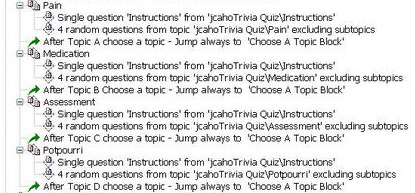
Each question block contains an "instructions" question, which is always the same, and a set of four random questions chosen from a bank of about 100 on the same topic. It wasn't easy to get the content experts to write so many questions at first, but we kept adding questions as the game went on. Using the ASCII text import template made it easy for people to contribute questions.
The structure of each trivia question:
Each trivia question is a simple multiple choice question, imported using the ASCII import feature. Questions get their stretch-to-fit trivia card backgrounds from a special question template, applied to each of the four question blocks in the assessment.
A single trivia question "card"
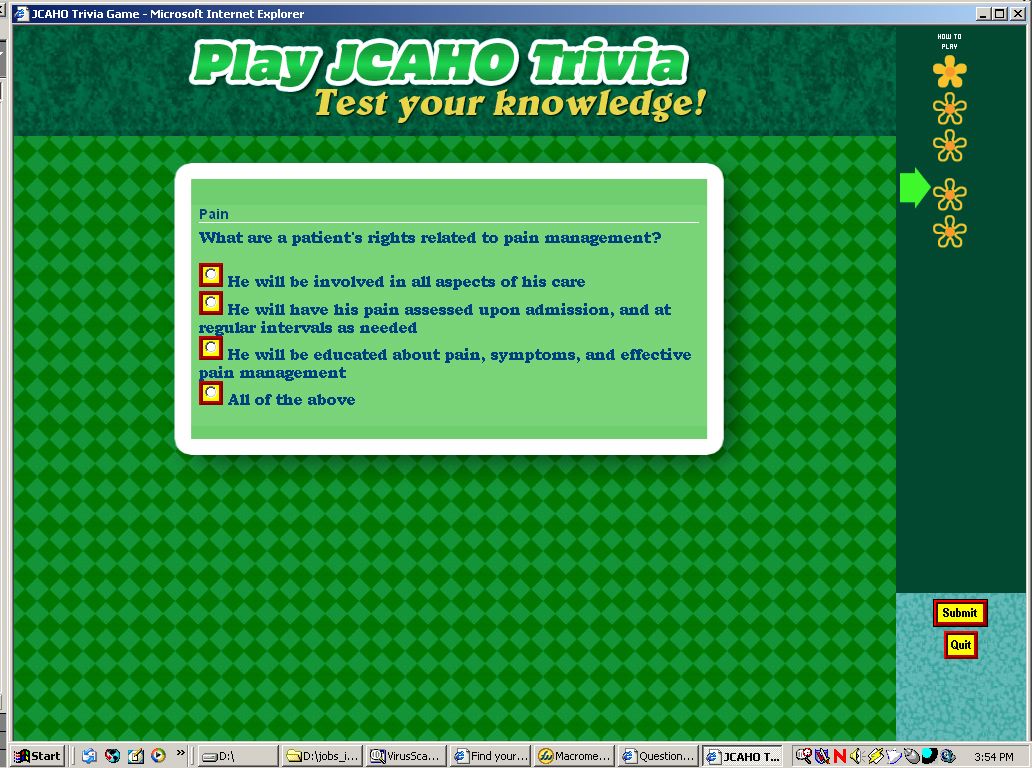
QML for a single trivia question:
<?xml version="1.0" standalone="no"?>

  <!DOCTYPE QML SYSTEM "QML_V3.dtd">

 <QML>

<QUESTION ID="7847605553549563" DESCRIPTION="401." TOPIC="jcahoTrivia Quiz\Hot Topics" STATUS="Normal">

  <CONTENT TYPE="text/html"><![CDATA[The surveyor asks: ›Can you tell me the types of training/competencies that are necessary to take care of the patients on this unit¿?<br>]]></CONTENT>

  <ANSWER QTYPE="MC">

  <CHOICE ID="0">

  <CONTENT TYPE="text/html"><![CDATA[A.  I have worked here for 5 years, that IS my training.]]></CONTENT>

  </CHOICE>

  <CHOICE ID="1">

  <CONTENT TYPE="text/html"><![CDATA[B.  Unit orientation]]></CONTENT>

  </CHOICE>

  <CHOICE ID="2">

  <CONTENT TYPE="text/html"><![CDATA[C.  Unit ongoing competencies each year]]></CONTENT>

  </CHOICE>

  <CHOICE ID="3">

  <CONTENT TYPE="text/html"><![CDATA[D.  Inservices]]></CONTENT>

  </CHOICE>

  <CHOICE ID="4">

  <CONTENT TYPE="text/html"><![CDATA[E.  I am a preceptor, need I say more?]]></CONTENT>

  </CHOICE>

  <CHOICE ID="5">

  <CONTENT TYPE="text/html"><![CDATA[F.  On line quizzes]]></CONTENT>

  </CHOICE>

  <CHOICE ID="6">

  <CONTENT TYPE="text/html"><![CDATA[G.  A, E, and F]]></CONTENT>

  </CHOICE>

  <CHOICE ID="7">

  <CONTENT TYPE="text/html"><![CDATA[H.  B, C, D, and F]]></CONTENT>

  </CHOICE>

  <CHOICE ID="8">

  <CONTENT TYPE="text/html"><![CDATA[I.  A, B, and E]]></CONTENT>

  </CHOICE>

  </ANSWER>

  <OUTCOME ID="0 A.  I have worked here for 5 years, that IS" SCORE="0">

  <CONDITION>"0"</CONDITION>

  <CONTENT TYPE="text/html"><![CDATA[The correct answer is H: B, C, D, and F.  Unit orientation, unit ongoing competencies, inservices, on line quizzes (e.g. Patient Safety -Mediations, Pediatric Calculations Across the Age Continuum, Calculations for Congenital Heart Patients)  are all good examples of how each nurse is competent to care for the population of patients on their unit.]]></CONTENT>

  </OUTCOME>

  <OUTCOME ID="1 B.  Unit orientation" SCORE="0">

  <CONDITION>"1"</CONDITION>

  <CONTENT TYPE="text/html"><![CDATA[The correct answer is H: B, C, D, and F.  Unit orientation, unit ongoing competencies, inservices, on line quizzes (e.g. Patient Safety -Mediations, Pediatric Calculations Across the Age Continuum, Calculations for Congenital Heart Patients)  are all good examples of how each nurse is competent to care for the population of patients on their unit.]]></CONTENT>

  </OUTCOME>

  <OUTCOME ID="2 C.  Unit ongoing competencies each year" SCORE="0">

  <CONDITION>"2"</CONDITION>

  <CONTENT TYPE="text/html"><![CDATA[The correct answer is H: B, C, D, and F.  Unit orientation, unit ongoing competencies, inservices, on line quizzes (e.g. Patient Safety -Mediations, Pediatric Calculations Across the Age Continuum, Calculations for Congenital Heart Patients)  are all good examples of how each nurse is competent to care for the population of patients on their unit.]]></CONTENT>

  </OUTCOME>

  <OUTCOME ID="3 D.  Inservices" SCORE="0">

  <CONDITION>"3"</CONDITION>

  <CONTENT TYPE="text/html"><![CDATA[The correct answer is H: B, C, D, and F.  Unit orientation, unit ongoing competencies, inservices, on line quizzes (e.g. Patient Safety -Mediations, Pediatric Calculations Across the Age Continuum, Calculations for Congenital Heart Patients)  are all good examples of how each nurse is competent to care for the population of patients on their unit.]]></CONTENT>

  </OUTCOME>

  <OUTCOME ID="4 E.  I am a preceptor, need I say more?" SCORE="0">
The special "Trivia Card" template applied to each question block:
[DOCUMENT] USE_QXQ=1 # ########################################### # REDIRECT page shown when perception.dll or open.dll redirect the user to session.dll
REDIRECT=
<HTML><HEAD><TITLE>%SESSION.TITLE%</TITLE>
<META HTTP-EQUIV="Refresh" CONTENT="0; URL=%SESSION.URL%">
</HEAD>
<BODY BACKGROUND="" %TEXT% %LINK%>
<P>
<H2>
Redirecting you
</H2>
<BR>
<P><A HREF="%SESSION.URL%">Click here if not redirected</A>
# ###############################################
# HEAD and BODY statements
# ###########################################
# make sure to use "##" in color declarations!!!SHOW_TITLE=0
SHOW_QUIT=1
START_DOCUMENT= this is the start document statement
# show the next and previous buttons to move between questions
SHOW_NAV_BUTTONS=0
HTML_HEADER=
<!--[if gte IE 5.5000]>
<script language="JavaScript">
function correctPNG() // correctly handle PNG transparency in Win IE 5.5 or higher.
{
for(var i=0; i<document.images.length; i++)
{
var img = document.images[i]
var imgName = img.src.toUpperCase()
if (imgName.substring(imgName.length-3, imgName.length) == "PNG")
{
var imgID = (img.id) ? "id='" + img.id + "' " : ""
var imgClass = (img.className) ? "class='" + img.className + "' " : ""
var imgTitle = (img.title) ? "title='" + img.title + "' " : "title='" + img.alt + "' "
var imgStyle = "display:inline-block;" + img.style.cssText
if (img.align == "left") imgStyle = "float:left;" + imgStyle
if (img.align == "right") imgStyle = "float:right;" + imgStyle
if (img.parentElement.href) imgStyle = "cursor:hand;" + imgStyle
var strNewHTML = "<span " + imgID + imgClass + imgTitle
+ " style=\"" + "width:" + img.width + "px; height:" + img.height + "px;" + imgStyle + ";"
+ "filter:progid:DXImageTransform.Microsoft.AlphaImageLoader"
+ "(src=\'" + img.src + "\', sizingMethod='scale');\"></span>"
img.outerHTML = strNewHTML
i = i-1
}
}
}
window.attachEvent("onload", correctPNG);
</script>
<![endif]--># preload Images script to force list images to load better on some machines
<script language="JavaScript" type="text/JavaScript">
<!--
function MM_preloadImages() { //v3.0
var d=document; if(d.images){ if(!d.MM_p) d.MM_p=new Array();
var i,j=d.MM_p.length,a=MM_preloadImages.arguments; for(i=0; i<a.length; i++)
if (a[i].indexOf("")!=0){ d.MM_p[j]=new Image; d.MM_p[j++].src=a[i];}}
}
//-->
</script>
# ############################the following styles create Question Card Background in the content area)#####
<link href="http://questionmarkServer.com/em/jcahoTrivia/css/inputStyles.css" rel="stylesheet" type="text/css"></link><link href="http://questionmarkServer.com/em/jcahoTrivia/css/JCAHOTriviaCARD_templateV3.css" rel="stylesheet" type="text/css"></link>
OPEN_DOCUMENT_HEADER=<div id="headerImage" align=center style="position:absolute; top:0px; left:0px; width:100%; padding-top: 6px;"><img src="http://questionmarkServer.com/em/jcahoTrivia/images/TopicPage/header_PlayJCAHOTrivia.gif" width="532" height="96"></div>
# includes html tags to start document TOP=<!-- start of top --> <HTML><HEAD>
<TITLE>%SESSION.TITLE%</TITLE> %HTML_HEADER% </HEAD> %SCRIPTS%# ###replaced DO_BODY with onKeyPress="checkReturn();" onSelectStart="noScroll();" onScroll="window.scroll(0,0);" from html.format
<BODY BACKGROUND="http://questionmarkServer.com/em/jcahoTrivia/images/TopicPage/topics_backgroundGreen.jpg" %TEXT% %LINK% onKeyPress="checkReturn();" onSelectStart="noScroll();" onScroll="window.scroll(0,0);" leftmargin="0" topmargin="0" marginwidth="0" style="font-family:Tahoma,Helvetica,Arial" onLoad="MM_preloadImages('http://questionmarkServer.com/em/jcahoTrivia/images/list_items/thumbs_up.gif','http://questionmarkServer.com/em/jcahoTrivia/images/list_items/thumbs_down.gif', 'http://questionmarkServer.com/em/jcahoTrivia/images/list_items/list_item_daisySeen.gif' , 'http://questionmarkServer.com/em/jcahoTrivia/images/list_items/list_item_daisyOutlineNotSe.gif', 'http://questionmarkServer.com/em/jcahoTrivia/images/list_items/list_item_howToPlay.gif', 'http://questionmarkServer.com/em/jcahoTrivia/images/list_items/list_arrow.gif')"># ###############################################################################
%HEADER%
<!-- end of top -->
BODY_ATTRIBUTES=
MESSAGETOP=<!-- start of message top -->
<HTML><HEAD>
<TITLE>%SESSION.TITLE%</TITLE>
%HTML_HEADER%
</HEAD>
<BODY %BACKC% %BACKI% %TEXT% %LINK%>
%CHECK_SCRIPT_VERSION%
%HEADER%
<!-- end of message top --># ###############################################
# FOOTER
# ############################################ placed at the bottom of all documents
# includes html tags to end document
TAIL=
<!-- start of tail -->%FOOTER%
<!-- THIS IS A FOOTER -->
</BODY>
</HTML><div style="height:100%"></div>
<!-- end of tail -->
# ############################################ ####################################################
# main format definition for question documents
qxqDOCUMENT=
<!-- start of qxq document Defined in template-->
%TOP%
<!-- qxq script here -->
%QXQ_SCRIPT%
%STYLE_SHEET%
# ##styles that overwrite styles written by the javascript
<style type="text/css">
<!--
.question {
width:90%;
text-align:center;
}.list {
font-size:11px;
font-weight:bold;
color: yellow;
font-family: "Bookman Old Style", Palatino, Georgia;
background-color: ##024830;
background-image: none;
z-index:7;
}
-->
</style>
%SPOILER%
<FORM NAME="QUESTION" METHOD="POST" AUTOCOMPLETE="off" ACTION="%SESSION.URL%" %DO_SUBMIT% %TARGET%>
<DIV ID="list" CLASS="list">
</DIV>
%NAV_CONTROL%
<DIV ID="header" CLASS="header">
<!-- start of session -->
%DOCUMENT_HEADER%
</DIV>
%TIMER_CONTROL%
# ###########SESSION CONTENT (QUESTION AREA)#################
<!-- start of session content -->
%SESSION.CONTENT%
<!-- end of session content --># %SEPARATOR%
%SUBMIT_CONTROL%
%QUIT_CONTROL%
</FORM>
<!-- end of session -->
%WRITE_LIST%
%TAIL%
<!-- end of qxq document --># ##############################
# FEEDBACK
# ###########################################
# feedback to questions before the end of the session (when feedback is set to show up after each block)
qxqFEEDBACK=
<!-- start of feedback -->
%TOP%
%QXQ_SCRIPT%
%IS_FEEDBACK%
%STYLE_SHEET%
# ##styles that overwrite styles written by the javascript
<style type="text/css">
<!--
.list {
font-size:11px;
font-weight:bold;
color: yellow;
font-family: "Bookman Old Style", Palatino, Georgia;
background-color: ##024830;
background-image: none;
z-index:7;
}
-->
</style>
%SPOILER%
<FORM NAME="FEEDBACK" METHOD="POST" ACTION="%SESSION.URL%" AUTOCOMPLETE="off" %DO_FEEDBACK_SUBMIT% %TARGET%>
<DIV ID="list" CLASS="list">
</DIV>
%NAV_CONTROL%
<DIV ID="header" CLASS="header">
<!-- start of session -->
%DOCUMENT_HEADER%
</DIV>
%TIMER_CONTROL%
%SEPARATOR%
<DIV ID="B_%SESSION.NUMBER%" CLASS="question">
<!-- start of end_feedback -->
%FEEDBACK_HEADER%
</DIV>
<SCRIPT>
oTemp = new Question(window, "B_%SESSION.NUMBER%", %SESSION.NUMBER%, iIndex, 'B', false, 0, 0, false);
oTemp.setTitle('%BLOCK.TITLE% - %BLOCK.SCORE%');
aElements[iIndex] = oTemp;
iIndex++;
</SCRIPT>
<!-- start of block feedback-->%SESSION.FEEDBACK%
<!-- end of block feedback-->
# %SEPARATOR%
%CONTINUE_CONTROL%
</FORM>
%WRITE_LIST%
%TAIL%
<!-- end of feedback -->
END=
_IF 1 = 1
%qxqEND%
_ELSE
<!-- start of final page--> <!-- start of top --> <HTML><HEAD> <TITLE>%SESSION.TITLE%</TITLE> %HEADER%
<STYLE TYPE=text/css>
TD {font-family: ""; color:
</STYLE>
</HEAD>
%SCRIPTS%<BODY %TEXT% %LINK% %DO_BODY% leftmargin="0" topmargin="0" marginwidth="0" style="font-family:Tahoma,Helvetica,Arial"> QXQ DEFINITION
<!-- START OF FINAL PAGE --><!-- end of top -->
<BR><form><input type="button" name="print" value="Print This Page" id=cmdPrint name=cmdPrint onclick="window.print ()"></form> %END_HEADER%
SUBMIT_TEXT=Continue# ###########################################
# final page - can include feedback saved using END_FEEDBACK definition
qxqEND=
<!-- start of final page-->
%TOP%
%QXQ_SCRIPT%
%IS_FEEDBACK%
%IS_END%
%NO_TIMER_STYLE_SHEET%
%SPOILER%
<DIV ID="list" CLASS="list">
</DIV>
%NAV_CONTROL%
<DIV ID="header" CLASS="header">
%END_HEADER%
</DIV>
%SEPARATOR%
<DIV ID="Outcome" CLASS="question">
<!-- start of session outcome-->
%SESSION.OUTCOME%
# %QXQ_END_BODY% #added for v.3
# %OUTCOME_DEF% #added for v.3
<!-- end of session outcome-->
</DIV>
<SCRIPT>
oTemp = new Question(window, "Outcome", 0, iIndex, 'O', false, 0, 0, false);
oTemp.setTitle('%SESSION.TITLE% - %SESSION.SCORE%');
aElements[iIndex] = oTemp;
iIndex++;
</SCRIPT>
<!-- start of final feedback-->
%SESSION.FEEDBACK%
<!-- end of final feedback-->
%NEXT_CONTROL%
%WRITE_LIST%
%TAIL%
<!-- end of final page -->
# ##############################
# ##############################
# Order of elements on the list_panelQUESTION_PANEL=
%SHOW_PANEL_START%
%SHOW_PANEL_FINISH%
%SHOW_PANEL_QUIT%
%SHOW_PANEL_END%
FEEDBACK_PANEL=
%SHOW_PANEL_START%
%SHOW_PANEL_CONTINUE%
%SHOW_PANEL_QUIT%
%SHOW_PANEL_END%END_PANEL=
%SHOW_PANEL_START%
%SHOW_PANEL_FINAL%
%SHOW_PANEL_END%
# #########################
# anything entered here shows up at the top of the page
# ##################################################
HEADER=SHOW_TOPIC=0
USE_TIMER=0
SHOW_TIMER=0
SHOW_RUNNING_SCORE=1
SHOW_BLOCK_SCORE=1
REQUIRE_SECURE_BROWSER=0
SHOW_FINAL_SCORE=1# show introduction for each block
SHOW_BLOCK_INTRO=0
# ###########################################
# FORMATTING SCORES
# ###########################################START_BLOCK_SCORE= <span style="font-size:24px; font-style:bold">Your score for this topic:<br></span>
END_BLOCK_SCORE=<br>
START_RUNNING_SCORE=<span style="font-size:24px; font-style:bold">Your score so far</span>
END_RUNNING_SCORE=<br>
START_INTRO=
# final score for assessment
START_FINAL_SCORE=
END_FINAL_SCORE=
# #################
# scoring text
# eg 1 'out of' 2
SCORE_OUT_OF_TEXT=out of
# score for question shown in last document
BLOCK_SCORE_TEXT= %BLOCK.TITLE%:
# score for all documents answered so far
SCORE_SO_FAR_TEXT=
# score at end of session
TOTAL_SCORE_TEXT=Total score:# shown in feedback if a question is not answered
NOTANSWERED_TEXT=Question not answered
# question numbering
# eg question 1 OF 10
NUMBER_OF_TEXT=of# ###############
# block score shown after each block
BLOCK_SCORE=
<!-- block score -->
%SCOREFONT%
%BLOCK_SCORE_TEXT% %BLOCK.SCORE% <BR>
</FONT># cumulative score shown at end of each block
RUNNING_SCORE=
<!-- running score -->
%SCOREFONT%
%SCORE_SO_FAR_TEXT% %SESSION.SCORE%
</FONT>
# ###########################################
# html syntax for submit button on a form
# ############################
SUBMIT=<INPUT TYPE=SUBMIT VALUE="%SUBMIT_TEXT%" CLASS="submit">
# ###########################################
# html syntax for reset button on a form
RESET=<INPUT TYPE=RESET VALUE="%RESET_TEXT%" %DO_RESET_BUTTON% CLASS="submit" >
# ###########################################
# html syntax for continue button on a feedback page
CONTINUE=<INPUT TYPE=SUBMIT VALUE="%CONTINUE_TEXT%" %DO_CONTINUE_BUTTON% CLASS="submit" >
# ############### ##############
# topic name question comes from
START_TOPIC=start topic %BLOCK.SCORE%
END_TOPIC=end topic<BR># question feedback document
# feedback for Instructions Explanation Question
OPEN_FEEDBACK_HEADER=
<div id="feedbackHeader" class="feedbackHeader"># ##############
CLOSE_FEEDBACK_HEADER=<div id="feedbackInstructions" class="feedbackInstructions">Click any symbol at right to see the feedback associated with that question. "Thumbs Up" symbols mean your answer was right, "Thumbs Down" mean your answer was wrong.
<p> When finished viewing feedback, click "Continue" to return to the "Choose a Topic" screen. You may choose any topic as many times as you wish! If you want to end the game, choose "I want to exit now and see my score". </div><!-- close feedback header--></div># <div id="CardContainer class="QuestionCardContainer">
# separator placed after each feedback item
START_FEEDBACK_ITEM=START_QUESTION_FEEDBACK=<div id="questionFeedbackContainer" class="questionFeedbackContainer">
%START_QUESTION%
END_QUESTION_FEEDBACK=<p></div># %END_QUESTION%
END_FEEDBACK_ITEM=
# after question feedback
# final page document
OPEN_END_HEADER=<BR><img src="http://questionmarkServer.com/em/jcahoTrivia/images/gifs/fireworks8.gif" width=100 height=100 border=1 border-color=green>
CLOSE_END_HEADER=<img src="http://questionmarkServer.com/em/jcahoTrivia/images/gifs/fireworks8.gif" width=100 height=100 border=1 border-color=green>
# ##############
# Question by Question delivery settings
# ###########################################
# ask for confirmation before submitting answers
# 0 - don't ask before submitting
# 1 - ask if any questions remain unanswered
# 2 - ask always
ASK_CONFIRM=1# allow questions to be flagged for later review
ENABLE_FLAGGING=0# ############
# use the QxQ scripts in qxqcore.js (1) instead of writing them to the document (0)
# the qxqcore.js is downloaded only once and cached by the browser
# you may need to set this to 0 if the HTTP connection goes through a firewall which filters out .js files
USE_SCRIPT_FILE=1# ##############
# Question by Question delivery text formatting# list entry format (to display question number)
START_ENTRY=<div style="font-weight:bold; color:#FFFFFF;"><b>
END_ENTRY=</B></div>
# show Cancel/Home button in monitor screen
SHOW_MONITOR_CANCEL=0
# ##############
# sizes of different Question by Question delivery sections as percentages of browser size# height of the header window as percentage of browser height
HEADER_HEIGHT=110# panel and list sizes used if vertically aligned - ALIGN = 0 or 1
PANEL_WIDTH=130 # width of control panel and question list
PANEL_CONTROL_HEIGHT=150 # height of the control panel
# height of the time section of the list window
TIMER_HEIGHT=13
# disable the browser menu produced by clicking the right mouse button
# (works with Internet Explorer only)
DISABLE_RIGHT_CLICK=0
# position of list window,
ALIGN=1
# use graphics for submit, reset and quit buttons
USE_GRAPHIC_BUTTONS=0
# show the list of individual questions
SHOW_NAV_LIST=1
# size of borders to screen areas (in pixels
BORDER_SIZE=1
# show numbers for questions in list
SHOW_LIST_NUMBER=0
# separator to be placed between control buttons
CONTROL_SEPARATOR=<p>
# show selector to current question in list
SHOW_LIST_SELECT=1
SEPARATOR=<p>
# ##############
# QxQ background colors
# #################
LIST_COLOR=##024830
CONTROL_COLOR=
HEADER_COLOR=
BORDER_COLOR=%white%
BACKCOLOR=
# ###########
# font face for text (will be ignored if blank)
TEXTFACE="Bookman Old Style Bold","Palatino","Georgia"
# text color
TEXTCOLOR=%DRKBLUE%
# text size (in points)
TEXTSIZE=18
# ##############
QXQ_GRAPHIC_DIR=%SERVER.GRAPHICS%system/
# ##############
# Question by Question delivery background images
# set to blank to have no background image
# question window
# set to session background
#Q_BACKGROUND=http://questionmarkServer.com/em/jcahoTrivia/images/TopicPage/topics_backgroundGreen.jpg
Q_BACKGROUND=# header window - default set to same as session background
H_BACKGROUND=http://questionmarkServer.com/em/jcahoTrivia/images/TopicPage/header_greenMarbleBackgroun.jpg
# ############################################################################
# List background (top right corner area containing buttons for each question)
# ############################################################################
# list window (top bit with list of questions)
# L_BACKGROUND=http://questionmarkServer.com/em/jcahoTrivia/images/TopicPage/testGameboard_12.jpg
L_BACKGROUND=##024830
# control window (bottom bit of list window with buttons and timer)
C_BACKGROUND=http://questionmarkServer.com/em/jcahoTrivia/images/TopicPage/nav_BG.jpg# ##############
# Question by Question delivery list images (IMAGES FOR question buttons)# empty image for selector
SPACE_IMAGE=http://questionmarkServer.com/em/jcahoTrivia/images/list_items/list_item_notSelected.gif# indicator image for selector - points to current item
SELECT_IMAGE=http://questionmarkServer.com/em/jcahoTrivia/images/list_items/list_arrow.gif# question answered correctly (score = max score)
RIGHT_IMAGE=http://questionmarkServer.com/em/jcahoTrivia/images/list_items/thumbs_up.gif# question answered wrongly (score = 0)
WRONG_IMAGE=http://questionmarkServer.com/em/jcahoTrivia/images/list_items/thumbs_down.gif# question answered partially right (score > 0 but < max score)
PART_IMAGE=http://questionmarkServer.com/em/jcahoTrivia/images/list_items/thumbs_down.gif# question not seen/answered
NONE_IMAGE=http://questionmarkServer.com/em/jcahoTrivia/images/list_items/list_item_daisyOutlineNotSe.gif# question seen
SEEN_IMAGE=http://questionmarkServer.com/em/jcahoTrivia/images/list_items/list_item_daisySeen.gif# explanation entry
EXPLAIN_IMAGE=http://questionmarkServer.com/em/jcahoTrivia/images/list_items/list_item_howToPlay.gif# session outcome entry
SESSION_IMAGE=%SERVER.GRAPHICS%system/qxsess.gif# block entry
BLOCK_IMAGE=http://questionmarkServer.com/em/jcahoTrivia/images/list_items/list_item_Scores.gif# flag image to show flagged answered questions
FLAG_SEEN_IMAGE=http://questionmarkServer.com/em/jcahoTrivia/images/list_items/list_item_stickpin.gif# flag image to show flagged answered questions
FLAG_NONE_IMAGE=http://questionmarkServer.com/em/jcahoTrivia/images/list_items/list_item_stickpin.gif# ##############
# Question by Question delivery text# text for submit button, to submit answers to all quesitons
FINISH_TEXT=Submit
# tooltip for submit button
FINISH_TOOLTIP=Submit ALL Answers and go to Next Section# text for continue button
CONTINUE_TEXT=Continue
# tooltip for continue button
CONTINUE_TOOLTIP=Continue to Next Section# text for previous question button
PREVIOUS_TEXT= Prev.Question
# tooltip for previous button
PREVIOUS_TOOLTIP=Move to Previous Question# text for next question button
NEXT_TEXT= Next Question
# tooltip for next button
NEXT_TOOLTIP=Move to Next Question
# tooltip for next button when disabled
NEXT_OFF_TOOLTIP=Click on a question above to answer it or change your answer# name for a question in the list
Q_LIST_TEXT=Question# name for an explanation in the list
E_LIST_TEXT=Explanation# message to say that questions are unanswered
# used if ASK_CONFIRM=1
CONFIRM_UNANSWERED_TEXT=Not all questions are answered. Are you sure you want to submit your answers now?# message to ask for confirmation before submitting
# used if ASK_CONFIRM=2
CONFIRM_SUBMIT_TEXT=Do you want to submit your answers now?# ###################################
# Home button definition
# ################################### how to request the link
# use POST for CGI programs, eg .dll and .pl files
# if HOME is set to %SESSION.LINK% then this should be set to POST
LINK_METHOD=POST# this can also be set to point to a fixed URL, eg :
#HOME=http://127.0.0.1/default.html
#HOME=https://quiz.med.umich.edu/qmdev/open.dll?login=jcahoTrivia&session=9244441523615266
HOME=%SESSION.LINK%
# use GET for static documents, eg .htm and .html files
#LINK_METHOD=GET
# ###################################
# Participant reports
# ##################################
# URL of participant report script
REPORT_URL=/enterprise/erparticipant/view.asp# name of report format to use
# set to blank to use default report
# NB must use + characters instead of spaces, eg 'My+Report'
REPORT_NAME=
# ###################################
# QUESTION NUMBERING
# ##################################
# question numbering
# 0 - don't show any question numbering
# 1 - show question number
SHOW_NUMBER=0# when question numbering is being shown
# 0 - just show the question number, not the number of questions, eg question 1
# 1 - show the number of, eg question 1 of 10
SHOW_NUMBER_OF=0
# ###################################
# QUESTION FORMATTING
# ##################################
# ###########################################
# define how questions are formatted
[QUESTION]
# ###########################################QUESTION=
_IF %USE_QXQ% = 1
# %SEPARATOR%
<DIV ID="Q_%QUESTION.ID%" CLASS="question" background-image:none; z-index:1;">
%QUESTION_HEADER%
<div id="CardContainer class="QuestionCardContainer">
<div id="CardTop" class="Top"></div>
<div id="CardMiddle" class="Middle">
%START_QUESTION%
<div id="topicName" style="font-weight:bold;font-size:14px;font-family:Helvetica,Arial,Verdana;border-bottom-width:1px;border-bottom-style:solid;border-bottom-color:white;margin-bottom:6px;">%BLOCK.TITLE%</div>
<!-- start of question content -->
%QUESTION.CONTENT%
<!-- end of question content -->
</div>
<div id="CardBottom" class="Bottom"></div>
</div>
%END_QUESTION%
</DIV>
<SCRIPT>
oTemp = new Question(window, "Q_%QUESTION.ID%", %QUESTION.NUMBER%, iIndex, 'Q', false, %QUESTION.SCORE%, %QUESTION.MAX%, answered);
aElements[iIndex] = oTemp;
aQuestions[%QUESTION.NUMBER%] = oTemp;
iIndex++;
</SCRIPT>
_ELSE
<!-- start of question -->
# %SEPARATOR%
THIS IS THE HEADER
%QUESTION_HEADER%
%START_QUESTION%
<!-- start of question content -->
%QUESTION.CONTENT%<BR>THIS IS THE QUESTION CONTENT
<!-- end of question content -->
%END_QUESTION%
<!-- end of question -->
# #############################################
# start and end each question type
# in the ways defined below
START_QUESTION=
END_QUESTION=
# multiple choice:
#START_QUESTION_mc=<br>
#END_QUESTION_mc=
# multiple response:
START_QUESTION_mr=<BR>
END_QUESTION_mr=<BR>START_QUESTION_num=<BR>
END_QUESTION_num=<BR>START_QUESTION_sel=<TABLE>
END_QUESTION_sel=</TABLE>START_QUESTION_tm=<BR>
END_QUESTION_tm=<BR>START_QUESTION_fib=<BR>
END_QUESTION_fib=<BR>START_QUESTION_mat=<TABLE>
END_QUESTION_mat=</TABLE>START_QUESTION_hot=
END_QUESTION_hot=START_QUESTION_essay=<BR>
END_QUESTION_essay=<BR>START_EXPLANATION=
START_mr=<tr><td valign="top">
END_mr=</td></tr>
START_QUESTION_mr=<table>
END_QUESTION_mr=</table>
[CHOICE]
MC=%START_mc% <INPUT TYPE=RADIO CLASS="radio" NAME="%QUESTION.ID%" VALUE="%CHOICE.ID%" %DO_MC% %CHOICE.CHECKED%> </td><td CLASS="choice"> %CHOICE.CONTENT% %END_mc%
# MR=%START_mr%<INPUT TYPE=CHECKBOX NAME="%QUESTION.ID%" VALUE="%CHOICE.ID%" %DO_MR% %CHOICE.CHECKED%> </td><td> %CHOICE.CONTENT% %END_mr%
START_num=
END_num=<BR>
START_sel=<TR>
END_sel=</TR>
START_tm=
END_tm=<BR>
START_fib=
END_fib=
# ############################
# redefined matrix question so they line up horizontally instead of in rows for jeopardy board
# #############################
# START_mat=<TR>
START_mat=
# END_mat=</TR>
END_mat=
START_essay=
END_essay=
Download Source Files - CSS, login and scoreboard scripts, templates, and images
Download file
Important! This is not a plug and play script. You will probably need to do extensive rewrites on these files to make them fit your needs. Because of some oddities about paths, it does not qpack well, so you will have to recreate the game manually.
Note that this game was created in Questionmark Perception version 3, so some template items will probably need to be adapted to version 4. Also, Internet Explorer version 5.5 was still current, so there are many CSS workarounds for its idiosyncracies which may no longer be necessary.
Constructing the game
Requirements:
Setup:
- Put the "jcahoTrivia" folder into the "em" folder on your perception server. I used that folder at the time because I was having problems getting the paths to work consistently when I used the "%RESOURCES%" folder in CSS, javascript and template files. Using the web-enabled "em" folder allowed me to use the same type of path, everywhere. You will probably want to change this to bring it in line with recommended practice.
- Search and replace the phrase
http://questionmarkServer.com/em/
with
http://[your questionmark server name]/em/
- Modify the file /em/jcahoTrivia/Connections/questionmark.asp. Add your database connection information.
- Put the three template files into the templates folder.
- jcahoTrivia.login (this is the login page)
- qxqonJCAHOTrivia.template (this will be applied to the assessment's master "Control block"
- qxqonTriviaQuestionCard.template (this will be applied to each of the question topic blocks, such as "Pain","Medication","Assessment", "Potpourri", and to the "Choose a Topic" block.
- Solicit LOTS of questions on your chosen topics from your content experts. Questions should be in multiple choice format, and it will go faster if they are delivered in ASCII import text files.
- In Assessment Manager's Question View, create your question topics, and start importing the trivia questions. Give the Content Experts BBA rights to the topics and let them correct them online while you are doing the rest of the setup.
- In Question View, create the multiple choice "Choose A Topic" question, based on the qml provided above.
- In Question View, create an explanation question called "Instructions" which contains instructions for game play. This will be displayed at the beginning of each block.
- Create the JCAHO Trivia Assessment
- Apply the JCAHOTrivia.template to the Control block of the assessment.
- Set the assessment to deliver feedback on each scored, right or wrong question "after each block."
- Add a Question Block. Call it "Choose A Topic Block" and add the "Choose A topic question." There should be No Feedback on this block.
- Immediately after the Choose a Topic question, add 5 jump blocks as shown here:
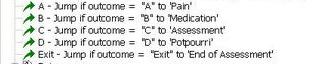
After the 5 jump blocks, add the 4 question topic blocks as shown here:
- There should be a single scoreband at the end, 0%-100%. The feedback page is created in the template and includes the iFrame which displays the scoreboard.
- jcahoTrivia.login (this is the login page)
December 11, 2007
Safari 3 on PPC iMac - Slow!
I've seen a lot of talk on the web about the slowness of Safari 3 on Windows. Am I the only one who finds Safari 3 on OS X slow also?
I have a 2 GHz PPC G5 iMac, not a great computer but respectable, but I guess it cannot handle the new Safari. This sluggishness is starting to make me wish I had never allowed the update.
Is this Apple's way of telling me to buy a new computer?
December 6, 2007
Perception 4.3 meets an Oracle 10g bug: Unsupported network datatype or representation
Last January, I installed a test instance of Questionmark's Perception server, version 4.2, in preparation for upgrading our version 3.4 Perception server. At the time, we were using Oracle version 9i. Once installed, our testing went well, and we did not notice any significant problems.
In July, we finally got around to doing the actual upgrade, and decided to upgrade the database to Oracle 10g at the same time. The installation and conversion of our version 3.4 data went very smoothly. Everything ran well for about a week. Then things began to go wrong. When we would open the Authoring Manager, it would refuse to show us any assessments ("assessments can't be found".) Then it would tell us administrators couldn't be found. After a few days, the assessments disappeared from the Perception Server as well, meaning users could no longer take them. After trying numerous fixes, we reverted to a recent backup of the database from a couple of days before, and the problem disappeared. The one Oracle error that both Perception Server and Authoring Manager were giving was "ORA-03115: unsupported network datatype or representation."
A few days later the problems came back. This time, we resolved it by recompiling the objects in the database. Meanwhile, we moved a bit-for-bit copy of the production database over to our test database server. We were very surprised when it worked perfectly. The data was completely intact.
When we decided to try restarting the database server the problem resolved. This led our DBA to discover the answer, hidden away in Oracle's Metalink:
Subject: OCI Application Errors with ORA-3115 Doc ID: Note 460498.1 last revision date Oct. 4, 2007Applies to Oracle net services - v. 10.2 to 11.1
This problem can occur on any platformSymptoms
Third party application using OCI, intermittently hangs. Application log reports ORA-3115 "Unsupported network datatype or representation". No dumps file ar produced nor are any error entries reported in the alert log.Flushing the shared pool is known to get rid of the problem for a short while:
SQL> alter system flush shared_poolCause
Bug 6085665 ORA-3115 Running OCI Application After install Patcheset 10.2.0.3
Bug is not published so not visable in metalink for customersSolution
Set the CURSOR_SHARING database parameter to EXACT.
This setting will only allow identical statements to share the same cursor.
A downside to this is that it can lead to fragmentation if the application uses literals instead of bind variables.
The solution was to set "CURSOR_SHARING parameter on the Oracle database to "Exact." Since that was done we have had no problems.
How to run Red 5 on a shared IIS server on port 80
Setting up Red5 on a box which also contains a web server can be a challenge if you are restricted to using specific ports because of a firewall. Here is how we set up Red5 on a Windows 2003 server which also contains a production IIS server.
Our firewall only allows traffic on ports 80 and 443. This is non-negotiable, so we needed to work around the requirement.
The folks - in particular Walter Tak - on the Red5 mailing list pointed me in the right direction: Make another IP (or two) for Red 5 to run under.
IIS was already using ports 80 and 443, so the system administrator made two additional IPs for Red5 to use, one for rtmp and one for http. He then changed the settings in the Default Website Properties in IIS Manager: In Web Site Identification: IP Address, instead of (All Unassigned), he selected the single IP which we wanted IIS to listen on. We did not want IIS to interfere with port 80 on the IPs used by Red5.
However, even after this change Red5 still would not start up. The error in the logs was "java.net.BindException: Address already in use: bind"
After a little more research we found this article:
Running Flashcom Server alongside IIS
by Stefan Richter
http://www.flashcomguru.com/tutorials/fcs_iis.cfm (backup version, PDF)
The article explains that on IIS 6 you must use a tool called httpcfg.exe to disable socket pooling. Otherwise, IIS will continue to grab port 80 on all IPs available, no matter what you set in IIS Manager.
The link to Microsoft's explanation of this in the Stefan Richter article is no longer good. Here is the correct link:
Setting metabase property DisableSocketPooling has no effect
Backup PDF version: Setting metabase property DisableSocketPooling has no effect.pdf
The red5.properties file for the server looks like this:
# HTTP
http.host=155.125.50.38
http.port=80
https.port=8443
# RTMP
rtmp.host=155.125.50.48
rtmp.port=1935
rtmp.event_threads_core=16
rtmp.event_threads_max=64
# event threads queue: -1 unbounded, 0 direct (no queue), n bounded queue
rtmp.event_threads_queue=0
rtmp.event_threads_keepalive=60
rtmp.send_buffer_size=271360
rtmp.receive_buffer_size=65536
rtmp.ping_interval=5000
rtmp.max_inactivity=60000
rtmp.tcp_nodelay=true
# RTMPT
#rtmpt.host=155.125.50.48
rtmpt.host=red501.myserver.com
rtmpt.port=80
rtmpt.ping_interval=5000
rtmpt.max_inactivity=60000
# MRTMP
mrtmp.host=155.125.50.48
mrtmp.port=9035
mrtmp.event_threads_core=4
mrtmp.event_threads_max=32
# event threads queue: -1 unbounded, 0 direct (no queue), n bounded queue
mrtmp.event_threads_queue=0
mrtmp.event_threads_keepalive=60
mrtmp.send_buffer_size=271360
mrtmp.receive_buffer_size=65536
mrtmp.ping_interval=5000
mrtmp.max_inactivity=60000
mrtmp.tcp_nodelay=true
# Debug proxy (needs to be activated in red5-core.xml)
proxy.source_host=127.0.0.1
proxy.source_port=1936
proxy.destination_host=127.0.0.1
proxy.destination_port=1935
After this was done, Red5 did start up, but I started getting "no application scope found" errors in the logs, and then it would shut down after a few moments. After a little experimentation I realized that I must have made some fatal change to one of the configuration files while we were troubleshooting, so I simply reinstalled Red5. Then it started up immediately and stayed up.
The last step was to register the new IPs with our firewall, and now it works perfectly!