March 23, 2004
Basic "Advanced" Search Form with 3 selectors
Here is a basic search form created in Dreamweaver MX that selects records based on the input from several form selectors. See demo here For example, you can select results based on author, keyword and subject. The example below selects medical learning resources based on subject classification, target audience, and keyword. There are a few dummy records so you can test the form out. This uses simple table relations instead of table joins, which limits the complexity of the database setup.
Import this SQL file into your database
# --------------------------------------------------------

#
# Table structure for table `Classifications`
#
# Creation: Mar 16, 2004 at 04:58 PM
# Last update: Mar 20, 2004 at 01:01 AM
#

CREATE TABLE `Classifications` (
  `ClassificationID` smallint(5) NOT NULL default '0',
  `ClassificationName` text,
  PRIMARY KEY  (`ClassificationID`),
  FULLTEXT KEY `ClassificationName` (`ClassificationName`)
) TYPE=MyISAM;

#
# Dumping data for table `Classifications`
#

INSERT INTO `Classifications` VALUES (2, 'Emergency Medicine');
INSERT INTO `Classifications` VALUES (3, 'Nursing');
INSERT INTO `Classifications` VALUES (4, 'Cardiology');
INSERT INTO `Classifications` VALUES (5, 'Geriatrics');
INSERT INTO `Classifications` VALUES (6, 'Internal Medicine');
INSERT INTO `Classifications` VALUES (7, 'Policies and Procedures');
INSERT INTO `Classifications` VALUES (8, 'Safety');
INSERT INTO `Classifications` VALUES (9, 'Pediatrics');
INSERT INTO `Classifications` VALUES (10, 'Oncology and Hematology');
INSERT INTO `Classifications` VALUES (11, 'Immunology');
INSERT INTO `Classifications` VALUES (12, 'Anesthesiology');
INSERT INTO `Classifications` VALUES (13, 'Surgery');

# --------------------------------------------------------

#
# Table structure for table `Population`
#
# Creation: Mar 16, 2004 at 04:44 PM
# Last update: Mar 16, 2004 at 08:18 PM
#

CREATE TABLE `Population` (
  `PopulationID` tinyint(25) NOT NULL auto_increment,
  `PopTitle` text,
  PRIMARY KEY  (`PopulationID`),
  FULLTEXT KEY `PopTitle` (`PopTitle`)
) TYPE=MyISAM AUTO_INCREMENT=6 ;

#
# Dumping data for table `Population`
#

INSERT INTO `Population` VALUES (1, 'Adult');
INSERT INTO `Population` VALUES (2, 'Child');
INSERT INTO `Population` VALUES (3, 'Neonatal');
INSERT INTO `Population` VALUES (4, 'Geriatric');
INSERT INTO `Population` VALUES (5, 'All');

# --------------------------------------------------------

#
# Table structure for table `Resources`
#
# Creation: Mar 16, 2004 at 05:05 PM
# Last update: Mar 16, 2004 at 11:30 PM
# Last check: Mar 16, 2004 at 05:05 PM
#

CREATE TABLE `Resources` (
  `ResourceId` smallint(5) NOT NULL auto_increment,
  `ResourceTitle` text,
  `Description` text,
  `URL` text,
  `Classification` text,
  `Population` text,
  `TargetAudience` text,
  PRIMARY KEY  (`ResourceId`),
  FULLTEXT KEY `ResourceTitle` (`ResourceTitle`,`Description`,`URL`)
) TYPE=MyISAM AUTO_INCREMENT=9

/* RELATIONS FOR TABLE `Resources`:
    `Classification`
        `Classifications` -> `ClassificationID`
    `Population`
        `Population` -> `PopulationID`
    `TargetAudience`
        `TargetAudience` -> `TargetAudienceId`
*/;

#
# Dumping data for table `Resources`
#

INSERT INTO `Resources` VALUES (1, 'Pain and the 3 M\'s: Medication, Monitoring and Management          ', 'Competency Statement:                  Effectively manages all patient\'s pain through appropriate administration of medications, monitoring and management                 ', 'http://www.umich.edu/', '12', '1', '5');
INSERT INTO `Resources` VALUES (6, 'Cardiac Arrest Response', 'Competency Statement: The clerk responds appropriately in the event of a cardiac arrest.                 ', 'http://www.med.umich.edu/', '4', '1', '1');
INSERT INTO `Resources` VALUES (3, 'Basic Life Support/Emergency Procedures', 'Competency: Provide Basic Life Support for infants, children and adults according to American Heart Association Standards.', 'http://www.umich.edu/', '2', '1', '1');
INSERT INTO `Resources` VALUES (4, 'Diversity', 'Competency: Ability to supervise effectively in a diverse environment.\r\nThe Essentials for Leading a Diverse Workforce focuses on executing one\'s basic supervisory responsibilities in the context of a diverse  environment. The curriculum consists of four modules:', 'http://www.umich.edu', '7', '1', '1');
INSERT INTO `Resources` VALUES (5, 'Teaching Physician Documentation Rules', 'Documentation    for physician services', 'http://www.umich.edu/', '7', NULL, '5');
INSERT INTO `Resources` VALUES (7, 'Psychology for House Officers', 'Competency Statement: Psychology basics for House Officers.', 'http://www.umich.edu/', '5', '4', '4');
INSERT INTO `Resources` VALUES (8, 'a nursing competency', 'nursing stuff', NULL, '3', '2', '1');

# --------------------------------------------------------

#
# Table structure for table `TargetAudience`
#
# Creation: Mar 16, 2004 at 05:01 PM
# Last update: Mar 20, 2004 at 01:00 AM
#

CREATE TABLE `TargetAudience` (
  `TargetAudienceId` tinyint(25) NOT NULL auto_increment,
  `TargAudTitle` text,
  PRIMARY KEY  (`TargetAudienceId`)
) TYPE=MyISAM AUTO_INCREMENT=7 ;

#
# Dumping data for table `TargetAudience`
#

INSERT INTO `TargetAudience` VALUES (1, 'RN');
INSERT INTO `TargetAudience` VALUES (2, 'LPN');
INSERT INTO `TargetAudience` VALUES (3, 'AP');
INSERT INTO `TargetAudience` VALUES (4, 'House Officer');
INSERT INTO `TargetAudience` VALUES (5, 'MD');
Create a connection file - this one was created by Dreamweaver. Put it in the root of your site - set the permissions to 644 - or set up the connection in Dreamweaver, and it will do it for you:
<?php
# FileName="Connection_php_mysql.htm"
# Type="MYSQL"
# HTTP="true"
$hostname_Competencies = "localhost";
$database_Competencies = "databaseName";
$username_Competencies = "userName";
$password_Competencies = "password";
$Competencies = mysql_pconnect($hostname_Competencies, $username_Competencies, $password_Competencies) or trigger_error(mysql_error(),E_USER_ERROR);
?>
In my example, the database connection is called "$Competencies", which is used throughout - you need to go through and replace with your own variable names to match your own setup.
Then create the php form itself:
<?php require_once('../Connections/Competencies.php'); ?>
<?php
mysql_select_db($database_Competencies, $Competencies);
$query_rsClassification = "SELECT * FROM Classifications ORDER BY ClassificationName ASC";
$rsClassification = mysql_query($query_rsClassification, $Competencies) or die(mysql_error());
$row_rsClassification = mysql_fetch_assoc($rsClassification);
$totalRows_rsClassification = mysql_num_rows($rsClassification);

mysql_select_db($database_Competencies, $Competencies);
$query_rsTargetAudience = "SELECT * FROM TargetAudience ORDER BY TargAudTitle ASC";
$rsTargetAudience = mysql_query($query_rsTargetAudience, $Competencies) or die(mysql_error());
$row_rsTargetAudience = mysql_fetch_assoc($rsTargetAudience);
$totalRows_rsTargetAudience = mysql_num_rows($rsTargetAudience);

$textField_rsResources = "%";
if (isset($_POST['textField'])) {
  $textField_rsResources = (get_magic_quotes_gpc()) ? $_POST['textField'] : addslashes($_POST['textField']);
}
$selectClassification_rsResources = "%";
if (isset($_POST['selectClassification'])) {
  $selectClassification_rsResources = (get_magic_quotes_gpc()) ? $_POST['selectClassification'] : addslashes($_POST['selectClassification']);
}
$selectTargetAudience_rsResources = "%";
if (isset($_POST['selectTargetAudience'])) {
  $selectTargetAudience_rsResources = (get_magic_quotes_gpc()) ? $_POST['selectTargetAudience'] : addslashes($_POST['selectTargetAudience']);
}
mysql_select_db($database_Competencies, $Competencies);
$query_rsResources = sprintf("SELECT DISTINCT ResourceTitle, Description, URL FROM Resources WHERE Classification LIKE '%s' AND TargetAudience LIKE '%s' AND Description LIKE '%%%s%%' ORDER BY ResourceTitle ASC", $selectClassification_rsResources,$selectTargetAudience_rsResources,$textField_rsResources);
$rsResources = mysql_query($query_rsResources, $Competencies) or die(mysql_error());
$row_rsResources = mysql_fetch_assoc($rsResources);
$totalRows_rsResources = mysql_num_rows($rsResources);
?>
<!DOCTYPE HTML PUBLIC "-//W3C//DTD HTML 4.01 Transitional//EN" "http://www.w3.org/TR/html4/loose.dtd">
<html>
<head>
<title>form test</title>
<meta http-equiv="Content-Type" content="text/html; charset=iso-8859-1">
<style type="text/css">
<!--
.style1 {
	font-family: Arial, Helvetica, sans-serif;
	font-weight: bold;
}
.style2 {font-family: "Courier New", Courier, mono}
-->
</style>
</head>

<body>


<form name="form2" action="" method="POST">
  <p>classification
    <select name="selectClassification" id="selectClassification">
    <option value="%" <?php if (!(strcmp("%", "%"))) {echo "SELECTED";} ?>>No Selection</option>
    <?php
do {
?>
    <option value="<?php echo $row_rsClassification['ClassificationID']?>"<?php if (!(strcmp($row_rsClassification['ClassificationID'], "%"))) {echo "SELECTED";} ?>><?php echo $row_rsClassification['ClassificationName']?></option>
    <?php
} while ($row_rsClassification = mysql_fetch_assoc($rsClassification));
  $rows = mysql_num_rows($rsClassification);
  if($rows > 0) {
      mysql_data_seek($rsClassification, 0);
	  $row_rsClassification = mysql_fetch_assoc($rsClassification);
  }
?>
    </select>
    <br>
TargetAudience:
<select name="selectTargetAudience" id="selectTargetAudience">
    <option value="%" <?php if (!(strcmp("%", "%"))) {echo "SELECTED";} ?>>No Selection</option>
    <?php
do {
?>
    <option value="<?php echo $row_rsTargetAudience['TargetAudienceId']?>"<?php if (!(strcmp($row_rsTargetAudience['TargetAudienceId'], "%"))) {echo "SELECTED";} ?>><?php echo $row_rsTargetAudience['TargAudTitle']?></option>
    <?php
} while ($row_rsTargetAudience = mysql_fetch_assoc($rsTargetAudience));
  $rows = mysql_num_rows($rsTargetAudience);
  if($rows > 0) {
      mysql_data_seek($rsTargetAudience, 0);
	  $row_rsTargetAudience = mysql_fetch_assoc($rsTargetAudience);
  }
?>
</select>
</p>
  <p>
    <input name="textField" type="text" id="textField">
    <br>
    <input type="submit" value="Submit">
    </p>
</form>


<?php do { ?>
<p class="style1"><?php echo $row_rsResources['ResourceTitle']; ?></p>
<p class="style2"><?php echo $row_rsResources['Description']; ?></p>
<hr>
<p>
  <?php
	  while(list($key, $Value) = each($_POST)){
	  echo $key ." : ". $Value . "<br>";
	  }
	  ?>
</p>
<?php } while ($row_rsResources = mysql_fetch_assoc($rsResources)); ?>
<p> </p>
</body>
</html>
<?php
mysql_free_result($rsClassification);

mysql_free_result($rsTargetAudience);

mysql_free_result($rsResources);
?>
March 8, 2004
Acrobat PDF's made from Powerpoint files show black borders around images
When converting a powerpoint presentation to PDF, using Windows Acrobat Professional 6.0, every image was given a 1 pixel black border. In the original powerpoint the images were a mixture of jpegs, word-generated art, etc. None were supposed to be bordered.
It turned out that the only way to get rid of the borders was to go back to the powerpoint, select each image, and change the "line color" to white instead of "No line" which is the default setting.
March 3, 2004
Seeking to Specific points in a Windows Media player file
I have had trouble getting Windows Media Player to consistently seek to markers embedded in the video itself, but it does seem to seek to specific timings.
Some sample code is provided below:
 <!DOCTYPE HTML PUBLIC "-//W3C//DTD HTML 4.01 Transitional//EN">
<HTML>
<HEAD>
<TITLE>Seeking to Specific Points in a Windows Media File</TITLE>
<META http-equiv="Content-Type" content="text/html; charset=iso-8859-1">

</HEAD>
<BODY leftmargin="0" topmargin="0" marginwidth="0" marginheight="0">


<P align="center"><BR>
    <BR>
    <BR>
    <OBJECT id='mediaPlayer' classid='CLSID:22d6f312-b0f6-11d0-94ab-0080c74c7e95' codebase='http://activex.microsoft.com/activex/controls/mplayer/en/nsmp2inf.cab#Version=5,1,52,701'
standby='Loading Microsoft Windows Media Player components...' type='application/x-oleobject'>
        <PARAM name='fileName' value='video.asx'>
        <PARAM name='autoStart' value='1'>
        <PARAM name='ShowControls' value='true'>
        <PARAM name='EnableContextMenu' value='true'>
        <PARAM name='EnableMarkerCount' value='true'>
        <PARAM name='ShowGoToBar' value='true'>
        <PARAM name='ShowStatusBar' value='true'>
        <PARAM name='ShowTracker' value='true'>
        <EMBED
          src="video.asx"
          width="300"
          height="290"
          enablemarkercount="1"
          enablecontextmenu="1"
          enablefullscreencontrols="1"
          enabletracker="1"
          showcontrols="1"
          showaudiocontrols="1"
          showdisplay="1"
          showgotobar="1"
          showpositioncontrols="1"
          showstatusbar="1"
          showtracker="1"
		   allowchangedisplaysize="0" autorewind="0" balance="0" bufferingtime="3" filename="video.asx" videobordercolor="1" videoborderwidth="1" volume="-500"  >
        </EMBED> </OBJECT>
    <BR>
    <BR>
    <A href=''onClick='javascript:mediaPlayer.CurrentPosition=149; return false'>Jump
    to 2</A> <BR>
    <A href=''onClick='javascript:mediaPlayer.CurrentPosition=268; return false'>Jump
    to 3</A> <BR>
    <A href=''onClick='javascript:mediaPlayer.CurrentPosition=396; return false'>Jump
    to 4 </A> </P>
</BODY>
</HTML>
March 1, 2004
Winning the war on Greenwater Algae
For about 4 months, I fought a war against greenwater algae in our big aquarium, home of our pet oscars. If you don't know what an oscar is, they are the most cantankerous, petulant, opinionated tropical fish ever created and they make great pets. They are members of the cichlid family, and are extremely smart, even trainable.
My oscar, Galadrial, showing her friendlier side
But this article is not about oscars. It's about their unwanted tankmate: greenwater algae. This algae was so thick I couldn't even see the fish! They would swim in and out of the green gloom. There are those who will tell you that greenwater algae is good for your fish, and indeed, it may be. But it doesn't look very good in your living room, and I wanted to be able to see the oscars! So I determined to rid my tank of the ugly, smelly stuff.
This looks a lot like my tank did. Try to imagine 120 gallons of this algae soup in your living room!

photo © Charles Yu, from an FAQ article on algae by George Booth
The algae problem had started soon after we set up their 120-gallon tank. The tank faces a bank of big windows, and there is a lot of light streaming in every afternoon. The water started turning green about 2 weeks after the tank was started up. Even when I cleaned their gravel thoroughly and changed 30-50% of their water, it made no difference. The water reverted to a deep murky green within 1 day. We tried everything to clean it up, even treating the tank once with Potassium Permanganate. That worked like an algae bomb. It cleared the water completely, for about 2 days. Then the water turned green again. So I started thinking hard about each piece of the tank eco-system.
The necessities of algae life
Algae need 4 items in sufficient quantities to grow:

Light
Air
Food
Water
Water and Air are fixed quantities: the fish need them to live as much as the algae do. Food, and by "food", I mean what algae consider to be food, which is almost any organic matter, and Light can be adjusted to try to reduce the algae, but tropical fish need a lot of light to be happy (they are from the equator), so I decided to focus on finding out if the algae had a hidden food supply.For example, if you don't clean your tank often, your first step should be to start with that. Gravel needs to be thoroughly suctioned regularly, ornaments need to be lifted up and vacuumed under, just like you'd do your rugs. Cichlids are not good at cleaning up after themselves, so things get pretty gross fast. But I had been cleaning their tank once a week.
When I've had greenwater algae problems in smaller tanks in the past, the source of the problem always proved to be a cluster of old food that had built up in a hidden spot in the tank. Sometimes it was flake food that had gathered under an ornament, but more often it was in the filter media, particularly AquaClear sponge media, that had collected so much organic matter that it became a rich food source for the algae.
In all those cases, we stopped the algae in its tracks by cleaning up the old food or cleaning the sponge media and keeping it clean. After that, the water remained clear even if the tank were right next to a window.
The big oscar tank, however, uses a different kind of filter than those small tanks. The smaller tanks use hang-off-the-back type filters, but the oscar tank needs more filtration, so it uses a wet/dry filter.
Wet/dry filter construction
A "wet/dry" filter is a plastic box filled with layers of filter media that sits underneath the aquarium in a small sump tank. The bottommost layer of the box contains dozens of plastic "bio-balls" which do the bio-filtration part of the process. The water from the aquarium flows into the top of the plastic box,down through all the layers of filter media, over the bio-balls, and finally falls into the sump, from where it is pumped back up into the main aquarium.
A wet/dry filter
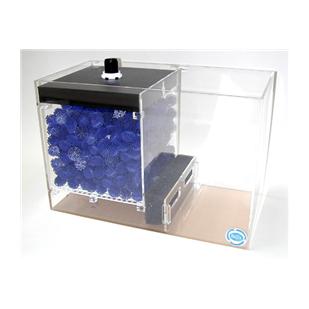
from Newaquariuminformation.com
The drip-tower sits in the sump in about 5 inches of water. The bioballs are just above the surface of the water, and always have enough air around them that the aerobic bacteria on them can breathe and do their conversion job. It turns out that those bioballs are extremely efficient at producing nitrates from the ammonia and nitrites in the water.
Our tank system was powered by two big Rio pumps, which pumped water from the sump up into the tank. It returned to the sump via two overflow tubes in opposite corners of the tank. The Rios were quite strong, and as a result, the water pressure was very high going into the top of the filter. It was looked more like a firehose than a drip filter.
The really weird thing was, we had tried the wet/dry filter on a 90 gallon tank in the exact same spot in front of the windows, before purchasing the 120 gallon tank. At that time, we used only one pump to drive it. There was no algae.
The algae variables
So, the "algae variables" in the oscar tank were different than what we were used to dealing with.
Light:
For one thing there was a lot more light! The only place we could put our tank was in the living room in front of the windows. We realized this would cause problems, but there was nothing we could do about the light. Water & Air
The amount of water in the tank was bigger, and the circulation was much stronger. There was a lot more water moving through the filter, much faster. There was probably a lot more air mixing with the water.Trying Micron filters
I bought two Magnum micron filters, the 350 and the 250, and put the 350 on the oscar tank, the 250 on our smallest goldfish tank which also had some algae problems. The goldfish cleared up and remained sparkling clear. They had never been so clear in their lives, I think. I clean the micron filter about once a week.
The oscar tank cleared up for about a week, then slowly got cloudy again, no matter how many times I cleaned the micron filter, and despite 99.9% water changes, and everything we could think of.
Algae population explosion
Then after about another month, the algae exploded! It was growing so fast, that the tank remained GREEN no matter what I did.
I was totally fed up. I was spending more time on that tank than on my household chores. It was an eyesore. I wasn't too worried about the oscars getting suffocated at night (they say algae can do that) because there were Hoover Dam-levels of aeration going through the filter, but I had definitely had enough of that green stuff.
Light shines through the green murk!
Then, one day I read a post that talked about wet/dry filters losing favor with some marine aquarists because they are such efficient biological filters that they become nitrate factories.
The culprit: the filter
A little light went on in my head. THERE was the cache of algae food! The filter itself. I saw that there were two possibilities: one was that the water pressure going into the filter is so high that no matter how much filter material I put in the top shelf, bits of organic material blast right through and just circulate constantly. The other possibility was that the organic matter WAS getting filtered out but the bacteria on the bioballs were pouring out nitrates at an accelerated rate because so much water was pouring over them so fast. No matter which was the real reason, both possibilities could be solved by cutting off one of the Rio pumps. So, 2 weeks ago I repeated my ritual: I drained the tank down the point where the oscars had to tip on their sides to stay covered, then kept flushing it with clean water until the water was crystal clear. I drained the overflow chambers, and even the sump. Then I filled the tank with fresh dechlorinated water, and cleaned the micron cartridge and all the media layers in the wet/dry filter.
I had done all of this before, but this time I made the big change - I only turned on one Rio pump, and the Magnum filter. So the water is being circulated at about half the rate it used to be, plus a trip through the Magnum to remove any algae.
Since then, the oscar tank has remained free of algae, and the oscars are happy and healthy.